
1. Введение
This manual provides essential information for setting up, operating, maintaining, and troubleshooting your Xiaomi Redmi 13C smartphone. Please read this guide carefully to ensure proper use and optimal performance of your device.
The Xiaomi Redmi 13C is a new product featuring 128GB storage and 6GB RAM, with Dual SIM capability, in Midnight Black. This device is supplied by a specialized distributor.
2. Что в коробке
После распаковки вашего Xiaomi Redmi 13C убедитесь, что в комплекте есть все следующие предметы:
- Смартфон Xiaomi Redmi 13C
- USB-кабель
- Зарядное устройство
- Инструмент для извлечения лотка SIM-карты
3. Устройство перешлоview
Familiarize yourself with the key components of your Redmi 13C.

Рисунок 3.1: Болееview of Xiaomi Redmi 13C key features, including its 6.74-inch 90Hz display, 50MP AI triple camera, 5000mAh battery with 18W fast charging, and powerful octa-core processor.
The Redmi 13C features a large 6.74-inch display with a 90Hz refresh rate for smooth visuals. It is equipped with a 50MP AI triple camera system and a robust 5000mAh battery supporting 18W fast charging. The device is powered by an octa-core processor, ensuring efficient performance.
4. Настройка
4.1. Установка SIM-карты и SD-карты
Your Redmi 13C supports Dual SIM cards and expandable storage via a microSD card (up to 128GB). Use the provided SIM tray ejector tool to open the SIM card slot.
- Найдите лоток для SIM-карты на боковой панели телефона.
- Вставьте инструмент для извлечения SIM-карты в небольшое отверстие рядом с лотком и сильно нажмите, пока лоток не выдвинется.
- Вставьте карту(ы) Nano-SIM и/или карту microSD в соответствующие слоты лотка. Убедитесь, что позолоченные контакты направлены вниз.
- Аккуратно вставьте лоток обратно в телефон.
4.2. Первоначальное включение и настройка
- Нажмите и удерживайте кнопку питания, пока не появится логотип Xiaomi.
- Следуйте инструкциям на экране, чтобы выбрать язык, регион, подключиться к Wi-Fi и настроить учетную запись Google.
- You can also set up fingerprint recognition for enhanced security during this initial setup.
5. Управление вашим устройством
5.1. Функции дисплея

Figure 5.1: The Redmi 13C features an immersive 6.74-inch display, providing a fluid visual experience.
The Redmi 13C boasts a 6.74-inch display with a 90Hz refresh rate, offering a smooth and immersive viewing experience for all your content. The maximum display resolution is 720x1600 pixels with a 16:9 aspect ratio.
5.2. Использование камеры
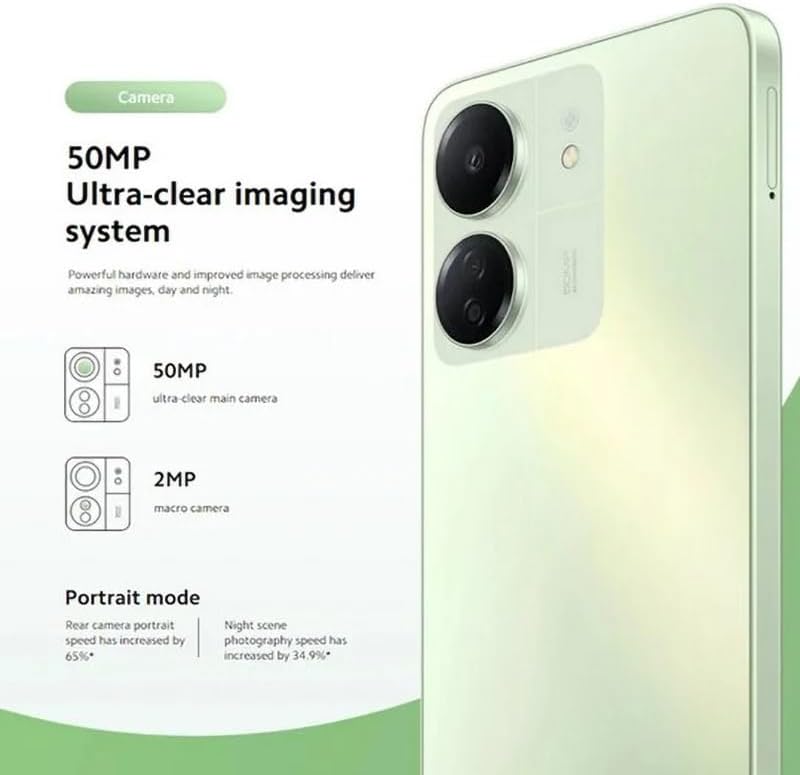
Figure 5.2: The Redmi 13C's 50MP Ultra-clear imaging system includes a 50MP main camera and a 2MP macro camera, supporting Portrait and Night modes.
The device is equipped with a 50MP Ultra-clear imaging system. The rear camera setup includes a 50MP main sensor and a 2MP macro camera. The front camera has an 8MP sensor. Utilize various shooting modes such as Portrait mode and Night mode to capture high-quality photos in different conditions.
5.3. Управление батареей
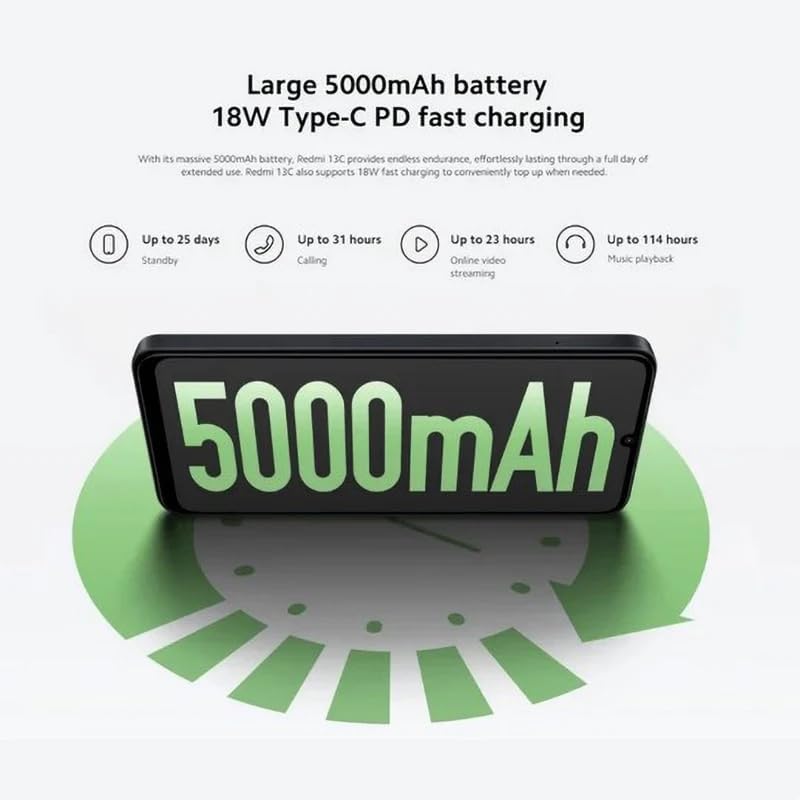
Figure 5.3: The Redmi 13C features a large 5000mAh battery with 18W Type-C PD fast charging, offering extended usage times.
Your Redmi 13C comes with a large 5000mAh Lithium-ion battery, providing extended usage. It supports 18W Type-C PD fast charging, allowing for quick power-ups. For optimal battery life, use the provided charger and avoid extreme temperatures.
- До 25 дней в режиме ожидания
- До 31 часов звонков
- Up to 23 hours online video streaming
- До 114 часов воспроизведения музыки
5.4.Производительность

Figure 5.4: The Redmi 13C is powered by an Octa-core MediaTek Helio G85 processor, delivering smooth and stable performance.
The Redmi 13C is powered by a MediaTek Helio G85 octa-core processor, ensuring smooth and stable performance for daily tasks and applications. It comes with 6GB of RAM and 128GB of internal storage, expandable up to 1TB with a microSD card.
5.5. Связь и безопасность
The device supports Wi-Fi, Bluetooth, and 4G cellular technology. It is an unlocked phone, allowing use with various wireless carriers. For security, the Redmi 13C includes a fingerprint recognition feature.
6. Техническое обслуживание
6.1. Очистка устройства
To clean your Redmi 13C, use a soft, lint-free cloth. Avoid using harsh chemicals or abrasive materials, as these can damage the screen and finish. The device is not water-resistant, so avoid exposure to liquids.
6.2. Обновления программного обеспечения
Regularly check for and install software updates to ensure your device has the latest features, security patches, and performance improvements. You can usually find this option in the phone's settings under "About phone" or "System updates."
6.3. Уход за аккумулятором
To prolong battery life, avoid fully discharging the battery frequently. Charge your phone using the original charger and cable. Do not expose the device to extreme heat or cold.
7. Поиск Неисправностей
В этом разделе рассматриваются распространенные проблемы, с которыми вы можете столкнуться при использовании Redmi 13C.
- Устройство не включается: Убедитесь, что аккумулятор заряжен. Подключите телефон к зарядному устройству и подождите несколько минут, прежде чем снова попытаться его включить.
- Приложения вылетают или зависают: Закройте фоновые приложения. Очистите кэш проблемного приложения или переустановите его. Если проблема сохраняется, рассмотрите возможность сброса до заводских настроек (предварительно сделав резервную копию данных).
- Плохое время автономной работы: Уменьшите яркость экрана, отключайте ненужные функции, такие как GPS или Bluetooth, когда они не используются, и проверьте в настройках аккумулятора, какие приложения потребляют слишком много энергии.
- Проблемы с сетевым подключением: Ensure your SIM card is properly inserted. Try restarting the device. Check your network settings and contact your carrier if problems persist.
- Сканер отпечатков пальцев не работает: Ensure your finger is clean and dry. Re-register your fingerprints in the security settings.
8. Технические характеристики
| Особенность | Спецификация |
|---|---|
| Бренд | сяоми |
| Название модели | Редми 13С |
| Операционная система | андроид |
| Размер установленной оперативной памяти | 6 ГБ |
| Емкость памяти | 128 ГБ (с возможностью расширения до 1 ТБ) |
| Модель ЦП | MediaTek Helio G85 (восьмиядерный) |
| Скорость ЦП | До 2.0 ГГц |
| Тип дисплея | AMOLED |
| Размер дисплея | 6.74 дюймов |
| Максимальное разрешение дисплея | 720x1600 |
| Частота обновления | 90 Гц |
| Rear Camera Sensor Resolution | 50 Megapixels (Main), 2 Megapixels (Macro) |
| Front Camera Sensor Resolution | 8 мегапикселей |
| Емкость аккумулятора | 5000 мАч (литий-ионный) |
| Зарядка | 18W Type-C PD Fast Charging |
| Технология связи | Bluetooth, Wi-Fi, 4G LTE |
| Слоты для SIM-карты | Dual SIM (Nano) |
| Биометрическая безопасность | Распознавание отпечатков пальцев |
| Разъем для наушников | USB-порт типа C |
| Цвет | Полуночный черный |
| Вес товара | 410 грамм |
| Уровень водонепроницаемости | Не водостойкий |
| Модельный год | 2023 |
9. Гарантия и поддержка
9.1. Информация о гарантии
The Xiaomi Redmi 13C comes with a standard manufacturer's warranty. Please refer to the warranty card included with your product for specific terms and conditions. Spare parts availability is stated as 2 years.
9.2. Official Documents and Support
For additional information and support, you can refer to the official user guide and data transparency statement:
For further assistance, please visit the official XIAOMI support webсайт или свяжитесь с их службой поддержки.