
Zenwire A10
Руководство пользователя мини-портативного проектора Zenwire A10
Модель: А10
1. Введение
Спасибо за покупкуasing the Zenwire A10 Mini Portable Projector. This device is designed to provide a versatile and convenient projection experience, allowing you to display content from various sources, including smartphones, tablets, and computers. Please read this manual carefully before using the projector to ensure proper operation and to maximize its lifespan.
2. Важные инструкции по технике безопасности
- Не смотрите прямо в объектив проектора, когда он включен.amp включено.
- Обеспечьте достаточную вентиляцию вокруг проектора, чтобы предотвратить перегрев. Не закрывайте вентиляционные отверстия.
- Используйте только тот адаптер питания, который входит в комплект поставки проектора.
- Держите проектор вдали от воды, влаги и легковоспламеняющихся материалов.
- Не пытайтесь разбирать или ремонтировать проектор самостоятельно. Обратитесь за помощью к квалифицированному специалисту.
- Установите проектор на устойчивую, ровную поверхность.
- Отключайте проектор от сети во время грозы или если он не используется в течение длительного времени.
3. Содержимое упаковки
Пожалуйста, проверьте комплектацию после распаковки. Если какие-либо предметы отсутствуют или повреждены, обратитесь к продавцу.
- Zenwire A10 Mini Portable Projector
- Дистанционное управление
- Адаптер питания
- Руководство пользователя
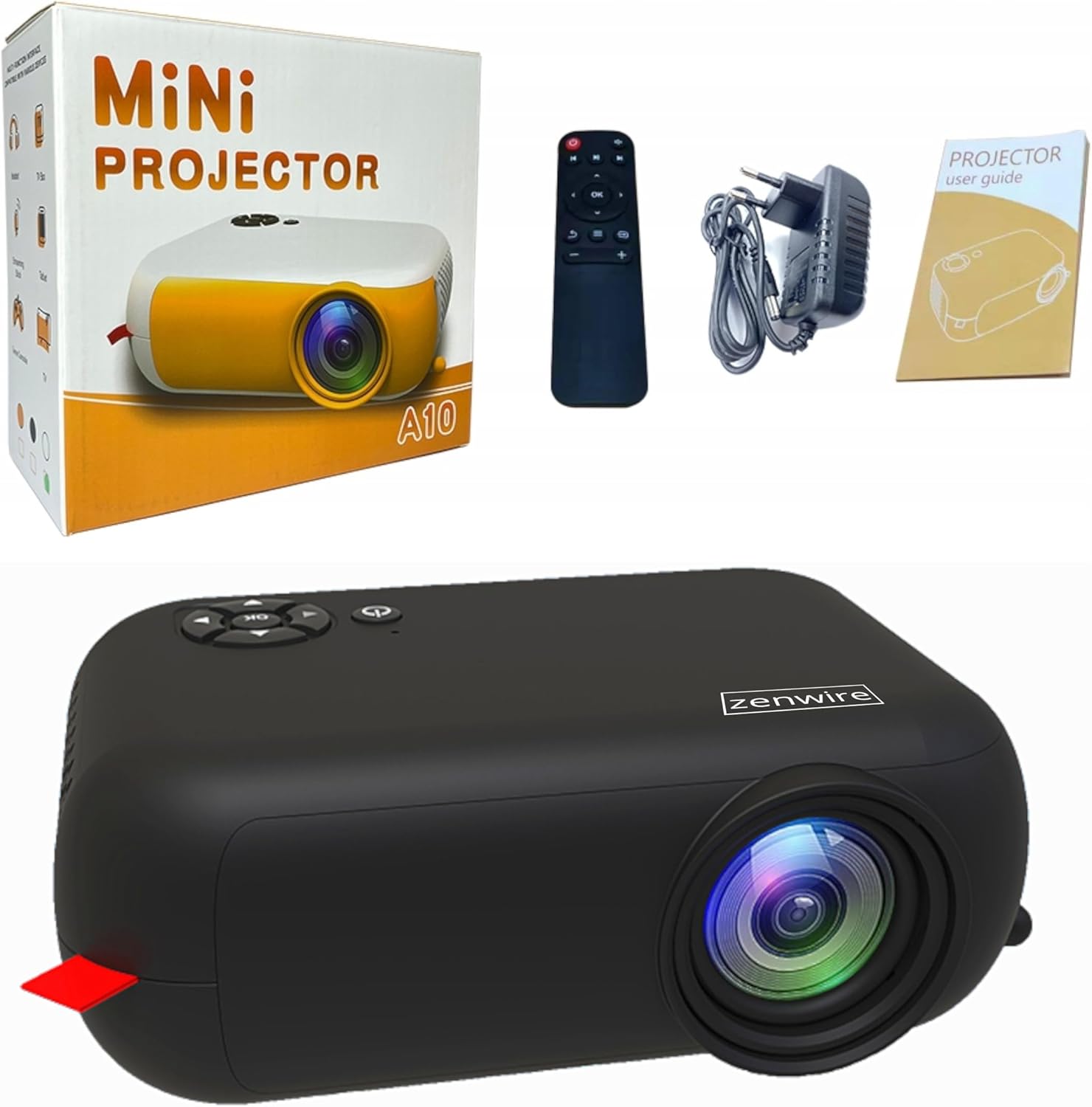
Image: Contents of the Zenwire A10 Mini Projector package, including the projector, remote control, power adapter, and user manual.
4. Продукт закончилсяview
4.1 Projector Dimensions and Design
The Zenwire A10 is designed for portability, featuring a compact and lightweight form factor. Its dimensions are approximately 14cm x 10cm x 5.5cm, making it easy to carry and set up in various locations.

Image: The Zenwire A10 Mini Projector held in a hand, illustrating its compact size and portability.
4.2 Порты и элементы управления
The projector features a range of input and output ports for versatile connectivity, along with intuitive controls.

Image: Rear panel of the Zenwire A10 Mini Projector, showing the 5V-IN DC power input, IR receiver, USB port, 3.5mm audio jack, HDMI port, and SD card slot.
- 5V-IN DC: Вход питания для проектора.
- ИК: Инфракрасный приемник для пульта дистанционного управления.
- USB: Подключите USB-накопители для воспроизведения мультимедиа.
- Разъем для наушников (3.5 мм): Подключите внешние динамики или наушники.
- HDMI: Connect devices such as laptops, gaming consoles, or streaming sticks.
- СД: Вставьте карты Micro SD для воспроизведения мультимедиа.
- Колесо фокусировки: Adjust image sharpness (located on the side).
- Панель управления: Buttons on top for navigation and selection.
5. Настройка
5.1 Подключение питания
- Подключите прилагаемый адаптер питания к 5V-IN DC порт на проекторе.
- Подключите адаптер питания к розетке.
- Нажмите кнопку питания на проекторе или пульте дистанционного управления, чтобы включить его.
5.2 Placement and Focus Adjustment
- Place the projector on a stable surface or mount it according to your preference. Ensure the projector lens is facing the projection surface (wall or screen).
- Adjust the distance between the projector and the screen to achieve your desired image size. The projector supports screen sizes up to 100 inches.
- Rotate the focus wheel (typically located near the lens) until the projected image appears clear and sharp.

Image: Diagram illustrating the Zenwire A10 Mini Projector's capability to project various screen sizes, from 13 inches up to 100 inches, depending on the projection distance.
6. Эксплуатация проектора
6.1 Wireless Connection (Miracast & Airplay)
The Zenwire A10 supports wireless screen mirroring via 2.4/5GHz WiFi, compatible with Android (Miracast) and iOS (Airplay) devices.
- Убедитесь, что ваш проектор и мобильное устройство подключены к одной и той же сети Wi-Fi.
- On the projector's main menu, select the 'Screen Mirroring' or 'Wireless Display' option.
- Для Android: On your Android phone/tablet, enable 'Wireless Display', 'Screen Mirroring', 'Smart View', or similar function (names may vary by device). Select the projector from the list of available devices.
- Для iOS: On your iPhone/iPad, open Control Center and tap 'Screen Mirroring'. Select the projector from the list of available devices.
- The content from your mobile device should now be mirrored on the projector screen.
6.2 Проводные соединения
The projector offers multiple wired input options for various devices.

Image: The Zenwire A10 Mini Projector connected to various devices such as smartphones, tablets, laptops, desktop computers, gaming consoles, and media players, highlighting its versatile connectivity.
- HDMI: Connect a laptop, PC, gaming console (e.g., Xbox, PlayStation), or streaming device (e.g., Amazon Fire TV Stick, Google Chromecast) using an HDMI cable. Select the HDMI input source on the projector.
- USB: Insert a USB flash drive or external hard drive into the USB port. The projector's media player will allow you to browse and play supported video, audio, and image files.
- Микро SD: Insert a Micro SD card into the SD card slot. Similar to USB, you can access media files through the projector's interface.
- Аудиовыход (разъем 3.5 мм): Connect external speakers or headphones to enhance the audio experience.
6.3 Навигация по меню
Use the remote control or the buttons on the projector to navigate through the on-screen menu. Select input sources, adjust picture settings (brightness, contrast, color), sound settings, and other system preferences.
7. Техническое обслуживание
- Чистка линз: Для бережной протирки линзы проектора используйте мягкую безворсовую ткань, специально предназначенную для оптических линз. Избегайте использования абразивных чистящих средств или чрезмерного усилия.
- Удаление пыли: Regularly clean the projector's exterior with a soft, dry cloth. Use a small brush or compressed air to clear dust from the ventilation openings to ensure proper airflow.
- Хранилище: Когда проектор не используется, храните его в прохладном, сухом месте, вдали от прямых солнечных лучей и экстремальных температур. Используйте оригинальную упаковку или защитный чехол, чтобы предотвратить скопление пыли и повреждение.
8. Поиск Неисправностей
If you encounter issues with your Zenwire A10 projector, refer to the following common problems and solutions:
| Проблема | Возможная причина | Решение |
|---|---|---|
| Нет изображения на экране | Питание не подключено; Неправильный источник входного сигнала; Устройство подключено неправильно. | Check power cable; Select correct input source (HDMI, USB, etc.); Reconnect source device. |
| Изображение расплывчатое | Фокусировка не отрегулирована; проектор расположен слишком близко/далеко от экрана. | Adjust the focus wheel; Adjust projection distance. |
| Нет звука | Слишком низкий уровень громкости; Отключено; Внешнее аудиоустройство не подключено/не выбрано. | Increase volume; Unmute; Check external speaker connection or select internal speaker. |
| Проблемы с беспроводным подключением | Not on same Wi-Fi network; Device not compatible; Interference. | Ensure both devices are on the same Wi-Fi; Verify device compatibility; Try moving closer to Wi-Fi router. |
9. Технические характеристики
| Особенность | Деталь |
|---|---|
| Бренд | Зенвайр |
| Номер модели | А10 |
| Тип продукта | Compact and Portable Projector |
| Собственное разрешение | 480 x 360p |
| Максимальное разрешение дисплея | 1920 x 1080 (Full HD) |
| Яркость | 1800lm / 60 ANSI |
| Коэффициент контрастности | 2000:1 |
| Тип дисплея | ВЕЛ |
| Технология связи | Wi-Fi (2.4/5GHz), HDMI, USB, Micro SD, 3.5mm Audio Jack |
| Беспроводные функции | Miracast, Airplay |
| Совместимые устройства | Smartphones (Android, iOS), Tablets, Laptops, PCs, Gaming Consoles |
| Рекомендуемое использование | Домашний кинотеатр |
| Размеры (приблизительные) | 14см х 10см х 5.5см |
10. Гарантия и поддержка
The Zenwire A10 Mini Portable Projector comes with a standard manufacturer's warranty. For specific warranty terms and conditions, please refer to the documentation provided at the time of purchase or contact your retailer. For technical support or service inquiries, please reach out to Zenwire customer service through their official webсайт или контактную информацию, предоставленную вместе с вашим продуктом.
Ask a question about this manual
Ask about setup, troubleshooting, compatibility, parts, safety, or missing instructions. Manuals+ will review the question and use this page’s manual context to help answer it.