
1. Введение
Welcome to the Numark Party Mix MKII DJ Controller Set. This comprehensive bundle includes the Party Mix MKII DJ controller with a built-in audio interface, M-Audio BX3 3.5" Studio Monitor Speakers, and DJ Headphones. Designed for both aspiring and experienced DJs, this set provides all the essential tools for mixing, monitoring, and performing. This manual will guide you through the setup, operation, and maintenance of your new DJ equipment.

Image 1: The complete Numark Party Mix MKII DJ Controller Set, including the controller, studio monitors, and headphones.
2. Что в коробке
Your Numark Party Mix MKII DJ Controller Set package should contain the following items:
- Numark Party Mix MKII DJ Controller
- M-Audio BX3 3.5" Studio Monitor Speakers (Pair)
- Диджейские наушники
- USB-кабель
- Software Download Card (for Serato DJ Lite)
- Power Adapter for Speakers
- Audio Cables for Speakers
- Инструкция по началу работы
- Руководство по безопасности и гарантии
3. Настройка
3.1 Connecting the DJ Controller
- Connect the included USB cable from the Party Mix MKII controller to an available USB port on your computer (Mac or PC).
- Install the Serato DJ Lite software using the provided download card or by visiting the official Serato webсайт.
- Launch Serato DJ Lite. The software should automatically detect your Party Mix MKII controller.
3.2 Connecting the Studio Monitor Speakers
- Connect the included audio cables from the main output of the Party Mix MKII controller to the input jacks on your M-Audio BX3 Studio Monitor Speakers. The BX3 speakers support 1/4-inch, 1/8-inch, and RCA inputs.
- Connect the power adapter to the active speaker and plug it into a power outlet.
- Connect the passive speaker to the active speaker using the provided speaker cable.
- Включите динамики.

Image 2: M-Audio BX3 Studio Monitor Speakers connected in a typical music production environment.
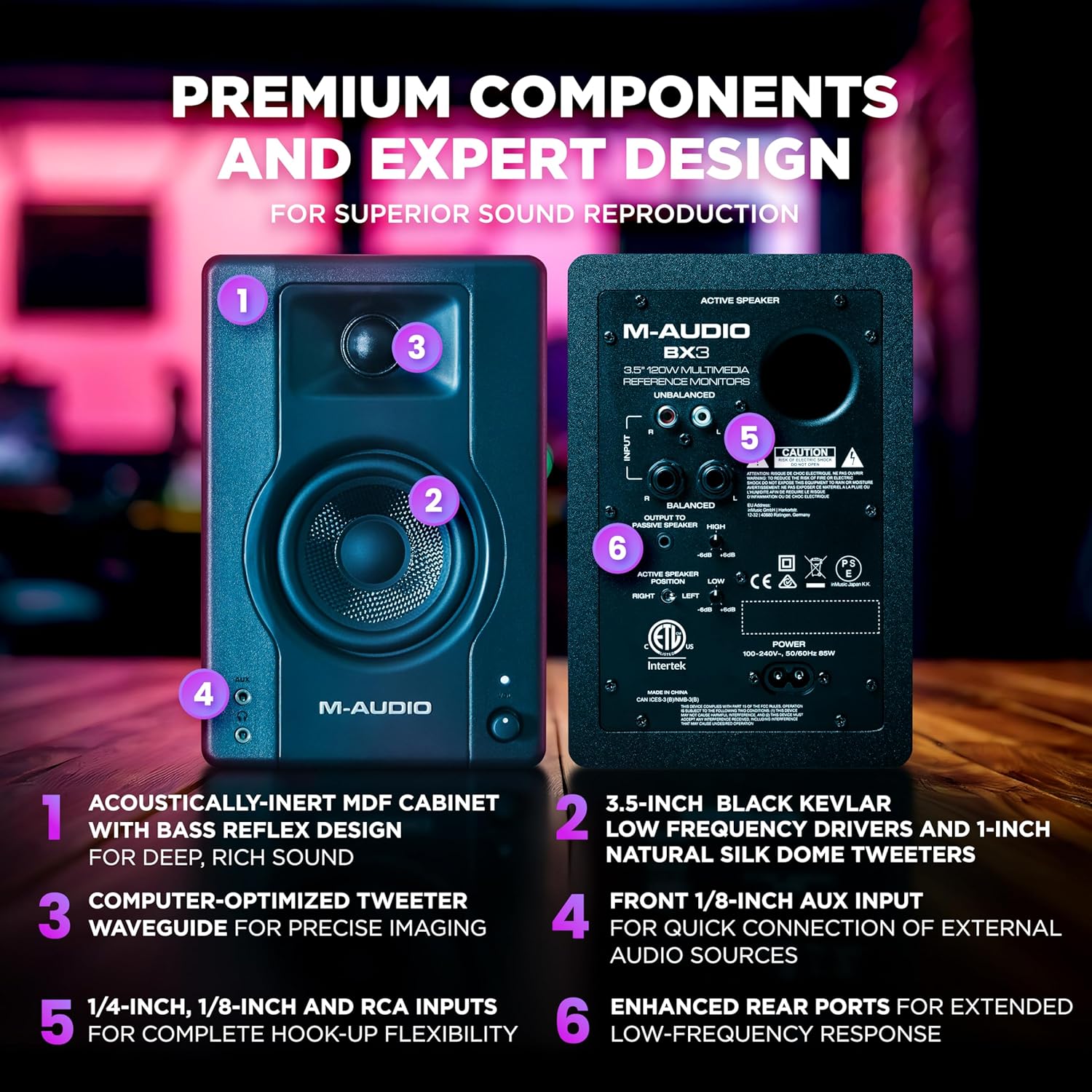
Изображение 3: Подробно view of the rear panel of the M-Audio BX3 speakers, highlighting various input options and power connection.
3.3 Connecting the DJ Headphones
Plug your DJ Headphones into the headphone jack located on the front or side of the Party Mix MKII controller. This allows for cueing tracks before playing them live.

Image 4: Close-up of the Numark DJ Headphones, featuring a coiled cable for flexibility.
4. Инструкция по эксплуатации
4.1 элементов управленияview
The Party Mix MKII features a user-friendly layout with two DJ decks, a central mixer section, and performance pads. Familiarize yourself with the controls:

Image 5: Labeled diagram of the Party Mix MKII DJ Controller, indicating the position and function of key controls such as jog wheels, EQ knobs, pitch sliders, and performance pads.
- Джог-колеса: Large, touch-sensitive wheels for scratching and track navigation.
- Ручки эквалайзера: Adjust bass and treble for each deck.
- Pitch Sliders: Control the tempo of your tracks.
- Пэды для исполнения: Trigger hot cues, loops, samples, and effects.
- Sync, Play/Pause & Cue Buttons: Essential transport controls for each deck.
- Ручка обзора: Navigate your music library in Serato DJ Lite.
- Load Buttons: Load selected tracks to Deck 1 or Deck 2.
- Headphone Cue Buttons: Listen to a track in your headphones before playing it live.
4.2 Mixing Tracks
- Load a track to Deck 1 and another to Deck 2 using the Browse knob and Load buttons.
- Use the Headphone Cue buttons to listen to the track on the inactive deck in your headphones.
- Adjust the tempo of the tracks using the Pitch Sliders and the Sync button to match their BPMs.
- Use the crossfader and individual channel faders to blend between the two tracks.
- Experiment with the EQ knobs to shape the sound of each track during your mix.
4.3 световых эффектов
The Party Mix MKII features built-in LED lighting that syncs to your DJ mix, creating an immersive party atmosphere. A conveniently located mode switch allows you to cycle between 5 different lighting modes.

Image 6: Close-up of the Party Mix MKII DJ Controller showing the multi-coloured LED lights in action, synchronized with the music.
5. Техническое обслуживание
5.1 Очистка
- Всегда отключайте питание перед очисткой.
- Use a soft, dry cloth to wipe down the surfaces of the controller, speakers, and headphones.
- Избегайте использования абразивных чистящих средств, растворителей или агрессивных химикатов, так как они могут повредить покрытие.
- For jog wheels and faders, use a soft brush or compressed air to remove dust and debris.
5.2 Хранение
Store your DJ equipment in a cool, dry place away from direct sunlight, extreme temperatures, and excessive humidity. When transporting, use appropriate cases to protect the equipment from physical damage.
6. Поиск Неисправностей
6.1 Нет звука
- Ensure all cables (USB, audio, power) are securely connected.
- Check the volume levels on the controller, speakers, and your computer.
- Verify that the correct audio output device is selected in your computer's sound settings and within Serato DJ Lite.
- Make sure the speakers are powered on and their volume is turned up.
6.2 Controller Not Recognized by Software
- Ensure the USB cable is connected directly to your computer, not through a USB hub.
- Restart your computer and the Serato DJ Lite software.
- Check for any available driver updates for your Party Mix MKII controller on the Numark webсайт.
- Confirm that Serato DJ Lite is the correct version and is compatible with your operating system.
6.3 Светодиодные лампы не работают
- Ensure the controller is powered on and connected to your computer.
- Check the lighting mode switch on the controller to ensure it's not set to "off" or a very dim mode.
7. Технические характеристики
7.1 Numark Party Mix MKII DJ Controller
- Бренд: Numark
- Название модели: Вечеринка Mix MKII
- Технологии подключения: USB
- Особые характеристики: Backlit, Compact, Lightweight, Built-in LED DJ light show
- Тип управления: DJ-контроллер
- Аппаратный интерфейс: USB
- Поддерживаемое программное обеспечение: Serato DJ Lite
- Совместимые устройства: USB-compatible computers and devices, including iOS and macOS systems
- Количество каналов микшера: 2
- Тип материала: Пластик, Резина
7.2 M-Audio BX3 3.5" Studio Monitor Speakers
- Выходная мощность: 120-ваттный
- Woofer: 3.5-inch Black Kevlar
- ВЧ-динамик: 1-inch Natural Silk Dome
- Кабинет: Acoustically-inert MDF with Bass Reflex Design
- Входные данные: 1/4-inch, 1/8-inch, and RCA
7.3 DJ Headphones
- Размер драйвера: 40 mm Neodymium magnet drivers
- Контроль шума: Sound Isolation (soft padded ear cushions)
- Дизайн: Swivel cup closed-back design