1. Введение
Thank you for choosing the Defender Enjoy S200 Portable Bluetooth Speaker. This manual provides essential information for setting up, operating, and maintaining your speaker to ensure optimal performance and longevity. Please read this manual thoroughly before use.
The Defender Enjoy S200 is a versatile portable speaker featuring Bluetooth 5.3 connectivity, True Wireless Stereo (TWS) pairing, an integrated FM radio, and MP3 playback capabilities via USB flash drive or microSD card. It also includes an LED light and supports hands-free calling. Designed for portability, it offers up to 9 hours of playback on a single charge and convenient USB Type-C charging.
2. Продукт закончилсяview
2.1 Основные характеристики
- Bluetooth 5.3: Для стабильной и эффективной беспроводной потоковой передачи аудио.
- Настоящее беспроводное стерео (TWS): Connect two Enjoy S200 speakers for a stereo sound experience.
- Несколько режимов воспроизведения: Bluetooth, FM Radio, USB Flash Drive, MicroSD Card (up to 32GB).
- Встроенный светодиодный светильник: Provides visual ambiance.
- Звонки в режиме громкой связи: Встроенный микрофон для телефонных звонков.
- Длительный срок службы батареи: До 9 часов непрерывного воспроизведения музыки.
- Зарядка USB Type-C: Современный и удобный зарядный порт.
- Портативная конструкция: Compact and lightweight with a carrying strap.
2.2 Содержимое упаковки
- Defender Enjoy S200 Portable Bluetooth Speaker
- Зарядный кабель типа C
- Краткое руководство пользователя
- Ремень для переноски

Image: The Defender Enjoy S200 Portable Bluetooth Speaker, showcasing its compact design and front grille with an illuminated LED ring.

Image: An infographic highlighting key features such as multi-colored LED lighting, True Wireless Stereo (TWS) pairing, Bluetooth 5.3, MP3 player, FM receiver, and hands-free calling.
3. Настройка
3.1 Зарядка динамика
- Locate the Type-C charging port on the back of the speaker.
- Connect the provided Type-C charging cable to the speaker and the other end to a USB power adapter (not included) or a computer's USB port.
- Светодиодный индикатор будет показывать состояние зарядки. Полная зарядка обычно занимает около 3-4 часов.
- После полной зарядки отсоедините кабель.
3.2 Включение/выключение питания
- To power on, slide the ON/OFF switch located on the back of the speaker to the 'ON' position.
- Чтобы выключить питание, переведите переключатель ВКЛ/ВЫКЛ в положение «ВЫКЛ».
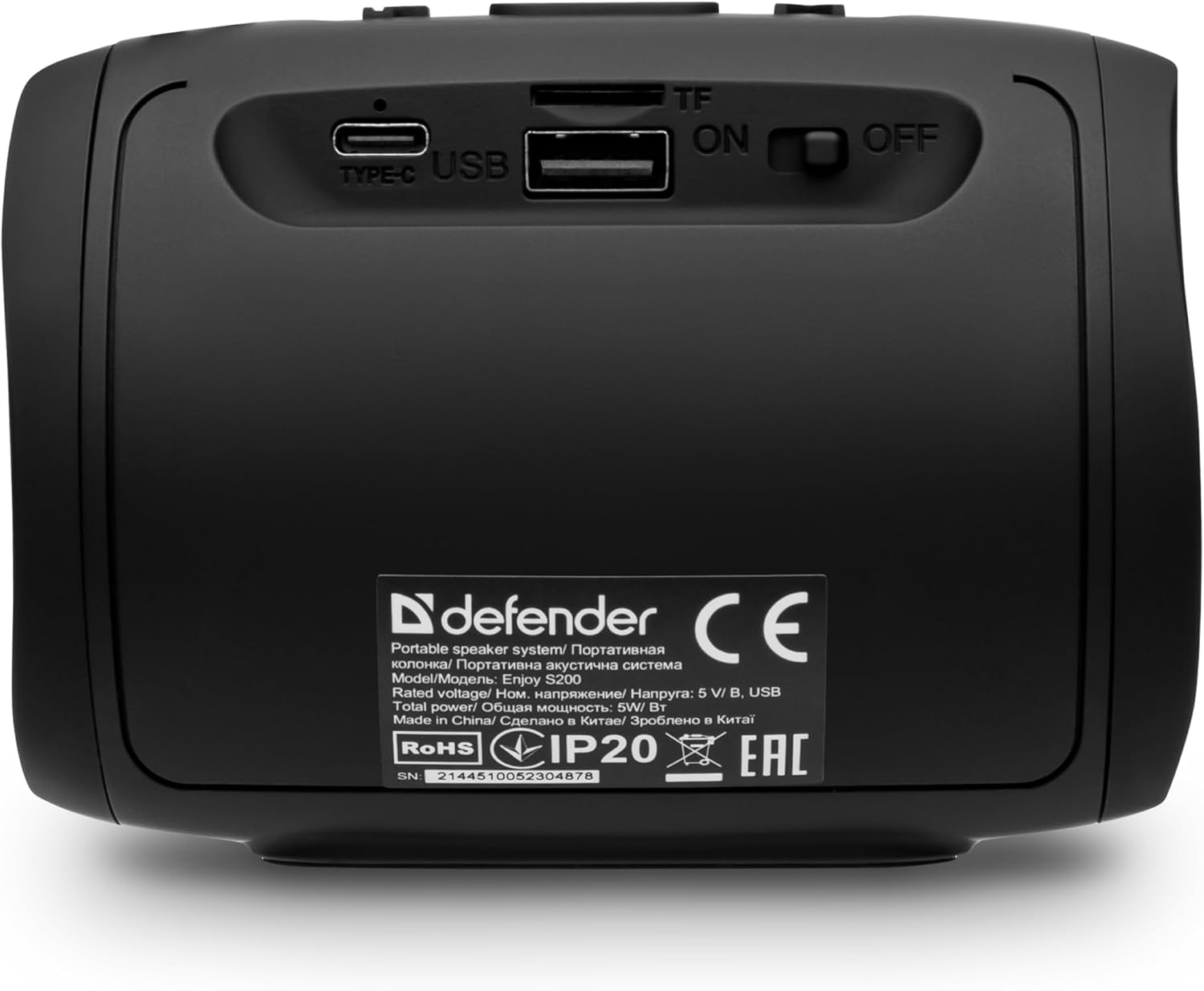
Изображение: сзади view of the Defender Enjoy S200 speaker, showing the Type-C charging port, USB port, TF (microSD) card slot, and the ON/OFF power switch.
3.3 Сопряжение по Bluetooth
- Убедитесь, что динамик включен и находится в режиме сопряжения по Bluetooth (обозначается мигающим светодиодом).
- На вашем устройстве (смартфоне, планшете и т. д.) включите Bluetooth и выполните поиск доступных устройств.
- Select "Defender Enjoy S200" from the list of devices.
- После сопряжения колонка издаст подтверждающий звук, и светодиод перестанет мигать.
3.4 Сопряжение беспроводных стереонаушников (TWS)
To pair two Defender Enjoy S200 speakers for stereo sound:
- Убедитесь, что оба динамика включены и не подключены ни к одному устройству Bluetooth.
- On one speaker (this will be the primary speaker), press and hold the TWS button (often indicated by a double-arrow icon) until you hear a pairing tone.
- The two speakers will automatically search and connect to each other. A confirmation tone will sound once connected.
- Теперь подключите устройство к основному динамику по Bluetooth, как описано в разделе 3.3. Звук будет воспроизводиться в стереорежиме через оба динамика.

Image: A visual representation of two Defender Enjoy S200 speakers pairing wirelessly to create a True Wireless Stereo system, alongside icons for Bluetooth 5.3, MP3 player, FM receiver, and hands-free calling.
4. Инструкция по эксплуатации
4.1 Button Functions (Refer to top panel controls)
- Кнопка питания: Long press to power on/off. Short press to play/pause in music mode, or answer/end calls.
- Увеличение громкости (+): Short press to increase volume. Long press for next track/station.
- Звук тише (-): Short press to decrease volume. Long press for previous track/station.
- Кнопка режима (M): Short press to switch between Bluetooth, FM Radio, USB, and MicroSD modes.
- Кнопка светодиодной подсветки: Short press to cycle through LED light modes or turn off the LED.
4.2 Воспроизведение по Bluetooth
After successful Bluetooth pairing (Section 3.3), open your music application on your device and begin playback. Use the speaker's volume buttons or your device's volume controls to adjust the audio level.
4.3 Режим FM-радио
- Press the 'M' (Mode) button until you hear the FM radio prompt.
- Длительное нажатие кнопки «Воспроизведение/Пауза» позволяет автоматически сканировать и сохранять доступные FM-станции.
- Для переключения между сохраненными станциями используйте кнопки увеличения громкости (+) и уменьшения громкости (-) (длительное нажатие).
4.4 Воспроизведение с USB/MicroSD
- Insert a USB flash drive or a microSD card (up to 32GB) containing MP3 audio files into the respective port on the back of the speaker.
- Press the 'M' (Mode) button until the speaker automatically switches to USB or MicroSD mode and begins playback.
- Use the speaker's control buttons for play/pause, next track, and previous track.
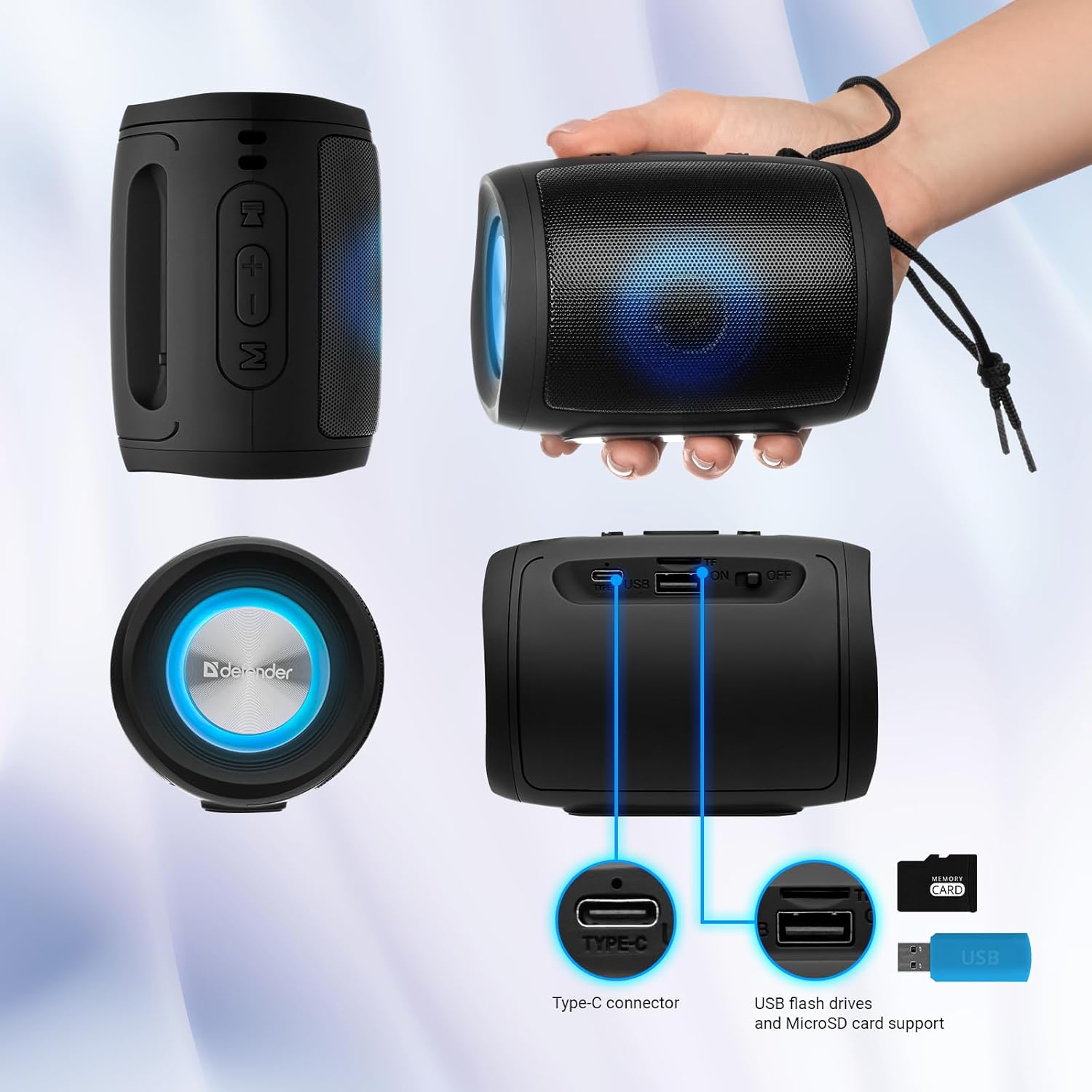
Image: A detailed diagram illustrating the Type-C connector, USB flash drive port, and MicroSD card slot on the Defender Enjoy S200 speaker.
4.5 Звонки по громкой связи
When connected to your smartphone via Bluetooth, the speaker's built-in microphone allows for hands-free calls.
- Ответ на звонок: Коротко нажмите кнопку воспроизведения/паузы.
- Завершить звонок: Коротко нажмите кнопку воспроизведения/паузы.
- Отклонить вызов: Нажмите и удерживайте кнопку «Воспроизведение/Пауза».
5. Техническое обслуживание
- Уборка: Для очистки поверхности динамика используйте мягкую сухую ткань. Не используйте абразивные чистящие средства или растворители.
- Хранилище: Храните динамик в прохладном, сухом месте, вдали от прямых солнечных лучей и экстремальных температур.
- Водостойкость: The speaker has an IP20 rating, meaning it is protected against solid objects larger than 12.5mm but has no protection against water. Avoid exposure to rain, splashes, or immersion in water.
- Уход батареи: Чтобы продлить срок службы аккумулятора, полностью зарядите динамик перед первым использованием и перезаряжайте его не реже одного раза в три месяца, если он не используется регулярно.
6. Поиск Неисправностей
- Нет питания: Ensure the speaker is charged. Connect the Type-C cable and allow it to charge for a few minutes before attempting to power on again.
- Нет звука: Check the volume levels on both the speaker and your connected device. Ensure the speaker is in the correct mode (Bluetooth, FM, USB, MicroSD).
- Проблемы с сопряжением Bluetooth: Ensure the speaker is in pairing mode. Turn off Bluetooth on your device and turn it back on. Try unpairing and re-pairing the speaker. Move closer to the speaker to ensure you are within the 10-meter range.
- Плохой приём FM-радио: Ensure you are in an area with good signal. The charging cable can sometimes act as an antenna; try connecting it for improved reception.
- USB/MicroSD Not Playing: Убедитесь, что звук files are in a compatible format (e.g., MP3). Check that the USB drive or microSD card is inserted correctly and is not corrupted.
7. Технические характеристики
| Название модели | Наслаждайтесь S200 |
| Номер модели товара | 65200 |
| Бренд | Защитник |
| Технология связи | Bluetooth 5.3, USB |
| Технология беспроводной связи | Bluetooth, радиочастота |
| Тип динамика | Мультимедиа |
| Размер динамика | 2 дюйма |
| Выходная мощность | 5 Вт |
| Режим аудиовыхода | Стерео |
| Источник питания | Питание от аккумулятора (в комплект входит 1 литий-ионный аккумулятор) |
| Особые возможности | Integrated Microphone, USB Port, Portable Bluetooth, LED Light, FM Radio, MicroSD Card Support, TWS |
| Размеры продукта (Д x Ш x В) | 8 х 11 х 8 см |
| Масса | 330 грамм |
| Максимальный диапазон | 10 метра |
| Рейтинг IP | IP20 |
8. Гарантия и поддержка
8.1 Информация о гарантии
Подробная информация о гарантии обычно приводится в документации о покупке или на официальном сайте производителя. website. Please refer to these resources for information regarding warranty coverage and duration.
8.2 Поддержка клиентов
For technical assistance, troubleshooting beyond this manual, or inquiries about your Defender Enjoy S200 speaker, please contact Defender Global customer support. Contact information can usually be found on the product packaging, the manufacturer's webсайте или чеке о покупке.