
1. Введение
This manual provides detailed instructions for the operation and maintenance of your FANGOR F-CD-143 Portable CD Player and Bluetooth Speaker. This device offers a versatile audio experience, functioning as a standalone portable CD player or combining with its detachable Bluetooth speaker base for enhanced sound. Please read this manual thoroughly before using the product to ensure proper function and longevity.
2. Содержимое упаковки
Please check the package contents upon unboxing to ensure all items are present.
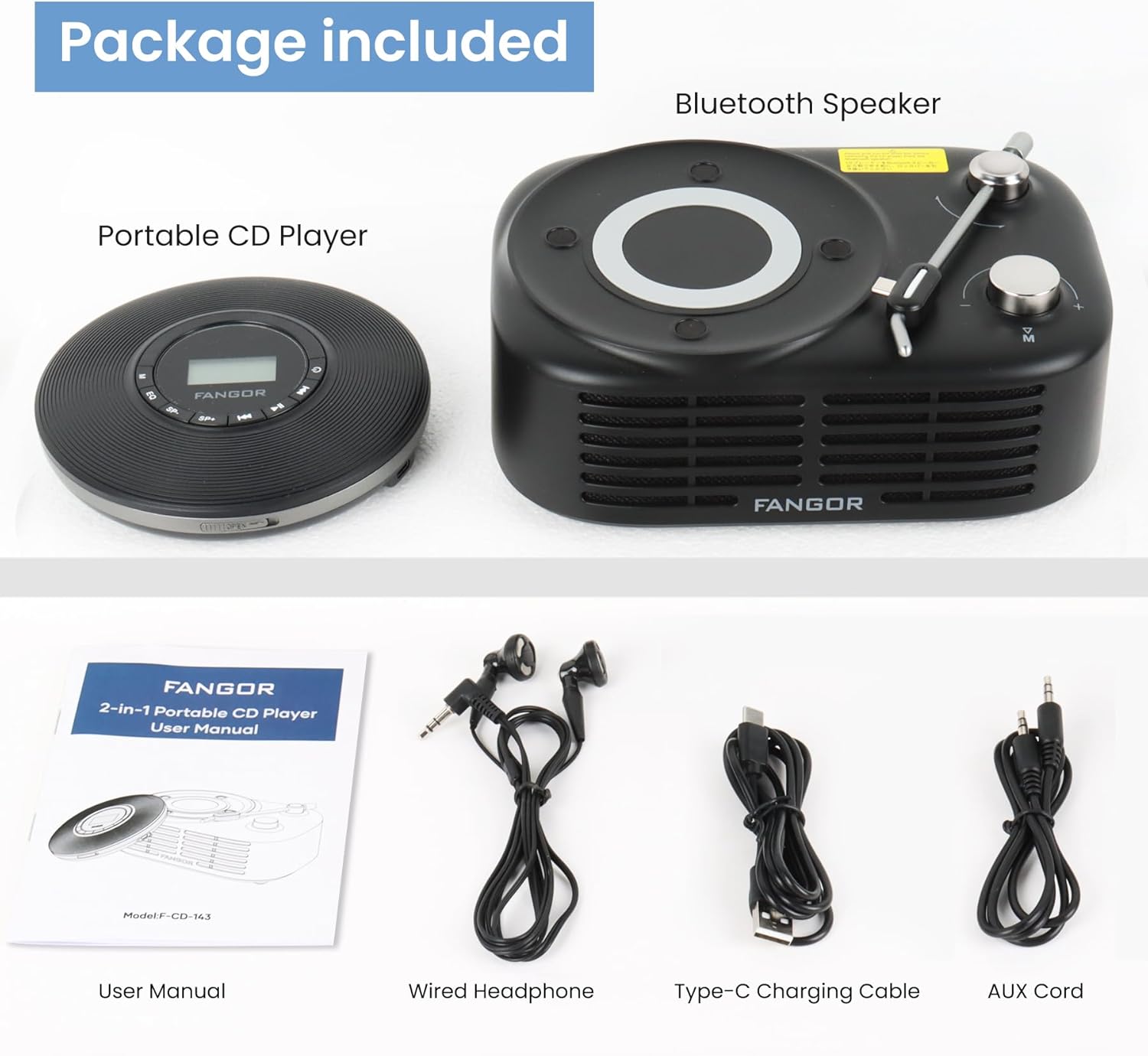
Figure 2.1: Package Contents. The image displays the portable CD player, the Bluetooth speaker base, a user manual, wired headphones, a Type-C charging cable, and an AUX cord.
- Портативный проигрыватель компакт-дисков
- База Bluetooth-динамика
- Руководство пользователя (этот документ)
- Проводные наушники
- Зарядный кабель типа C
- AUX-шнур
3. Продукт закончилсяview
The FANGOR F-CD-143 is a versatile audio device designed for both personal and shared listening experiences. It features a portable CD player that can be used independently with wired headphones or connected to the included Bluetooth speaker base.

Figure 3.1: 2-in-1 Portable CD Player & Bluetooth Speaker. The top half shows a person using the portable CD player with wired headphones. The bottom half shows the Bluetooth speaker base with 'Bluetooth 5.3' indicated.
3.1 Основные характеристики
- Съемный дизайн: Use the CD player independently or with the Bluetooth speaker base.
- Совместимость с широким форматом: Supports CD, MP3, CD-R, CD-RW, CD-DA, WMA (WAV must be below 128 bitrate) formats.
- Воспроизведение TF-карты: Supports TF cards up to 32GB for additional music options.
- Защита от пропуска: 60-second Electronic Skip Protection (ESP) system prevents playback interruptions.
- ЖК-дисплей с подсветкой: Позволяет очистить viewing of information in various lighting conditions.
- Несколько режимов игры: Includes A-B repeat, repeat all, and repeat single track.
- Звуковые эффекты: Features 5 sound effects: BBS, POP, JAZZ, ROCK, Original Sound.
- Последняя функция памяти: Resumes playback from the last stopped position.
- Связь: 3.5mm AUX output for wired headphones or external speakers. Bluetooth 5.3 for wireless connection to the speaker base or other Bluetooth devices.
- Встроенная аккумуляторная батарея: Provides long-lasting playtime for portable use.
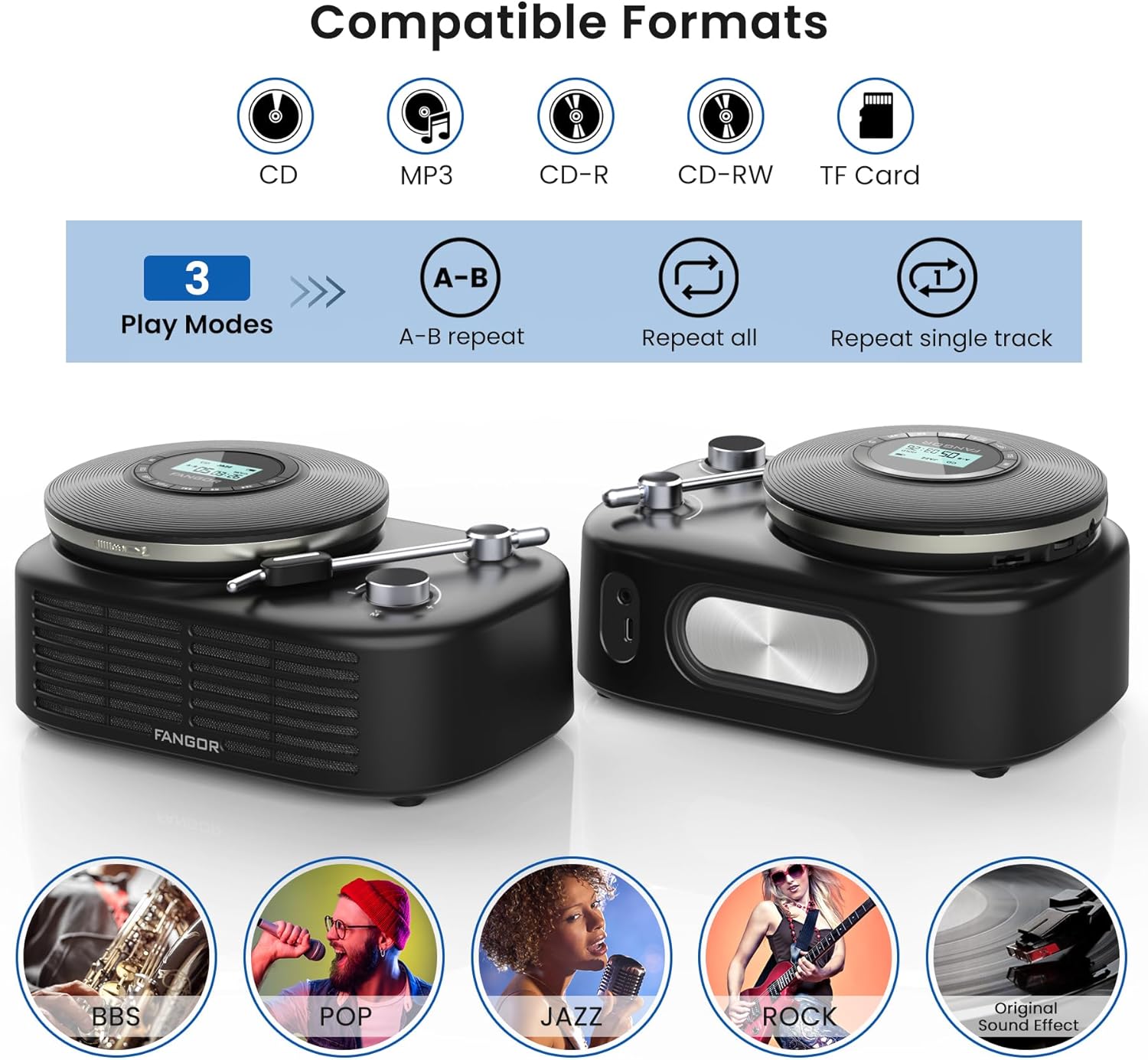
Figure 3.2: Compatible Formats, Play Modes, and Sound Effects. This image illustrates the various audio formats supported by the device, the available playback modes, and the different sound equalization options.

Figure 3.3: HIFI Stereo Sound and Connectivity. The image highlights the dual speakers of the Bluetooth base and its ability to connect via Bluetooth 5.3 or AUX to various devices like tablets, computers, and mobile phones.
4. Настройка
4.1 Зарядка устройства
The portable CD player has a built-in rechargeable battery. Before first use, fully charge the device.
- Connect the provided Type-C charging cable to the charging port on the portable CD player.
- Connect the other end of the cable to a compatible USB power source (e.g., wall charger, power bank, computer USB port, car charger).
- Индикатор зарядки будет светиться во время зарядки и выключится, когда устройство полностью зарядится.

Figure 4.1: Built-in Rechargeable Battery and Charging Options. This image demonstrates the flexibility of charging the portable CD player using common USB power sources.
4.2 Assembling the CD Player with Bluetooth Speaker Base
To use the CD player with the Bluetooth speaker base, align the CD player with the designated slot on the speaker base and gently press until it clicks into place. Ensure a secure connection.
4.3 Вставка компакт-диска
- Open the CD compartment cover on the portable CD player.
- Carefully place the CD with the label side facing up onto the spindle.
- Gently press the center of the CD until it is securely seated on the spindle.
- Плотно закройте крышку отсека для компакт-дисков.
4.4 Подключение наушников или внешних динамиков
- Проводные наушники: Plug the wired headphones into the 3.5mm AUX output jack on the portable CD player.
- Внешние колонки (проводные): Use the provided AUX cord to connect the 3.5mm AUX output jack of the CD player to the AUX input of an external speaker system.
- External Speakers (Bluetooth): The Bluetooth speaker base can connect to other Bluetooth devices. Refer to section 5.3 for Bluetooth pairing instructions.
5. Инструкция по эксплуатации
5.1 Базовое воспроизведение компакт-дисков
- Ensure a CD is properly inserted and the device is powered on.
- Нажмите ВОСПРОИЗВЕДЕНИЕ/ПАУЗА button to start playback. The track number and elapsed time will be shown on the LCD display.
- Нажимать ВОСПРОИЗВЕДЕНИЕ/ПАУЗА again to pause playback. Press it once more to resume.
- Нажмите ПРОПУСТИТЬ ВПЕРЕД кнопку для перехода к следующему треку.
- Нажмите ПРОПУСТИТЬ НАЗАД button to return to the beginning of the current track. Press it twice quickly to go to the previous track.
- Нажмите ОСТАНАВЛИВАТЬСЯ кнопку, чтобы остановить воспроизведение.
5.2 Регулятор громкости
Отрегулируйте громкость с помощью ГРОМКОСТЬ+ и VOL- buttons on the portable CD player. If using the Bluetooth speaker base, additional volume control may be available on the speaker itself or the connected Bluetooth device.
5.3 Bluetooth Pairing (Speaker Base)
The Bluetooth speaker base can be used independently as a Bluetooth speaker.
- Ensure the Bluetooth speaker base is powered on.
- Активируйте Bluetooth на внешнем устройстве (например, смартфоне, планшете).
- Искать available Bluetooth devices. The speaker base will appear as "FANGOR Speaker" or similar.
- Select the speaker from the list to pair. Once paired, a confirmation sound may be heard.
5.4 Воспроизведение с TF-карты
- Insert a TF card (up to 32GB) into the TF card slot on the portable CD player.
- The device should automatically switch to TF card mode. If not, press the РЕЖИМ button to select TF card playback.
- Используйте ВОСПРОИЗВЕДЕНИЕ/ПАУЗА и ПРОПУСКАТЬ кнопки для управления воспроизведением.
5.5 AB Функция повтора
The A-B repeat function allows you to repeatedly play a specific segment of a track. This is particularly useful for language learning or musical practice.

Figure 5.1: Ideal for Language Learners and Audiobook Enthusiasts. This image demonstrates a practical application of the device's features, such as A-B repeat, for educational purposes.
- Во время воспроизведения нажмите кнопку АБ Нажмите кнопку один раз, чтобы установить начальную точку (A).
- Нажмите АБ button again to set the ending point (B). The segment between A and B will now repeat.
- Нажмите АБ button a third time to cancel the A-B repeat function.
5.6 Звуковые эффекты (эквалайзер)
Нажмите EQ button repeatedly to cycle through the available sound effects: BBS, POP, JAZZ, ROCK, Original Sound. Select the effect that best suits your listening preference.
5.7 Последняя функция памяти
The device automatically remembers the last playback position. When you power on the CD player again, it will resume from where it last stopped.
6. Техническое обслуживание
6.1 Очистка устройства
- Перед чисткой всегда выключайте устройство и отключайте его от источника питания.
- Для протирки наружных поверхностей используйте мягкую сухую ткань. Не используйте абразивные чистящие средства, воски или растворители.
- Для чистки линз CD используйте специальный набор. Не прикасайтесь к линзе напрямую.
6.2 Уход за аккумулятором
- Чтобы продлить срок службы аккумулятора, избегайте его частой полной разрядки.
- При длительном хранении устройства заряжайте его примерно до 50% каждые несколько месяцев.
- Избегайте воздействия на устройство экстремальных температур, так как это может ухудшить работу батареи.
6.3 Хранение
Store the device in a cool, dry place away from direct sunlight, dust, and moisture when not in use.
7. Поиск Неисправностей
If you encounter issues with your FANGOR F-CD-143, please refer to the following common problems and solutions.
| Проблема | Возможная причина | Решение |
|---|---|---|
| CD does not play / No sound | CD inserted incorrectly; CD is dirty or scratched; Headphones/speakers not connected; Volume too low; Device not powered on. | Ensure CD is inserted correctly (label side up); Clean or replace CD; Check headphone/speaker connection; Increase volume; Power on the device. |
| Пропуск во время воспроизведения | CD is scratched or dirty; Device is subjected to strong vibrations; ESP system malfunction. | Clean or replace CD; Use the device on a stable surface; Ensure ESP is active (60 seconds anti-skip protection). |
| Bluetooth-колонка не сопрягается. | Speaker not in pairing mode; Bluetooth disabled on external device; Speaker too far from external device. | Ensure speaker is powered on and in pairing mode; Enable Bluetooth on your external device; Move speaker closer to the external device (within 10 meters). |
| TF-карта не распознана | TF card inserted incorrectly; TF card corrupted; Unsupported file format on TF card. | Reinsert TF card correctly; Try a different TF card; Ensure music fileФайлы представлены в поддерживаемых форматах (MP3, WMA). |
| Устройство не включается | Батарея разряжена; кнопка питания нажата неправильно. | Полностью зарядите устройство; нажмите и удерживайте кнопку питания в течение нескольких секунд. |
8. Технические характеристики
| Особенность | Спецификация |
|---|---|
| Бренд | ФАНГОР |
| Номер модели | F-CD-143 |
| Технология связи | Вспомогательный, Bluetooth 5.3 |
| Особые возможности | Portable, Detachable Bluetooth Speaker Base, Anti-Skip Protection, Backlit LCD Display, A-B Repeat, Last Memory |
| Поддерживаемые аудиоформаты | CD, MP3, CD-R, CD-RW, CD-DA, WMA (WAV below 128 bitrate) |
| Тип формата носителя | CD-R, |
| Поддержка TF-карт | Макс. 32 ГБ |
| Тип разъема | 3.5mm Jack (AUX output), Type-C (Charging) |
| Количество дисков | 1 |
| Совместимые устройства | Headphone, Speaker, Phones, Tablets, Smart TVs (via Bluetooth speaker base) |
| Встроенные медиа | CD-плеер |
9. Гарантия и поддержка
FANGOR is committed to providing high-quality products and services. Your FANGOR F-CD-143 Portable CD Player and Bluetooth Speaker comes with:
- 365-Day No-Reason Replacement: If you encounter any issues within 365 days of purchase, you are eligible for a replacement.
- Пожизненная техническая поддержка: Our professional after-sales team is available to provide technical assistance for the lifetime of the product.
For any inquiries or support needs, please contact our customer service team. We aim to handle all issues properly within 24 hours.