
1. Введение
Thank you for choosing the TONGOU TO-Q-SY1-ZigBee 25A Smart ZigBee Switch. This device is designed to transform your conventional appliances into smart, connected devices, offering remote control, voice control, energy monitoring, and advanced timing functions. For optimal performance and safety, please read this manual thoroughly before installation and use.
2. Продукт закончилсяview
The TONGOU TO-Q-SY1-ZigBee Smart Switch integrates seamlessly into your smart home ecosystem, provided you have a compatible TUYA ZigBee hub. It allows for intelligent control and monitoring of connected devices.
Основные характеристики:
- Протокол ZigBee 3.0: Requires a TUYA ZigBee hub/gateway for connectivity.
- Универсальный модуль для самостоятельной сборки «умного дома»: Easily convert small home appliances (lamps, fans, heaters) to smart devices in under 10 minutes.
- Удаленное управление через приложение: Control appliances via the "Smart Life" or "TUYA" APP from anywhere, anytime.
- Electricity Consumption Monitoring: Real-time and historical analysis of energy consumption, displaying current, voltage, and power, with data recording (hours, days, months, years).
- Голосовое управление: Совместимость с Amazon Alexa и Google Assistant для управления без помощи рук.
- Функции синхронизации: Features timing modes to prevent energy waste and optimize device operation.
- Easy Installation and Use: Simple wiring process with push-in terminals and screw tightening/loosening.
- Премиум-материал: Constructed with high-quality, flame-retardant PA66 material and good conductivity copper for enhanced safety and durability.
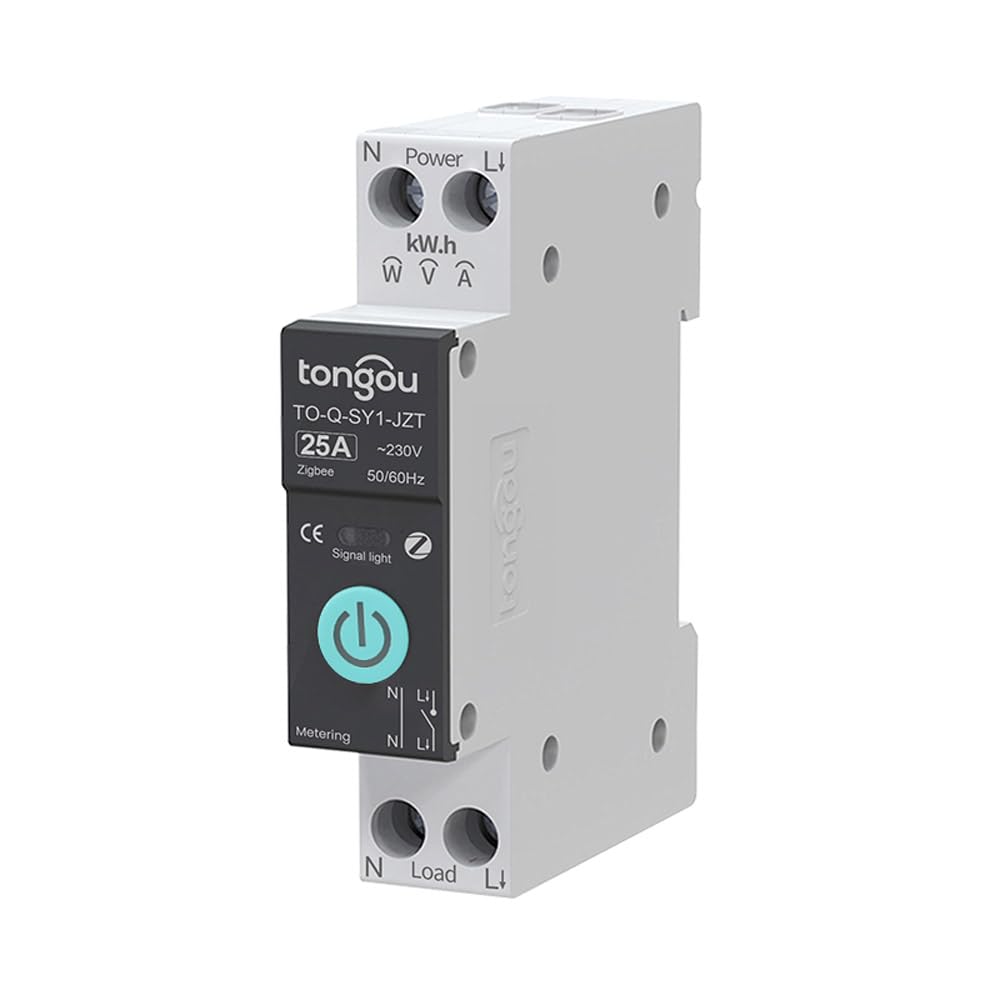
Image 2.1: TONGOU TO-Q-SY1-ZigBee Smart Switch highlighting its features like timer, countdown, circulate, and metering.
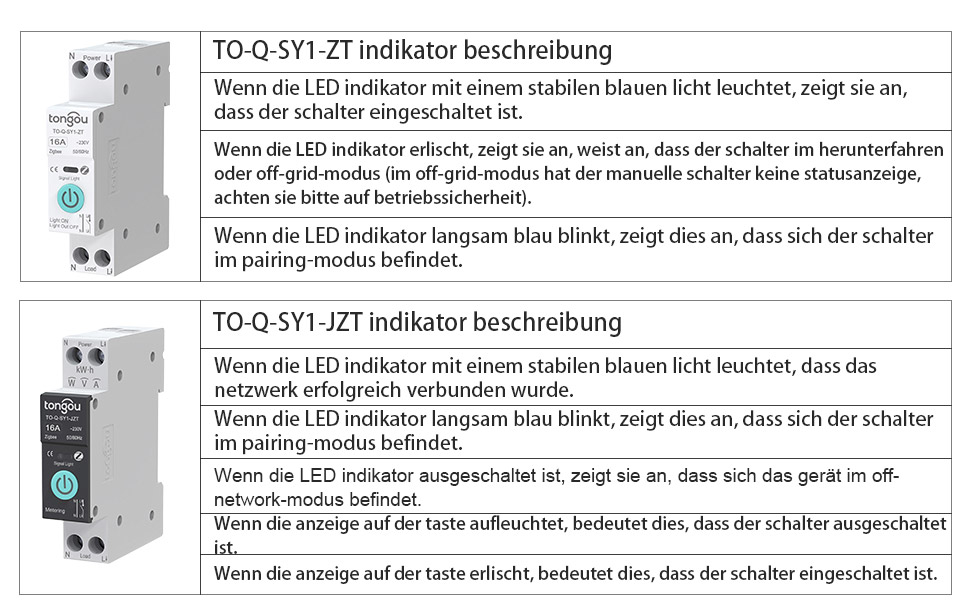
Image 2.2: Diagram illustrating the TONGOU TO-Q-SY1-ZigBee Smart Switch's connectivity and control options.
3. Информация по технике безопасности
ВНИМАНИЕ: Опасность поражения электрическим током. Установка должна производиться только квалифицированным электриком.
- Перед установкой или обслуживанием выключателя всегда отключайте питание на автоматическом выключателе.
- Убедитесь в громкости переключателя.tagЗначения параметров e и тока соответствуют вашей электрической системе.
- Не включайте выключатель мокрыми руками или в воде.amp условия.
- Хранить в недоступном для детей месте.
- Не пытайтесь ремонтировать или модифицировать устройство. Обратитесь за помощью в службу поддержки клиентов.
4. Установка
The TONGOU TO-Q-SY1-ZigBee Smart Switch is designed for DIN rail mounting. Follow these steps for safe and correct installation:
- Выключение: Turn off the main power supply at your circuit breaker to prevent electrical shock.
- Монтаж: Securely mount the switch onto a standard 35mm DIN rail in your electrical box.
- Проводка: Connect the live (L) and neutral (N) wires to the input terminals (Power L and Power N) of the switch. Connect the load wires to the output terminals (Load L and Load N). Ensure all connections are tight and secure. The switch supports simple push-in cable insertion and screw tightening.
- Включение питания: Once all wiring is complete and secure, restore power at the circuit breaker.

Изображение 4.1: Примерample wiring diagram for the TONGOU TO-Q-SY1-ZigBee Smart Switch with a light bulb and a Tuya ZigBee hub.

Image 4.2: Dimensions of the TONGOU TO-Q-SY1-ZigBee DIN Rail Switch for installation planning.
5. Setup (App Pairing)
To enable smart features, the switch must be paired with a TUYA ZigBee 3.0 hub and the Smart Life/TUYA app.
- Скачать приложение: Download the "Smart Life" or "TUYA" app from the App Store (iOS) or Google Play (Android).
- Добавить хаб: Open the app and add your TUYA ZigBee 3.0 hub if you haven't already.
- Войдите в режим сопряжения: On the TONGOU Smart Switch, press and hold the button for 5 seconds until the indicator light blinks blue. This indicates pairing mode.
- Откройте для себя устройство: In the Smart Life/TUYA app, navigate to your ZigBee hub and select "Add sub-device" or "Искать device." The app will discover the switch.
- Подтвердите сопряжение: Follow the on-screen prompts to confirm pairing. Once successfully paired, the indicator light on the switch will stop blinking and remain solid blue.
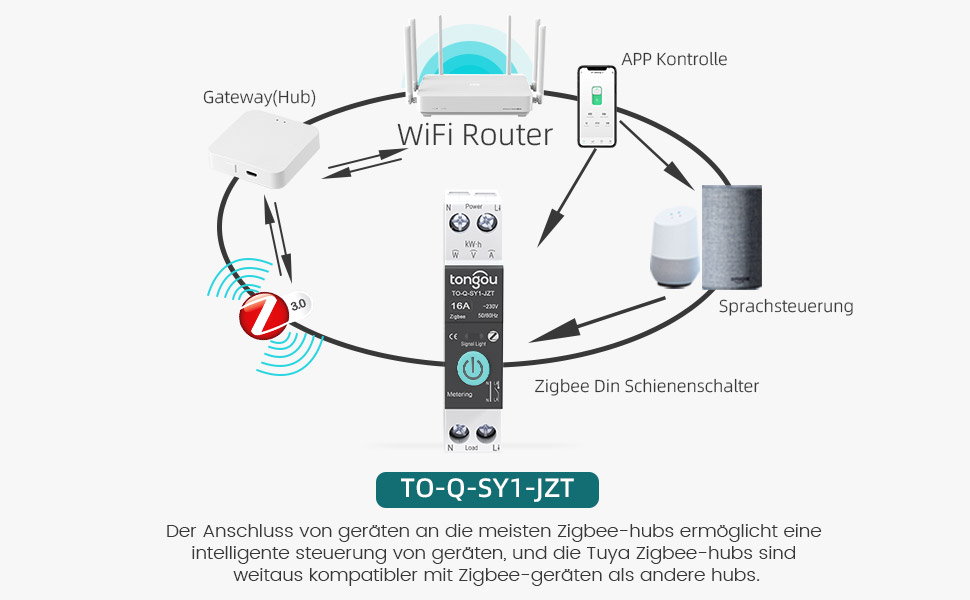
Image 5.1: Diagram showing the connection of the TONGOU TO-Q-SY1-ZigBee Smart Switch to a WiFi router via a ZigBee hub for app and voice control.
Video 5.1: This video demonstrates the pairing process of the TONGOU TO-Q-SY1-ZigBee Smart Switch with a Tuya ZigBee hub and the Smart Life app, including initial setup and basic control functions.
6. Операция
6.1. Ручное управление
The switch can be operated manually by pressing the physical button on the device. Press once to turn ON, press again to turn OFF.
6.2. Пульт дистанционного управления APP
After successful pairing, open the Smart Life/TUYA app. You will see the added switch. Tap the switch icon to toggle power ON/OFF. The app also provides real-time status updates.
6.3. Electricity Consumption Monitoring
Within the app, navigate to the switch's details page. Here you can view Данные в реальном времени о текущем токе и объемеtage, and power. Historical data for energy consumption (kWh) is also available, broken down by day, month, and year.
6.4. Голосовое управление
Integrate the Smart Life/TUYA app with Amazon Alexa or Google Assistant. Once linked, you can use voice commands to control your connected appliances. For example, "Alexa, turn on the living room light" or "Hey Google, turn off the fan."
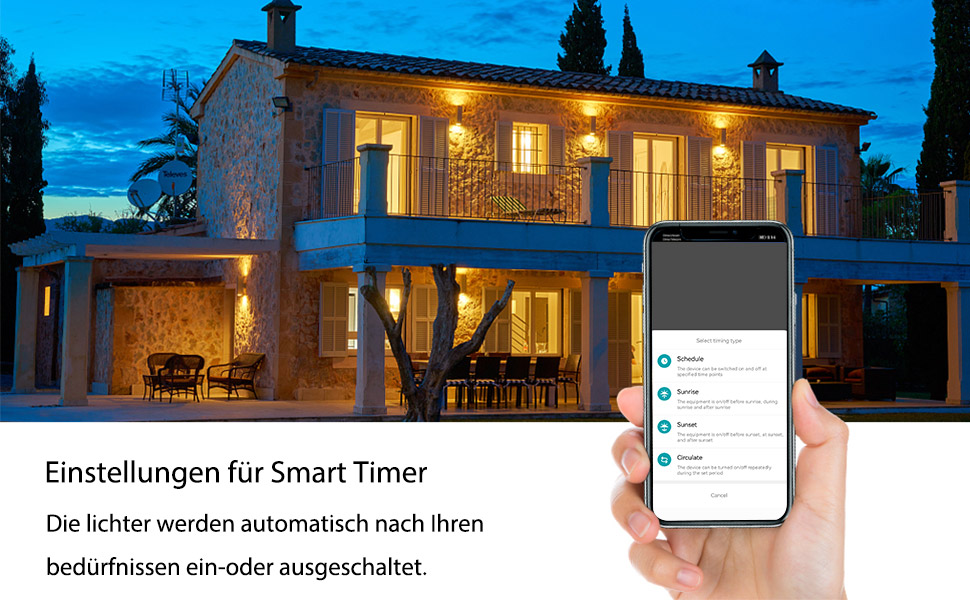
Image 6.1: Screenshot showing smart timer settings within the app, allowing users to schedule device operation.
6.5. Функции синхронизации
The app offers various timing options:
- Расписание: Set specific ON/OFF times for your devices on selected days.
- Обратный отсчет: Установите таймер для включения или выключения устройства по истечении заданного промежутка времени.
- Распространить: Program the device to cycle ON and OFF repeatedly for set intervals.
7. Техническое обслуживание
- Уборка: Аккуратно протрите устройство сухой мягкой тканью. Не используйте агрессивные химические вещества или абразивные чистящие средства.
- Проверка связи: Периодически проверяйте соединения проводов, чтобы убедиться в их надежности.
- Обновления прошивки: Keep the Smart Life/TUYA app updated to receive the latest firmware for your switch, which may include performance improvements and new features.
8. Поиск Неисправностей
- Устройство не подключается:
- Убедитесь, что ваш ZigBee-хаб TUYA включен и подключен к вашей сети.
- Verify the switch is in pairing mode (blinking blue indicator light).
- Move the switch closer to the ZigBee hub.
- Reset the switch by holding the button for 10 seconds until the light turns off, then try pairing again.
- Пульт дистанционного управления отсутствует:
- Check your internet connection and the ZigBee hub's connection.
- Ensure the Smart Life/TUYA app is up to date.
- Verify the switch is still connected to the ZigBee network in the app.
- Голосовое управление не работает:
- Confirm that your Alexa or Google Assistant device is properly linked to your Smart Life/TUYA account.
- Check if the device name in the app matches the name you are using in voice commands.
- Неточный мониторинг энергопотребления:
- Ensure the switch is correctly wired and the load is within its rated capacity.
- Обратитесь в службу поддержки, если проблема не устранена.
9. Технические характеристики
| Производитель | ТОНГОУ |
| Номер модели | TO-Q-SY1-ZigBee |
| Материал | With measurement 25A (PA66 flame-retardant) |
| Томtage | 240 Вольт |
| Власть | 6000 Вт |
| Текущий рейтинг | 25 А |
| Тип переключателя | Single-phase, Touchpad |
| Тип крепления | Крепление на DIN-рейку |
| Режим работы | ВКЛ ВЫКЛ |
| Связность | ZigBee 3.0 (requires Tuya ZigBee Hub) |
| Сертификаты | CE |
| Размеры упаковки | 8.5 x 7.1 x 2.2 см; 110 грамм |
| Страна происхождения | Китай |
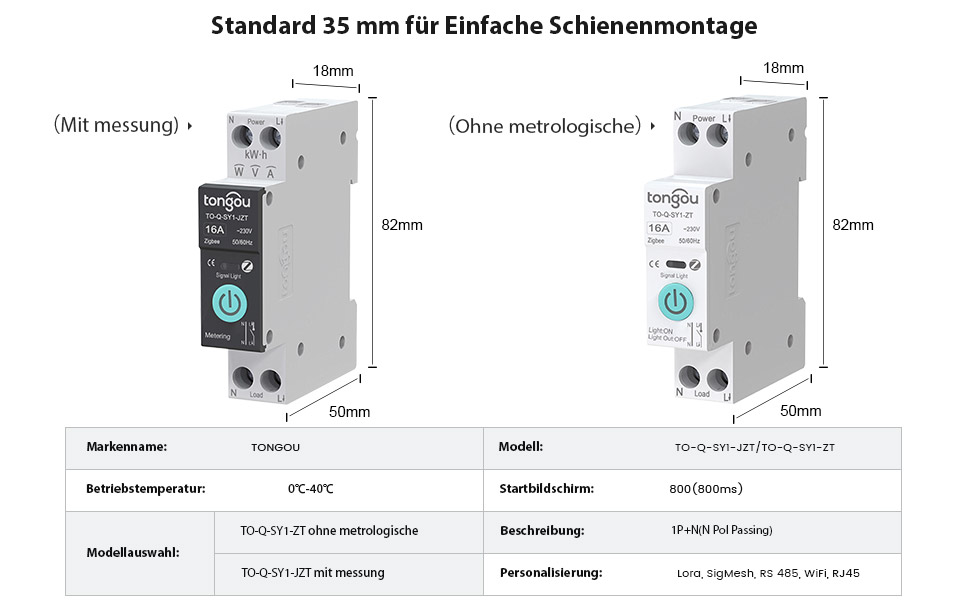
Image 9.1: Detailed product parameters for the TONGOU TO-Q-SY1-ZigBee Smart Switch.
10. Гарантия и поддержка
This TONGOU Smart ZigBee Switch comes with a двухлетняя гарантия с даты покупки. Данная гарантия распространяется на дефекты материалов и изготовления при нормальном использовании.
For technical support, warranty claims, or any questions regarding your product, please contact TONGOU customer service through your retailer or the official TONGOU website. Please have your purchase receipt and product model number (TO-Q-SY1-ZigBee) ready when contacting support.
Информация о наличии запасных частей в настоящее время недоступна.