
SPORTARC LCD-S966
SPORTARC LCD-S966 Ebike Display User Manual
Model: LCD-S966
Brand: SPORTARC
1. Введение
Thank you for choosing the SPORTARC LCD-S966 Ebike Display. This high-quality, durable display is designed to enhance your electric bicycle riding experience by providing crucial information at a glance. It accurately reflects battery charge, records real-time energy consumption to ensure riding mileage, and displays useful data such as riding speed, time, power, and temperature. The colorful screen makes data viewing clear and easy. Please note that this display must be used with a Protocol No. 2 controller for proper functionality.
2. Информация по технике безопасности
- Перед началом поездки всегда убедитесь, что дисплей надежно закреплен.
- Не пытайтесь открыть или модифицировать дисплейный блок, так как это может привести к аннулированию гарантии и повреждению.
- Keep the display clean and dry. Avoid exposure to extreme temperatures or direct sunlight for prolonged periods.
- Ensure all connections are properly seated and waterproofed (if applicable) to prevent electrical issues.
- Operate your ebike responsibly and always prioritize safety.
3. Содержимое упаковки
В комплект входят следующие предметы:
- 1 x SPORTARC LCD-S966 Ebike Display
- Integrated connection cable (5-pin waterproof connector)
- Control button unit
4. Продукт закончилсяview
4.1 Функции дисплея
The LCD-S966 display provides a comprehensive overview of your ebike's status and riding data. Key indicators include:
- Скорость: Current riding speed (km/h or mph).
- Уровень заряда батареи: Real-time battery charge indicator.
- Индикатор ошибки: Displays error codes if issues arise.
- Режимы езды: SPORT, STD (Standard), ECO (Economy) modes.
- Механизм: Current assist level or gear.
- Одометр (ODO): Общее пройденное расстояние.
- ПУТЕШЕСТВИЕ: Current trip distance.
- AVG (Average Speed): Average speed for the current trip.
- MAX (Maximum Speed): Максимальная скорость, достигнутая во время текущей поездки.
- VWh/Ah: Томtage-Watt-hour or Amp-hour consumption.

Рисунок 1: Передняя часть view of the SPORTARC LCD-S966 Ebike Display, showing the screen interface with various data points like speed, battery level, error indicators, and riding modes.
4.2 Control Buttons and Connectors
The display unit is operated via a separate control button unit, typically mounted near the handlebar grip. This unit usually includes:
- Кнопка «М»: Mode/Menu button for cycling through display information or entering settings.
- Кнопка со стрелкой вверх: Увеличивает значения или перемещается вверх по меню.
- Кнопка со стрелкой вниз: Уменьшает значения или перемещается вниз по меню.
The display connects to your ebike's controller via a 5-pin waterproof connector, ensuring a secure and reliable connection.

Figure 2: The LCD-S966 display unit, its 5-pin waterproof connector, and the separate control buttons. The image also indicates the overall length of the display unit with its cable.
5. Настройка и установка
5.1 Монтаж дисплея
- Choose a suitable location on your ebike's handlebars for the display, ensuring it is easily visible and accessible without obstructing your view или элементы управления.
- Securely attach the display bracket to the handlebars using the provided hardware.
- Mount the control button unit near your thumb for easy operation while riding.

Figure 3: The LCD-S966 display securely mounted on the handlebars of an electric bicycle, demonstrating its typical placement and user perspective during operation.
5.2 Подключение дисплея
The LCD-S966 display features clearly configured individual joints for straightforward installation. It is crucial to connect the display to an ebike controller that supports Protocol No. 2. Failure to do so will result in the display not functioning.
- Locate the corresponding 5-pin connector on your ebike's controller or wiring harness.
- Align the pins and carefully push the display's 5-pin waterproof connector into the controller's port until it clicks securely into place.
- Ensure the connection is firm and free from any loose wires.
- Route the cable neatly along the handlebars and frame, securing it with cable ties if necessary, to prevent interference with moving parts.

Figure 4: This image presents two wiring configurations for the LCD-S966 display: one with a direct 5-pin waterproof connector and another showing individual wire connections. It also provides a dimension for the cable length.
6. Инструкция по эксплуатации
6.1 Включение/выключение питания
To power on the display, turn on your ebike's main power switch. The display should illuminate automatically. To power off, turn off your ebike's main power switch.
6.2 Режимы отображения
Press the 'M' (Mode) button on the control unit to cycle through different display modes, such as ODO (Odometer), TRIP (Trip Distance), AVG (Average Speed), and MAX (Maximum Speed).
6.3 Gear Selection / Assist Levels
Use the Up and Down arrow buttons on the control unit to adjust the ebike's assist level or gear. The current gear will be displayed on the screen.
6.4 Индикаторы ошибок
If an error occurs, the display will show an 'ERROR' message along with a specific code. Refer to the troubleshooting section or your ebike's controller manual for details on specific error codes.
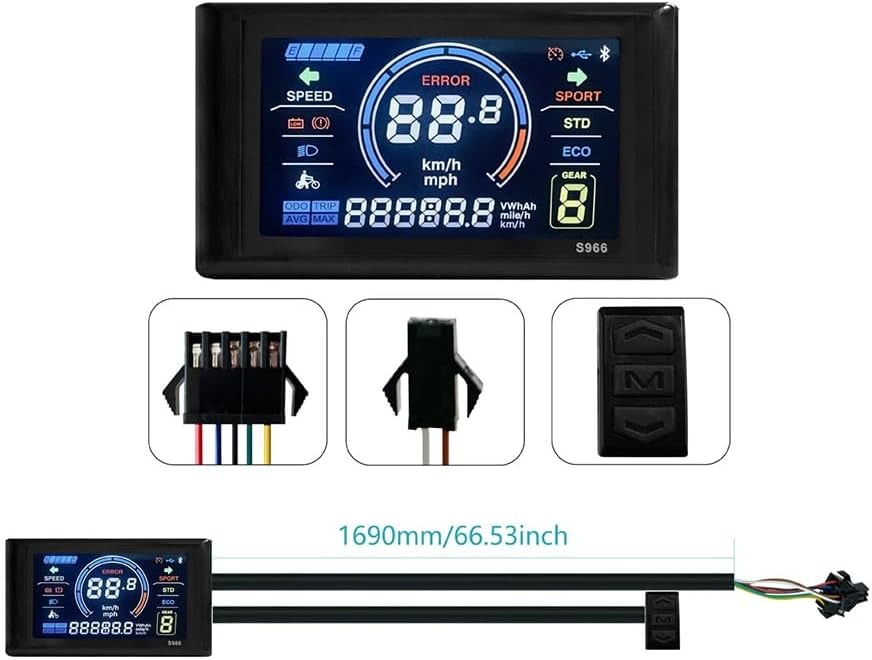
Figure 5: This image compares the visibility of the LCD-S966 display in different lighting conditions, showing its clear readability during both daytime and nighttime riding.
7. Техническое обслуживание
- Уборка: Протирайте экран дисплея и корпус мягкой тканью.amp Ткань. Не используйте абразивные чистящие средства или растворители.
- Воздействие воды: While the display is designed to be waterproof, avoid submerging it in water or exposing it to high-pressure water jets.
- Хранилище: В периоды, когда электровелосипед не используется, храните его и подставку в сухом, прохладном месте, вдали от прямых солнечных лучей.
- Проверка связи: Периодически проверяйте все кабельные соединения, чтобы убедиться в их надежности и отсутствии коррозии.
8. Поиск Неисправностей
- Дисплей не включается:
- Ensure your ebike's main power is on.
- Check all cable connections, especially the 5-pin connector, for proper seating.
- Verify that your ebike's controller is compatible with Protocol No. 2. The display will not function with incompatible controllers.
- Check the ebike's battery level.
- Incorrect Data Displayed:
- Ensure the wheel circumference setting (if adjustable via controller) is correct.
- Check for any loose sensor connections on your ebike.
- 'ERROR' Message on Screen:
- Обратите внимание на отображаемый код ошибки.
- Consult your ebike's controller manual or contact ebike support for interpretation of error codes.
- Кнопки не реагируют:
- Check the connection of the control button unit to the main wiring harness.
- Ensure buttons are not physically stuck or damaged.
9. Технические характеристики
| Особенность | Деталь |
|---|---|
| Модель | LCD-S966 |
| Номер модели продукта | 1401919856 |
| Материал | АБС |
| Цвет | Черный |
| Томtage Совместимость | 24-72В |
| Тип разъема | 5-pin waterproof |
| Входной интерфейс | Кнопки |
| Размеры продукта (Д x Ш x В) | Примерно 15 х 10 х 5 см (5.9 х 3.9 х 2 дюйма) |
| Вес продукта | Approximately 190g - 200g (0.42 - 0.44 lbs) |
| Источник | Китай |
10. Гарантия и поддержка
For warranty information or technical support, please refer to the documentation provided with your ebike or contact the retailer where you purchased the SPORTARC LCD-S966 Ebike Display. Keep your purchase receipt as proof of purchase.
Ask a question about this manual
Ask about setup, troubleshooting, compatibility, parts, safety, or missing instructions. Manuals+ will review the question and use this page’s manual context to help answer it.