Введение
Thank you for choosing the MEGATEK Portable CD Player. This device is designed to provide a versatile and high-quality audio experience, supporting various media formats and offering multiple connectivity options. Please read this manual carefully to ensure proper use and maintenance of your new CD player.

Image: The MEGATEK Portable CD Player, showcasing its compact design, integrated speakers, control buttons, and included accessories like headphones and USB-C charging cables.
Информация по безопасности
Для обеспечения безопасной эксплуатации и предотвращения повреждений соблюдайте следующие меры предосторожности:
- Не подвергайте устройство воздействию экстремальных температур, влажности или прямых солнечных лучей.
- Не роняйте устройство и не подвергайте его сильным ударам.
- Не разбирайте и не пытайтесь ремонтировать устройство самостоятельно. По всем вопросам обслуживания обращайтесь к квалифицированному персоналу.
- Используйте только прилагаемый зарядный кабель и совместимый адаптер питания.
- Держите устройство вдали от воды и других жидкостей.
- Протирайте устройство мягкой сухой тканью. Не используйте абразивные чистящие средства или растворители.
- Длительное прослушивание на высокой громкости может привести к повреждению слуха. Отрегулируйте громкость до безопасного уровня.
Содержимое упаковки
Проверьте наличие всех предметов в упаковке:
- MEGATEK Portable CD Player - Black
- Проводные наушники
- Зарядный кабель USB-C
- Руководство пользователя

Image: A visual representation of the package contents, including the CD player, headphones, USB-C cable, and user manual.
Продукт болееview
Familiarize yourself with the various parts and controls of your MEGATEK Portable CD Player.
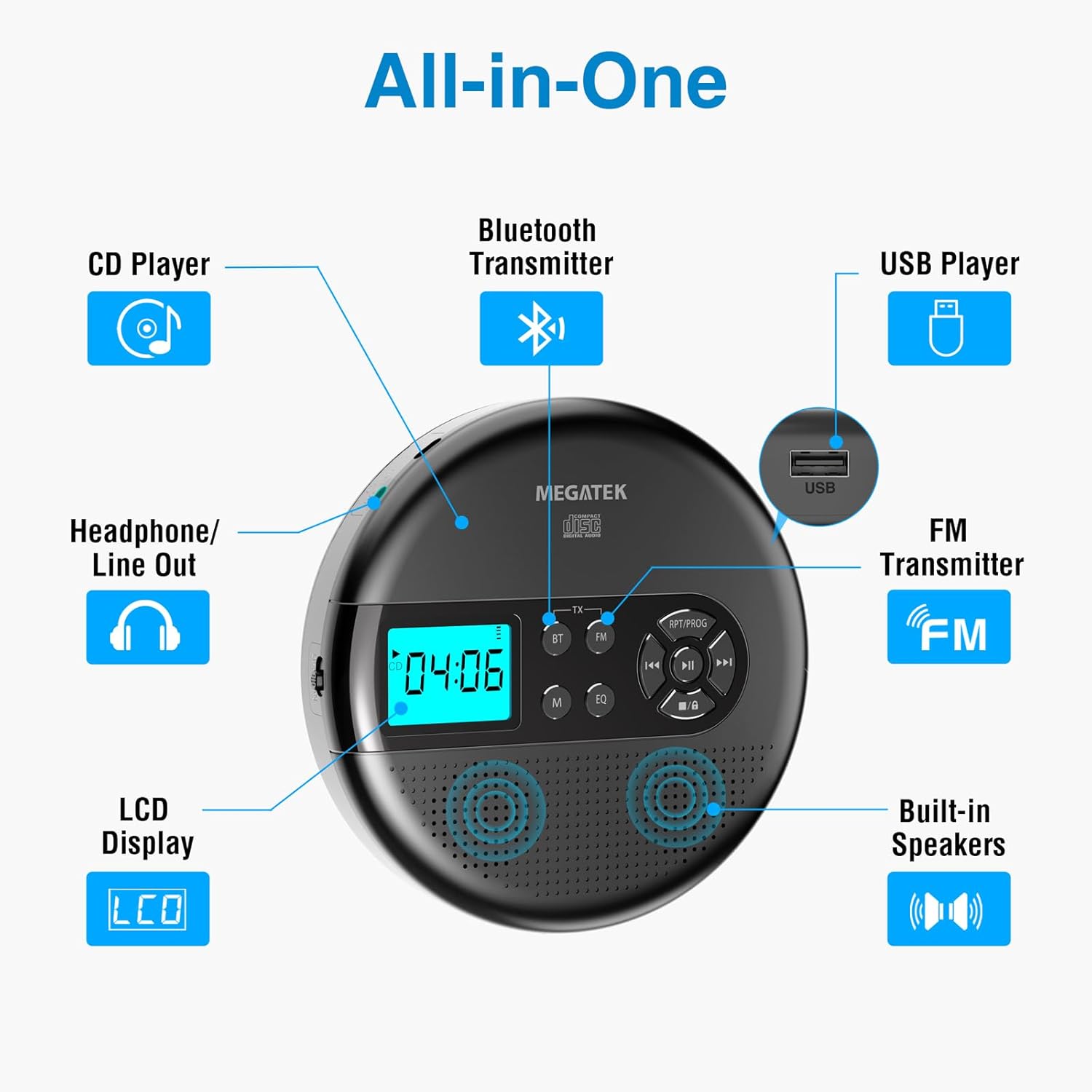
Image: An "All-in-One" diagram highlighting key features such as the CD Player, Bluetooth Transmitter, USB Player, FM Transmitter, Built-in Speakers, LCD Display, and Headphone/Line Out port.
Элементы управления и порты:
- ЖК-дисплей: Shows track number, time, mode, and battery status.
- Кнопка воспроизведения/паузы: Запускает или приостанавливает воспроизведение.
- Кнопки «Предыдущая/Следующая»: Пропускает треки или перематывает вперед/назад.
- Кнопка остановки: Останавливает воспроизведение.
- RPT/PROG Button: Controls repeat modes and programming tracks.
- Кнопка BT: Активирует режим передачи данных по Bluetooth.
- Кнопка FM: Activates FM transmission mode.
- Кнопка M (режим): Switches between CD, USB, Bluetooth, and FM modes.
- Кнопка эквалайзера: Переключает настройки эквалайзера.
- Регулятор громкости: Регулирует уровень выходного звука.
- USB-порт: Для воспроизведения аудио files с USB-накопителя.
- Порт зарядки типа C: Для зарядки внутренней батареи.
- 3.5mm Audio Out Jack: Для подключения наушников или внешних динамиков.
- Встроенные стереодинамики: Для прямого воспроизведения звука.
Настраивать
Зарядка аккумулятора:
The device is equipped with a built-in 2000mAh rechargeable Li-ion battery. Before first use, fully charge the player.
- Connect the provided USB-C charging cable to the Type-C charging port on the player.
- Другой конец кабеля USB-C подключите к USB-адаптеру питания (не входит в комплект) или к USB-порту компьютера.
- The battery indicator on the LCD display will show charging status. A full charge provides up to 15 hours of playtime at medium volume.

Image: The portable CD player connected to a power source via its USB-C cable, resting on a nightstand next to a bed.
Вставка компакт-диска:
- Locate the CD compartment latch/button on the side of the player and slide/press it to open the lid.
- Carefully place the CD onto the center spindle with the label side facing up.
- Аккуратно нажмите на компакт-диск, пока он не зафиксируется со щелчком.
- Плотно закройте крышку отсека для компакт-дисков до щелчка.

Image: The portable CD player with its lid open, showing a blue CD disc inserted into the compartment, ready for playback.
Инструкция по эксплуатации
Воспроизведение компакт-дисков:
- Insert a CD as described in the Setup section.
- Нажмите Воспроизведение/Пауза кнопку, чтобы начать воспроизведение.
- Используйте Предыдущий/Следующий buttons to navigate between tracks. Hold to fast-forward or rewind.
- Нажмите RPT/PROG button to cycle through repeat modes (repeat one, repeat all, random) or to program a custom playback order.
- Нажмите Останавливаться кнопка для завершения воспроизведения.
- Adjust volume using the dedicated volume control.
Воспроизведение через USB:
The player supports MP3, WMA, and WAV audio files с USB-накопителя.
- Вставьте USB-флеш-накопитель в USB-порт.
- Нажмите М (режим) кнопку, чтобы переключиться в режим USB.
- Используйте Воспроизведение/Пауза, Предыдущий/Следующий, и RPT/PROG кнопки, как при воспроизведении компакт-дисков.
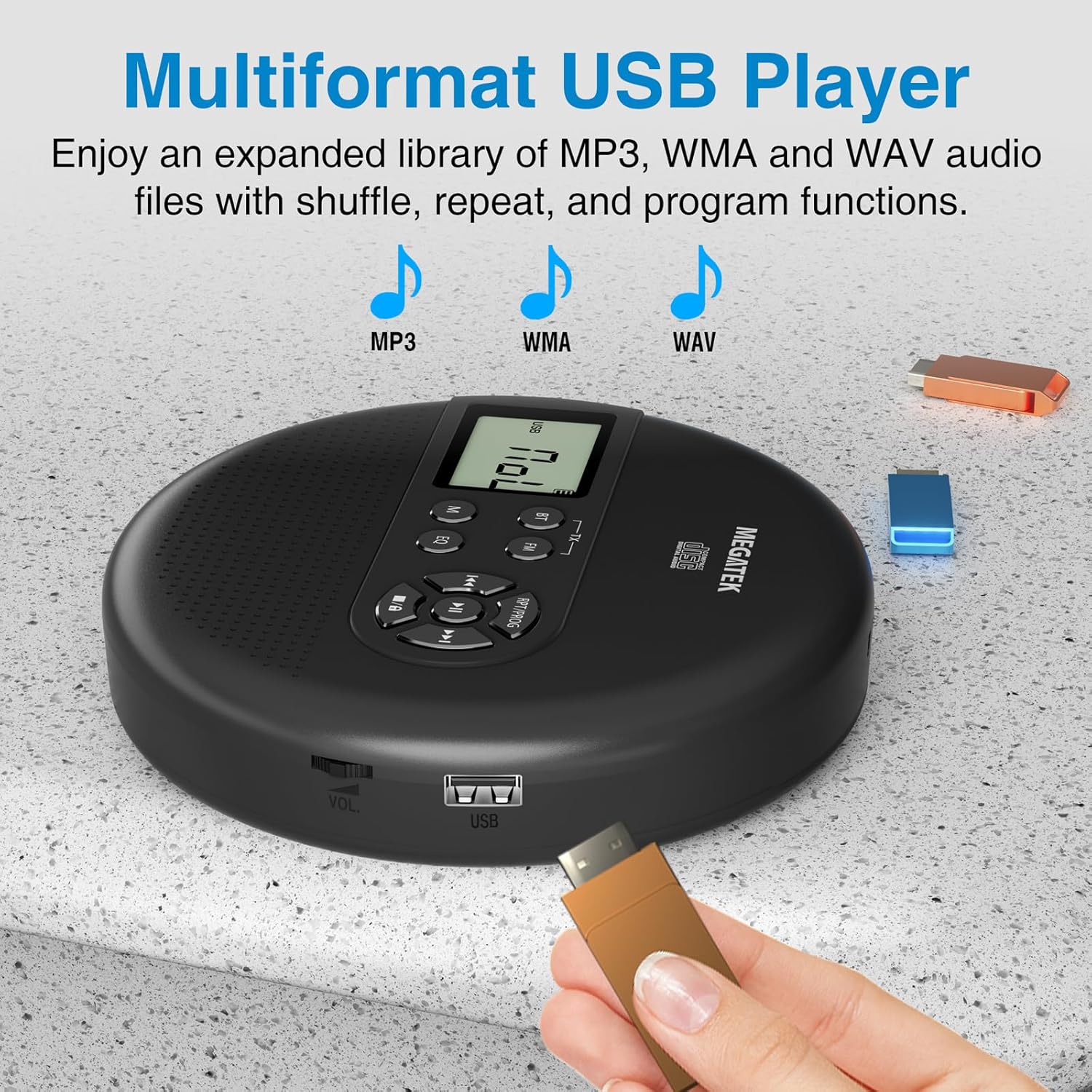
Image: The portable CD player with a USB flash drive inserted into its side port, illustrating its multi-format USB playback capability.
Передача Bluetooth:
Stream audio wirelessly to Bluetooth-enabled headphones or speakers. Note: This feature does not support connections to car stereo systems.
- Убедитесь, что ваши наушники или динамики Bluetooth находятся в режиме сопряжения.
- On the CD player, press the BT button. The Bluetooth indicator on the display will flash.
- The player will automatically search for and connect to nearby Bluetooth devices. Once connected, the indicator will stop flashing.

Image: The portable CD player wirelessly transmitting audio to two external Bluetooth speakers, demonstrating its Bluetooth transmission capability.
FM-передача:
Transmit audio signals to nearby FM radios, including car FM stereos and home stereo systems.
- Нажмите FM button on the CD player. The display will show an FM frequency.
- Tune your FM radio (car stereo, home stereo) to the same frequency displayed on the CD player.
- Adjust the frequency on the CD player using the Предыдущий/Следующий buttons if interference occurs or to find a clearer channel.

Image: The portable CD player placed on a car dashboard, transmitting audio to the car's FM stereo system, indicated by an FM frequency on the car's display.
Using Headphones/External Speakers:
For private listening or connecting to wired audio systems:
- Plug the included wired headphones into the 3.5mm audio out jack.
- Alternatively, connect an audio cable (not included) from the 3.5mm audio out jack to the AUX input of external speakers or an audio system.
- The built-in speakers will automatically mute when headphones or external speakers are connected.

Image: A close-up of the portable CD player, visually representing sound waves emitting from its dual stereo speakers, emphasizing the built-in audio capability.
Обслуживание
- Уборка: Use a soft, dry, lint-free cloth to clean the exterior of the player. For the CD lens, use a specialized CD lens cleaner. Do not use liquids or aerosol cleaners directly on the device.
- Хранилище: При длительном неиспользовании храните плеер в прохладном, сухом месте, вдали от прямых солнечных лучей и экстремальных температур.
- Уход батареи: Чтобы продлить срок службы аккумулятора, избегайте его частой полной разрядки. Регулярно заряжайте устройство, даже если оно не используется активно.
Поиск неисправностей
| Проблема | Возможная причина | Решение |
|---|---|---|
| Плеер не включается. | Батарея разряжена. | Зарядите плеер с помощью кабеля USB-C. |
| Нет звука из динамиков/наушников. | Volume is too low; headphones not fully plugged in; incorrect mode selected. | Increase volume; ensure headphones are securely connected; press the М (режим) кнопку, чтобы выбрать правильный источник. |
| Компакт-диск пропускает или не воспроизводится. | CD is dirty, scratched, or inserted incorrectly; anti-skip function overwhelmed. | Clean the CD; ensure CD is properly seated; avoid strong vibrations. |
| Проблемы с подключением Bluetooth. | Device not in pairing mode; too far from player; interference. | Ensure receiving device is in pairing mode; move closer to the player; restart both devices. |
| Помехи в FM-передаче/низкое качество звука. | Interference; incorrect frequency. | Adjust the FM frequency on the player and receiver to find a clear channel. |
Технические характеристики
| Особенность | Деталь |
|---|---|
| Номер модели | CP27BR |
| Размеры продукта | 5.91 x 5.91 x 1.32 дюйма |
| Вес товара | 10.9 унции |
| Аккумулятор | 2000 мАч литий-ионный (перезаряжаемый) |
| Время игры | До 15 часов (при средней громкости) |
| Поддерживаемые форматы CD | CD, CD-R/RW, MP3 CD, Audio Book CD |
| Поддерживаемые форматы USB | MP3, WMA, WAV |
| Защита от пропусков | 60 секунд |
| Связность | USB, Bluetooth Transmitter, FM Transmitter, 3.5mm Audio Out |
| Особые возможности | Built-in Stereo Speakers, Resume Play, Shuffle, Repeat, Program Functions, 5 EQ Options |
Гарантия и поддержка
MEGATEK offers comprehensive support for its products:
- Замена через 12 месяцев: In case of product defects or issues within 12 months of purchase.
- Пожизненная техническая поддержка: Assistance with product usage, troubleshooting, and general inquiries.
- Круглосуточное обслуживание клиентов: Available through Amazon buyer-seller messaging.
For any questions or problems, please contact MEGATEK customer service via the Amazon platform or refer to the contact information provided in the product packaging.
Image: A graphic detailing MEGATEK's customer support, including 12-month replacement, lifetime technical support, and 24/7 Amazon buyer-seller messaging, alongside an image of customer service representatives.