
Введение
The Cerwin Vega! VEGA10SB-PR are 10-inch active powered nearfield studio monitors designed for versatile audio applications. These monitors feature full-range audio DSP control and offer both wired and wireless connectivity options, including Bluetooth 5.0+ and SKAA low latency high-speed technology. They are suitable for home desktop use, gaming, and professional studio environments, providing a comprehensive audio experience.
This manual provides essential information for the safe and efficient operation of your VEGA10SB-PR studio monitors. Please read it thoroughly before use and retain it for future reference.
Информация по безопасности
ПРЕДУПРЕЖДЕНИЕ: Этот продукт может подвергнуть вас воздействию химикатов, которые, как известно в штате Калифорния, вызывают рак. Для получения дополнительной информации перейдите на P65Warnings.ca.gov.
Always ensure proper ventilation around the speakers. Do not block any ventilation openings. Avoid exposing the speakers to water, moisture, or extreme temperatures. Disconnect the power cable during lightning storms or when unused for long periods.
Что в коробке?
После распаковки убедитесь, что все перечисленные ниже предметы имеются в наличии и находятся в хорошем состоянии:
- 2 x Powered Nearfield Studio Monitors (VEGA10SB-PR)
- Силовые кабели
- Руководство пользователя (этот документ)
Настраивать
1. Физическое размещение
Proper placement of your studio monitors is crucial for optimal sound reproduction. Position the monitors at ear level, forming an equilateral triangle with your listening position. Ensure there are no obstructions between the monitors and your ears. Maintain some distance from walls to avoid bass buildup, or adjust the monitor's DSP settings if available.
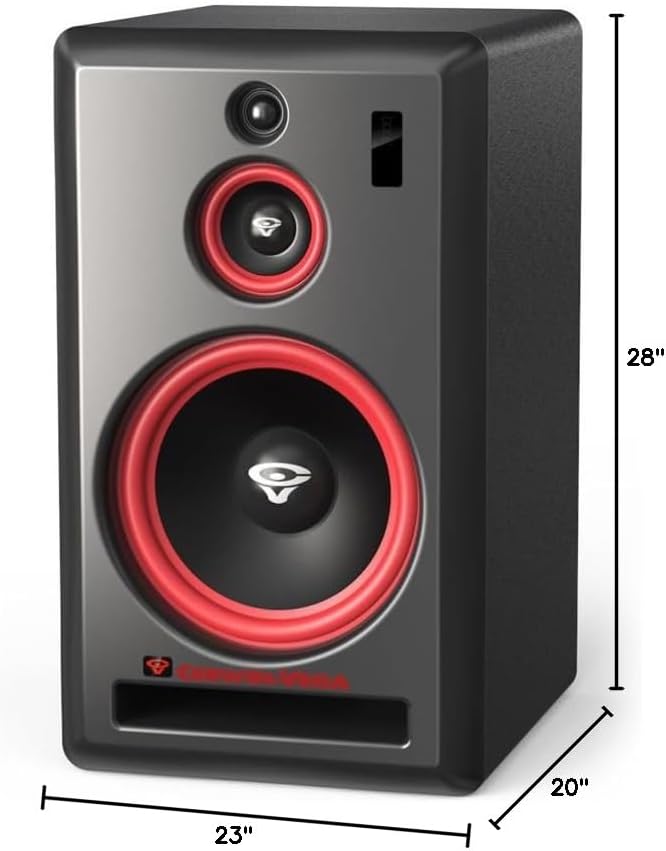
Изображение: Спереди view of a Cerwin Vega VEGA10SB-PR studio monitor with approximate dimensions (28" height, 23" width, 20" depth).
2. Связи
The VEGA10SB-PR system consists of a HUB speaker and a SAT (satellite) speaker. The HUB speaker contains all primary inputs and controls, while the SAT speaker connects to the HUB.

Изображение: сзади view of both VEGA10SB-PR monitors. The left unit (HUB) shows various inputs like XLR, TRS, RCA, and power. The right unit (SAT) shows a single input from the HUB and power.
- Подключение питания: Connect the provided power cables to the power input on the rear of each monitor and then to a suitable AC power outlet. Ensure the power switch is in the OFF position before connecting.
- Wired Audio Input (HUB Speaker):
- XLR/TRS Combo Jacks: For balanced audio sources (e.g., audio interfaces, mixers).
- Входы RCA: For unbalanced audio sources (e.g., consumer audio equipment).
- Connecting SAT Speaker to HUB: Use the dedicated cable (not explicitly listed but implied by the image) to connect the SAT speaker to the HUB speaker's output.
3. Беспроводное сопряжение
- Bluetooth 5.0+:
- Убедитесь, что мониторы включены.
- Activate Bluetooth pairing mode on the HUB speaker (refer to the controls on the rear panel, typically a button).
- On your audio device (smartphone, computer), search for "VEGA10SB-PR" in the Bluetooth settings and select it to pair.
- A confirmation sound or indicator light will confirm successful pairing. The Bluetooth range is approximately 5 meters.
- SKAA / SKAA Pro Technology:
SKAA technology allows for low-latency, high-speed wireless audio transmission, ideal for synchronizing multiple speakers or professional real-time mixing. The wireless range for SKAA is approximately 30 meters+.
- To use SKAA, you will need a compatible SKAA transmitter (sold separately) connected to your audio source.
- Follow the instructions provided with your SKAA transmitter to pair it with the VEGA10SB-PR monitors. The monitors are equipped with embedded SKAA and SKAA Pro technology for seamless integration.
- SKAA Pro offers enhanced features for critical listening and detailed audio work, enabling precise synchronization for multi-speaker setups.
Операционная
1. Включение/выключение питания
After all connections are made, flip the power switch on the rear of the HUB speaker to the ON position. The monitors will power up. Always power off the monitors when not in use.
2. Регулятор громкости
Adjust the master volume knob on the rear of the HUB speaker to your desired listening level. Start with a low volume and gradually increase it to prevent sudden loud sounds.
3. Управление DSP
The VEGA10SB-PR monitors feature full-range audio DSP control. This allows for fine-tuning of the audio characteristics to match your listening environment and preferences. Refer to the specific controls on the rear panel of the HUB speaker for adjustments such as EQ, room correction, or other sound shaping options. (Specific DSP controls are not detailed in the provided data, so keep this general).
Обслуживание
- Уборка: Use a soft, dry cloth to clean the exterior surfaces of the monitors. Do not use abrasive cleaners, waxes, or solvents.
- Вентиляция: Ensure that the ventilation openings on the rear of the monitors are not blocked by dust or debris.
- Хранилище: If storing the monitors for an extended period, disconnect them from power and store them in a cool, dry place, preferably in their original packaging.
Поиск неисправностей
| Проблема | Возможная причина | Решение |
|---|---|---|
| Нет электричества | Power cable disconnected; Power switch off; Outlet not working | Check power cable connections; Ensure power switch is ON; Test outlet with another device |
| Нет звука | Input cable disconnected; Volume too low; Incorrect input selected; Bluetooth/SKAA not paired | Check all audio cable connections; Increase volume; Select correct input source; Re-pair Bluetooth/SKAA device |
| Искаженный звук | Input signal too high; Speaker volume too high; Damaged cable | Reduce input source volume; Reduce monitor volume; Replace audio cables |
| Bluetooth/SKAA not connecting | Устройство вне зоны действия; режим сопряжения не активен; помехи. | Move device closer to monitors; Activate pairing mode on monitors; Reduce interference from other wireless devices |
Технические характеристики
| Номер модели | VEGA10SB-PR |
| Бренд | Сервин Вега |
| Тип динамика | Monitor (Nearfield Studio) |
| Максимальная выходная мощность динамика | 280 Вт |
| Диаметр низкочастотного динамика | 10 дюйма |
| Технология связи | Bluetooth, SKAA, Wired |
| Диапазон Bluetooth | 5 метра |
| SKAA Wireless Range | 30 Meters+ |
| Режим аудиовыхода | Стерео |
| Материал корпуса | Пластик |
| Источник питания | Проводной электрический |
| Конкретные области применения продукта | Home Entertainment, Desktop Audio, Studio Monitoring |
Гарантия и поддержка
The Cerwin Vega! VEGA10SB-PR studio monitors come with a Ограниченная гарантия. Please refer to the warranty card included with your product for specific terms and conditions, including coverage duration and limitations.
For technical support, service, or warranty claims, please contact Cerwin Vega! customer service. Contact information can typically be found on the manufacturer's official webсайте или на упаковке продукта.
Интернет-ресурсы: For additional information, FAQs, and support, visit the official Cerwin Vega webсайт.