
DinoFire X17
DinoFire Rechargeable Presentation Clicker X17 User Manual
Модель: X17
Введение
Thank you for choosing the DinoFire Rechargeable Presentation Clicker, Model X17. This device is designed to enhance your presentations with its wireless control, integrated laser pointer, and user-friendly features. This manual provides detailed instructions for setup, operation, maintenance, and troubleshooting to ensure optimal performance.
Содержимое упаковки
Пожалуйста, проверьте наличие всех предметов в вашей посылке:
- DinoFire Rechargeable Presentation Clicker (X17)
- USB Receiver (stored inside the clicker)
- Кабель для зарядки Micro USB
- Руководство пользователя (этот документ)
Продукт болееview
The DinoFire X17 Presentation Clicker features an ergonomic design with intuitive controls for seamless presentation delivery. Familiarize yourself with the device's components and button functions.
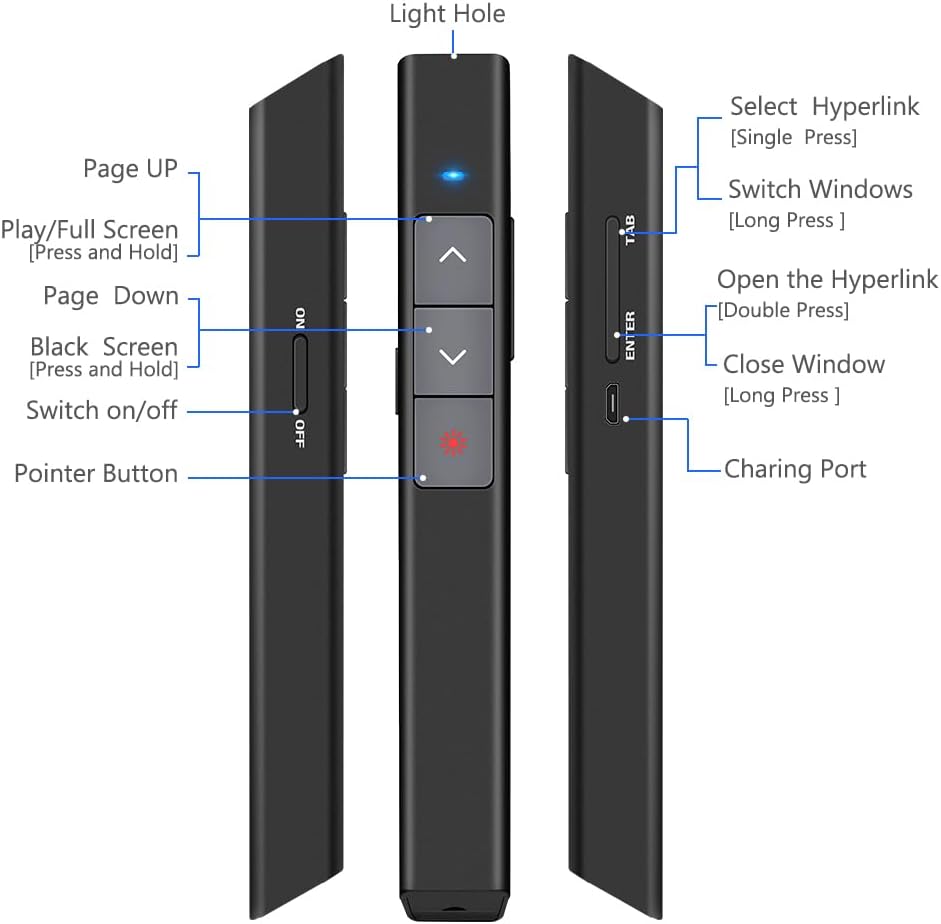
Рисунок 1: Подробный view of the DinoFire X17 Presentation Clicker showing button functions and port locations.
Функции кнопок:
- Страница вверх (▲): Advances to the previous slide.
- Страница вниз (▼): Переход к следующему слайду.
- Pointer Button: Включает красный лазерный указатель.
- Play/Full Screen (Press and Hold): Initiates or exits full-screen presentation mode.
- Black Screen (Press and Hold): Toggles a black screen during presentation.
- Включение/выключение: Выключатель питания устройства.
- Select Hyperlink (Single Press): Selects a hyperlink on the slide.
- Open the Hyperlink (Double Press): Opens the selected hyperlink.
- Switch Windows (Long Press): Cycles through open application windows.
- Close Window (Long Press): Closes the active window.
- Порт зарядки: Micro USB port for recharging the device.
- Light Hole: Location of the laser emitter.
Руководство по настройке
1. Charging the Presenter
Before initial use, fully charge the presentation clicker. A full charge typically takes approximately one hour and provides power for over one week of use.
- Connect the provided Micro USB charging cable to the charging port on the side of the presenter.
- Другой конец кабеля подключите к источнику питания USB (например, к порту USB компьютера, сетевому адаптеру USB).
- The charging indicator light will illuminate (refer to "Low Power Indicator" section for details).
- После полной зарядки отсоедините кабель.

Рисунок 2: The presentation clicker being charged via its Micro USB port, connected to a laptop.
2. Подключение USB-приемника
The USB receiver is stored magnetically within the presentation clicker for convenience and to prevent loss.
- Gently pull out the USB receiver from the bottom end of the presentation clicker.
- Вставьте USB-приемник в свободный USB-порт вашего компьютера (ноутбука или настольного компьютера).
- Система автоматически обнаружит и установит необходимые драйверы. Ручная установка драйверов не требуется.

Рисунок 3: The magnetic storage for the USB receiver, demonstrating its removal and insertion into a computer's USB port.
3. Включение и выключение
- Locate the "Switch on/off" button on the side of the clicker.
- Переведите переключатель в положение «ВКЛ», чтобы включить устройство.
- Для экономии заряда батареи, когда переключатель не используется, переведите его в положение «ВЫКЛ».
4. Совместимость системы и программного обеспечения
The DinoFire X17 is widely compatible with various operating systems and presentation software.
- Поддерживаемые системы: Windows 2003, XP, Windows Vista, Windows 7, 8, 10, Linux, Android, Mac OS.
- Поддерживаемое программное обеспечение: Keynote, Prezi, MS Word, Excel, PowerPoint, ACD See, website browsers, iWork, Google Slides, etc.
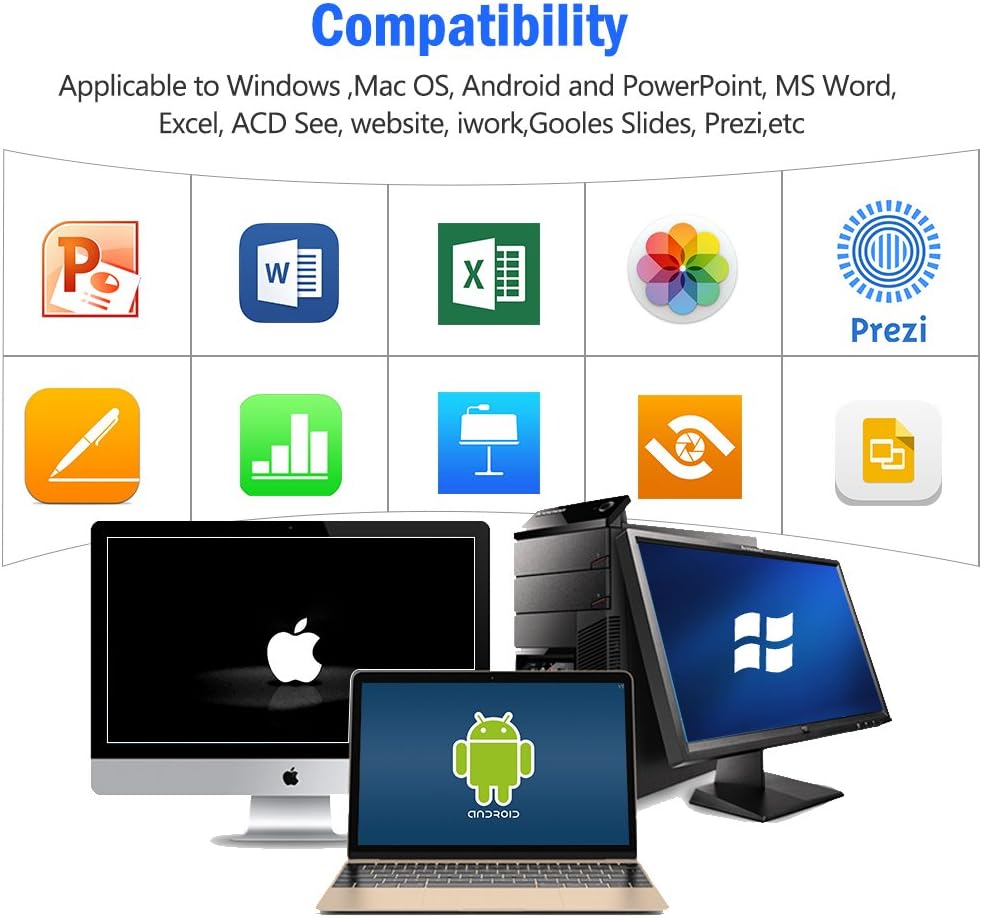
Рисунок 4: Visual representation of the broad compatibility of the presentation clicker with different operating systems and presentation applications.
Инструкция по эксплуатации
Basic Presentation Control
- Следующий слайд: Press the "Page Down" (▼) button.
- Предыдущий слайд: Press the "Page Up" (▲) button.
- Start/Exit Full Screen: Press and hold the "Page Up" (▲) button.
- Черный экран: Press and hold the "Page Down" (▼) button to toggle a black screen.
Использование лазерной указки
The integrated red laser pointer allows you to highlight specific content on your screen or projection.
- Press and hold the "Pointer Button" (red dot icon) to activate the laser.
- Release the button to turn off the laser.
- The laser has a range of up to 300 feet (91 meters).
- Осторожность: Do not point the laser directly at people's eyes or at highly reflective surfaces.

Рисунок 5: The red laser pointer in operation, highlighting its visibility and including a safety warning.
Расширенные функции
- Select Hyperlink: Single press the "ENTER" button.
- Open Hyperlink: Double press the "ENTER" button.
- Переключить окна: Long press the "TAB" button to cycle through open applications.
- Закрыть окно: Long press the "ENTER" button to close the active window.
Диапазон беспроводного управления
The DinoFire X17 offers a wireless control range of up to 100 feet (30 meters), allowing you freedom of movement during your presentation.

Рисунок 6: Illustration of the presentation clicker's effective long control range in a presentation setting.
Обслуживание
Руководство по зарядке
- Charge the device when the low power indicator flashes continuously.
- Avoid overcharging by disconnecting the cable once fully charged.
- Use the provided Micro USB cable or a certified equivalent for charging.
USB-приемник для хранения данных
Always store the USB receiver inside the magnetic compartment of the clicker when not in use to prevent loss and damage.
Уборка
Протирайте устройство мягкой сухой тканью. Не используйте жидкие чистящие средства или абразивные материалы.
Поиск неисправностей
| Проблема | Возможная причина | Решение |
|---|---|---|
| Устройство не отвечает. | Low battery; USB receiver not connected; Device is off. | Charge the device; Ensure USB receiver is securely plugged in; Turn on the device. |
| Лазерная указка не работает. | Low battery; Laser button not pressed correctly. | Charge the device; Press and hold the laser button firmly. |
| Короткий диапазон регулирования. | Препятствия; помехи; низкий заряд батареи. | Ensure clear line of sight to the receiver; Move away from sources of interference; Charge the device. |
| Hyperlink function not working. | Software specific issue; Hyperlink not properly selected. | Ensure the hyperlink is active and selected (single press ENTER) before attempting to open (double press ENTER). Check software settings. |
Индикатор низкого энергопотребления
The device features a low power indicator to alert you when charging is needed. When the indicator flashes continuously, please charge the device. The device will enter auto-sleep mode after approximately 5 minutes of inactivity to save energy.

Рисунок 7: Explanation of the indicator light states for working, charging, and fully charged conditions.
Технические характеристики
- Модель: Х17
- Бренд: Динофайр
- Беспроводная технология: 2.4GHz RF
- Диапазон регулирования: До 100 футов (30 метров)
- Тип лазера: Красный лазер
- Лазерный диапазон: До 300 футов (91 метров)
- Тип батареи: 1 литий-полимерный аккумулятор (входит в комплект)
- Время зарядки: Примерно 1 час
- Время использования: Over one week (on a single charge)
- Размеры: 6.42 x 1.61 x 1.14 дюйма (16.3 x 4.1 x 2.9 см)
- Вес товара: 1.6 унции (45 грамма)
- Совместимые системы: Windows 2003/XP/Vista/7/8/10, Linux, Android, Mac OS
- Совместимое программное обеспечение: Keynote, Prezi, MS Word, Excel, PowerPoint, ACD See, web browsers, iWork, Google Slides
Гарантия и поддержка
Информация о гарантии
The DinoFire Rechargeable Presentation Clicker X17 typically comes with a 3-year warranty. Please refer to your purchase documentation or the manufacturer's official webсайт для получения информации о конкретных условиях гарантии.
Поддержка клиентов
For technical assistance, troubleshooting beyond this manual, or warranty claims, please contact DinoFire customer support through their official website or the retailer where the product was purchased. Keep your purchase receipt or order number handy for faster service.
Ask a question about this manual
Ask about setup, troubleshooting, compatibility, parts, safety, or missing instructions. Manuals+ will review the question and use this page’s manual context to help answer it.