
1. Введение
The IHSENO Mini WiFi Smart Switch Relay is a compact and intelligent device designed to integrate your traditional lighting and appliances into a smart home system. It operates on 2.4GHz WiFi and is compatible with the Tuya Smart Life App, allowing for remote control, voice commands via Alexa and Google Home, and intelligent scheduling.

Изображение 1.1: оконченоview of the IHSENO Mini WiFi Smart Switch Relay and its packaging.
Основные характеристики:
- Mini WiFi Smart Switch: Designed for 2.4GHz WiFi, enabling whole-house intelligence through the Tuya APP.
- Tuya Smart Life App Control: Connects with other smart devices for intelligent scene linkage.
- Customize Different Scene Modes: Allows setting scenes like 'Reading' or 'Movie' and controlling various smart devices.
- Alexa & Google Home Enabled: Supports voice control for hands-free operation.
- Компактный дизайн: Fits into most standard electrical boxes, even with existing wiring.
2. Информация по технике безопасности
Перед установкой и эксплуатацией внимательно ознакомьтесь со всеми инструкциями по технике безопасности. Несоблюдение этих инструкций может привести к поражению электрическим током, возгоранию или другим опасным ситуациям.
- Рекомендуется профессиональная установка: Электромонтажные работы должны выполняться квалифицированным электриком.
- Перед установкой выключите питание: Перед установкой или обслуживанием устройства всегда отключайте питание с помощью автоматического выключателя.
- Только для использования в помещении: Данное устройство предназначено для использования в сухих помещениях.
- Томtage и текущие рейтинги: Не превышайте указанный объемtage (AC 100-240V) and current (3 Amps) ratings.
- Проводка: Ensure all wiring connections are secure and comply with local electrical codes. Input and output connections cannot be reversed.

Image 2.1: Safety and Certification details for the Mini Smart Switch.
3. Настройка и установка
The IHSENO Mini WiFi Smart Switch Relay is designed for easy integration into your existing electrical system. It supports both 1-way and 2-way control setups.
Схемы электропроводки:
Важный: Always ensure the power is OFF at the circuit breaker before performing any wiring. Input and output connections cannot be reversed.

Image 3.1: Wiring Method 1 - Direct connection to a lamp and mains power.

Image 3.2: Wiring Method 2 - Connection with a 1-way wall switch.

Image 3.3: Wiring Method 3 - Connection with a 2-way wall switch.
Сопряжение приложений:
- Загрузить Туя Смарт or Умная жизнь приложение из магазина приложений вашего смартфона.
- Зарегистрируйтесь или войдите в свою учетную запись.
- Убедитесь, что ваш смартфон подключен к сети Wi-Fi 2.4 ГГц.
- Power on the smart switch. The indicator light should blink rapidly, indicating it's in pairing mode. If not, refer to the troubleshooting section for resetting the device.
- In the app, tap '+' to add a device. Select 'Electrical' > 'Switch (Wi-Fi)' or allow the app to auto-discover the device.
- Следуйте инструкциям на экране для завершения процесса сопряжения.
4. Инструкция по эксплуатации
Once installed and paired, you can control your IHSENO Mini WiFi Smart Switch Relay through various methods.
4.1. Приложение для удаленного управления
Control your connected devices from anywhere using the Tuya Smart Life App, as long as your smartphone and the switch are connected to the internet.

Image 4.1: WiFi Remote Control functionality.

Image 4.2: App Remote Control in action, showing control of a lamp.
4.2. Голосовое управление
Integrate your smart switch with Amazon Alexa or Google Assistant for convenient voice commands.
- Откройте приложение Alexa или Google Home.
- Link your Tuya Smart Life account to the voice assistant.
- Откройте для себя устройства.
- Use commands like "Alexa, turn on the lamp" or "Hey Google, turn off the kitchen light."
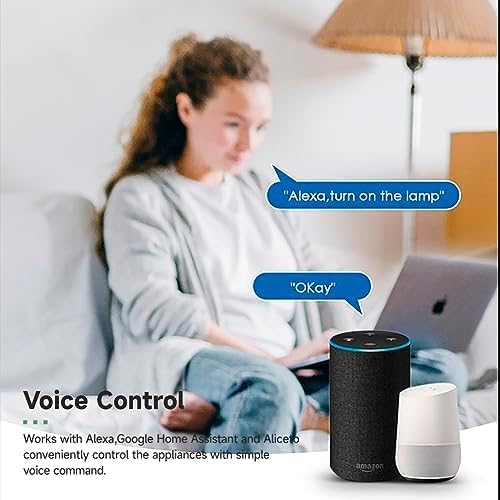
Image 4.3: Voice control with Alexa and Google Home.
4.3. Intelligent Timing and Scene Modes
Set schedules, countdowns, and create custom scene modes within the Tuya Smart Life App.
- Сроки: Schedule devices to turn on/off at specific times (e.g., 23:30 Off).
- Велоспорт: Set recurring schedules (e.g., 08:00 ON Everyday).
- Обратный отсчет: Установите таймер, по истечении которого устройство выключится.
- Режимы сцены: Combine multiple smart devices to activate with a single command or schedule (e.g., 'Movie Night' scene dims lights and turns on entertainment).
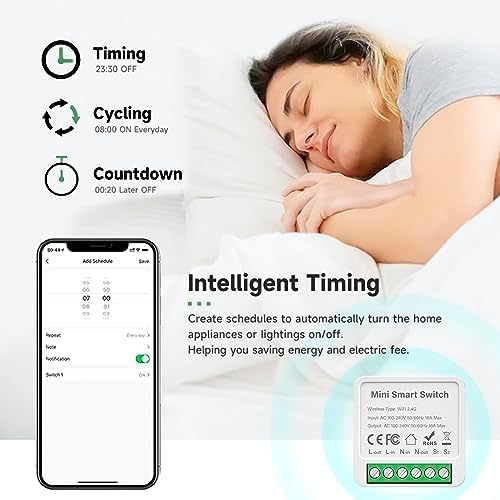
Image 4.4: Intelligent Timing features in the app.
4.4. Функция совместного использования
Share control of your smart devices with family members through the Tuya Smart Life App.

Image 4.5: Sharing function for family members.
5. Техническое обслуживание
To ensure the longevity and optimal performance of your IHSENO Mini WiFi Smart Switch Relay, follow these simple maintenance guidelines:
- Уборка: Для чистки устройства используйте мягкую сухую ткань. Не используйте жидкие чистящие средства или аэрозоли.
- Среда: Избегайте воздействия на устройство чрезмерной влаги, экстремальных температур или прямых солнечных лучей.
- Инспекция: Периодически проверяйте соединения проводов на предмет наличия признаков износа или ослабления.
6. Поиск Неисправностей
If you encounter issues with your IHSENO Mini WiFi Smart Switch Relay, refer to the following common problems and solutions:
- Устройство не подключается:
- Убедитесь, что ваша сеть Wi-Fi работает на частоте 2.4 ГГц. Устройство не поддерживает Wi-Fi на частоте 5 ГГц.
- Check that the device is powered on and the indicator light is blinking rapidly. If not, power cycle the device or perform a factory reset (refer to app instructions for reset procedure).
- Move the device closer to your WiFi router during pairing.
- Устройство отключено от сети в приложении:
- Verify your home WiFi network is active and has internet access.
- Проверьте источник питания интеллектуального выключателя.
- Перезагрузите ваш Wi-Fi роутер.
- Голосовое управление не работает:
- Ensure your Tuya Smart Life account is correctly linked to Alexa or Google Home.
- Check the device name in the voice assistant app; ensure it's easy to pronounce and recognize.
- Убедитесь, что ваше устройство голосового помощника подключено к Интернету.
- Физический коммутатор не отвечает:
- Ensure all wiring connections are secure and correct according to the diagrams.
- Check if the physical switch itself is functional.
7. Технические характеристики
Technical specifications for the IHSENO Mini WiFi Smart Switch Relay:

Рисунок 7.1: Подробные характеристики продукта.
| Спецификация | Деталь |
|---|---|
| Бренд | IHSENO |
| Модель | B0CF1FYYBN |
| Тип беспроводной связи | Wi-Fi 2.4G |
| Vol входtage | Переменный ток 100-240 В 50/60 Гц |
| Выход Voltage | Переменный ток 100-240 В 50/60 Гц |
| Максимально допустимый ток | 3 Amps (Note: Product image shows 16A Max, but product specifications list 3 Amps. Please verify with product packaging.) |
| Тип крепления | Поверхностный монтаж |
| Контактный материал | Медь |
| Материал | PC V0 (Fireproof) |
| Размер | 41x20x41mm (approx. 1.6*0.8*1.6 inches) |
| Режим работы | (ON)-ON-OFF |
| Тип переключателя | 1-х полосный |
| Стиль переключателя | Кнопка нажатия |
| Совместимость приложений | Smart Life (Support iOS & Android) |
8. Гарантия и поддержка
IHSENO is committed to providing high-quality products and customer satisfaction.
If you have any questions about this product, please feel free to contact our customer service team. We aim to reply within 24 hours to assist you with any inquiries or issues.
Конкретные условия гарантии см. в документации о покупке.