
1. Введение
This manual provides detailed instructions for the installation, operation, and maintenance of your Fellostar Android 11 Car Stereo. This multimedia player is designed for Ford EcoSport models from 2013 to 2016, offering features such as Apple CarPlay, Android Auto, GPS navigation, Bluetooth connectivity, and a 9.7-inch capacitive touchscreen.
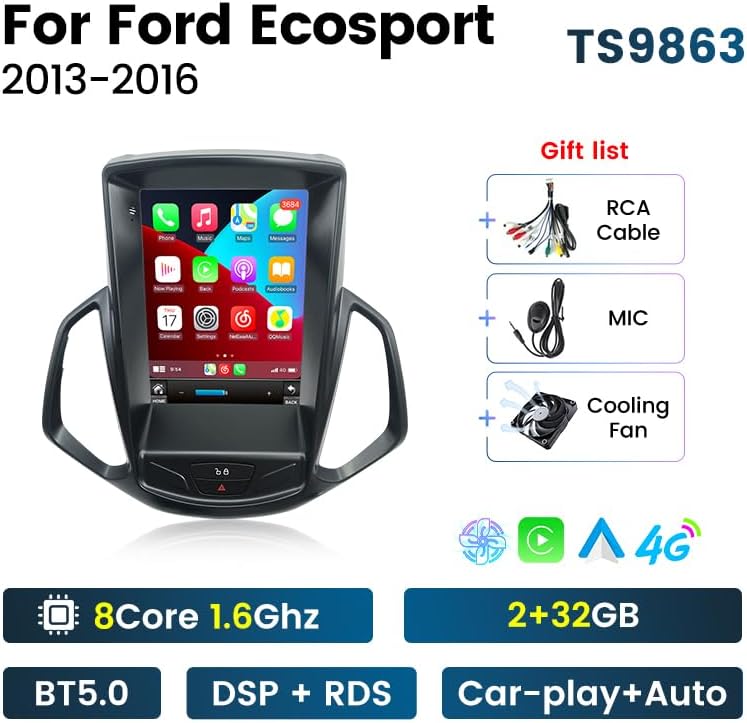
Image: The Fellostar Android 11 Car Stereo unit with its main features highlighted, including the 8-core processor, 2+32GB memory, BT5.0, DSP+RDS, and Car-play+Auto capabilities. Also shown are the included RCA cable, microphone, and cooling fan.
2. Настройка и установка
Before installation, ensure your vehicle is a Ford EcoSport manufactured between 2013 and 2016. It is recommended to disconnect the car battery before beginning the installation process.
2.1 Проверка совместимости
To confirm compatibility and ensure you receive the correct wiring harness, please provide your car's model, production year, and a picture of your car's dashboard to Fellostar customer support.
2.2 Back Cover Adjustment
Some installations may require adjusting the position of the unit's back cover for proper fitment. This can be done by removing four screws and selecting the appropriate position (top, upper side, or bottom) before re-securing it.

Image: A diagram illustrating the process of adjusting the back cover of the car stereo unit. It shows removing four screws and repositioning the cover to one of three possible positions: top, upper side, or bottom, to ensure a correct fit in the vehicle's dashboard.
2.3 Установка оконченаview
The unit is designed for a vertical screen installation, integrating seamlessly into the Ford EcoSport dashboard. Follow the provided wiring diagram for connecting power, speakers, and other accessories.
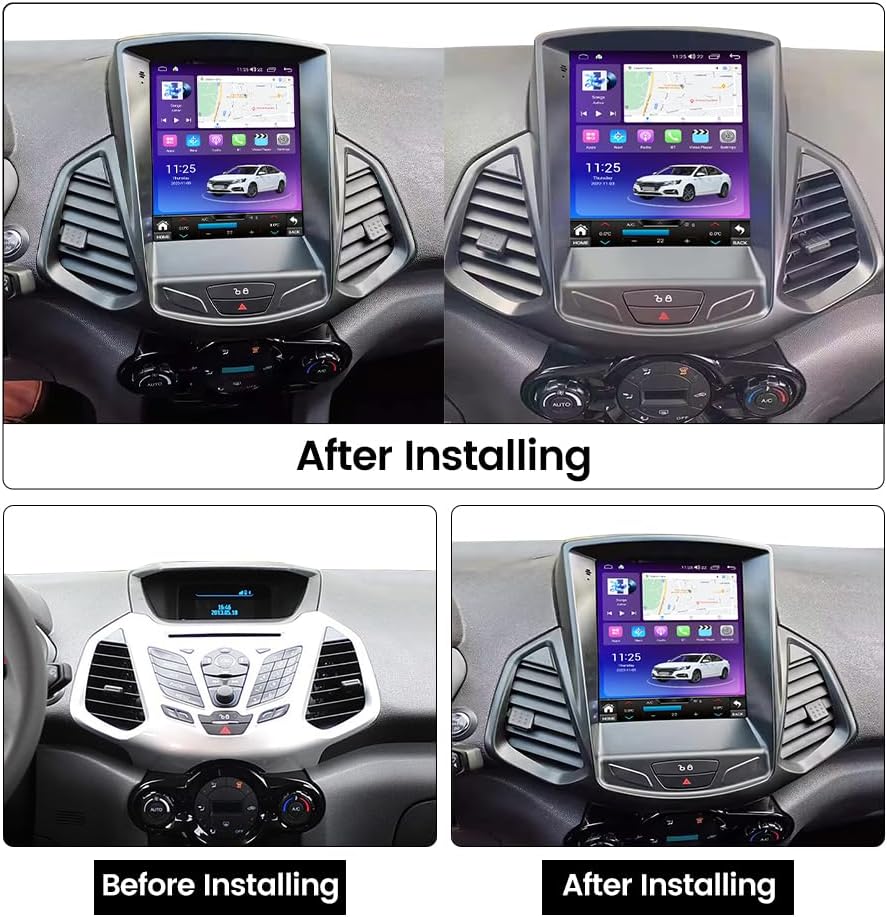
Image: A comparison showing the car dashboard before and after the installation of the Fellostar Android 11 Car Stereo. The 'Before Installing' image shows the original dashboard, while the 'After Installing' image displays the new vertical screen unit seamlessly integrated.
3. Инструкции по эксплуатации и характеристики
Your Fellostar car stereo runs on Android 11, providing a stable and responsive user experience on its 9.7-inch capacitive touch screen.
3.1 Core System and Performance
The unit features an 8-core processor (2.0GHz) for enhanced performance and efficient heat dissipation. It includes 2MB of three-level cache for faster operation.

Изображение: Подробное графическое представлениеasing the car stereo's internal components and key features. It highlights the 2.0GHz 8-core processor, the DSP (Digital Sound Processor) for high-precision audio tuning, and the integrated CarPlay/Android Auto functionality with a smartphone interface.
3.2 Apple CarPlay и Android Auto
Connect your smartphone via the radio's USB cable to access built-in Apple CarPlay or Android Auto. This allows for voice commands (Siri/Google Assistant) to make calls, get GPS directions, listen to music, and send/receive messages directly from the car stereo display.
3.3 GPS-навигация
The system supports global positioning with preloaded offline maps. For real-time traffic and updated routes, connect to the internet to use online navigation apps such as Google Maps, Sygic, or Waze. It supports 3D maps and voice guidance.
3.4 Функциональность Bluetooth
Utilize Bluetooth for hands-free phone calls, music streaming (BT music), and synchronizing your phone contacts. The built-in microphone ensures clear communication.
3.5 Мультимедиа и возможности подключения
- FM/AM RDS Radio: Automatic search and manual tuning, with support for RDS (Radio Data System) to display station information.
- 4G LTE and Wi-Fi: Insert a 4G SIM card (not included) for mobile data connectivity or connect to a Wi-Fi hotspot for internet access, enabling online music, video streaming, and app downloads.
- Функция разделения экрана: Запустите два приложения одновременно на экране.
- Ссылка на зеркало экрана телефона: Display your smartphone screen directly on the car stereo.
- Управление на рулевом колесе (SWC): Control basic functions of the stereo using your vehicle's existing steering wheel buttons.
- Полный аудио-видеовыход: Connect external displays (e.g., headrest monitors) to output video and audio content.

Image: A visual representation of various features: FM/AM RDS Radio interface, Steering Wheel Control functionality, Full AV Output for connecting external screens, and GPS Navigation with support for GPS, GLONASS, and BDS systems.
3.6 Advanced Driving Assistance (Optional)
- Система предупреждения о столкновении ADAS DVR: Поддерживает прогнозирование расстояния до впереди идущего автомобиля, предупреждение о столкновении и предупреждение о выезде за пределы полосы движения. Note: A compatible ADAS DVR camera must be purchased separately.
- Панорамная камера 360°: Обеспечивает панорамный обзор на 360 градусов. view for easier parking and maneuvering. Note: A compatible 360° camera system must be purchased separately.
- Видеозапись заднего вида в формате AHD: Supports high-definition reversing camera input for clear rear view. Note: A compatible AHD reversing camera must be purchased separately.

Image: This graphic illustrates the ADAS DVR Anti-collision warning system, showing visual cues for front distance, front car collision, and lane departure. It also details the Bluetooth function, including BT music, sync contacts, and synchronous call record, with a phone dialer interface.

Image: A comprehensive display of advanced features: 360° panoramic camera view for dead-end surveillance, AHD reversing video for clear rear visibility, support for multiple languages (English, German, French, Spanish, etc.), and a sample UI-Display showing the user interface layout.
4. Техническое обслуживание
Для обеспечения долговечности и оптимальной работы вашей автомобильной стереосистемы следуйте этим рекомендациям по техническому обслуживанию:
- Уборка: Для чистки сенсорного экрана и корпуса используйте мягкую сухую ткань. Избегайте использования абразивных чистящих средств и растворителей.
- Обновления программного обеспечения: Периодически проверяйте наличие доступных обновлений программного обеспечения и устанавливайте их для повышения производительности и добавления новых функций.
- Условия окружающей среды: Не подвергайте устройство длительному воздействию экстремальных температур или прямых солнечных лучей.
5. Поиск Неисправностей
Если у вас возникли проблемы с автомобильной стереосистемой, выполните следующие общие действия по устранению неисправностей:
- Нет питания: Check all power connections and the vehicle's fuse box. Ensure the car battery is properly connected.
- Нет звука: Verify speaker connections. Check volume settings and ensure the mute function is not active.
- Сенсорный экран не отвечает: Попробуйте перезагрузить устройство. Если проблема не исчезнет, может потребоваться сброс до заводских настроек (обратитесь к меню настроек).
- Потеря сигнала GPS: Убедитесь, что антенна GPS установлена правильно и имеет свободное пространство. view неба.
- Проблемы с подключением Bluetooth: Убедитесь, что Bluetooth включен как на стереосистеме, так и на вашем устройстве. Попробуйте отменить сопряжение устройств и выполнить его повторно.
- Система тормозит/зависает: Close unnecessary applications. Clear cache or perform a factory reset if the problem continues.
For persistent issues, please contact Fellostar technical support.
6. Технические характеристики
| Особенность | Описание |
|---|---|
| Бренд | ФЕЛЛОСТАР |
| Операционная система | Андроид 11 |
| Тип дисплея | 9.7-inch Capacitive Touchscreen (LCD) |
| Процессор | 8-ядерный, 2.0 ГГц |
| Технология связи | Bluetooth, USB, Wi-Fi, 4G LTE (слот для SIM-карты) |
| Особые возможности | Apple CarPlay, Android Auto, GPS Navigation, DSP, RDS, Split Screen, Phone Mirror Link, Steering Wheel Control |
| Тип карты | Worldwide (Offline & Online) |
| Режим аудиовыхода | Стерео |
| Включенные компоненты | Car radio unit, cables |
| Тип крепления | Крепление на приборную панель |
| Совместимые устройства | Смартфон |
| Поддерживаемая спутниковая навигационная система | GPS |
7. Гарантия
This Fellostar car stereo comes with a Гарантия 1 год Гарантия действует с даты покупки. Пожалуйста, сохраните чек о покупке для предъявления гарантийных претензий. Гарантия распространяется на производственные дефекты и неисправности при нормальной эксплуатации. Она не распространяется на повреждения, вызванные неправильной установкой, неправильным использованием, несчастными случаями или несанкционированными модификациями.
8 Поддержка
Fellostar provides 7x24 hours of after-sales technical support to assist you with any installation or operation issues. If you have questions or require assistance, please contact us via Amazon message. We aim to provide a solution within 24 hours.
For further information, you may visit the official Fellostar store on Amazon: Магазин Феллостар