
1. Введение
The ZOYI ZT-702S is a versatile 2-in-1 handheld device combining the functionalities of a digital oscilloscope and a multimeter. It features a 2.8-inch IPS display, 10 MHz bandwidth, and a 48 MSa/s real-time sampling rate. This manual provides essential information for the safe and efficient operation, maintenance, and troubleshooting of your ZT-702S device.
2. Продукт закончилсяview
Основные характеристики:
- 2-в-1 Функциональность: Single-channel handheld oscilloscope and multimeter.
- Отображать: 2.8-inch IPS display with 320*240 resolution, adjustable brightness.
- Технические характеристики осциллографа: Полоса пропускания 10 МГц, скорость передачи данных в реальном времени 48 Мвыб/с.ampling rate, ±400 V input capability, 64Kb recording depth.
- Технические характеристики мультиметра: 9999 counts, AC/DC Voltage, AC/DC Current, Resistance, Capacitance, Frequency, Temperature, Diode, Continuity Measurement.
- Дизайн: Double injection molded ABS and TPE reinforced construction for durability.
- Управление данными: Waveform storage and viewing, USB Type-C connectivity for data transfer.
- Автоматическая калибровка: Features auto calibration for ease of use.
Включенные компоненты:
- ZOYI ZT-702S Device
- 1x Осциллографический щуп
- Измерительные щупы мультиметра
- Температурный зонд

Рисунок 2.1: Передняя часть view of the ZOYI ZT-702S Digital Oscilloscope Multimeter.

Figure 2.2: ZOYI ZT-702S highlighting 2-in-1 functionality, bandwidth, counts, and display.
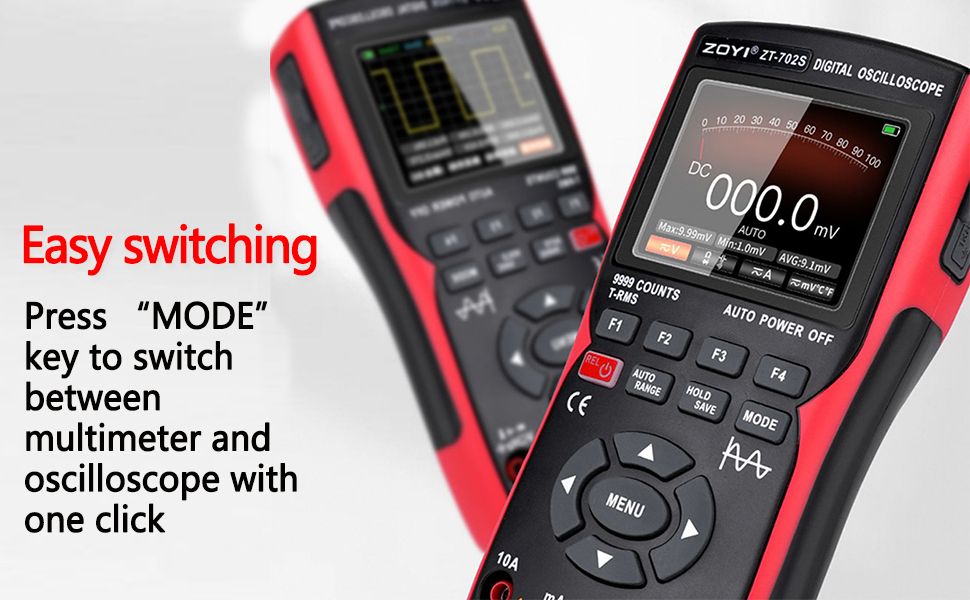
Figure 2.3: ZOYI ZT-702S demonstrating the mode switch button for easy operation.
3. Настройка
3.1 Первоначальная зарядка
Before first use, ensure the device is fully charged. Connect the ZT-702S to a power source using the provided Type-C cable. The charging indicator will show the charging status.
3.2 Подключение зондов
- Осциллографический зонд: Connect the oscilloscope probe to the BNC connector labeled 'CH1' on the top of the device. Ensure a secure connection.
- Измерительные щупы мультиметра: Insert the red test lead into the 'VΩHz+' jack and the black test lead into the 'COM' jack for voltage, resistance, frequency, and other measurements. For current measurements, refer to the operating instructions.
- Температурный зонд: Connect the temperature probe to the appropriate jacks as indicated for temperature measurements.

Figure 3.1: ZOYI ZT-702S showing Type-C charging port and probe connections.
4. Инструкция по эксплуатации
4.1 Включение/выключение питания
Press and hold the power button (usually marked with ⑁) to turn the device on or off.
4.2 режима переключения
The ZT-702S allows switching between Oscilloscope and Multimeter modes. Press the РЕЖИМ button to toggle between the two functionalities. The display will indicate the active mode.

Figure 4.1: ZOYI ZT-702S showing both oscilloscope and multimeter displays.
4.3 Oscilloscope Mode Operation
In Oscilloscope mode, the device displays waveforms. Key controls include:
- VOL/TIME: Adjusts vertical sensitivity (Volts/Div) and horizontal time base (Time/Div).
- ДВИГАТЬСЯ: Shifts the waveform horizontally or vertically.
- КУРОК: Sets the trigger level and mode (Auto, Normal, Single) to stabilize the waveform.
- AC/DC-соединение: Selects AC or DC coupling for the input signal.
- Автоматическая калибровка: Use the auto calibration function for quick setup and optimal display of the waveform.
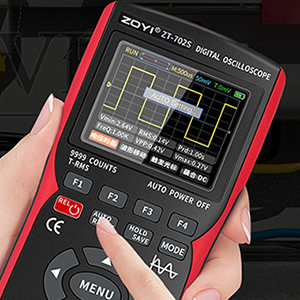
Figure 4.2: ZOYI ZT-702S demonstrating one-button automatic waveform acquisition.
4.4 Multimeter Mode Operation
In Multimeter mode, the device functions as a digital multimeter. Use the RANGE или АВТО ДИАПАЗОН feature to select the appropriate measurement range. The device supports:
- Переменный / постоянный токtage: Connect test leads to measure voltage.
- Переменный/постоянный ток: Connect test leads to the appropriate current jacks (10A or mA) and select the current function.
- Сопротивление (Ом): Measure resistance by connecting leads across the component.
- Емкость: Измерьте емкость конденсаторов.
- Частота (Гц): Measure signal frequency.
- Temperature (℃/℉): Use the temperature probe for measurements.
- Диодный Тест: Проверка диодов на прямое напряжениеtagе падение.
- Непрерывность: Check for circuit continuity with an audible beep.
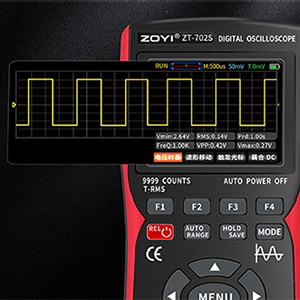
Figure 4.3: ZOYI ZT-702S multimeter display showing 9999 counts for precise measurements.
4.5 Waveform Storage and Data Transfer
The oscilloscope automatically stores measured waveform data. To access or download waveforms:
- Connect the ZT-702S to a computer using a Type-C USB cable.
- The device will appear as a USB flash drive.
- Open the image folder to access stored waveform images.
- You can then transfer these files to your computer for backup and analysis.
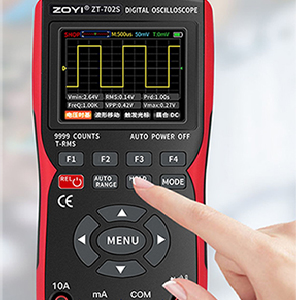
Figure 4.4: ZOYI ZT-702S showing data capture and storage capabilities.
5. Техническое обслуживание
5.1 Очистка
Протрите устройство мягкой, дamp cloth. Do not use abrasive cleaners or solvents. Ensure the device is powered off and disconnected from all probes and power sources before cleaning.
5.2 Хранение
Store the ZT-702S in a cool, dry place away from direct sunlight and extreme temperatures. Disconnect all probes and cables before storage. If storing for extended periods, ensure the battery is partially charged (around 50%) to prolong its lifespan.
5.3 Уход за аккумулятором
The device is powered by a rechargeable battery. Avoid fully discharging the battery frequently. Recharge the battery when the low battery indicator appears. Do not attempt to replace the internal battery yourself; contact qualified service personnel if battery issues arise.
6. Поиск Неисправностей
- Устройство не включается: Убедитесь, что аккумулятор заряжен. Подключитесь к источнику питания и повторите попытку.
- В режиме осциллографа форма сигнала не отображается: Check probe connections. Verify trigger settings. Ensure the input signal is within the device's measurement range.
- Неправильные показания мультиметра: Check test lead connections. Ensure the correct measurement function and range are selected. Perform auto calibration if available.
- Проблемы с отображением: Adjust screen brightness. If the display remains problematic, contact support.
- Проблемы с передачей данных: Ensure the Type-C cable is properly connected to both the device and the computer. Try a different USB port or cable.
По вопросам, не рассмотренным здесь, обращайтесь в службу поддержки клиентов.
7. Технические характеристики
| Особенность | Спецификация |
|---|---|
| Бренд | ЗОЙИ |
| Номер модели | ЗТ-702С |
| Источник питания | Питание от батареи |
| Вес товара | 0.6 Килограмма |
| Размеры изделия (Д x Ш x В) | 8 x 4 x 3 сантиметров |
| Минимальный рабочий объемtage | 0.1 Вольт |
| Полоса пропускания осциллографа | 10 МГц |
| Sampскорость | 48 Мвыб/с |
| Максимальный входной объемtage | ±400 V (DC+AC) |
| Каналы | 1 |
| Входное сопротивление | 1 MΩ, @16pF |
| Показания мультиметра | 9999 отсчетов |
| том переменного токаtage Диапазон | 0-750 В |
| DC Томtage Диапазон | 0-999.9 В |
| Диапазон постоянного/переменного тока | 0-9.999 |
| Диапазон сопротивления | 0-99.99 МОм |
| Диапазон емкостного сопротивления | 0-99.99 mF |
| Диапазон частот | 0-99.99 кГц |
| Диапазон температур | -20℃ - 1000℃ |
| Отображать | 2.8-inch IPS color screen, 320*240 resolution |
| Страна происхождения | Китай |
8. Гарантия и поддержка
8.1 Информация о гарантии
Please refer to the warranty card included with your product for detailed warranty terms and conditions. Typically, ZOYI products come with a manufacturer's warranty covering defects in materials and workmanship.
8.2 Поддержка клиентов
For technical assistance, troubleshooting, or service inquiries, please contact the manufacturer or your local distributor. In India, support is provided by Skyking Instruments.
Производитель: ZOYI & ZOTEK Instruments
Импортер (Индия): Skyking Instruments, Mumbai, India