
Введение
The Tilta Nucleus Nano II Hand Wheel Controller is an advanced wireless lens control system designed for precise control over focus, iris, and zoom (FIZ) functions. Featuring a responsive touch screen and intuitive controls, it allows for seamless adjustment of camera settings and multiple motors, enhancing your filmmaking workflow.

Рисунок 1: Передняя часть view of the Nucleus Nano II Hand Wheel Controller, showing its touch screen interface.
Что в коробке?
Пожалуйста, проверьте, что все предметы включены в ваш пакет:
- 1x Nucleus Nano II Hand Wheel Controller (12009.00002.00.00)
- 1x USB-C Power Cable (30cm) (21114.00061.00.00)
- 1x Руководство по эксплуатации
Настраивать
1. Зарядка контроллера
The Nucleus Nano II Hand Wheel Controller includes a built-in Lithium Ion battery. Before first use, fully charge the device using the provided USB-C cable. Connect the USB-C cable to the port on the controller and to a compatible USB power source.
2. Монтаж контроллера
The controller features a NATO mount and a tie-down mechanism for secure attachment to camera rigs or gimbals.
- Locate the NATO rail or mounting point on your camera rig or gimbal.
- Align the NATO mount on the back of the controller with the rail.
- Secure the controller by tightening the tie-down lever until it is firmly attached.

Рисунок 2: Сзади view of the controller, highlighting the NATO mount and USB-C port.

Figure 3: Controller mounted on a camera setup.
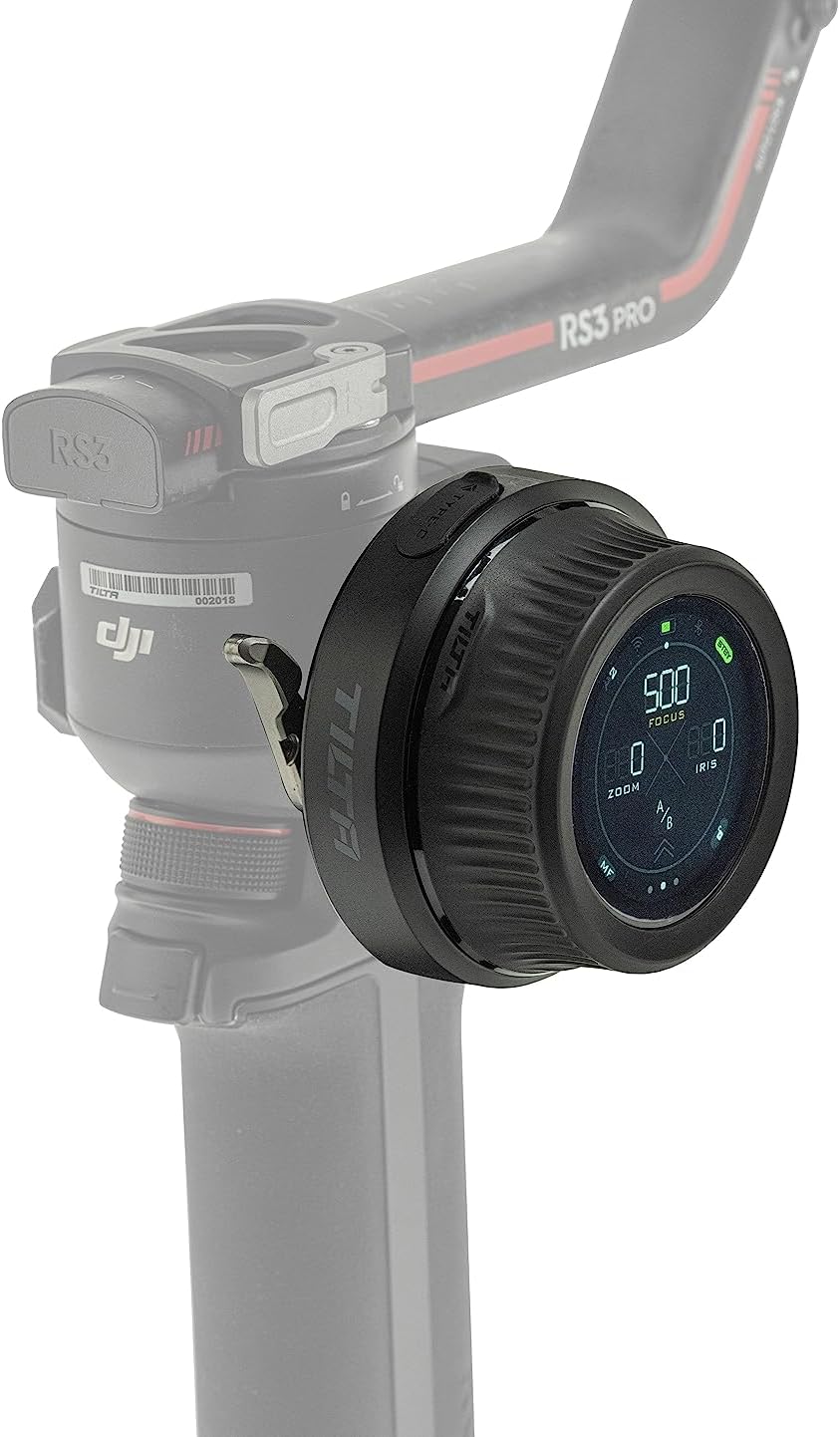
Figure 4: Controller mounted on a gimbal for remote control.
3. Connecting to Motors and Camera
The controller can connect to various motors and cameras via Wifi, Bluetooth, and USB-C for comprehensive control.
- Подключение двигателя: The controller is compatible with Nucleus M & Nano motors, and DJI Focus Motors. Refer to the specific motor's manual for pairing instructions.
- Связь с камерой: Connect to compatible Canon, Sony, and Black Magic Design cameras (selected models) to adjust settings like ISO, Shutter Speed, and Frame Rate. Consult your camera's manual for wireless control setup.
Инструкция по эксплуатации
1. Основные элементы управления
The controller features a hand wheel, REC button, rocker switch, and FUNC button for intuitive operation.
- Маховик: Primarily used for precise focus pulling.
- Кнопка REC: Initiates and stops recording on compatible cameras.
- Кулисный переключатель: Controls zoom or iris depending on the selected mode.
- Кнопка FUNC: Customizable function button for quick access to frequently used features.

Figure 5: Labeled diagram of the controller's components.
2. Сенсорный интерфейс
The integrated touch screen provides easy access to advanced features and streamlines on-set workflow. Tap and swipe to navigate menus and adjust settings.

Figure 6: User interacting with the touch screen for intuitive control.

Figure 7: The three main display modes on the touch screen.
3. Multi-Motor Control
The Hand Wheel Controller can control multiple motors simultaneously. With optional expansion, it supports up to 4 motors when used with the Tilta Control Handle.
4. Lens Mapping
The controller displays real-time focal distance information, enabling more accurate and repeatable focus pulling. This feature is particularly useful for precise cinematic work.
5. Совместимость
The Nucleus Nano II is compatible with a range of Tilta wireless lens control systems, including Nucleus M and Nucleus Nano, as well as DJI Ronin S series gimbals and DJI Focus Motors. It also supports communication with selected Canon, Sony, and Black Magic Design cameras.

Figure 8: High compatibility with various lens control systems and gimbals.
Обслуживание
- Уборка: Use a soft, dry cloth to clean the controller. Avoid abrasive materials or harsh chemicals.
- Хранилище: Храните контроллер в прохладном, сухом месте, вдали от прямых солнечных лучей и экстремальных температур.
- Уход батареи: Чтобы продлить срок службы аккумулятора, избегайте частой полной разрядки. При длительном хранении зарядите аккумулятор примерно до 50% и подзаряжайте его каждые несколько месяцев.
Поиск неисправностей
| Проблема | Возможная причина | Решение |
|---|---|---|
| Контроллер не включается. | Батарея разряжена. | Charge the controller using the USB-C cable. |
| Unable to control motors. | Motors are not paired or out of range. | Ensure motors are powered on and within range. Re-pair the motors if necessary. |
| Camera communication issues. | Incorrect camera settings or compatibility. | Verify camera compatibility and settings. Ensure Wi-Fi/Bluetooth is enabled on both devices. |
| Сенсорный экран не реагирует. | Временный сбой программного обеспечения. | Restart the controller. If the issue persists, contact customer support. |
Технические характеристики
| Особенность | Деталь |
|---|---|
| Номер модели | WLC-T05-HWC |
| Размеры | 6 x 5 x 4 дюйма |
| Вес товара | 10.9 унции (0.68 фунта) |
| Тип батареи | 1 литий-ионный аккумулятор (входит в комплект) |
| Цвет | Черный |
| Связность | Wifi, Bluetooth, USB-C |
| Производитель | Тилта |
| СКП | 810076276465 |
Гарантия и поддержка
For warranty information and technical support, please refer to the official Tilta webили обратитесь в службу поддержки напрямую. Сохраните чек о покупке в качестве подтверждения покупки на случай предъявления гарантийных претензий.
Tilta Official Webсайт: www.tilta.com