
1. Введение
Thank you for choosing the GZCRDZ V519 OBD2 Car Code Reader. This multifunctional diagnostic tool is designed to help you efficiently read and clear engine fault codes, monitor vehicle data, and perform various diagnostic tests on your vehicle. This manual provides detailed instructions on how to set up, operate, and maintain your V519 device.
The V519 supports international universal OBD protocols for vehicles manufactured from 2012 onwards. For vehicles older than 2012, please consult customer service for compatibility. This product is not compatible with new energy vehicles, hybrid vehicles, or models that do not comply with the OBD2 protocol.
2. Продукт закончилсяview и особенности
The GZCRDZ V519 is a professional, plug-and-play OBD2 scanner featuring a 2.8-inch color screen (resolution: 240*320) for clear display of diagnostic information. It is powered directly by the vehicle's OBDII data link connector, requiring no external battery or charger.

Figure 2.1: The GZCRDZ V519 OBD2 Car Code Reader, a compact and ergonomic diagnostic tool with a clear color display and intuitive button layout.
Основные характеристики:
- Многофункциональность: Чтение и удаление кодов неисправностей двигателя, view I/M readiness status, access vehicle information, display live data streams, read battery voltage, perform Mode 6 and Mode 8 detection, conduct oxygen sensor tests, query fault codes, utilize playback function, and print diagnostic reports.
- Обширная библиотека DTC: Integrated with 35901 Diagnostic Trouble Codes (DTCs) to assist in diagnosing and resolving vehicle faults.
- Удобный дизайн: Features an elegant appearance with a comfortable grip, anti-slip and anti-fall protective cover, and reinforced wiring for stability and durability. Buttons provide accurate feedback.
- Работа по принципу «подключи и работай»: Simply connect to your vehicle's OBDII port for immediate use.
- Поддержка нескольких языков: Supports 10 languages including English, German, French, Spanish, Italian, Russian, Dutch, Chinese, Japanese, and Portuguese.

Рисунок 2.2: Болееview of the V519's main features, including code reading, data stream, DTC library, and various diagnostic functions, displayed on the device screen.
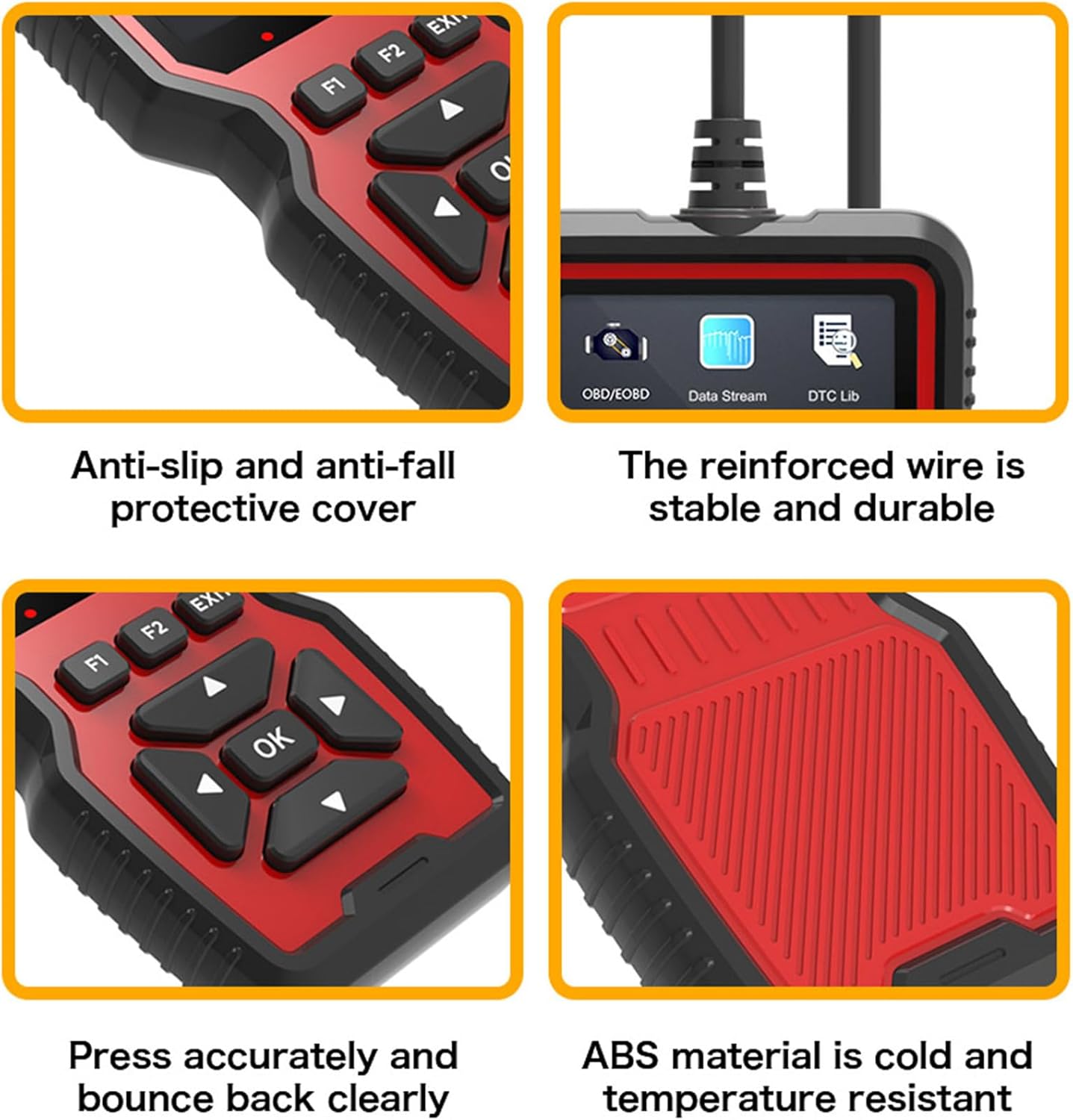
Рисунок 2.3: Крупный план views highlighting the V519's design elements: anti-slip protective cover, reinforced and durable wire, responsive buttons, and robust ABS material construction.

Figure 2.4: The V519 supports 10 languages, indicated by flags of various countries, making it accessible to a wide range of users.
3. Содержимое упаковки
При открытии упаковки, пожалуйста, убедитесь, что все перечисленные ниже предметы присутствуют и находятся в хорошем состоянии:
- 1 x GZCRDZ V519 Fault Detector
- 1 х Руководство пользователя
4. Технические характеристики
| Спецификация | Ценить |
|---|---|
| Модель продукта | В519 |
| Рабочий объемtage | 12 - 16 В |
| Температура рабочей среды | -20 0C до 65 0C (-4 0F до 149 0F) |
| Температура хранения | -30 0C до 70 0C (-22 0F до 158 0F) |
| Поддерживаемые языки | английский, немецкий, французский, испанский, итальянский, русский, голландский, китайский, японский, португальский |
| Отображать | 2.8-inch Color Screen (240*320 resolution) |
| Масса | 330 г |
| Размеры | Прибл. 20 x 13 x 4.3 см |
5. Настройка и установка
The GZCRDZ V519 is designed for simple plug-and-play operation. Follow these steps to connect the device to your vehicle:
- Locate the OBDII (On-Board Diagnostics II) port in your vehicle. This port is typically found under the dashboard on the driver's side, but its exact location may vary by vehicle model. Common locations are marked A, B, C, D in Figure 5.1.
- Ensure your vehicle's ignition is in the OFF position before connecting the scanner.
- Firmly plug the V519's 16-pin connector into the vehicle's OBDII port.
- Once connected, turn the vehicle's ignition to the ON position (engine can be off or running, depending on the diagnostic task). The V519 will power on automatically.

Figure 5.1: Common locations for the automotive OBD universal interface (A, B, C, D) within a vehicle's cabin, typically under the dashboard on the driver's side.
6. Инструкция по эксплуатации
After connecting the V519 to your vehicle, the device will power on and display the main menu. Use the navigation buttons to select desired functions.

Figure 6.1: Diagram illustrating the button layout and functions on the V519 device, including navigation (up, down, left, right, OK), function keys (F1, F2), and EXIT button.
Функции кнопок:
- Кнопка ОК: Подтверждает выбор или входит в меню.
- Стрелки вверх/вниз: Перемещайтесь по опциям меню или корректируйте значения.
- Стрелки влево/вправо: Navigate horizontally or change digits during input.
- Кнопки F1/F2: Function-specific keys, their purpose may change depending on the current screen.
- Кнопка ВЫХОД: Возврат к предыдущему экрану или выход из функции.
Светодиодные индикаторы:
The V519 features LED indicators to provide quick status feedback:
- Красный свет: Indicates an error code is present. Read the error code for details.
- Желтый свет: Indicates the device is unable to connect to the vehicle's ECU. Check connections.
- Зеленый свет: Indicates a successful connection to the vehicle.
Общие операции:
- Прочтите коды: Select 'Read Codes' from the main menu to retrieve Diagnostic Trouble Codes (DTCs) stored in the vehicle's ECU.
- Коды стирания: After addressing a fault, select 'Erase Codes' to clear the DTCs and turn off the Check Engine Light (MIL).
- Поток данных: View live data parameters from the vehicle's sensors, such as engine RPM, vehicle speed, oxygen sensor readings, etc.
- I / M Готовность: Проверьте состояние мониторов выбросов, чтобы определить, готово ли транспортное средство к испытанию на выбросы.
- Информация о транспортном средстве: Retrieve vehicle information such as VIN (Vehicle Identification Number), CID (Calibration ID), and CVN (Calibration Verification Number).
- Батарея Voltage: Следите за напряжением аккумулятора автомобиля.tagе в реальном времени.
7. Fault Code Library (DTC Lookup)
The V519 has a built-in library of 35901 Diagnostic Trouble Codes (DTCs). This feature allows you to quickly look up the definition of a fault code directly on the device, helping you understand the nature of the problem without needing external resources.
- From the main menu, select 'DTC Lib' or 'Fault Code Query'.
- Enter the specific fault code using the navigation buttons to change digits.
- Нажмите «ОК», чтобы view подробное описание кода.

Figure 7.1: The V519's fault code library interface, showing a list of common DTCs and the input screen for looking up specific codes.
8. Software Update and Printing Function
The V519 supports software updates and allows you to print diagnostic reports by connecting to a computer.
- Log in to elm327.com (or the official GZCRDZ support website) to download the V519 Product Tool software.
- After successful download, use a Type-C data cable to connect the V519 device to your computer.
- Double-click the downloaded 'V519ProductTool' executable file для запуска приложения.
- Within the software, select 'Update Firmware' or 'Review Datastream' as required.
- Follow the on-screen prompts to complete the upgrading process or print your diagnostic reports.

Figure 8.1: Setup for the V519's software update and print function, showing the device connected via USB-C to a laptop, with a printer nearby for report output.
9. Поиск Неисправностей
If you encounter issues while using your GZCRDZ V519, refer to the following common problems and solutions:
- Устройство не включается:
- Ensure the V519 is securely plugged into the vehicle's OBDII port.
- Убедитесь, что зажигание автомобиля находится в положении «ВКЛ».
- Check the vehicle's fuse for the OBDII port (refer to your vehicle's owner's manual).
- Yellow LED (No Connection):
- Confirm the vehicle supports the universal OBDII protocol (vehicles from 2012 onwards are generally compatible).
- Убедитесь, что зажигание автомобиля включено.
- Try connecting the device to a different compatible vehicle to rule out a vehicle-specific issue.
- Inspect the OBDII port and the V519 connector for any damage or debris.
- Red LED (Error Code Present) but No Codes Displayed:
- Ensure you have selected the 'Read Codes' function.
- Some codes may be pending or historical; check all code types available in the menu.
- Не удается сбросить коды:
- Ensure the underlying fault has been repaired. Codes will reappear if the issue persists.
- The ignition must be ON, and the engine may need to be off for some vehicles to clear codes.
- Software Update Fails:
- Обеспечьте стабильное подключение к Интернету.
- Temporarily disable antivirus software that might interfere with the update process.
- Use the provided Type-C data cable and ensure it is securely connected.
If problems persist, please contact GZCRDZ customer support for further assistance.
10. Информация по технике безопасности
Please read and follow these safety precautions to prevent personal injury or damage to the device or vehicle:
- Эксплуатировать транспортное средство всегда следует в хорошо проветриваемом помещении.
- При работе с автомобилем не следует надевать свободную одежду или украшения.
- Беречь устройство от воды, масла и экстремальных температур.
- Do not attempt to disassemble or modify the V519 device. There are no user-serviceable parts inside.
- Be aware of hot engine components and moving parts when working under the hood.
- Always consult your vehicle's service manual for specific diagnostic procedures and safety warnings.
- Не работайте с устройством во время вождения.
11. Гарантия и поддержка
For information regarding warranty coverage and terms, please refer to the warranty card included with your product or visit the official GZCRDZ website. For technical support, troubleshooting assistance, or any other inquiries, please contact GZCRDZ customer service through the contact information provided on their official webсайте или упаковке продукта.