
Введение
Thank you for choosing the PETLIBRO 5L Automatic Pet Feeder with 1080P Camera. This device is designed to provide convenient and reliable feeding for your pets, ensuring they receive their meals on schedule while allowing you to monitor and interact with them remotely. This manual provides essential information for setting up, operating, and maintaining your feeder.

The PETLIBRO 5L Automatic Pet Feeder offers a range of features including a 1080p HD camera, night vision, two-way audio, remote feeding, in-app monitoring, and easy cleanup.
Инструкции по технике безопасности
- Read all instructions carefully before using the feeder.
- Данный прибор предназначен только для использования внутри помещений.
- Не погружайте основной блок в воду или другие жидкости.
- Держите кормушку подальше от прямых солнечных лучей и источников тепла.
- Убедитесь, что шнур питания не поврежден и расположен в таком месте, где домашние животные не смогут его грызть.
- Используйте только оригинальный адаптер питания, входящий в комплект поставки кормушки.
- Always supervise children around the feeder.
- Используйте только сухой корм для животных с диаметром частиц от 2 до 15 мм.
Содержимое упаковки
Убедитесь, что в упаковке присутствуют все компоненты:
- PETLIBRO Automatic Pet Feeder (Main Unit)
- Миска для еды из нержавеющей стали
- Адаптер питания
- Руководство пользователя
- Desiccant Bag (may be pre-installed)
Продукт болееview
Familiarize yourself with the different parts of your PETLIBRO Automatic Pet Feeder.

The main unit of the feeder, featuring the food hopper, dispensing mechanism, 1080P camera, and control panel. A cat is shown eating from the stainless steel bowl, with a smartphone displaying the live camera feed.
- Food Hopper: Stores dry pet food.
- Lid with Twist-Lock: Secures the food hopper and keeps food fresh.
- Панель управления: Buttons for manual feeding and settings.
- Камера 1080P HD: Для мониторинга и записи в реальном времени.
- Инфракрасный датчик: Detects low food levels and blockages.
- Динамик и микрофон: Для двусторонней аудиосвязи.
- Продуктовый магазин: Место, где еда выкладывается в миску.
- Чаша из нержавеющей стали: Съемный для легкой очистки.
- Порт питания: Для подключения адаптера переменного тока.
- Отсек для батареи: For backup batteries (not included).
Настраивать
1. Распаковка и сборка
- Извлеките все компоненты из упаковки.
- Установите основной подающий блок на ровной, устойчивой поверхности.
- Insert the stainless steel bowl into the designated slot at the base of the feeder.
2 Источник питания
- Подключите адаптер питания к разъему питания фидера и вставьте его в розетку.
- Для властиtage protection, install 3 D-cell alkaline batteries (not included) into the battery compartment at the bottom of the feeder. This ensures continuous operation during power interruptions.
3. Заполнение бункера для еды
- Open the Twist-Lock lid on top of the feeder.
- Pour dry pet food into the hopper. Ensure the food size is between 2-15mm.
- Close the lid securely by twisting it until it locks.
4. Установка приложения и подключение к Wi-Fi
- Загрузите приложение PETLIBRO из App Store (iOS) или Google Play Store (Android).
- Создайте учетную запись и войдите в систему.
- Follow the in-app instructions to add your feeder. Ensure your smartphone is connected to a 2.4GHz or 5GHz Wi-Fi network. The feeder supports both for a more stable connection.
- The app will guide you through connecting the feeder to your home Wi-Fi network.
5. Настройка камеры
- Once connected to Wi-Fi, the 1080P camera will automatically activate.
- For video recording, insert a Micro SD card (up to 256GB, not included) into the designated slot, usually located near the camera or at the bottom of the unit.
Инструкция по эксплуатации
1. Ручное кормление
- Press the manual feed button on the feeder's control panel to dispense one portion of food instantly.
- Alternatively, use the 'Feed Now' option in the PETLIBRO app for immediate dispensing.
2. Планирование питания через приложение
The PETLIBRO app allows you to customize your pet's feeding schedule.

The PETLIBRO app provides an intuitive interface to set custom feeding times and amounts, and to review feeding logs.
- Open the PETLIBRO app and select your feeder.
- Navigate to the 'Feeding Schedule' section.
- Set up to 10 meals per day. For each meal, specify the time and the number of portions (1-50 portions per meal).
- Сохраните свой график. Кормушка будет автоматически раздавать корм в запрограммированное время.
- Ты можешь view feeding logs within the app to track your pet's meal history.
3. Two-Way Audio & Voice Recording
Communicate with your pet remotely using the two-way audio feature.

The feeder allows two-way audio communication, enabling you to speak to your pet and hear their responses through the app.
- Живое общение: В реальном времени приложения view, tap the microphone icon to speak to your pet. Your voice will be played through the feeder's speaker.
- Запись голоса: Record a personalized voice message (up to 10 seconds) in the app. This message can be set to play at meal times (0-5 times per meal). A new recording will overwrite any previous one.
4. Monitoring with 1080P Camera and Night Vision
The integrated camera allows you to keep an eye on your pet at all times.

The 1080P camera provides clear vision, even at night, allowing you to monitor your pet's meals with high-definition infrared night vision.
- Access the live camera feed through the PETLIBRO app to view вашего питомца в режиме реального времени.
- Широкоугольный объектив с углом обзора 145° обеспечивает широкий угол обзора. view зоны кормления.
- Infrared night vision ensures clear visibility even in dark conditions.
- Videos can be stored on a Micro SD card (up to 256GB, not included).
5. Интеллектуальные оповещения и уведомления
- Обнаружение движения и звука: The feeder automatically records pet activity and saves video clips (SD card required). You will receive notifications on your phone for detected motion or sounds.
- Low Food Level Alert: The infrared sensor monitors the food level in the hopper. You will receive an alert on your phone when the food supply is low, prompting you to refill.
- Blockage Detection: The sensor also detects potential food blockages in the dispensing mechanism and will send an alert if an issue occurs.
- Wi-Fi Disconnection Alert: If the feeder loses its Wi-Fi connection, you will be notified via the app.
Обслуживание
1. Очистка кормушки
Регулярная чистка обеспечивает гигиену и правильное функционирование кормушки.
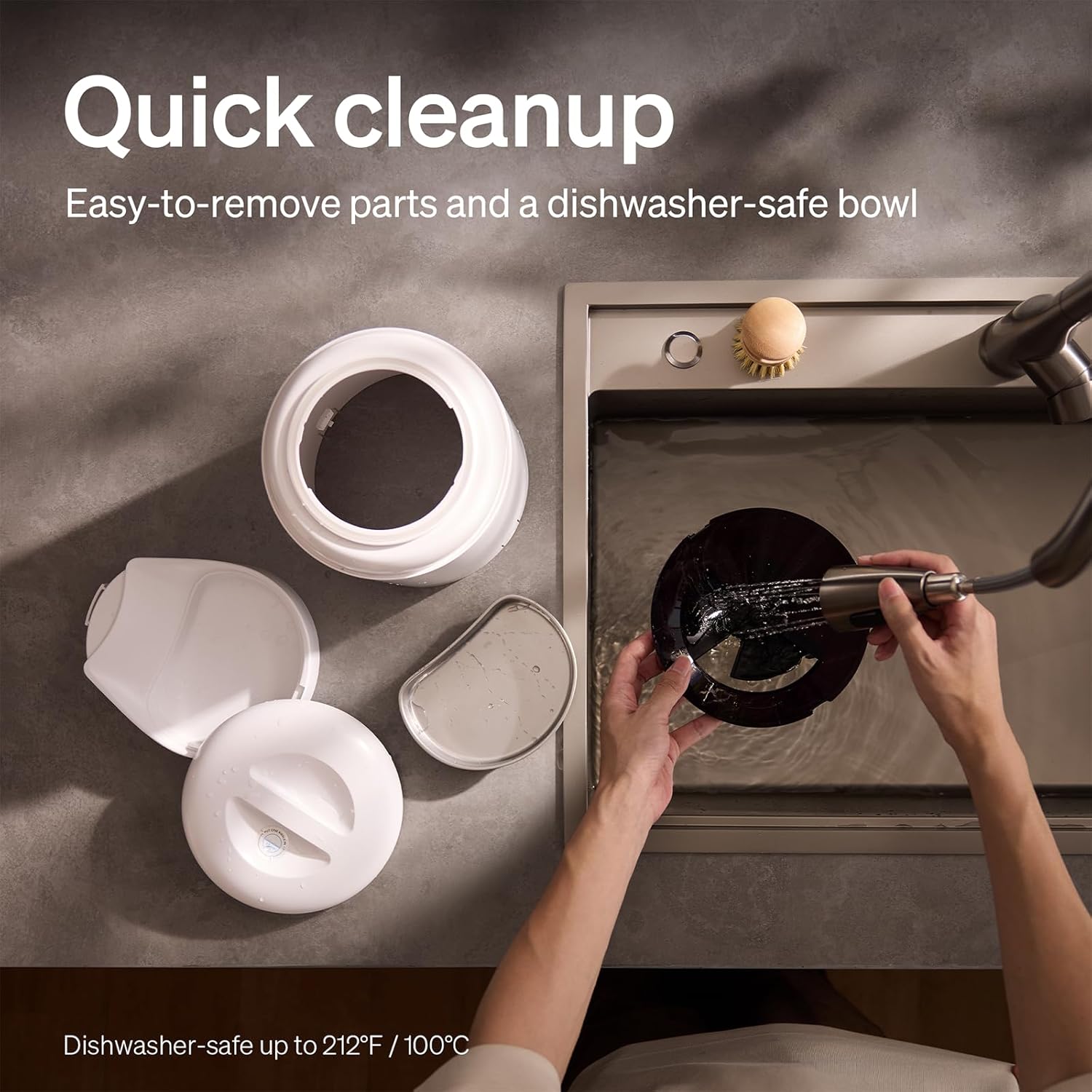
The feeder is designed for quick cleanup with easy-to-remove parts and a dishwasher-safe bowl.
- Отключить питание: Перед чисткой всегда отключайте кормушку от сети.
- Удалить еду: Empty any remaining food from the hopper.
- Разобрать: Remove the food bowl, lid, and food hopper.
- Моющиеся детали: The stainless steel bowl and food hopper are dishwasher-safe (up to 100°C / 212°F) or can be hand-washed with mild soap and water.
- Основной блок: Протрите основной блок мягкой, damp ткань. Не погружайте его в воду.
- Тщательно высушите: Перед сборкой и наполнением едой убедитесь, что все детали полностью сухие.
2. Замена осушителя
- The desiccant bag helps keep the food fresh. It is recommended to replace it every 15 days.
- Locate the desiccant compartment, usually under the lid.
- Извлеките старый пакет с осушителем и вставьте новый.
Поиск неисправностей
| Проблема | Возможная причина | Решение |
|---|---|---|
| Кормушка не раздает корм. | Food blockage; empty hopper; dispensing mechanism issue. | Check for food blockages and clear them. Refill hopper if empty. Ensure food size is appropriate (2-15mm). |
| Отключение Wi-Fi. | Weak Wi-Fi signal; router issues; incorrect password. | Ensure feeder is within Wi-Fi range. Restart your router. Reconnect the feeder to Wi-Fi via the app, verifying the password. |
| Camera not working or frequently disconnecting. | Poor Wi-Fi connection; app glitch; SD card issue. | Check Wi-Fi stability. Restart the feeder and the app. Ensure the SD card is properly inserted and not full. Consider a system reset if issues persist. |
| App shows "status unknown" or feeding errors. | Wi-Fi disconnection; app synchronization issue. | Verify Wi-Fi connection. Close and reopen the app. Restart the feeder. |
| Запись голоса не воспроизводится. | No recording saved; volume too low; incorrect schedule. | Ensure a voice message is recorded and saved in the app. Check the playback settings for meal times. |
Технические характеристики
| Особенность | Деталь |
|---|---|
| Номер модели | АФ203 |
| Размеры (Д x Ш x В) | 12 х 10 х 27 см |
| Масса | 2.15 кг |
| Материал | Нержавеющая сталь (чаша) |
| Емкость | 5 литра |
| Целевые виды | Котопес |
| Рекомендуемое использование | Automatic indoor dog/cat feeding |
| Особые возможности | 1080P Camera, Smart App, Two-way Audio |
| Цвет | Белый |
| Технология связи | Wi-Fi (2.4 ГГц и 5 ГГц) |
| Режим работы | Автоматический |
| Инструкции по уходу | Dishwasher safe (bowl) |
| Требуются батареи | No (for primary operation), Yes (for backup, 3 D-cell, not included) |
Гарантия и поддержка
PETLIBRO products come with a standard manufacturer's warranty. For detailed warranty information, please refer to the warranty card included in your package or visit the official PETLIBRO webсайт.
If you encounter any issues or have questions regarding your PETLIBRO Automatic Pet Feeder, please contact PETLIBRO customer support through the following channels:
- Электронная почта: Refer to your product packaging or the PETLIBRO webсайт для получения актуального адреса электронной почты службы поддержки.
- Webсайт: Visit the official PETLIBRO webсайт с ответами на часто задаваемые вопросы, руководствами по устранению неполадок и контактными формами.
- Поддержка в приложении: The PETLIBRO app may offer a support section for direct assistance.
Please have your model number (AF203) and purchase information ready when contacting support.