
Diydeg HW300PRO
Diydeg HW300PRO Paint Thickness Gauge User Manual
Model: HW300PRO
Бренд: Diydeg
1. Введение
The Diydeg HW300PRO Paint Thickness Gauge is a high-precision instrument designed for non-destructive measurement of coating thickness on metal substrates. It is capable of measuring both magnetic (ferrous) and non-magnetic (non-ferrous) coatings. This device is widely utilized in various industries including manufacturing, metal processing, chemical engineering, and quality inspection, particularly for assessing vehicle paint conditions.
Key features include a wide measurement range of 0-2000µm, high accuracy, clear display with backlight, automatic substrate identification, and statistical analysis functions (average, minimum, maximum, quantity). Its compact and anti-slip design ensures comfortable handling and portability.
2. Информация по технике безопасности
Пожалуйста, прочтите и поймите все инструкции по технике безопасности перед эксплуатацией устройства, чтобы обеспечить его безопасное и правильное использование.
- Общая безопасность: Keep the device away from water, moisture, and extreme temperatures. Do not expose it to direct sunlight for prolonged periods.
- Безопасность аккумулятора: Use only the specified battery type (2 x 1.5V AAA). Ensure correct polarity when inserting batteries. Remove batteries if the device will not be used for an extended period to prevent leakage.
- Умение обращаться: Handle the gauge with care. Avoid dropping or subjecting it to strong impacts, which may damage the internal components or the sensitive probe.
- Обслуживание: Не пытайтесь разбирать или ремонтировать устройство самостоятельно. По всем вопросам обслуживания обращайтесь к квалифицированному персоналу.
- Дети: Храните устройство в недоступном для детей месте.
3. Содержимое упаковки
При открытии упаковки, пожалуйста, проверьте наличие всех следующих предметов:
- 1 x HW300PRO Paint Thickness Gauge
- 6 x Calibration Films (various thicknesses)
- 1 x Base Sheet (for calibration)
- 1 х Руководство пользователя

Рисунок 3.1: Contents of the HW300PRO package, including the gauge, calibration films, and base sheet.
4. Продукт закончилсяview
Familiarize yourself with the components and controls of your HW300PRO Paint Thickness Gauge.

Рисунок 4.1: Передний view of the HW300PRO gauge with labeled components.
- Зонд: The sensor tip used for making contact with the surface to be measured.
- Экран дисплея: High-definition LCD with backlight, showing measurement readings, metal type, operating mode, battery status, and statistical data.
- F/NF Button (Left Key): Switches between ferrous (F) and non-ferrous (NFE) modes, or clears statistics.
- Кнопка питания: Включает/выключает устройство.
- Unit Button (Right Key): Switches measurement units (µm/mm/mils) or performs zero calibration/statistical display.
- Backlight Button (Down Key): Toggles the display backlight ON/OFF. Also activates automatic shutdown.
- Отверстие для ремешка: Для крепления ремешка на запястье.
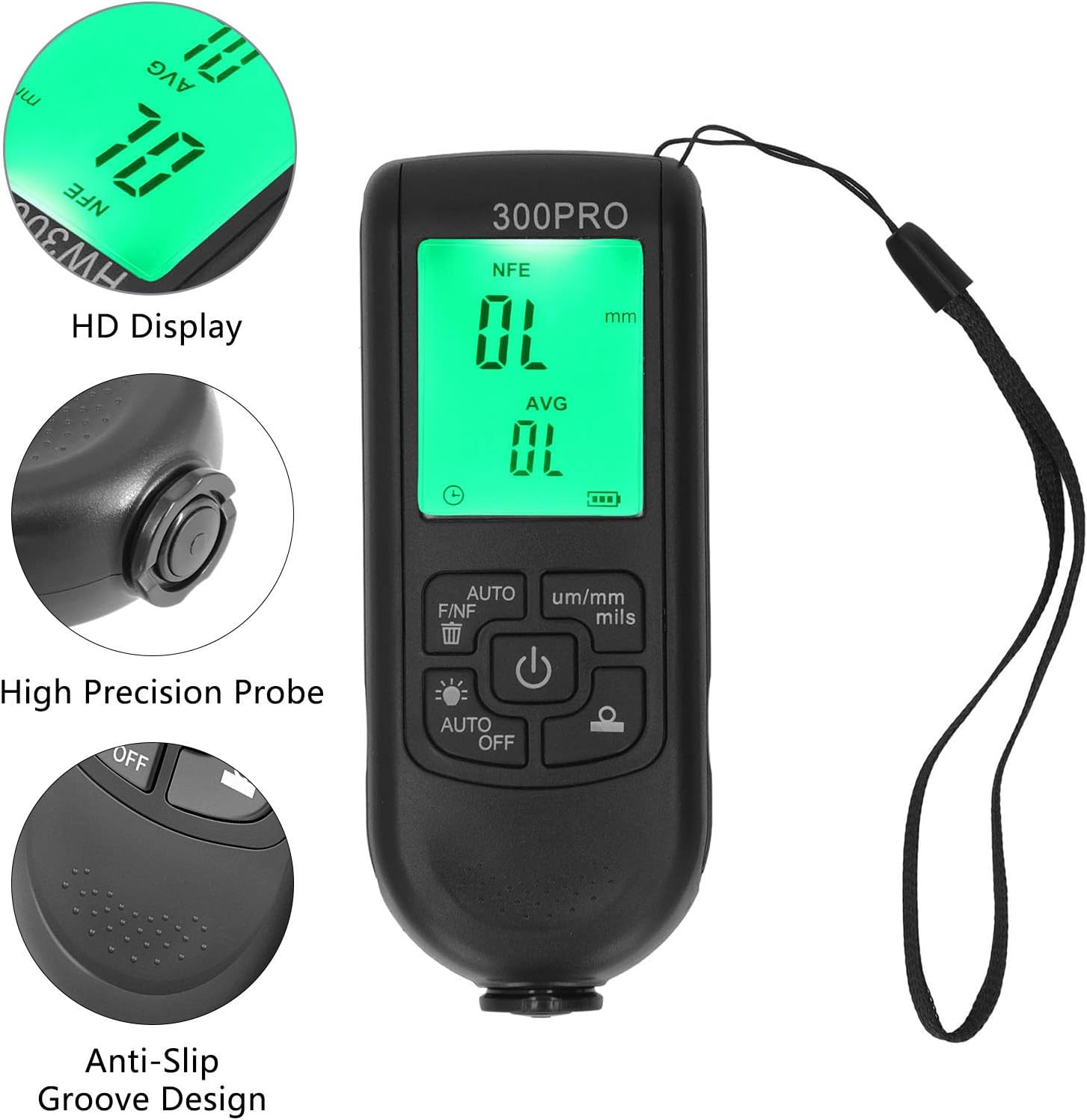
Рисунок 4.2: Details of the HD display, high-precision probe, and anti-slip groove design.
5. Настройка и калибровка
5.1 Установка аккумулятора
The HW300PRO gauge requires two 1.5V AAA batteries (not included). To install:
- Найдите крышку батарейного отсека на задней панели устройства.
- Чтобы открыть крышку, сдвиньте ее вниз.
- Вставьте две батарейки типа AAA, соблюдая правильную полярность (+/-), как указано внутри отсека.
- Close the battery compartment cover by sliding it back into place until it clicks.

Рисунок 5.1: Battery compartment with cover removed, showing battery slots.
5.2 Калибровка
For accurate measurements, it is recommended to perform a zero calibration before use, especially when measuring on a new type of substrate or after prolonged storage.
- Turn on the gauge by pressing the Power button.
- Place the probe firmly and flatly on the provided Base Sheet (non-coated metal substrate).
- Press and hold the Unit button (Right Key) until the display shows "0.00" or "CAL". Release the button.
- The gauge is now zero-calibrated for the current substrate.

Рисунок 5.2: Performing self-calibration for accurate measurements.
6. Инструкция по эксплуатации
6.1 Проведение измерений
- Убедитесь, что прибор включен.
- Place the probe perpendicular to the surface to be measured. Apply gentle, steady pressure to ensure full contact.
- The measurement reading will appear on the display almost instantly (within 2 readings per second).
- Lift the gauge from the surface to prepare for the next measurement.

Рисунок 6.1: The HW300PRO display showing a typical measurement reading.
6.2 Understanding Measurement Principles
The HW300PRO utilizes two primary measurement principles:
- Magnetic Induction (F-probe): Used for measuring non-magnetic coatings (e.g., paint, plastic, enamel, rubber) on magnetic metal substrates (e.g., steel, iron).
- Eddy Current Effect (NFE-probe): Used for measuring non-conductive coatings (e.g., paint, anodized layers) on non-magnetic metal substrates (e.g., aluminum, copper, brass).
The gauge automatically detects the substrate type (ferrous or non-ferrous) and switches to the appropriate measurement mode.

Рисунок 6.2: The highly sensitive probe automatically identifies magnetic (Fe) and non-magnetic (NFE) substrates.
6.3 Переключение устройств
Нажмите Кнопка устройства (Right Key) to cycle through the available measurement units: micrometers (µm), millimeters (mm), and mils.
6.4 Статистическое отображение
The gauge can display statistical values of your measurements. Press the Кнопка устройства repeatedly to cycle through average (AVG), minimum (MIN), maximum (MAX), and number (NUM) of readings.
6.5 Управление подсветкой
Нажмите Кнопка подсветки (Down Key) to turn the display backlight ON or OFF for better visibility in different lighting conditions.
6.6 Автоматическое отключение
To conserve battery life, the HW300PRO features an automatic shutdown function. If the device is idle for a certain period (typically 3 minutes), it will automatically power off. This feature can be activated or deactivated via the Backlight button (Down Key) in some modes.
7. Техническое обслуживание
Proper maintenance will ensure the longevity and accuracy of your HW300PRO Paint Thickness Gauge.
- Уборка: Wipe the device with a soft, dry cloth. Do not use abrasive cleaners, solvents, or immerse the device in water. Ensure the probe tip is clean and free of debris before each measurement.
- Хранилище: Store the gauge in a cool, dry place, away from direct sunlight and extreme temperatures. If storing for an extended period, remove the batteries to prevent leakage.
- Уход за зондом: The probe is a sensitive component. Avoid scratching or damaging it. Do not apply excessive force when taking measurements.
8. Поиск Неисправностей
If you encounter issues with your HW300PRO gauge, refer to the following common problems and solutions:
| Проблема | Возможная причина | Решение |
|---|---|---|
| Устройство не включается. | Низкий заряд или полная разрядка батарей; неправильная установка батарей. | Replace batteries with new 1.5V AAA batteries. Check battery polarity. |
| Неточные показания. | Needs calibration; dirty probe; unstable contact with surface. | Perform zero calibration. Clean the probe tip. Ensure firm and flat contact with the surface. |
| Дисплей тусклый или мерцает. | Низкий заряд батареи. | Замените батареи. |
| "OL" or "Err" displayed. | Measurement out of range; sensor error. | Ensure the coating thickness is within 0-2000µm. Re-calibrate. If problem persists, contact support. |
9. Технические характеристики
Technical specifications for the Diydeg HW300PRO Paint Thickness Gauge:
| Параметр | Ценить |
|---|---|
| Модель | HW300PRO |
| Диапазон измерения | 0-2000 мкм (0-78.7 мил) |
| Точность измерения | ±(3% ± 1µm) |
| Разрешение | 0µm~999µm (1µm) |
| Скорость измерения | 2 показаний в секунду |
| Minimum Convex Arc | Приблизительно 5 мм / 0.2 дюйма |
| Minimum Concave Arc | Приблизительно 25 мм / 0.98 дюйма |
| Minimum Measuring Area Diameter | Приблизительно 20 мм / 0.79 дюйма |
| Minimum Substrate Thickness (F-probe) | 0.2 мм |
| Minimum Substrate Thickness (N-probe) | 0.05 мм |
| Источник питания | 2 батарейки 1.5 В AAA (не входят в комплект) |
| Рабочая температура | 0℃ ~ 50℃ (32℉ ~ 122℉) |
| Рабочая влажность | 20–90 % относительной влажности, без конденсации |
| Температура хранения | -10℃ ~ 60℃ (14℉ ~ 140℉) |
| Влажность при хранении | 20–90 % относительной влажности, без конденсации |
| Размеры | Приблизительные размеры: 12.2 см x 5 см x 2.2 см (4.8 дюйма x 1.97 дюйма x 0.87 дюйма) |
| Вес товара | Примерно 106 г (3.74 унции) без батареек. |

Рисунок 9.1: Physical dimensions of the HW300PRO gauge.
10. Гарантия и поддержка
Diydeg is committed to the quality of its products. The HW300PRO Paint Thickness Gauge comes with a commitment to replacement and lifelong technical support. If you encounter any issues or have questions regarding the operation or performance of your device, please do not hesitate to contact Diydeg customer support.
For further assistance, please visit the official Diydeg store on Amazon: Diydeg Store
Ask a question about this manual
Ask about setup, troubleshooting, compatibility, parts, safety, or missing instructions. Manuals+ will review the question and use this page’s manual context to help answer it.