
Введение
This manual provides detailed instructions for the installation, operation, and maintenance of your EBTOOLS 4.3-inch 1080P Mirror Dash Cam. This device is designed to record video footage from both the front and rear of your vehicle, offering features such as parking monitoring and loop recording for enhanced driving safety and evidence collection. Please read this manual thoroughly before using the product to ensure proper functionality and to avoid any damage.
Характеристики продукта
- Прочная конструкция: Manufactured from high-quality ABS material for robustness and extended durability.
- Широкоугольные объективы: Equipped with wide-angle lenses to minimize blind spots and capture comprehensive road details.
- Циклическая запись: Ensures continuous recording by automatically overwriting the oldest video files when the memory card reaches its capacity.
- Всепогодные характеристики: Capable of recording clear video footage even in adverse weather conditions such as rain or fog.
- Удобный дизайн: Features a straightforward installation process and intuitive controls for ease of use.
Содержимое упаковки
Пожалуйста, убедитесь, что в ваш пакет включены все следующие предметы:
- EBTOOLS 4.3-inch Mirror Dash Cam Unit
- Заднийview Камера
- Автомобильное зарядное устройство
- Кабель для подключения задней камеры
- Mounting Straps/Adhesive
- Руководство пользователя (Этот документ)

Настраивать
1. Установка видеорегистратора
Закрепите видеорегистратор на зеркале заднего вида вашего автомобиля.view Используйте прилагаемые крепежные ремни для установки зеркала. Убедитесь, что оно надежно закреплено и не загораживает обзор. view.
2. Подключение задней камеры
Route the rear camera cable from the dash cam to the desired mounting location at the rear of your vehicle. Connect the rear camera to the AV IN port on the main dash cam unit. For optimal performance, ensure the cable is neatly tucked away and secured.


3. Подключение питания
Connect the provided car charger to the dash cam's power input port and then plug the other end into your vehicle's 12V power outlet (cigarette lighter socket). The device will typically power on automatically with the vehicle's ignition.
4. Вставьте карту памяти
Insert a compatible Micro SD card (not included) into the TF CARD slot on the dash cam. Ensure the card is inserted correctly until it clicks into place. A high-speed Class 10 or higher card is recommended for reliable recording.

Инструкция по эксплуатации
Включение/выключение питания
- Автоматический: The dash cam will power on and begin recording automatically when your vehicle's ignition is turned on.
- Инструкция по эксплуатации: Press and hold the Power button (usually marked with a power symbol) to manually turn the device on or off.
Навигация по меню
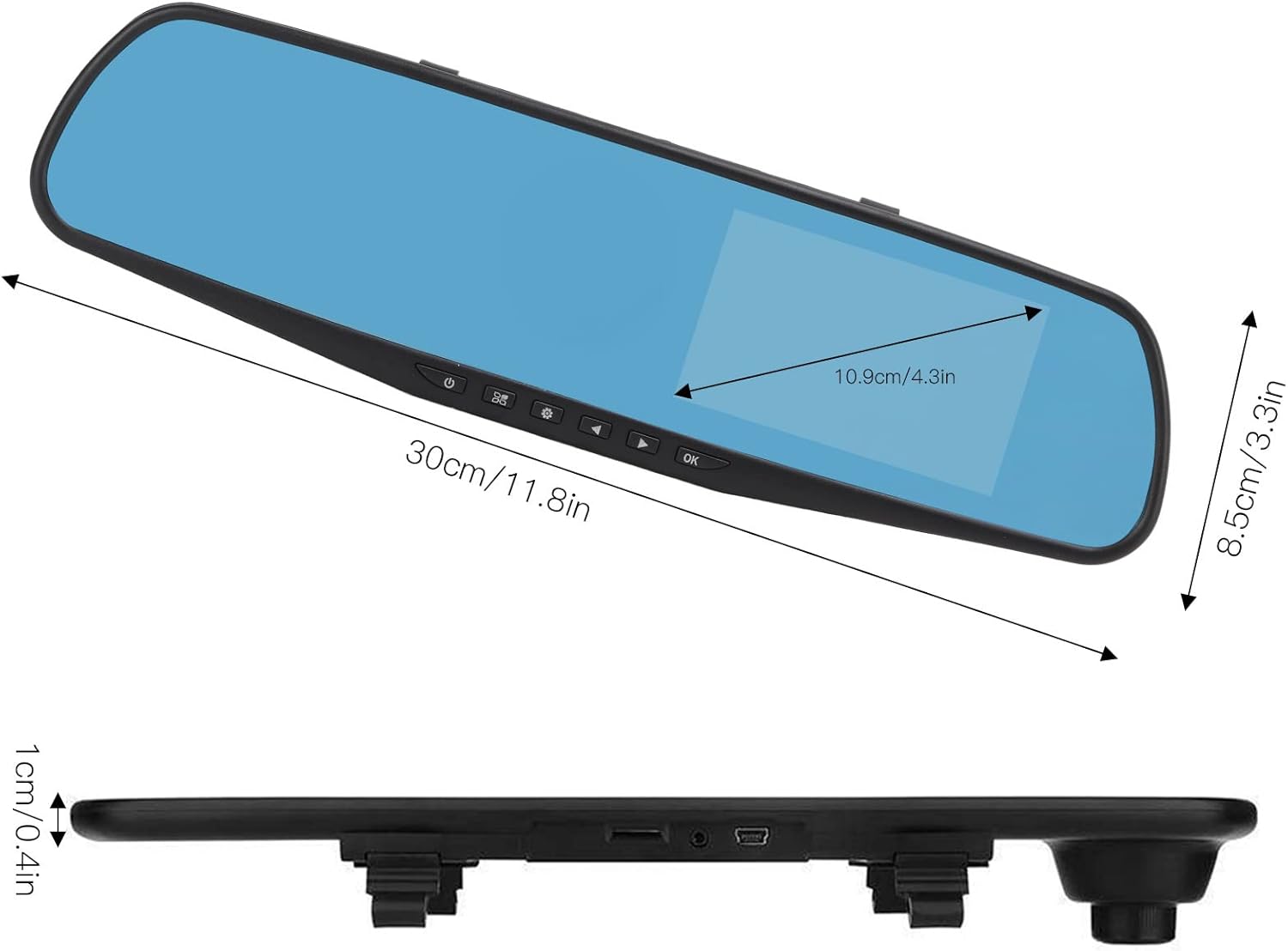
Use the physical buttons located on the bottom of the mirror unit to navigate through the menu options:
- Кнопка меню: Нажмите, чтобы войти в меню настроек.
- Кнопки вверх / вниз: Use to scroll through menu options.
- Кнопка ОК: Press to confirm a selection or setting.
Режимы записи
- Циклическая запись: This feature records video in continuous segments (e.g., 1, 2, 3, or 5 minutes). When the memory card is full, the oldest fileФайлы автоматически перезаписываются, чтобы освободить место для новых записей.
- Обнаружение движения: When enabled, the dash cam will automatically start recording if it detects movement in front of the vehicle while parked. This feature is useful for parking surveillance.
Настройки разрешения видео
You can adjust the video resolution for both front and rear cameras in the settings menu:
- Фронтальная камера: Select between 1080P (FHD 1400x1080) or 720P (HD 1280x720).
- Задняя камера: Records at 720P resolution.
Настройки языка
The device supports multiple languages. Navigate to the language settings in the menu to select your preferred language, including English, German, French, Italian, Japanese, Korean, and Simplified Chinese.

Обслуживание
- Уборка: Для очистки экрана и линз видеорегистратора используйте мягкую сухую ткань. Избегайте использования абразивных чистящих средств или растворителей.
- Карта памяти: Regularly format your Micro SD card (at least once a month) to ensure optimal performance and prevent data corruption. Back up any important footagе перед форматированием.
- Температура: Avoid exposing the device to extreme temperatures, both hot and cold, as this can affect battery life and component integrity.
Поиск неисправностей
- Устройство не включается:
- Ensure the car charger is properly connected to both the dash cam and the vehicle's 12V power outlet. Check if the vehicle's ignition is on. Test the charger in another port or with another device if possible.
- Проблемы с записью (например, остановка записи, повреждение файла записи). files):
- Verify that a compatible, high-speed Micro SD card (Class 10 or higher) is inserted correctly. Format the memory card through the dash cam's settings menu. If issues persist, try a different memory card.
- Screen display problems (e.g., black screen, distorted image):
- Check all cable connections, especially for the rear camera. Try resetting the device to factory settings via the menu. If the problem continues, contact customer support.
- Задняя камера не отображает:
- Ensure the rear camera cable is securely connected to both the rear camera and the AV IN port on the main unit. Check for any damage to the cable or connectors.
Технические характеристики
| Тип товара | 4.3-дюймовый видеорегистратор в зеркале заднего вида |
| Материал | АБС |
| Размер экрана | 4.3 дюймов |
| Тип дисплея | TFT-ЖК-дисплей |
| Ракурс фронтальной камеры | 110 градусов |
| Ракурс задней камеры | 90-110 degrees (Adjustable) |
| Разрешение фронтальной видеокамеры | 1080P (FHD 1400x1080), 720P (HD 1280x720) |
| Разрешение заднего видео | 720P |
| Loop Recording Intervals | 1 минута, 2 минут, 3 минут, 5 минут |
| Обнаружение движения | Поддерживается |
| Разрешение изображения | 12 МП, 10 МП, 5 МП, 3 МП, 2 МП, 1.3 МП |
| Формат видео | АВИ |
| Формат изображения | JPEG |
| Тип объектива | F2.78 glass resolution multi-layer filter wide-angle lens |
| Поддерживаемые языки | English, German, French, Italian, Japanese, Korean, Simplified Chinese |
| Видеовыход | Читатель карточки USB |
| Метод монтажа | Тип клея |
| Размеры продукта | Approx. 30cm (11.8in) L x 8.5cm (3.3in) W x 1cm (0.4in) T |
| Размеры упаковки | 34 x 12 x 6 см; 512 г |
Гарантия и поддержка
For warranty information or technical assistance, please refer to the warranty card included with your product or contact EBTOOLS customer support through the retailer's platform where the product was purchased. Our support team is available to help with any questions or issues you may encounter.