
1. Введение
Thank you for choosing the SILENTWARE Air 1000 Black ATX Midi Tower PC Case. This manual provides essential information for the proper installation, operation, and maintenance of your new PC case. Please read this manual thoroughly before beginning the assembly process to ensure a smooth and successful build.
2. Информация по технике безопасности
- Перед установкой или извлечением любых компонентов из корпуса ПК всегда отключайте блок питания от розетки.
- Обращайтесь с компонентами осторожно, чтобы избежать повреждений от электростатического разряда (ЭСР). Рекомендуется использовать антистатический браслет.
- Будьте осторожны с острыми краями внутри корпуса.
- Не пытайтесь модифицировать корпус или его компоненты, так как это может привести к аннулированию гарантии и создать угрозу безопасности.
- Беречь чехол от воды, влаги и экстремальных температур.
3. Содержимое упаковки
Пожалуйста, проверьте наличие всех предметов в вашей посылке:
- SILENTWARE Air 1000 Black ATX Midi Tower PC Case
- Pre-installed 4x 120mm ARGB Fans
- Accessory box (screws, cable ties, standoffs, etc.)
- Руководство пользователя (этот документ)
4. Продукт закончилсяview
The SILENTWARE Air 1000 is an ATX Midi Tower PC case designed for optimal airflow and component compatibility. It features a mesh front panel for maximum ventilation and a tempered glass side panel to showcase your build.


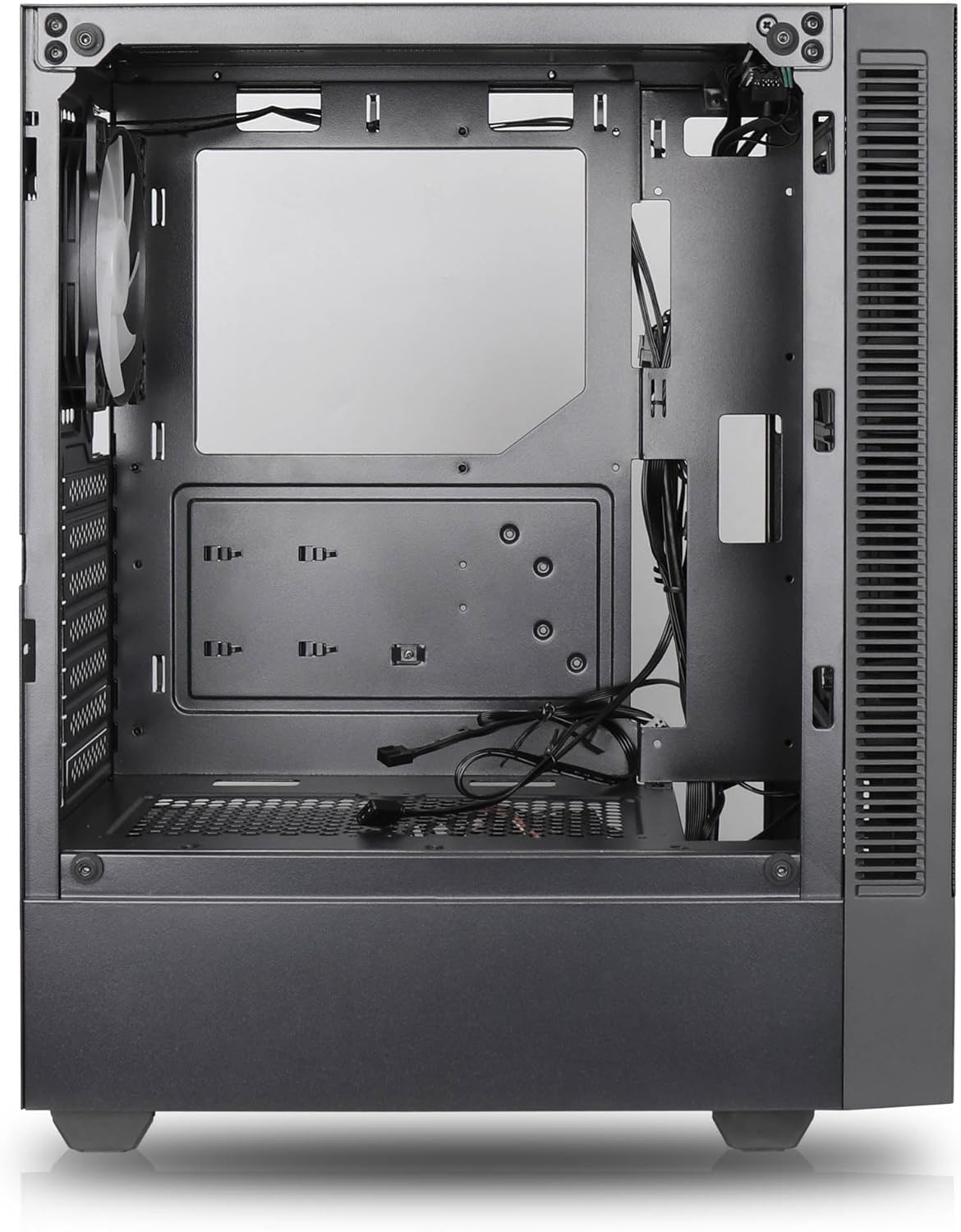

Основные характеристики:
- Максимальный поток воздуха: Large mesh front panel and four pre-installed 140mm A-RGB fans with hydraulic bearings ensure excellent ventilation.
- Easy PC Building: Thoughtful design with daisy-chain connections simplifies installation, eliminating the need for additional adapters or controllers.
- Качественный дизайн: Genuine tempered glass side panel showcases installed components and provides a minimalist, premium aesthetic.
- Flexible Lighting and Control: 3-pin A-RGB fans and 4-pin fan control allow for impressive lighting effects and easy adjustment of fan speed and curves directly from the motherboard.
- Powerful Component Compatibility: Supports GPUs up to 400mm long, radiators up to 360mm (front and top) and 140mm (rear), and space for up to 4 fans.
- Compact Case with AmpПространство: Midi tower format accommodates E-ATX, ATX, mATX, and ITX motherboards, up to two 2.5" SSDs, two 3.5" HDDs, and ATX power supplies.
5. Руководство по установке
Follow these steps for component installation. Refer to your individual component manuals for specific instructions.
5.1. Подготовка дела
- Поместите корпус на ровную, устойчивую поверхность.
- Carefully remove the tempered glass side panel by unscrewing the thumb screws and gently pulling it away. Set it aside on a soft, non-abrasive surface.
- Remove the solid right side panel by unscrewing the thumb screws and sliding it backward.
5.2. Установка материнской платы
- Установите защитную крышку ввода-вывода в заднее отверстие корпуса.
- Ensure the correct standoffs are installed for your motherboard form factor (E-ATX, ATX, mATX, ITX). Adjust or add standoffs as needed.
- Аккуратно поместите материнскую плату на стойки, совместив отверстия для винтов.
- Закрепите материнскую плату с помощью прилагаемых винтов. Не затягивайте их слишком сильно.
5.3 Установка блока питания (БП)
- Установите блок питания в специальный отсек в нижней задней части корпуса.
- Ensure the PSU fan faces downwards (if the case has a bottom vent) or upwards, depending on your cooling preference.
- Закрепите блок питания на корпусе с помощью прилагаемых винтов с задней стороны.
5.4 Установка накопителя
2.5-дюймовые твердотельные накопители:
- Locate the 2.5" drive mounts (typically behind the motherboard tray).
- Secure the SSDs using the provided screws.
3.5-дюймовые жесткие диски:
- Locate the 3.5" drive cages (usually near the PSU shroud).
- Slide the HDDs into the drive trays and secure them with screws or tool-less mechanisms if available.
5.5 Установка видеокарты (GPU)
- Снимите необходимые заглушки слотов PCIe с задней части корпуса.
- Align your GPU with the PCIe slot on the motherboard and press firmly until it clicks into place.
- Secure the GPU to the case with screws.
5.6. Организация кабелей.
Используйте отверстия для прокладки кабелей и точки крепления за лотком материнской платы, чтобы аккуратно уложить кабели. Это улучшит циркуляцию воздуха и внешний вид.
6. Операция
6.1. Включение
After all components are installed and cables are connected, reattach the side panels. Connect the power cable to the PSU and a wall outlet, then press the power button on the top I/O panel of the case.
6.2. Управление вентилятором ARGB
The pre-installed ARGB fans feature 3-pin ARGB connectors for lighting control and 4-pin connectors for fan speed control. These can be connected directly to compatible headers on your motherboard. Use your motherboard's software or BIOS settings to customize lighting effects and fan curves.
7. Техническое обслуживание
7.1. Уборка
- Для поддержания оптимального воздушного потока регулярно очищайте пылевые фильтры (если они установлены).
- Use a can of compressed air to remove dust from inside the case and components.
- Протрите внешние поверхности мягкой, тряпкой.amp ткань. Избегайте агрессивных химикатов.
- Для чистки панели из закаленного стекла используйте средство для чистки стекол и салфетку из микрофибры.
8. Поиск Неисправностей
- Компьютер не включается: Check all power connections, including the 24-pin motherboard power, 8-pin CPU power, and GPU power cables. Ensure the PSU switch is in the 'ON' position.
- Вентиляторы не вращаются/подсветка RGB не работает: Verify that fan and ARGB headers are correctly connected to the motherboard. Check motherboard software for fan speed and lighting control settings.
- Перегрев: Ensure proper airflow by checking fan orientation and cleaning dust filters. Verify CPU cooler and GPU cooler are properly seated.
- Нет дисплея: Confirm the monitor cable is connected to the graphics card (not the motherboard integrated graphics, unless you are using integrated graphics). Reseat the graphics card and RAM modules.
9. Технические характеристики
| Особенность | Спецификация |
|---|---|
| Бренд | SILENTWARE |
| Название модели | Silentware Flow 100 ARGB |
| Номер модели товара | ПОТОК100 |
| ASIN | B0CB8CZ5GF |
| Цвет | Черный |
| Тип корпуса | Средняя башня |
| Материал | Закаленное стекло |
| Совместимость с материнской платой | ATX, Micro ATX, Mini ITX |
| Совместимые устройства | ATX, mATX, ITX motherboards, GPUs up to 325mm, radiators up to 360mm, 2.5" and 3.5" storage drives |
| Рекомендуемое использование | Игровой |
| Метод охлаждения | Воздух |
| Предустановленные вентиляторы | 4 x 120-мм вентилятора с ARGB-подсветкой |
| Размер вентилятора | 140 Millimeters (Note: Product description mentions 140mm fans, while pre-installed are 120mm. Please verify with product packaging.) |
| Тип крепления блока питания | Нижнее крепление |
| Максимальная длина графического процессора | 400 мм |
| Radiator Support (Front/Top) | До 360 мм |
| Опора радиатора (задняя) | До 140 мм |
| 2.5-дюймовые отсеки для дисков | До 2 |
| 3.5-дюймовые отсеки для дисков | До 2 |
10. Гарантия и поддержка
For warranty information and technical support, please refer to the official SILENTWARE website or contact your retailer. Specific details regarding spare parts availability and software updates are not available in the provided product information.