
1. Введение
This manual provides detailed instructions for the installation, operation, and maintenance of the EVURU Digital Single Phase Energy Meter. This device is designed to measure active energy (kWh), voltage, current, and power consumption in single-phase AC circuits. Please read this manual thoroughly before installation and use to ensure safe and correct operation.
2. Информация по технике безопасности
- Установка и обслуживание должны выполняться только квалифицированным персоналом.
- Перед началом любых монтажных или электромонтажных работ убедитесь, что источник питания отключен.
- Не используйте измерительный прибор в условиях повышенной влажности, запыленности или воздействия коррозионных газов.
- Verify all connections are secure and correct according to the wiring diagrams to prevent damage to the meter or electrical system.
- Данный счетчик предназначен только для использования внутри помещений.
3. Продукт закончилсяview и особенности
The EVURU Digital Single Phase Energy Meter is a compact device for DIN rail installation, offering precise measurement of electrical parameters. Key features include:
- ЖК-дисплей с подсветкой для четкого отображения информации.
- Measures total Energy (kWh), temporary Energy (kWh), real Voltage (V), real Current (A), and real Power (W).
- Pulse LED indicator for active energy measurement.
- 35mm DIN rail mounting.
- Temporary kWh can be reset to zero. Total kWh is non-resettable.

Рисунок 1: Болееview of DDS662, DDS667, and DDS668 models.

Figure 2: Feature comparison table for DDS662, DDS667, and DDS668 models.
4. Технические характеристики
| Параметр | Ценить |
|---|---|
| Максимальный ток | 80А |
| Частота импульса | 1000 имперских/кВтч |
| Номинальный объемtage | 220 В переменного тока |
| Установка | DIN-рейка 35 мм |
| Тип дисплея | ЖК-дисплей с подсветкой |
| Измеряемые параметры | Total kWh, Temporary kWh, Voltagе, ток, мощность |
| Temporary kWh Reset | Yes (hold button for 6 seconds) |
| Total kWh Reset | Нет |
| Wiring Modes | Upper input lower output, Lower input upper output |
| Вес товара | 0.035 унции (приблизительно 1 грамм) |
5. Установка (настройка)
5.1 Размеры
Before installation, ensure adequate space for the meter. The dimensions are suitable for standard DIN rail enclosures.

Figure 3: Meter dimensions (example shown for DDS668).
5.2 Монтаж на DIN-рейку
The meter is designed for 35mm DIN rail installation. Simply clip the meter onto the DIN rail in your electrical panel.
5.3 Схем электропроводки
Ensure all power is OFF before proceeding with wiring. Connect the meter according to the appropriate diagram for your model and desired wiring mode.
5.3.1 DDS662 Wiring
The DDS662 model typically uses a direct connection for single-phase two-wire systems.

Figure 4: Wiring diagram for DDS662 model.
5.3.2 DDS667 Wiring
The DDS667 model can be integrated with circuit breakers for protection.

Figure 5: Wiring diagram for DDS667 model, showing integration with circuit breakers.
5.3.3 DDS668 Wiring Modes
The DDS668 model supports two wiring configurations: upper input/lower output and lower input/upper output.
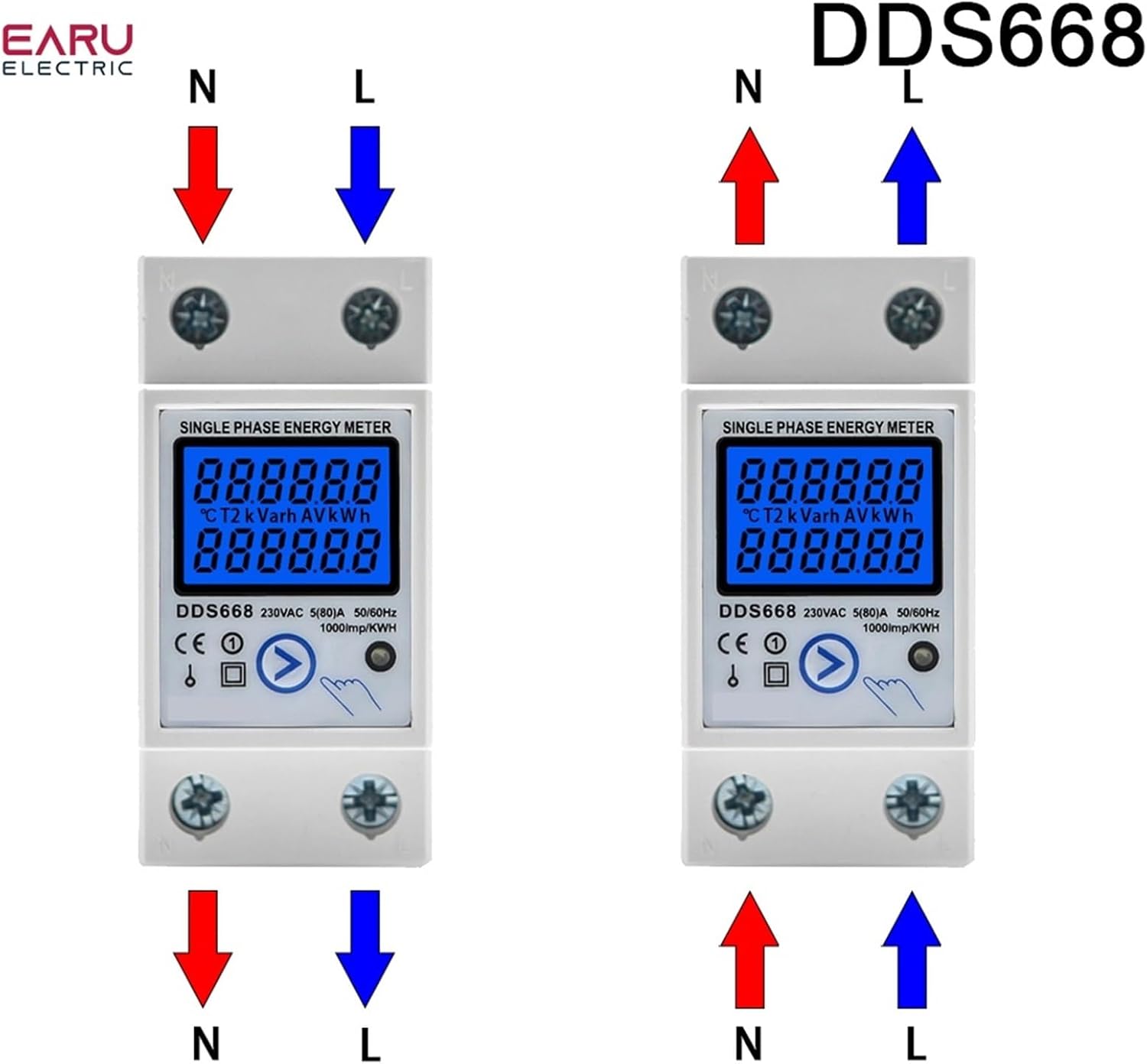
Figure 6: Wiring diagrams for DDS668 model, illustrating upper input/lower output and lower input/upper output modes.
6. Операция
6.1 Включение
Once correctly wired and mounted, restore power to the circuit. The LCD display will illuminate, showing the current readings.
6.2 Reading Displayed Values
The meter cycles through various parameters on its LCD display. You can manually press the button (if available on your model, e.g., DDS667, DDS668) to cycle through:
- Общая энергия (кВтч)
- Temporary Energy (kWh)
- Real Voltagе (В)
- Real Current (A)
- Реальная мощность (Вт)
The pulse LED will flash to indicate active energy measurement.
6.3 Resetting Temporary kWh
To reset the temporary kWh reading to zero, press and hold the button on the front of the meter for approximately 6 seconds. Note that the total kWh reading cannot be reset.
7. Техническое обслуживание
The EVURU Digital Single Phase Energy Meter requires minimal maintenance.
- Содержите прибор в чистоте и не допускайте попадания пыли. Для чистки используйте мягкую сухую ткань.
- Не используйте абразивные чистящие средства или растворители.
- Regularly inspect wiring connections for tightness and signs of wear or damage.
- Ensure the operating environment remains within specified conditions (temperature, humidity).
8. Поиск Неисправностей
- No Display / Meter Not Powering On:
- Проверьте источник питания цепи.
- Убедитесь, что все электрические соединения надежно закреплены и выполнены правильно в соответствии со схемами.
- Неправильные показания:
- Ensure the meter is correctly wired for the load. Incorrect wiring can lead to inaccurate measurements.
- Подтвердите объемtage and current are within the meter's specified range (e.g., 220V AC, max 80A).
- Temporary kWh Not Resetting:
- Ensure you are holding the reset button for the full 6 seconds.
- Note that the total kWh cannot be reset.
- Индикатор пульсации не мигает:
- Verify there is an active load connected and drawing power through the meter.
- Check wiring for proper current flow.
9. Гарантия и поддержка
Для получения информации о гарантии или технической поддержке обратитесь к упаковке продукта или свяжитесь с продавцом. Сохраните чек в качестве подтверждения покупки.