
1. Введение
Спасибо за покупкуasing the Sofirn SC18 Rechargeable Flashlight. This compact and powerful EDC (Everyday Carry) flashlight is designed for various applications, offering high brightness, convenient USB-C charging, and durable construction. Please read this manual carefully before use to ensure proper operation and maintenance.
2. Информация по технике безопасности
- Безопасность глаз: Do not shine the flashlight directly into eyes or at other people. The high lumen output can cause temporary vision impairment.
- Дети: Хранить в недоступном для детей месте, чтобы предотвратить случайное включение или неправильное использование.
- Нагревать: The flashlight head may become hot during prolonged use at high brightness levels. Exercise caution to avoid burns.
- Безопасность аккумулятора: Use only the recommended rechargeable battery. Do not disassemble, crush, or expose the battery to extreme temperatures or fire.
- Разборка: Do not disassemble the flashlight head as this may damage the light and void the warranty.
3. Содержимое упаковки
Проверьте наличие всех предметов в посылке:
- Фонарик Sofirn SC18
- Аккумуляторная батарея (предустановленная или отдельная)
- Зарядный кабель USB-C
- Шнурки
- Руководство пользователя

Image: The Sofirn SC18 flashlight shown with its included accessories, typically a USB-C cable, lanyard, and battery.
4. Настройка
4.1 Установка аккумулятора
The Sofirn SC18 typically comes with the battery pre-installed. If not, unscrew the tail cap, insert the 18650 rechargeable battery with the positive (+) end facing towards the head of the flashlight, and then screw the tail cap back on tightly.
4.2 Первоначальная зарядка
Before first use, fully charge the flashlight. The SC18 features a built-in USB-C charging port.
- Locate the rubber cover on the side of the flashlight head.
- Аккуратно потяните за резиновую крышку, чтобы открыть доступ к порту USB-C.
- Connect the provided USB-C cable to the flashlight and plug the other end into a USB power source (e.g., phone charger, power bank, computer USB port).
- Индикатор на боковом переключателе покажет состояние зарядки:
- Красный: Зарядка
- Зеленый: Полностью заряжен
- Once charging is complete, disconnect the cable and firmly close the rubber cover to maintain water resistance.

Image: The Sofirn SC18 flashlight with its USB-C port exposed and connected to a charging cable, illustrating the charging process and battery indicator.
5. Инструкция по эксплуатации
The Sofirn SC18 uses a single side switch for all operations.
5.1 Основные операции
- Включение/выключение: Чтобы включить или выключить свет, нажмите один раз на боковой переключатель.
- Изменение режимов яркости: While the light is on, press and hold the side switch to cycle through Moon, Low, Medium, and High modes. Release the switch to select the desired mode. The flashlight has a Smart Memory function and will turn on at the last used brightness level (except Turbo and Strobe).

Image: A person holding the Sofirn SC18 flashlight, illuminating a dark path with its powerful 1800 lumen beam, demonstrating its effective beam distance.
5.2 Специальные режимы
- Режим лунного света: From OFF, press and hold the side switch for 1 second to activate Moonlight mode.
- Турбо-режим: Double-click the side switch from any state (ON or OFF) to activate Turbo mode. Double-click again to return to the previously used mode.
- Режим строба: Triple-click the side switch from any state (ON or OFF) to activate Strobe mode. Single click to turn off or double-click to return to the previously used mode.
5.3 Функция блокировки
The lockout function prevents accidental activation, which is useful when carrying the flashlight in a pocket or bag.
- Активировать блокировку: From OFF, quadruple-click the side switch. The main LED will flash twice to indicate lockout is active.
- Отключить блокировку: Quadruple-click the side switch again. The main LED will flash twice, and the flashlight will turn on in Moonlight mode, indicating lockout is deactivated.

Image: An illustration of the Sofirn SC18 flashlight with a protective shield graphic, demonstrating the safety lock mode feature to prevent accidental activation.
6. Техническое обслуживание
6.1 Очистка
Корпус фонарика можно чистить мягкой тряпкой.amp cloth. Do not use abrasive cleaners or solvents. Keep the threads and O-rings clean and lubricated with silicone grease to ensure smooth operation and water resistance.
6.2 Водостойкость
The Sofirn SC18 is rated IP68 waterproof, meaning it is protected against dust ingress and can withstand immersion in water up to 2 meters for 30 minutes. Ensure the USB-C port cover is fully sealed before exposing the flashlight to water.

Image: The Sofirn SC18 flashlight shown in two scenarios: one being splashed with water and another on wet rocks, highlighting its IP68 waterproof and drop-resistant design.
6.3 Уход за аккумулятором
To prolong battery life, charge the battery regularly and avoid fully discharging it. If the flashlight will not be used for an extended period, remove the battery or activate the lockout function to prevent parasitic drain.
7. Поиск Неисправностей
| Проблема | Возможная причина | Решение |
|---|---|---|
| Фонарик не включается. | Батарея разряжена или неправильно вставлена. Фонарик находится в режиме блокировки. | Charge the battery or reinsert it with the correct polarity. Deactivate lockout mode (quadruple-click). |
| Свет мерцает или неожиданно выключается. | Низкий заряд батареи. Свободно висящая головка или хвост. Грязные контакты. | Зарядите аккумулятор. Затяните хвостовую крышку и головку. Очистите контакты и резьбу батареи. |
| Cannot charge the flashlight. | Проблема связана с кабелем USB-C или источником питания. Засорение зарядного порта. | Попробуйте использовать другой кабель USB-C или адаптер питания. Проверьте порт зарядки на наличие мусора. |
8. Технические характеристики
| Особенность | Деталь |
|---|---|
| Модель | SC18 |
| Источник света | ВЕЛ |
| Макс. выход | 1800 люмен |
| Максимальная дальность луча | 217 метра (712 фута) |
| Источник питания | 1 литий-ионный аккумулятор 18650 (в комплекте) |
| Зарядка | USB-C перезаряжаемый |
| Водостойкость | IP68 (up to 2 meters submersible) |
| Устойчивость к падениям | 1 метр |
| Материал | Алюминиевый сплав |
| Размеры (Д x Г) | Approx. 10.14 cm x 2.46 cm (3.99" x 0.97") |
| Масса | Approx. 55g (1.94oz) without battery |
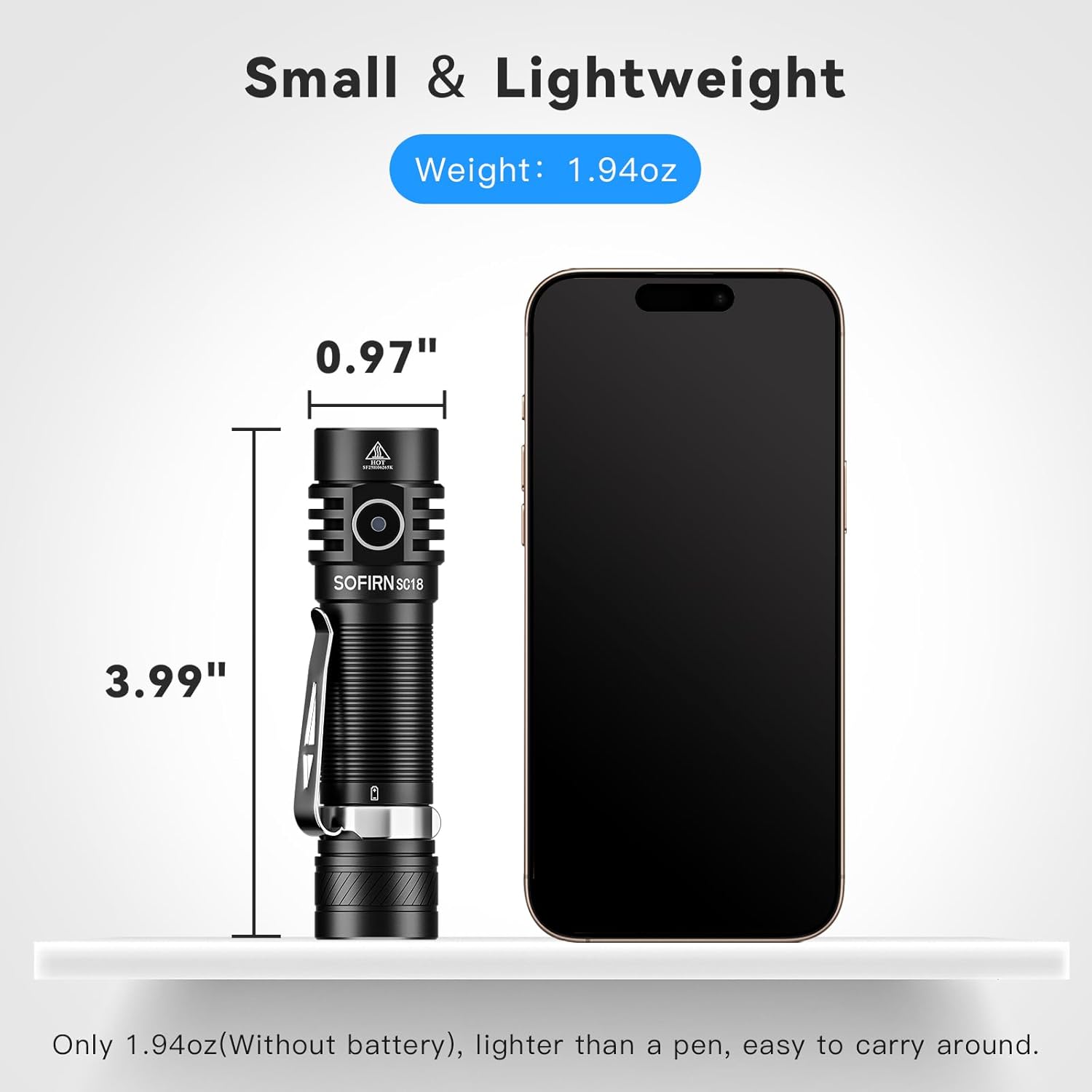
Image: The Sofirn SC18 flashlight displayed next to a smartphone, illustrating its compact size and dimensions (3.99 inches long, 0.97 inches diameter).
Brightness and Runtime Table
| Режим | Выход (люмен) | Время выполнения | Расстояние луча |
|---|---|---|---|
| Лунный свет | 3лм | 230ч | 11м |
| Низкий | 100лм | 23ч | 51м |
| Середина | 350лм | 6.3ч | 97м |
| Высокий | 800лм | 2.6ч | 150м |
| Турбо | 1800лм | 2.3ч | 217м |
| Стробоскоп | 1800лм | 5h | - |
Note: Runtimes are approximate and may vary based on environmental conditions and battery age.
9. Гарантия и поддержка
The Sofirn SC18 Rechargeable Flashlight comes with a 1-летняя гарантия производителя from the date of purchase, covering defects in materials and workmanship. This warranty does not cover damage caused by misuse, unauthorized modifications, or normal wear and tear.
For warranty claims, technical support, or any questions regarding your product, please contact Sofirn customer service through the retailer where you purchased the product or visit the official Sofirn webсайт для контактной информации.
Интернет-ресурсы:
10. Видеоролики о продуктах
Sofirn SC18 Product Overview
Video: An official product video from Sofirn showcasing the features and functionality of the SC18 flashlight, including its design, charging, and various light modes.