
SAMA M203
SAMA M203 M-ATX/ITX Computer Case Instruction Manual
Модель: М203
Введение
This manual provides detailed instructions for the installation, operation, and maintenance of your SAMA M203 M-ATX/ITX Computer Case. Please read this manual thoroughly before beginning assembly to ensure proper setup and optimal performance.

Изображение: ракурс спереди view of the SAMA M203 computer case, showcasing the tempered glass side panel and three front-mounted F-RGB fans, along with one rear F-RGB fan.
Характеристики продукта
- Поддержка материнских плат: Vertical M-ATX/ITX form factors.
- Ввод/вывод на передней панели: USB 3.0 x 1, USB 2.0 x 2, HD Audio (Headphone/Microphone).
- Отсеки для дисков: 3.5-inch HDD x 1, 2.5-inch SSD x 4.
- Зазор процессорного кулера: Up to 160mm height.
- Длина видеокарты: До 330 мм.
- Управление кабелями: 22mm backline space.
- Слоты расширения: 4 слота PCI.
- Система охлаждения: Pre-installed F-RGB fans. Supports front 3x120mm (or 2x140mm) fans/240/280mm radiators, rear 1x120mm fan/120mm radiator, top 2x120mm fans/120/240mm radiators.
- Размеры: 380 x 205 x 425mm (Chassis).
- Материал: Tempered Glass side panel.
Настройка и установка
1. Подготовка дела
Before installing components, ensure the case is placed on a stable, flat surface. Carefully remove the tempered glass side panel by unscrewing the four thumb screws and gently pulling it away from the chassis. It is recommended to lay the case on its side during component installation.
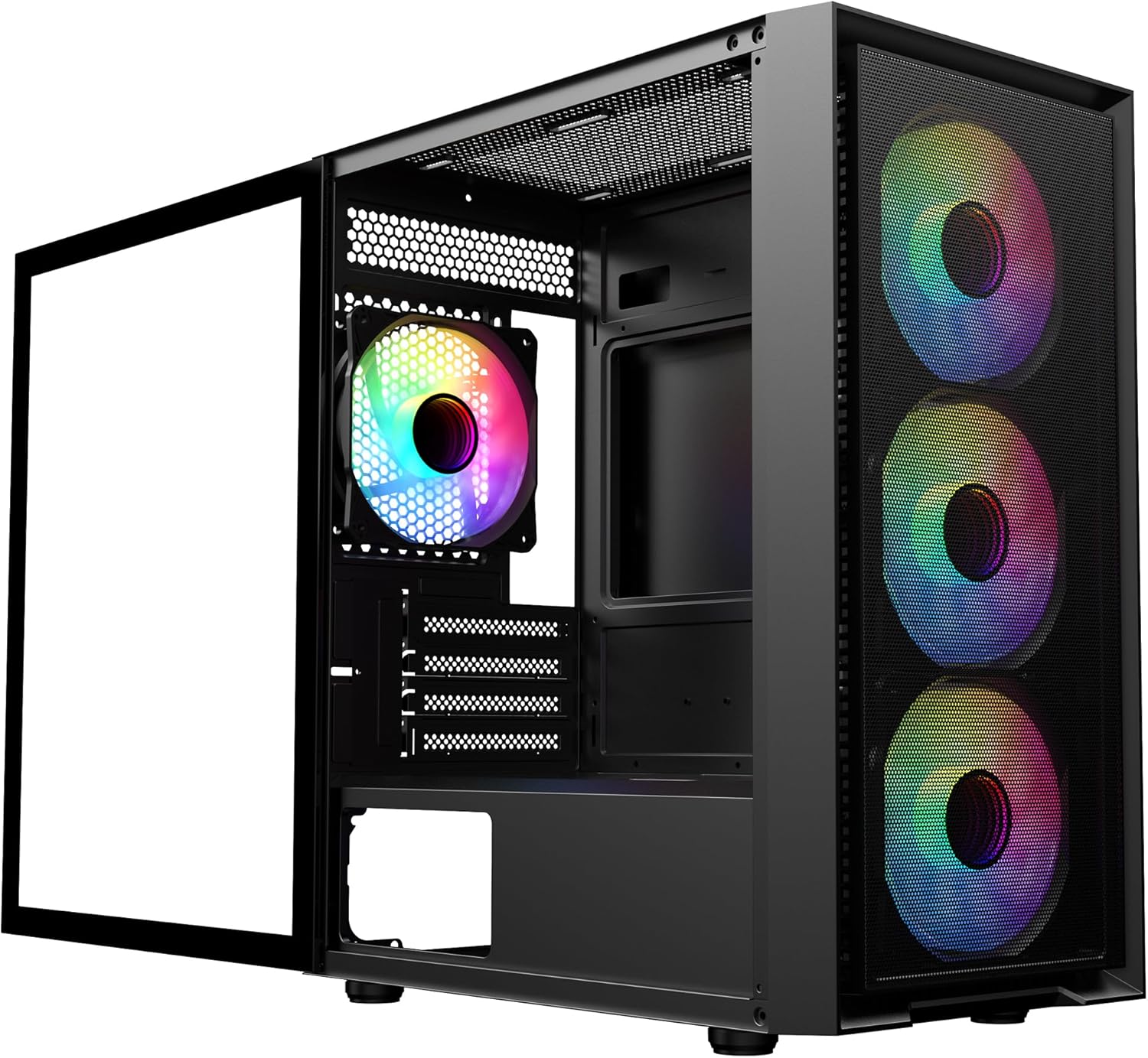
Image: The SAMA M203 computer case with its tempered glass side panel removed, revealing the interior for component installation.
2. Установка материнской платы
The SAMA M203 supports vertical M-ATX and ITX motherboards. Install the necessary standoffs for your motherboard form factor. Carefully align your motherboard with the standoffs and the rear I/O shield opening, then secure it with screws.

Image: Diagram illustrating the vertical M-ATX and ITX motherboard compatibility within the SAMA M203 case.
3. Drive Installation (HDD/SSD)
The case provides support for one 3.5-inch HDD and up to four 2.5-inch SSDs. Refer to the internal layout diagram for specific mounting locations. The 3.5-inch HDD typically mounts in the bottom HDD cage. 2.5-inch SSDs can be mounted on the motherboard tray or within the PSU shroud area.
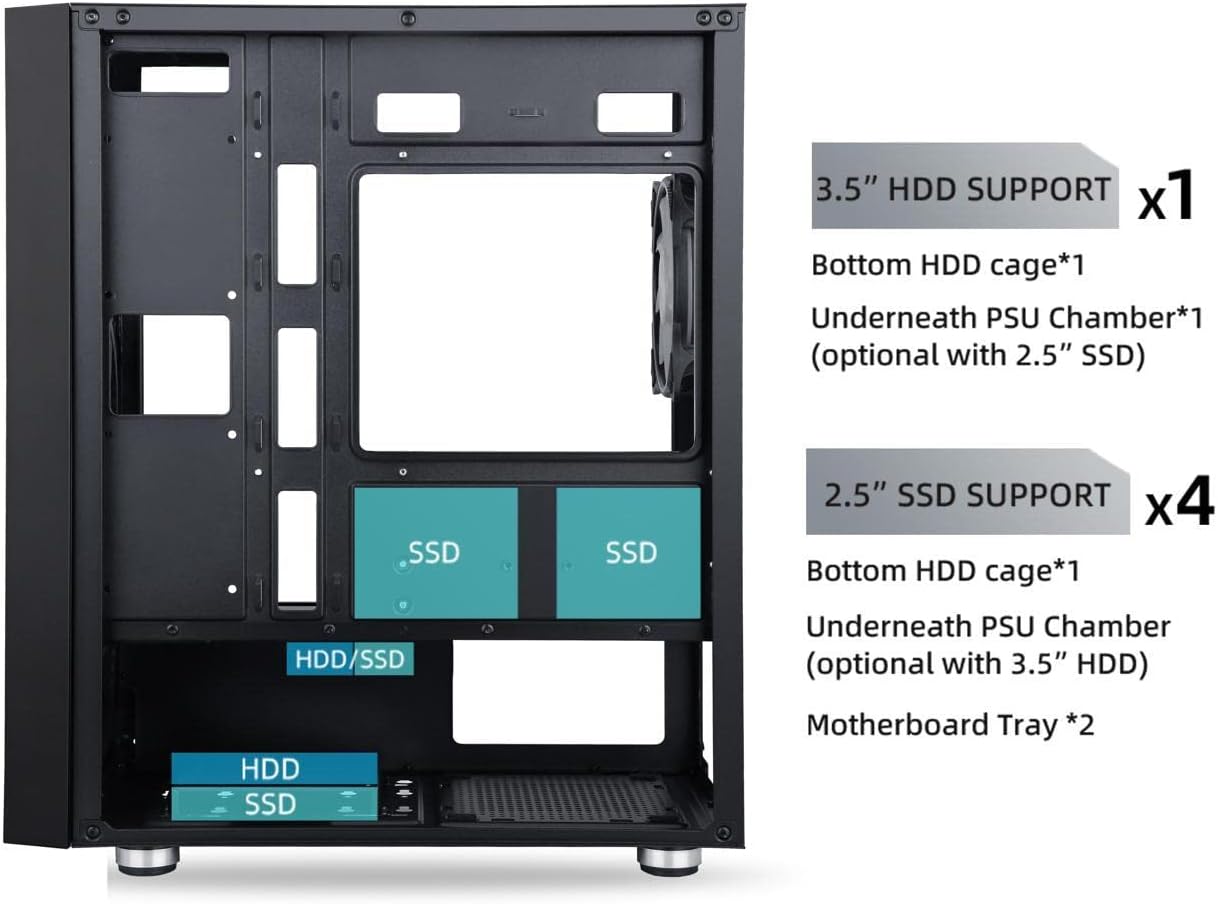
Image: Diagram showing the internal layout of the SAMA M203 case, highlighting the locations for 3.5-inch HDD and 2.5-inch SSD installations.
4 Установка блока питания (БП)
Install your power supply unit into the dedicated compartment at the bottom rear of the case. Secure it with screws from the exterior rear of the chassis.
5. Установка видеокарты и платы расширения.
Remove the necessary PCI slot covers from the rear of the case. Note that some PCI slot covers are break-off type. Carefully insert your graphics card or other expansion cards into the motherboard's PCI-E slots and secure them with screws.
6. Cooling System Setup
The SAMA M203 comes with pre-installed F-RGB fans. Additional fans or radiators can be installed in the front, top, and rear positions as per the specifications. Ensure proper airflow direction for optimal cooling.

Image: Diagram detailing the fan and radiator support locations and sizes for the front, top, and rear of the SAMA M203 case.
7. Организация кабелей.
Utilize the 22mm backline space and cable routing cutouts to organize cables behind the motherboard tray. Connect all power cables from the PSU to the motherboard and components. Connect the front panel I/O cables (USB 3.0, USB 2.0, HD Audio, Power, Reset, LED) to the corresponding headers on your motherboard.

Изображение: Крупный план view of the SAMA M203's top panel, showing the front I/O ports including Power, Reset, USB 3.0, USB 2.0, HD Audio, and Microphone jacks.
Инструкция по эксплуатации
After all components are securely installed and cables connected, replace the tempered glass side panel. Connect your peripherals (monitor, keyboard, mouse) and power cable. Press the power button on the top panel to start your computer. The F-RGB fans will illuminate upon power-on. If your motherboard supports RGB control, you may be able to customize fan lighting.
Обслуживание
Пылевые фильтры
The SAMA M203 case includes dust filters on the top and bottom to prevent dust accumulation. Regularly clean these filters to maintain optimal airflow and cooling performance. The front mesh also acts as a filter and can be cleaned.
- Верхний фильтр: Magnetic, easily removable for cleaning.
- Нижний фильтр: Located under the PSU, slide out for cleaning.
- Front Mesh: Can be cleaned with a soft brush or compressed air.
Генеральная уборка
Use a soft, dry cloth to wipe down the exterior of the case. For the tempered glass panel, use a glass cleaner and a microfiber cloth. Avoid abrasive cleaners or solvents.
Поиск неисправностей
- Компьютер не включается:
- Убедитесь, что блок питания включен и правильно подключен к розетке и материнской плате.
- Verify all front panel connectors (especially the power switch) are correctly attached to the motherboard headers.
- Check that all internal power cables (24-pin ATX, CPU, GPU) are securely connected.
- Вентиляторы не вращаются или RGB-подсветка не работает:
- Confirm that the fan power connectors (Molex) are securely plugged into the power supply.
- If RGB is not working, ensure any RGB control cables are properly connected to the motherboard or a dedicated controller (if applicable).
- Чрезмерный шум вентилятора:
- Проверьте, не мешают ли лопасти вентилятора какие-либо кабели.
- Ensure fans are securely mounted and not vibrating against the chassis.
- Clean dust from fan blades and dust filters.
- Компоненты, не подходящие:
- Процессорный кулер: Убедитесь, что высота вашего процессорного кулера не превышает 160 мм.
- Видеокарта: Ensure your graphics card length does not exceed 330mm.
- Материнская плата: Verify your motherboard is M-ATX or ITX form factor.
Технические характеристики
| Особенность | Деталь |
|---|---|
| Бренд | САМА |
| Модель | М203 |
| Поддержка материнских плат | M-ATX, ITX |
| Тип корпуса | Тип корпуса ПК |
| Материал | Закаленное стекло (боковая панель) |
| Передние порты ввода / вывода | 1x USB 3.0, 2x USB 2.0, HD Audio (Headphone/Microphone) |
| Поддержка 3.5-дюймовых жестких дисков | 1 |
| Поддержка 2.5-дюймовых SSD-накопителей | 4 |
| Ограничение высоты кулера ЦП | 160 мм |
| Ограничение по длине видеокарты | 330 мм |
| Backline Space | 22 мм |
| Слоты расширения | 4 ЧКВ |
| Предустановленные вентиляторы | 4 F-RGB Fans |
| Опора вентилятора (спереди) | 3 x 120 мм или 2 x 140 мм |
| Опора радиатора (передняя) | 240мм, 280мм |
| Опора вентилятора (задняя) | 1x 120 мм |
| Опора радиатора (задняя) | 120 мм |
| Поддержка фанатов (сверху) | 2x 120 мм |
| Опора радиатора (верхняя) | 120мм, 240мм |
| Габариты шасси (Д x Ш x В) | 380 х 205 х 425 мм |
| Размеры продукта (Д x Ш x В) | 48.26 х 38.1 х 17.78 см |
| Вес товара | 5.15 кг |
| Тип крепления блока питания | Нижнее крепление |
| Метод охлаждения | Воздух, вода |
Гарантия и поддержка
For warranty information and technical support, please refer to the official SAMA webна сайте или обратитесь к продавцу. Сохраните чек о покупке для предъявления гарантийных претензий.
Ask a question about this manual
Ask about setup, troubleshooting, compatibility, parts, safety, or missing instructions. Manuals+ will review the question and use this page’s manual context to help answer it.