
OIEXI 666186954140
OIEXI UHD 4K Video Camera Camcorder Instruction Manual
Модель: 666186954140
Введение
This manual provides comprehensive instructions for the operation and maintenance of your OIEXI UHD 4K Video Camera Camcorder. Designed for ease of use, this camcorder features 4K Ultra HD video recording, 64MP photo capabilities, 18X digital zoom, a 4.0-inch rotating touchscreen, and various advanced functions to capture high-quality visuals. Please read this manual thoroughly before using the device to ensure optimal performance and longevity.

Figure 1: OIEXI UHD 4K Video Camera Camcorder and Included Accessories.
Продукт болееview и компоненты
Familiarize yourself with the various parts of your camcorder to ensure proper operation.

Figure 2: Detailed diagram of the camcorder's components.
- 1. Handle Charging Port: For charging the camera via the handle.
- 2. Аккумулятор: Main power source for the camcorder.
- 3. Video Button: Запускает и останавливает видеозапись.
- 4. Photo Button: Делает снимки неподвижных изображений.
- 5. Confirmation Button/Control Wheel: Осуществляет навигацию по меню и подтверждает выбор.
- 6. DISP Button: Toggles display information on/off.
- 7. USB Interface/Camera Charging Port: Connects to computer or charger.
- 8. MIC Interface: Connects external microphone.
- 9. HDMI Interface: Connects to external display.
- 10. Объектив: Основной оптический компонент для захвата изображений.
- 11. Кнопка питания: Включает/выключает видеокамеру.
- 12. Menu Button: Доступ к меню настроек видеокамеры.
- 13. Кнопка режима: Switches between different operating modes (e.g., video, photo, playback).
- 14. Playback Button: Переходим в режим воспроизведения для повторногоview записанные носители.
- 15. Слот для SD-карты: Вставьте SD-карту сюда.
- 16. Спикер: Для воспроизведения звука.
- 17. Internal Hot Shoe: For attaching accessories like the external microphone.
- 18. Handle Video/Photo Button: Alternative buttons on the handle for recording video or taking photos.
- 19. Handle Digital Zoom: Controls digital zoom from the handle.
- 20. Camera Zoom: Controls optical/digital zoom.
- 21. Camera Hot Shoe: Для крепления аксессуаров.
Настраивать
1. Зарядка аккумулятора
Before first use, fully charge the included Lithium Ion battery. The 4500mAh battery provides over 3 hours of continuous use. You can also record while charging.
- Вставьте батарею в батарейный отсек.
- Connect the USB cable to the camera's charging port (7) or the handle charging port (1) and then to the charger.
- Plug the charger into a power outlet. The charging indicator will show the charging status.

Figure 3: Battery charging and SD card insertion.
2. Установка SD-карты
This camcorder supports SD cards up to 256GB. A 64GB SD card is included for immediate use.
- Locate the SD card slot (15) on the camcorder.
- Вставьте SD-карту металлическими контактами вниз до щелчка.
3. Прикрепление аксессуаров
- Внешний микрофон: Connect the external microphone to the MIC Interface (8) for improved audio clarity and noise reduction.
- Бленда: Attach the lens hood to the front of the lens (10) to protect it from damage and reduce glare, improving photo color and contrast.
- Ручной стабилизатор: For low-angle shots and improved video stability, attach the camcorder to the included handheld stabilizer. The stabilizer also features zoom and shooting buttons for convenience.
Инструкция по эксплуатации
1. Включение/выключение питания
Press the Power Button (11) to turn the camcorder on or off.
2. Basic Recording (Video & Photo)
- Видеозапись: Press the Video Button (3) or the Handle Video Button (18) to start recording. Press again to stop.
- Фотосъемка: Press the Photo Button (4) or the Handle Photo Button (18) to take a still picture.
- Увеличить: Use the Camera Zoom (20) or Handle Digital Zoom (19) controls to adjust the 18X digital zoom.
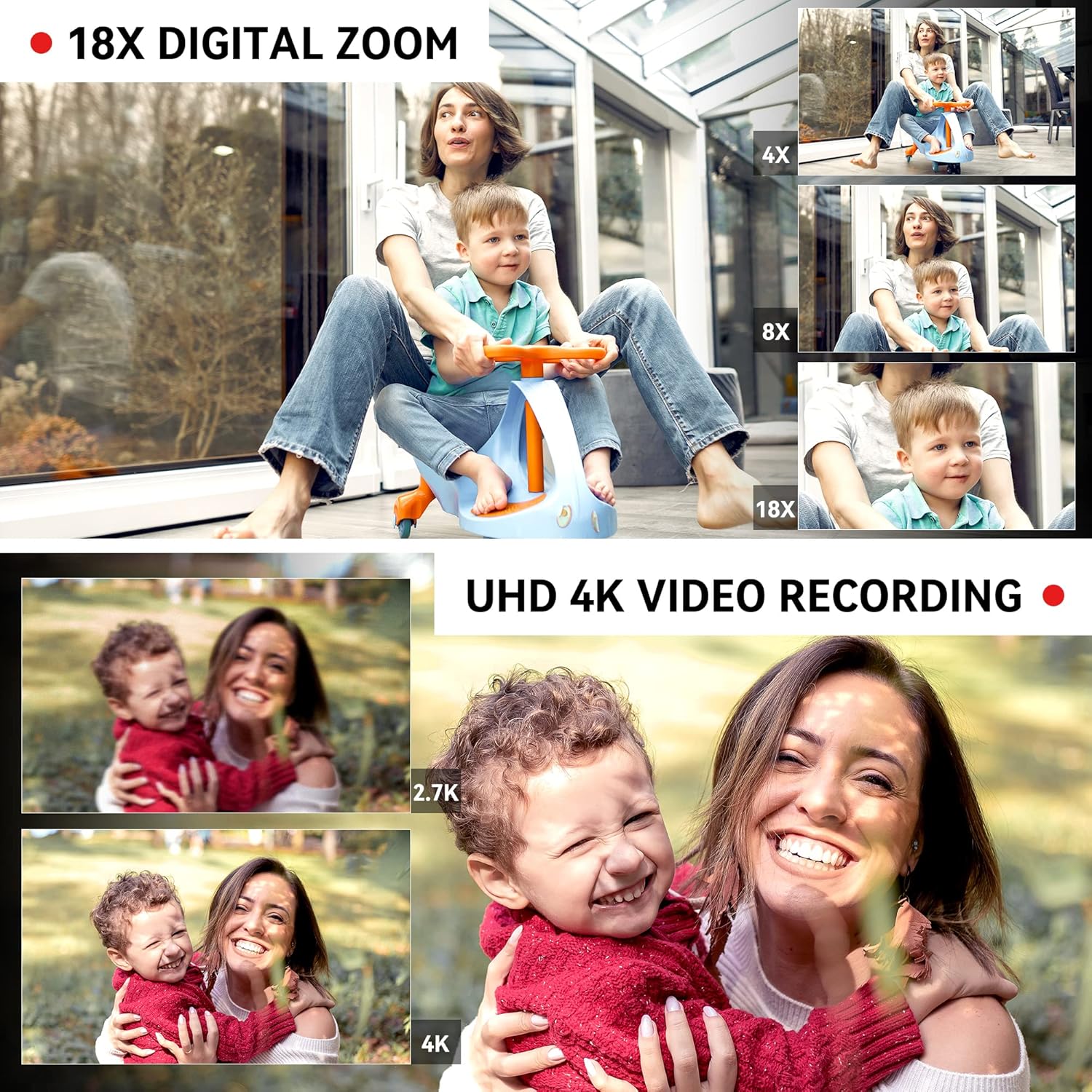
Figure 4: Demonstrating 18X Digital Zoom and 4K video quality.
3. Touchscreen and Menu Navigation
The 4.0-inch 270-degree rotating touchscreen allows for easy navigation. Use the Confirmation Button/Control Wheel (5) or touch the screen directly to select options and adjust settings via the Menu Button (12).
Video 1: This video demonstrates the camcorder's physical features, including the rotating screen, and shows the menu interface for selecting multiple shooting modes and adjusting focus. It also illustrates the wireless connection feature.
4. Multiple Shooting Modes
Press the Mode Button (13) to switch between various shooting modes, including:
- Функция паузы: Temporarily stop and resume recording within the same file.
- Промежуток времени: Capture images at set intervals to create a time-lapse video.
- Замедленная съемка: Record video at a higher frame rate for slow-motion playback.
- Непрерывная съемка: Сделайте несколько снимков подряд с небольшим интервалом.
- Автоспуск: Установите задержку перед тем, как сделать снимок.
- Циклическая запись: Непрерывная запись с перезаписью самых старых записей. files когда карта памяти заполнена.

Figure 5: Visual representation of different shooting modes available.
5. Регулировка фокуса
The camcorder supports both manual and auto-focus. Adjust focus as needed for sharp images and videos.
6. Связь и File Передача
- Беспроводное соединение (Wi-Fi): Use the "XDV PRO" app on your smartphone to remotely control the camcorder and transfer videos and photos. No internet connection is required for direct file transfer between the camera and phone via Wi-Fi.
- USB-подключение (Webcam/Mass Storage): Connect the camcorder to a computer using the USB cable. You can select "Webcam" for live streaming or video calls, or "Mass Storage" to transfer fileнапрямую на ваш компьютер.
- HDMI-выход: Connect the camcorder to a TV or monitor using the HDMI cable (9) for a larger viewопыт.

Figure 6: Connecting the camcorder to a computer and selecting modes.

Figure 7: Remote and Wi-Fi control options.
7. Дистанционное управление
The included 2.4G wireless remote control allows you to easily control shooting functions from up to 65 feet away.
Обслуживание
- Уборка: Use the provided wiping cloth to gently clean the lens and screen. Avoid using harsh chemicals.
- Хранилище: When not in use, store the camcorder in the included camera bag in a cool, dry place away from direct sunlight and extreme temperatures.
- Уход батареи: Чтобы продлить срок службы аккумулятора, избегайте его частой полной разрядки. Регулярно заряжайте его, даже если он не используется в течение длительного времени.
- Управление SD-картой: Регулярно создавайте резервные копии ваших файлов. files and format the SD card in the camera to maintain optimal performance.
Поиск неисправностей
| Проблема | Возможная причина | Решение |
|---|---|---|
| Видеокамера не включается. | Аккумулятор не заряжен или вставлен неправильно. | Ensure the battery is fully charged and properly inserted. Try charging the battery for at least 30 minutes before attempting to power on again. |
| SD card not recognized or files corrupted. | SD card not inserted correctly, incompatible, or corrupted. | Reinsert the SD card. Ensure it is a compatible SDXC card (up to 256GB). Try formatting the SD card within the camera (this will erase all data). If issues persist, try a different SD card. |
| Плохое качество звука. | Internal microphone limitations or external microphone not connected/charged. | Ensure the external microphone is securely connected to the MIC interface (8). If using an external microphone, ensure its battery is charged (if applicable). For optimal sound, use the external microphone. |
| Видеозапись останавливается или files are split/corrupted during long recordings. | SD card speed is too slow or card is faulty. | Use a high-speed SD card (Class 10 or higher, U3 recommended for 4K). Format the SD card regularly. If the problem persists, try a different, high-quality SD card. |
| Cannot connect to phone via Wi-Fi. | Неправильные настройки Wi-Fi или проблемы с приложением. | Ensure Wi-Fi is enabled on the camcorder and your phone. Check that you have the correct "XDV PRO" app installed. Restart both devices and try again. |
Технические характеристики
| Особенность | Деталь |
|---|---|
| Бренд | ОИЕХИ |
| Номер модели | 666186954140 |
| Разрешение видеозахвата | 4K Ultra HD (60FPS) |
| Разрешение фото | До 64 мегапикселей |
| Цифровой зум | 18X |
| Размер экрана | 4.0 Inches (270° Rotating Touchscreen) |
| Тип датчика | 1/2" CMOS-сенсор |
| Тип батареи | Литий-ионный (4500 мАч) |
| Носители информации | SD-карта (до 256 ГБ, 64 ГБ в комплекте) |
| Связность | Wi-Fi, USB, HDMI |
| Особые возможности | Built-In Light, Microphone Input, Remote Control, Time Lapse, Touchscreen, Pause Function, Slow Motion, Continuous Shooting, Self-Timer, Anti-Shake |
| Размеры | 7.09 x 3.92 x 3.14 дюйма |
| Масса | 3.45 фунта |

Figure 8: Camcorder dimensions and weight.
Что в коробке?
Your OIEXI UHD 4K Video Camera Camcorder package includes the following items:
- 1 x Camcorder
- 1 х аккумуляторов
- 1 х Зарядное устройство
- 1 x 64GB SD-карта
- 1 x Handheld Stabilizer
- 1 х сумка для фотокамеры
- 1 х Руководство по эксплуатации
- 1 салфетка для протирки
- 1 х пульт дистанционного управления
- 2 x Remote Control Batteries
- 1 х USB-кабель
- 1 х HDMI-кабель
- 1 х внешний микрофон
- 1 бленда для объектива

Рисунок 9: Все аксессуары, входящие в комплект поставки.
Гарантия и поддержка
Информацию о гарантии и поддержке клиентов можно найти в документации, прилагаемой к товару, или связаться напрямую с продавцом. Сохраните чек на случай предъявления гарантийных претензий.
Ask a question about this manual
Ask about setup, troubleshooting, compatibility, parts, safety, or missing instructions. Manuals+ will review the question and use this page’s manual context to help answer it.