
1. Продукт закончилсяview
The Sudio F2 is a portable Bluetooth speaker designed for high-quality audio playback in various environments. It features Bluetooth 5.3 connectivity, an AUX input, IPX7 waterproof rating, and a unique broadcast function allowing connection of up to 100 speakers.

Передний view of the Sudio F2 Portable Bluetooth Speaker.
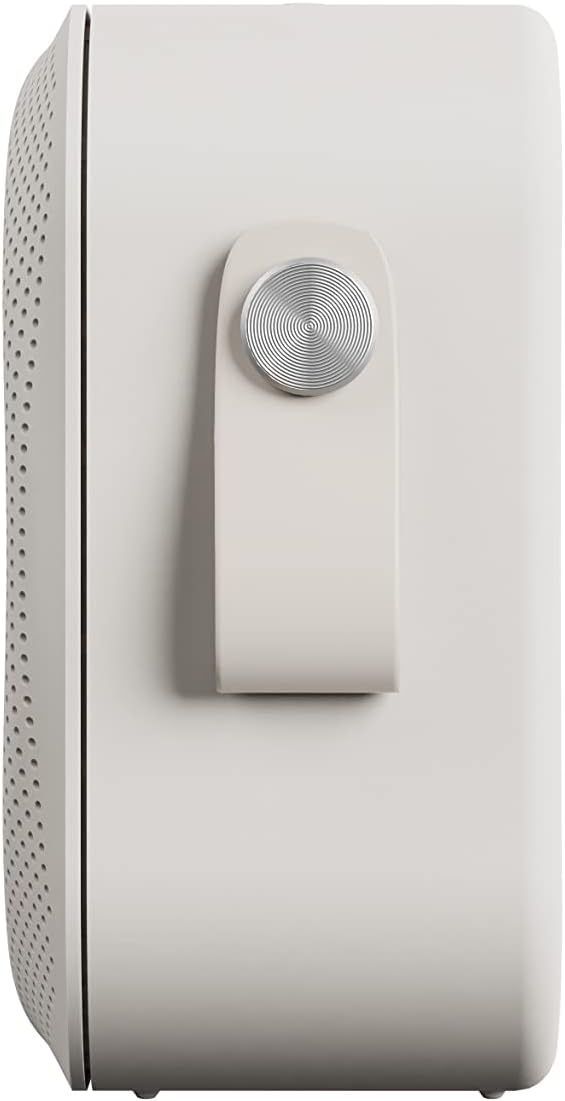
Сторона view of the Sudio F2 speaker, highlighting the integrated silicone strap for portability.
2. Содержимое упаковки
Убедитесь, что в упаковке присутствуют все предметы:
- Sudio F2 Portable Bluetooth Speaker
- Type-C USB-cable for charging
- Руководство по эксплуатации (данный документ)
3. Настройка и зарядка
3.1 Первоначальная зарядка
Before first use, fully charge your Sudio F2 speaker. Connect the provided Type-C USB cable to the charging port on the speaker and to a compatible USB power adapter (not included). A full charge takes approximately 4 hours and provides up to 15 hours of playtime.
3.2 Включение/выключение питания
- Для включения: нажмите и удерживайте кнопку питания, пока не загорится индикатор.
- Чтобы выключить устройство: нажмите и удерживайте кнопку питания, пока индикатор не погаснет.

Сторона view of the Sudio F2 speaker, showing the power button location.
4. Инструкция по эксплуатации
4.1 Сопряжение по Bluetooth
- Ensure the Sudio F2 speaker is powered on and in pairing mode (indicator light will flash).
- На вашем устройстве (смартфоне, планшете и т. д.) включите Bluetooth и выполните поиск доступных устройств.
- Select "Sudio F2" from the list.
- Once connected, the indicator light will become solid, and you will hear an audible confirmation.
The speaker uses Bluetooth 5.3 technology and has a connection range of up to 10 meters.
4.2 Дополнительный вход
To connect a device via AUX, insert a 3.5mm audio cable (not included) into the AUX input port on the Sudio F2 speaker and the other end into your audio source. The speaker will automatically switch to AUX mode.

The Sudio F2 speaker featuring its AUX input port for wired connections.
4.3 Broadcast Function (Multi-Speaker Pairing)
The Sudio F2 allows you to link up to 100 speakers simultaneously for a larger sound experience. This feature is activated using the broadcast function button.
- Connect your primary Sudio F2 speaker to your device via Bluetooth.
- Power on all other Sudio F2 speakers you wish to connect.
- On the primary speaker, press the broadcast function button (refer to the speaker diagram for location).
- The primary speaker will begin searching for other F2 speakers.
- Once connected, all linked speakers will play audio synchronously.

Multiple Sudio F2 speakers demonstrating the broadcast function for synchronized audio playback.

The Sudio F2 speaker connected to a turntable via AUX, illustrating its compatibility with various audio sources.
4.4 Элементы управления
The Sudio F2 features touch controls for playback and volume adjustments. Specific functions include:
- Воспроизведение/Пауза: Single tap the main control button.
- Увеличение/уменьшение громкости: Swipe or tap dedicated volume areas (refer to product diagram for exact locations).
- Следующий / предыдущий трек: Double tap or triple tap the main control button (functionality may vary, refer to quick start guide for details).
5. Водонепроницаемость (IPX7)
The Sudio F2 speaker has an IPX7 waterproof rating, meaning it can be submerged in water up to 1 meter for 30 minutes. This makes it suitable for use in showers, by pools, or in rainy conditions. Ensure all ports are securely closed before exposing the speaker to water.

The Sudio F2 speaker, highlighting its IPX7 waterproof capability, suitable for wet environments.

A Sudio F2 speaker in a shower setting, demonstrating its waterproof design.
6. Техническое обслуживание
6.1 Очистка
To clean your Sudio F2 speaker, use a soft, damp cloth. Avoid using harsh chemicals or abrasive materials, as these can damage the speaker's finish or waterproof seals. Ensure the speaker is dry before charging.
6.2 Хранение
Храните динамик в прохладном, сухом месте, вдали от прямых солнечных лучей и экстремальных температур. При длительном хранении периодически заряжайте аккумулятор для поддержания его работоспособности.
7. Поиск Неисправностей
7.1 Нет питания
- Ensure the speaker is fully charged. Connect it to a power source using the provided Type-C USB cable.
- Убедитесь, что зарядный кабель и адаптер работают правильно.
7.2 Невозможно подключиться через Bluetooth
- Убедитесь, что динамик находится в режиме сопряжения (индикатор мигает).
- Убедитесь, что Bluetooth на вашем устройстве включен и находится на расстоянии не более 10 метров от динамика.
- Try forgetting the "Sudio F2" device from your device's Bluetooth settings and re-pairing.
- Перезагрузите динамик и устройство.
7.3 Нет звука
- Проверьте уровень громкости как на динамике, так и на подключенном устройстве.
- Ensure the speaker is correctly paired via Bluetooth or connected via AUX.
- If using AUX, verify the cable is fully inserted and functional.
7.4 Broadcast Function Not Working
- Ensure all speakers are Sudio F2 models.
- Verify that the primary speaker is successfully connected to your device via Bluetooth.
- Make sure all speakers are powered on and within close proximity to each other.
8. Технические характеристики
| Особенность | Спецификация |
|---|---|
| Название модели | Аудио F2 |
| Номер модели | СД-1802 |
| Технология связи | Блютус 5.3 |
| Дальность беспроводной связи | 10 метра |
| Аудиовход | AUX-вход 3.5 мм |
| Уровень водонепроницаемости | IPX7 (водонепроницаемый) |
| Время игры | До 15 часов |
| Время зарядки | 4 часов |
| Емкость аккумулятора | 2200 мАч |
| Максимальная выходная мощность динамика | 20 Вт |
| Частотная характеристика | 35 Гц – 18 кГц |
| Вес товара | 410 грамм (14.5 унции) |
| Размеры продукта | 2.16"Д x 4.16"Ш x 4.17"В |
| Метод контроля | Трогать |
| Включенные компоненты | Type-C USB-cable for charging |
9. Гарантия и поддержка
9.1 Информация о гарантии
The Sudio F2 Portable Bluetooth Speaker comes with a limited warranty. Please refer to the official Sudio website or your purchase documentation for specific terms and conditions regarding warranty coverage.
9.2 Поддержка клиентов
For further assistance, technical support, or warranty claims, please contact Sudio customer service. You can find contact information and additional resources on the official Sudio webсайт: Visit the Sudio Store on Amazon
10. Видеоролик о продукте
Official Sudio F2 product video, showcasing the speaker's design and features in various settings.