
1. Продукт закончилсяview
The Cudy GS108D is an 8-port Gigabit Ethernet Network Switch designed for expanding your network connectivity. It offers high-speed data transfer for devices such as computers, IPTVs, printers, NAS, game consoles, and routers. Featuring a plug-and-play design, fanless operation, and energy-efficient technology, this switch provides a reliable and quiet solution for both home and office networks.

Изображение: Спереди view of the Cudy GS108D switch, highlighting its 8 Gigabit Ethernet ports and LED indicators.
Основные характеристики:
- 8 портов Gigabit Ethernet: Обеспечивает высокоскоростное проводное соединение для нескольких устройств.
- Подключи и работай: Requires no software installation or configuration for immediate use.
- Безвентиляторный дизайн: Ensures quiet operation, suitable for any environment.
- Энергоэффективность: Compliant with IEEE802.3az standard, saving power when ports are idle.
- Универсальный монтаж: Поддерживается как размещение на столе, так и настенное крепление.
2. Содержимое упаковки
Убедитесь, что ваш пакет содержит следующие предметы:
- Cudy GS108D 8-Port Gigabit Ethernet Network Switch
- Адаптер питания
- Руководство по эксплуатации (данный документ)
- Ethernet Cable (may vary by region/package)

Image: Contents of the Cudy GS108D package, showing the switch, power adapter, and an Ethernet cable.
3. Физическое описание
Передняя панель:
The front panel features eight 10/100/1000 Mbps RJ45 ports. Each port has an associated LED indicator to show link/activity status.
- Светодиод питания: Указывает состояние питания коммутатора.
- Светодиоды Link/Act (1-8):
- Сплошной зеленый: A device is connected and the link is active.
- Мигающий зеленый: Данные передаются или принимаются через этот порт.
- Выключенный: No device is connected or the link is inactive.

Изображение: подробное view of the Cudy GS108D's front panel, showing the 8 RJ45 ports and their corresponding LED indicators.
Задняя панель:
На задней панели обычно расположен разъем питания.
Размеры:
The compact design of the GS108D allows for flexible placement. Approximate dimensions are 138mm (5.43") L x 61.5mm (2.42") W x 24mm (0.94") H.
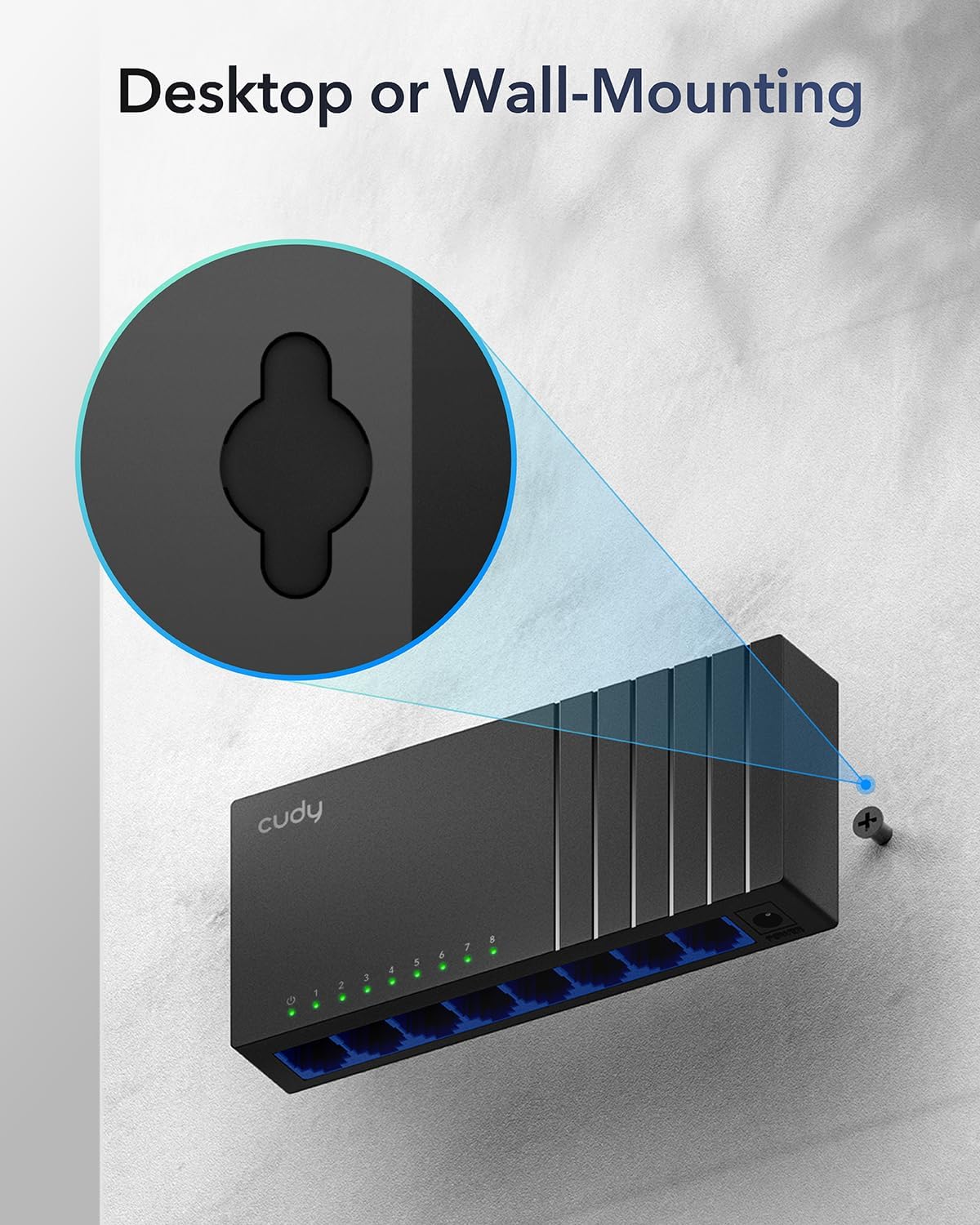
Image: The Cudy GS108D switch with its compact dimensions clearly indicated.
4. Инструкции по настройке
The Cudy GS108D switch is designed for simple plug-and-play installation. No complex configuration is required.
Шаг 1: Подключение питания
- Connect one end of the provided power adapter to the power port on the rear panel of the GS108D switch.
- Вставьте другой конец адаптера питания в стандартную электрическую розетку.
- Убедитесь, что светодиод питания на передней панели загорается, указывая на то, что коммутатор получает питание.

Image: The Cudy GS108D switch with its power adapter connected and ready for use.
Шаг 2: Подключение устройства
- Connect your network devices (e.g., computer, router, NAS, game console) to any of the 8 RJ45 ports on the front panel using standard Ethernet cables (Cat5e or higher recommended for Gigabit speeds).
- Ensure the Link/Act LED for each connected port illuminates, indicating a successful connection. If the LED is flashing, data is being transmitted.

Image: A laptop being connected to the Cudy GS108D switch with an Ethernet cable, demonstrating a typical setup.
Шаг 3: Варианты монтажа
The GS108D supports both desktop placement and wall mounting.
- Размещение на рабочем столе: Simply place the switch on a flat, stable surface.
- Настенный монтаж: The switch features mounting slots on its underside. Use appropriate screws (not included) to secure the switch to a wall.

Image: The Cudy GS108D switch shown with its wall-mounting slots, illustrating how it can be securely attached to a wall.
5. Инструкция по эксплуатации
Once connected, the Cudy GS108D operates automatically without further user intervention.
Автосогласование
Each port on the switch automatically detects the network speed (10/100/1000 Mbps) and duplex mode (Half/Full Duplex) of the connected device and adjusts accordingly for optimal performance.
Оптимизация трафика
The switch features a 4 Mbit packet buffer to ensure stable and efficient data forwarding, reducing packet loss and improving overall network performance, especially during high traffic loads.
Energy Efficiency (IEEE 802.3az)
The GS108D incorporates energy-efficient Ethernet technology. It automatically adjusts power consumption based on cable length and network traffic, reducing energy usage when ports are idle or when connected devices are turned off.

Image: Visual representation of the power-saving feature, showing reduced energy consumption when ports are idle.
Передача на большие расстояния
The switch supports long-distance Ethernet cable runs, allowing for reliable data transmission up to 170 meters (557 feet) with Cat5e or higher Ethernet cables.

Image: Illustration of the Cudy GS108D's capability for long-distance transmission, up to 170 meters, requiring Cat5e or higher cables.
6. Техническое обслуживание
To ensure optimal performance and longevity of your Cudy GS108D switch, follow these maintenance guidelines:
- Размещение: Разместите выключатель в прохладном, сухом месте, вдали от прямых солнечных лучей, источников тепла и чрезмерной влажности. Обеспечьте достаточную вентиляцию вокруг устройства.
- Уборка: Для чистки внешней поверхности переключателя используйте мягкую сухую ткань. Не используйте жидкие или аэрозольные чистящие средства.
- Власть: Use only the provided power adapter. Disconnect the power adapter during electrical storms or when unused for long periods.
- кабели: Ensure all Ethernet cables are securely connected and free from damage.
7. Поиск Неисправностей
If you encounter issues with your Cudy GS108D switch, refer to the following common troubleshooting steps:
Нет питания
- Убедитесь, что адаптер питания надежно подключен как к выключателю, так и к исправной электрической розетке.
- Проверьте работоспособность розетки, подключив к ней другое устройство.
- Verify that the Power LED on the switch is illuminated. If not, try a different power outlet.
Отсутствие связи/активности на порту
- Убедитесь, что кабель Ethernet надежно подключен как к порту коммутатора, так и к подключенному устройству.
- Чтобы исключить повреждение кабеля, попробуйте использовать другой Ethernet-кабель.
- Подключите устройство к другому порту коммутатора.
- Verify that the connected device (e.g., computer, router) is powered on and its network adapter is enabled.
- If connecting to a router, ensure the router's port is active.
Низкая скорость сети
- Ensure you are using Cat5e or higher Ethernet cables for Gigabit speeds. Older Cat5 cables may limit speed.
- Check the Link/Act LED for the port. A solid green light indicates a Gigabit connection. If it's amber or off, there might be a speed mismatch or connection issue.
- Verify that the connected devices also support Gigabit Ethernet.
- Reduce network congestion by limiting simultaneous high-bandwidth activities.
8. Технические характеристики
| Особенность | Описание |
|---|---|
| Бренд | Кади |
| Номер модели | GS108D |
| Количество портов | 8 |
| Интерфейс | RJ45 |
| Скорость передачи данных | 1000 мегабит в секунду (гигабит) |
| Тип переключателя | Коммутатор Ethernet |
| Совместимые устройства | Camera, Desktop, Laptop, Router |
| Томtage | 28 Volts (Input for power adapter) |
| Рабочая температура | от 40°F до 104°F (от 4.4°C до 40°C) |
| Case Material Type | Пластик |
| Размеры изделия (Д x Ш x В) | 7.87" x 5.91" x 5.91" (Product packaging dimensions, actual device is smaller) |
| Вес товара | 200 грамм |
9. Гарантия и поддержка
Информация о гарантии:
The Cudy GS108D 8-Port Gigabit Ethernet Network Switch comes with a Гарантия 2 год с даты покупки. Пожалуйста, сохраните чек о покупке для предъявления гарантийных претензий. Данная гарантия распространяется на дефекты материалов и изготовления при нормальной эксплуатации.
Техническая поддержка:
For technical assistance, troubleshooting, or further inquiries, please visit the official Cudy website or contact Cudy customer support. Cudy is committed to delivering high-performance, user-friendly communication technology and provides resources to help you with your product.
Часто на этой странице можно найти ресурсы поддержки, ответы на часто задаваемые вопросы и контактную информацию. Cudy Store on Amazon or the main Cudy webсайт.


