
1. Введение
The Shanrya GFQ3-80/4P Dual Power Automatic Transfer Switch (ATS) is a miniature household power switch designed for automatic switching between a main power source and a backup power source. It is primarily used to ensure continuous power supply by automatically transferring the load to the backup source when the main power fails, and back to the main source when it is restored. This device is suitable for PZ30 distribution boxes and is ideal for emergency power systems in various settings such as factories, shopping centers, and nurseries, operating at 50 or 60Hz AC rated 220V.
2. Информация по технике безопасности
- Только квалифицированный персонал: Установка и техническое обслуживание должны выполняться только квалифицированными электриками.
- Отключить питание: Always disconnect all power sources before installing, wiring, or servicing the switch to prevent electric shock.
- Правильная проводка: Ensure all wiring connections are secure and comply with local electrical codes and standards. Incorrect wiring can lead to malfunction or hazards.
- Условия окружающей среды: Не допускайте воздействия на устройство чрезмерной влаги, пыли или экстремальных температур.
- Инспекция: Regularly inspect the switch for any signs of damage or wear. Do not operate a damaged device.
3. Продукт закончилсяview
The GFQ3-80/4P ATS is engineered for reliability and ease of use. It features a compact design and robust construction using PC flame-retardant plastic material and silver contacts, ensuring high insulation, temperature resistance, and anti-aging properties.
Основные характеристики:
- Millisecond-Level Switching: Ensures a non-stop power supply by transferring to backup power almost instantaneously when the main power is abnormal.
- Прочная конструкция: Made from PC flame-retardant plastic with high insulation and silver contacts for enhanced safety and reliability.
- Двойные режимы работы: Supports both automatic and manual switching for flexible control.
- Простая установка: Designed for 35mm standard DIN rail mounting with snap-on installation.
Идентификация компонента:
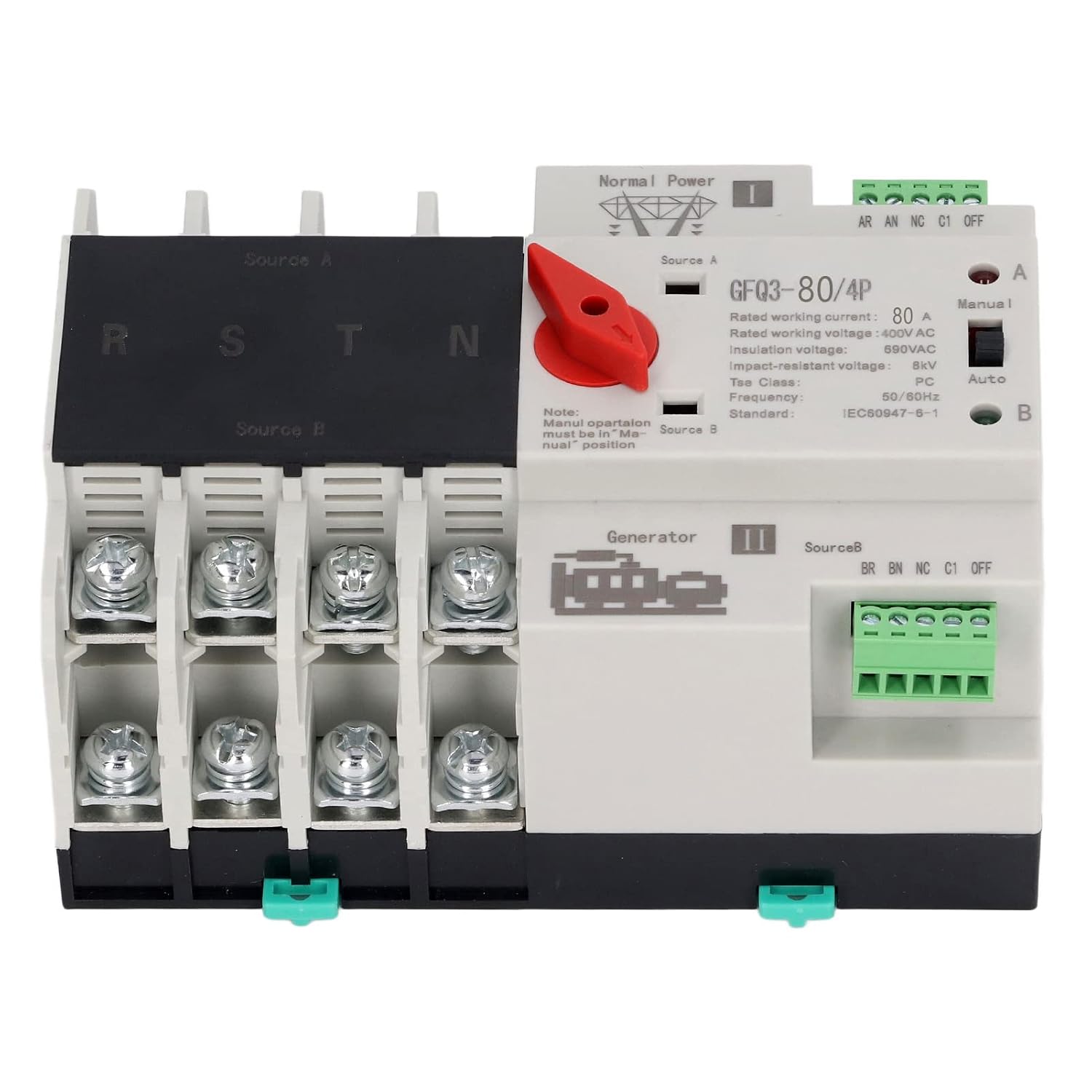
Рисунок 1: Передний view of the GFQ3-80/4P ATS, showing terminals for Source A (Normal Power) and Source B (Generator), output terminals (R, S, T, N), and the Manual/Auto selector switch.

Рисунок 2: Угловой view of the GFQ3-80/4P ATS, highlighting the red manual selector handle and control terminals.
4. Технические характеристики
| Параметр | Ценить |
|---|---|
| Тип товара | Автоматический переключатель резерва двойного питания |
| Модель | GFQ3-80/4P |
| Материал | ПК, серебристый |
| Rated Current (Le) | 80А |
| Изоляция Томtagе (Ui) | 690 В переменного тока |
| Номинальный объемtagе (Уэ) | 400 В переменного тока |
| Частота | 50/60Гц |
| Номинальный контрольный объемtagе (Мы) | 220VAC (85%Us-110%Us) |
| Оценка | PC Grade |
| Поляки | 4P |
5. Настройка и установка
The GFQ3-80/4P ATS is designed for easy installation on a standard 35mm DIN rail. Ensure all power is disconnected before proceeding with installation.
5.1 Монтаж
- Locate a suitable 35mm DIN rail within your PZ30 distribution box or electrical panel.
- Align the ATS with the DIN rail. The device features a snap-on mechanism for secure attachment.
- Press the ATS firmly onto the DIN rail until it clicks into place. Ensure it is stable and does not wobble.

Рисунок 3: Illustration of the 35mm standard guide rail and snap installation method for the ATS.
5.2 Подключение
Refer to the wiring diagram on the device and the following instructions for proper connection. Ensure all connections are tight and secure.
- Source A (Normal Power): Connect the main power supply (e.g., utility grid) to the 'Source A' input terminals. These are typically labeled R, S, T, N for a 4-pole system.
- Source B (Backup Power): Connect the backup power supply (e.g., generator, UPS) to the 'Source B' input terminals. These are also typically labeled R, S, T, N.
- Загрузка выходных данных: Connect the electrical load (e.g., building's electrical system) to the output terminals of the ATS.
- Терминалы управления: Connect the control wiring as per your system requirements. The device has terminals for 'Normal Power' and 'Generator' status monitoring and control.

Рисунок 4: Example of the ATS wired into an electrical panel, demonstrating connections to power sources and load.
6. Инструкция по эксплуатации
The GFQ3-80/4P ATS offers both automatic and manual operation modes.
6.1 Автоматический режим
- Ensure the 'Manual/Auto' switch on the front panel is set to the 'Auto' position.
- In this mode, the switch will automatically monitor the main power supply (Source A).
- Если источник А выйдет из строя или его томtage drops below acceptable levels, the ATS will automatically switch the load to Source B (backup power) within milliseconds.
- When Source A is restored and stable, the ATS will automatically switch the load back to Source A.
6.2 Ручной режим
- Set the 'Manual/Auto' switch on the front panel to the 'Manual' position.
- To manually switch between Source A and Source B, use the red selector handle.
- Rotate the red handle to position 'I' to connect to Source A.
- Rotate the red handle to position 'II' to connect to Source B.
- Примечание: Manual operation overrides automatic functions. Always ensure the desired power source is available and stable before manual switching.
7. Техническое обслуживание
Регулярное техническое обслуживание обеспечивает долговечность и надежную работу вашего АТС.
- Визуальный осмотр: Периодически проверяйте устройство на наличие признаков механических повреждений, ослабленных соединений или перегрева.
- Уборка: Следите за тем, чтобы устройство не загрязнялось пылью и мусором. Для чистки используйте сухую мягкую ткань. Не используйте жидкие чистящие средства.
- Проверка подключения: Ensure all terminal connections remain tight and secure. Loose connections can cause arcing and overheating.
- Функциональный тест: Periodically test the automatic transfer function by temporarily disconnecting the main power source to ensure the switch transfers to backup power correctly.
8. Поиск Неисправностей
Если у вас возникли проблемы с системой ATS, обратитесь к следующему руководству по устранению неполадок:
| Проблема | Возможная причина | Решение |
|---|---|---|
| Device does not switch automatically | Switch is in Manual mode; No power from backup source; Faulty control circuit. | Set switch to 'Auto' mode; Check backup power supply; Consult a qualified electrician. |
| Нет выходной мощности | Both power sources are off; Loose wiring connections; Internal fault. | Verify both power sources are active; Check all wiring connections; Contact support. |
| Перегрев | Loose connections; Overload; Insufficient ventilation. | Tighten all connections; Ensure load does not exceed rated current; Improve ventilation around the device. |
Если проблема сохраняется после попытки устранения этих неполадок, обратитесь в службу поддержки клиентов.
9. Гарантия и поддержка
Для получения информации о гарантии, технической поддержке или сервисном обслуживании, пожалуйста, обратитесь к документации, прилагаемой к вашей покупке, или свяжитесь напрямую с продавцом. Сохраните чек в качестве подтверждения покупки.