
Введение
This manual provides comprehensive instructions for the SENGBIRCH Keyboard Case, designed to enhance your iPad experience. Please read this manual thoroughly before using the product to ensure proper operation and longevity.
Совместимость
The SENGBIRCH Keyboard Case is compatible with the following iPad models:
- iPad Air 13-inch (M3 2025, M2 2024)
- iPad Pro 12.9-inch 6th Generation (2022) - Models: A2436, A2437, A2764, A2766
- iPad Pro 12.9-inch 5th Generation (2021) - Models: A2378, A2379, A2461, A2462
- iPad Pro 12.9-inch 4th Generation (2020) - Models: A2229, A2069, A2232, A2233
- iPad Pro 12.9-inch 3rd Generation (2018) - Models: A1876, A2014, A1895, A1983
Специальное напоминание: This keyboard case is not compatible with iPad Pro 13-inch tablets. Please verify your iPad model before use.
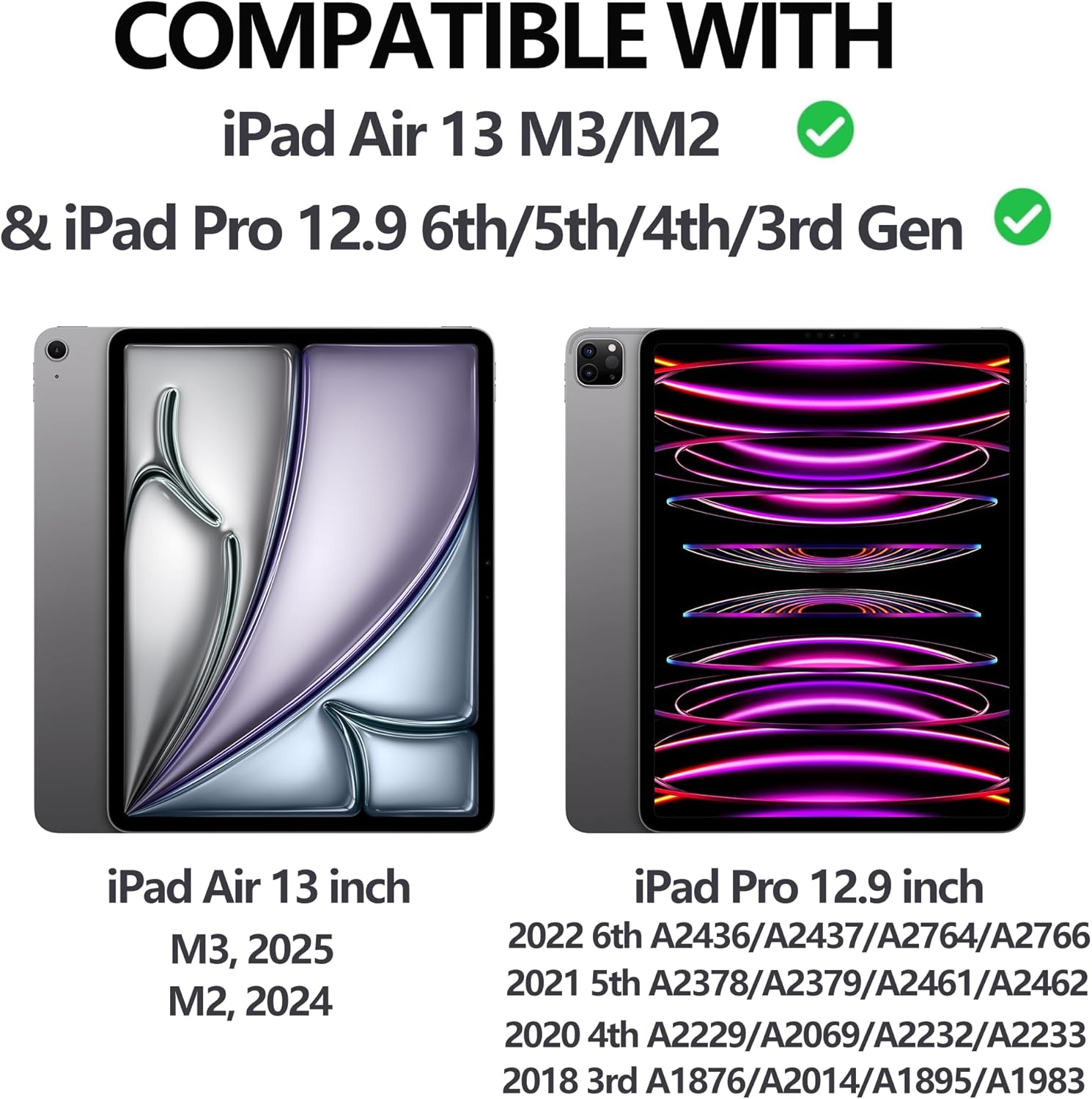
Figure 1: iPad Compatibility Chart
Что в коробке?
При распаковке убедитесь, что в наличии все следующие предметы:
- 1 x Keyboard for iPad Pro 12.9 inch (3rd, 4th, 5th, 6th Generation)
- 1 x Case for iPad Pro 12.9 inch (6th, 5th, 4th, 3rd Generation)
- Зарядный кабель 1 x USB-C
- 1 х Руководство пользователя
Примечание: Tablet and Apple Pencil are not included.
Инструкции по установке
1. Крепление iPad к чехлу
The case features a magnetic adsorption design for secure attachment of your iPad. Align the camera cutout of the case with your iPad's camera, and the iPad will magnetically snap into place.

Figure 2: Magnetic iPad Attachment and Detachable Keyboard
2. Зарядка клавиатуры
Before first use, fully charge the keyboard using the provided USB-C cable. Connect the USB-C end to the keyboard's charging port and the other end to a compatible USB power adapter (not included).
- Время зарядки: около 2.5 часов для полной зарядки.
- Battery Life: Up to 70 hours of continuous work on a single charge.

Figure 3: Keyboard Charging and Battery Information
3. Подключение клавиатуры через Bluetooth
Follow these steps to pair your keyboard with your iPad:
- Switch the keyboard's ON/OFF switch to the "ON" position (located on the top right of the keyboard).
- Press the "Connect" button on the keyboard.
- На вашем iPad перейдите в Настройки > Bluetooth.
- Ensure Bluetooth is enabled and select "Bluetooth 3.0 Keyboard" from the list of available devices to pair.

Рисунок 4: Этапы подключения по Bluetooth.
Инструкция по эксплуатации
Регулировка Viewуглы
The case allows for adjustable viewing angles (115°, 120°, 130°) to suit your needs for typing, viewрисование или рисунок.
Съемная клавиатура
The keyboard is magnetically attached to the case and can be easily detached if you prefer to use your iPad without the keyboard, offering flexibility for various tasks.
Функция подсветки
The keyboard features 7 colors of backlight and 3 levels of brightness adjustment. This allows for comfortable typing in low-light conditions.

Figure 5: 7-Color Backlit Keyboard

Figure 6: Keyboard Backlight in Use
Подставка для карандашей
The case includes a dedicated pencil holder that supports Apple Pencil charging, ensuring your stylus is always ready and secure.

Figure 7: Pencil Holder and Key Features
Функция автоматического пробуждения/сна
The smart cover utilizes a magnetic switch to automatically wake your iPad when opened and put it to sleep when closed, conserving battery life.

Figure 8: Auto Wake/Sleep Smart Cover
Сочетания клавиш
The keyboard supports various iOS shortcuts for efficient operation. Refer to your iPad's settings for a full list of available shortcuts. For exampле, нажимая Команда + Tab allows you to switch between open applications.
Обслуживание
To ensure the longevity and optimal performance of your keyboard case, follow these maintenance guidelines:
- Уборка: Используйте мягкий, damp Для протирки внешней поверхности корпуса и клавиатуры используйте тряпку. Избегайте агрессивных химикатов и абразивных материалов.
- Хранилище: Когда чехол для клавиатуры не используется, храните его в прохладном, сухом месте, вдали от прямых солнечных лучей и экстремальных температур.
- Защита: The case is made of premium PU leather and a silicone inner shell, providing all-round protection against scratches, bumps, and dents. However, avoid dropping the device from significant heights.
- Рассеивание тепла: The honeycomb grid pattern inner padding is designed to improve heat dissipation. Ensure the vents are not obstructed during use.
Поиск неисправностей
If you encounter any issues with your SENGBIRCH Keyboard Case, please refer to the following common solutions:
- Keyboard not connecting to iPad: If the keyboard fails to connect, press Fn + Q simultaneously to switch the keyboard to iOS system mode. Then, attempt to re-pair via Bluetooth.
- Клавиатура не отвечает: Ensure the keyboard is charged. If the battery is low, connect it to a power source using the USB-C cable.
- Подсветка не работает: Check if the backlight function is enabled and adjust the brightness levels.
- iPad не включается/выключается автоматически: Убедитесь, что iPad правильно установлен в чехле и крышка полностью закрыта.
For further assistance, please contact SENGBIRCH customer support.
Технические характеристики
| Бренд | СЕНГБЕРЧ |
| Номер модели | Air13 (M3/M2) & Pro 6th/5th/4th/3rd Gen |
| Размеры продукта | 11.34 x 9.45 x 0.59 дюйма |
| Вес товара | 2.16 фунта |
| Аккумуляторы | 1 литий-полимерный аккумулятор (входит в комплект) |
| Технология связи | Bluetooth, USB-C |
| Описание клавиатуры | Wireless / Rechargeable / Detachable / Backlight |
| Особые возможности | Backlit, Ergonomic, Hotkeys and Media Keys, Lightweight, Rechargeable |
| Цвет | Black (Keyboard backlighting color support: RGB) |
Гарантия и поддержка
For warranty information or technical support, please contact SENGBIRCH customer service through the retailer where the product was purchased or visit the official SENGBIRCH webсайт.
Сохраните чек о покупке в качестве подтверждения покупки на случай предъявления гарантийных претензий.