
Введение
The HUBBLE CONNECTED Nursery Pal Deluxe is a smart baby monitor system designed to provide comprehensive monitoring of your child. It includes a portable baby unit camera and a 5-inch HD color touchscreen parent unit, offering both local and remote viewing capabilities via the HubbleClub app.
This manual provides detailed instructions for setting up, operating, and maintaining your Nursery Pal Deluxe monitor, along with troubleshooting tips and product specifications.
Что в коробке?
Пожалуйста, проверьте содержимое упаковки, чтобы убедиться в наличии всех предметов:
- Родительский блок
- Детский блок (камера)
- Адаптер питания x2
- Краткое руководство пользователя
- HubbleGrip (Flexible mounting accessory)
Настраивать
1. Зарядка устройств
Before initial use, fully charge both the Parent Unit and the Baby Unit using the provided power adapters. The Parent Unit has a built-in battery for portability, and the Baby Unit also features a built-in rechargeable battery for flexible placement.
2. Размещение детского блока (камеры)
Разместите детский блок в месте, обеспечивающем беспрепятственный обзор. view of your baby. Ensure it is at least 3 feet (1 meter) away from your baby to avoid potential hazards. The included HubbleGrip allows for versatile mounting options, such as clamping to a crib rail or standing on a flat surface.

Image: Parent unit on a table next to a crib, with the baby unit camera clamped to the crib rail.

Image: Close-up of the baby unit camera clamped securely to a crib rail using the HubbleGrip accessory.

Image: The baby unit camera mounted on a wall above a baby's crib, providing an overhead view.
3. Сопряжение единиц
The Parent Unit and Baby Unit are typically pre-paired. If they lose connection or you need to re-pair them, refer to the Quick Start Guide or the troubleshooting section for specific instructions.
4. Downloading the HubbleClub App
Для удаленного viewing and advanced features, download the free HubbleClub app from the iOS App Store or Google Play Store. Follow the in-app instructions to connect your Baby Unit to your Wi-Fi network and link it to your account.

Image: A smartphone displaying the HubbleClub app interface, showing a live feed from the baby monitor camera and various control options.
Инструкция по эксплуатации
Родительский блок Viewer
- Прямой эфир: View your baby in HD on the 5-inch color touchscreen.
- Дистанционное панорамирование, наклон и масштабирование: Отрегулируйте камеру view directly from the Parent Unit.
- Двусторонний разговор: Общайтесь с ребенком или партнером через монитор.
- Мониторинг комнатной температуры: Следите за температурой в питомнике.
- Ночное видение: Автоматически активируется в условиях низкой освещенности для обеспечения четкого изображения. viewинж.
- Preloaded Content: The Parent Unit includes preloaded lullabies, audiobooks, and soothing sounds to comfort your baby.
- Hubble Baby Mode: The Parent Unit doubles as an interactive viewer for children, offering educational videos, picture books, and games.

Image: The 5-inch parent unit displaying a live video feed of a baby in a crib.

Image: The parent unit screen displaying the 'Hubble Baby Mode' interface with options for videos, stories, and games.
Baby Unit (Camera) Features
- Портативная конструкция: Built-in rechargeable battery allows for flexible placement.
- Дистанционное панорамирование, наклон и масштабирование: Control the camera's perspective from the Parent Unit or HubbleClub app.
- Высокочувствительный микрофон: Clearly pick up sounds from the nursery.
- Режим конфиденциальности: Manually close the camera lens for privacy when not in use.

Image: The baby unit camera with its lens manually covered, indicating privacy mode is active.
Функции приложения HubbleClub
Приложение HubbleClub расширяет возможности мониторинга благодаря дополнительным функциям:
- Прямая трансляция: View the camera feed from your smartphone or tablet with private end-to-end encryption.
- Уведомления об активности: Получайте оповещения о движении, звуке и изменениях температуры.
- Video Recordings & Images: Manually capture precious moments or review motion-activated video footage.
- Детская зона: Access personalized audio recordings, routine management, and more.
- Отслеживание роста ребенка: Регистрируйте и отслеживайте этапы развития вашего малыша, его рост, режим кормления и смены подгузников.
- Sleep & Parenting Tips: Access expert advice and articles.
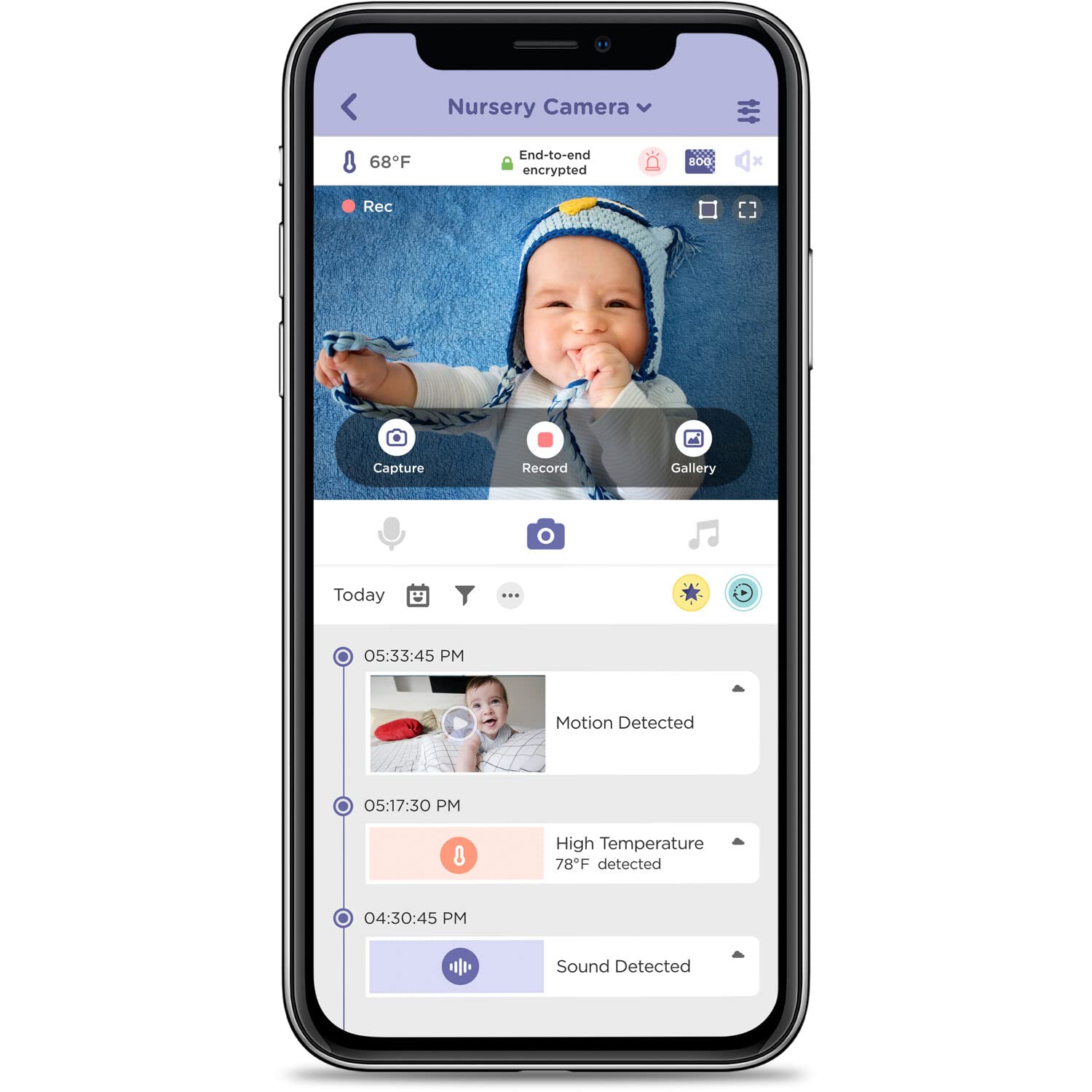
Image: A smartphone screen displaying the HubbleClub app, showing a live video feed of a baby and a timeline of detected events like motion, sound, and temperature alerts.
Video: An official product video demonstrating the features of the Nursery Pal Deluxe Smart Wireless, Wi-Fi Enabled Baby Monitor, including the parent unit, portable camera, and HubbleClub app functionalities.
Обслуживание
Уборка
To clean your monitor units, use a soft, dry, lint-free cloth. Do not use cleaning agents or abrasive materials. Avoid getting moisture into any openings.
Уход за аккумулятором
To prolong battery life, avoid exposing the units to extreme temperatures. If storing for an extended period, ensure the batteries are partially charged.
Поиск неисправностей
- No Picture/Sound on Parent Unit: Ensure both units are powered on and within range. Re-pair the units if necessary (refer to the Quick Start Guide).
- Poor Connection/Frequent Disconnects: Check your Wi-Fi signal strength if using the app. Ensure the Baby Unit is not too far from the router or the Parent Unit. Obstacles like thick walls can interfere with the signal.
- Parent Unit Screen Too Bright at Night: Adjust the brightness settings on the Parent Unit.
- Touch Screen Not Locking: Ensure the Parent Unit is in the correct mode or setting to prevent accidental touches.
- Audio Too Loud: Adjust the volume settings on both the Parent Unit and within the HubbleClub app.
- Камера не реагирует на повороты/наклон/масштабирование: Check the connection. If using the app, ensure a stable internet connection.
Технические характеристики
| Особенность | Деталь |
|---|---|
| Название модели | Nursery Pal Deluxe Smart Connected, Wireless, Wi-Fi Enabled Baby Monitor with Parent Unit Viewer |
| Номер модели | HCTNPDLX |
| Использование внутри и снаружи помещений | В помещении |
| Совместимые устройства | Смартфон, Планшет |
| Источник питания | Питание от батареи |
| Протокол подключения | 2.4 ГГц FHSS |
| Тип контроллера | Android (App compatibility) |
| Тип крепления | Настенное крепление, настольное крепление |
| Разрешение видеозахвата | 1280 x 720 (HD 720p) |
| Цвет | Белый |
| Количество предметов | 2 (Parent Unit, Baby Unit) |
| Количество каналов | 2 |
| Технология беспроводной связи | 2.4 ГГц FHSS |
| Материал | Акрилонитрилбутадиенстирол (АБС) |
| Ватtage | 5 Вт |
| Размеры изделия (Д x Ш x В) | 6 x 0.8 x 3.5 дюйма |
| Нужны ли батареи? | Да (в комплект входит 1 литий-ионный аккумулятор) |
| Вес товара | 1.03 фунта |
| Тип фокусировки | Автофокус |
| Технология слабого освещения | Ночной цвет |
| Тип предупреждения | Аудио и движение |
| Тип комнаты | Детская |
| Формат захвата видео | MPEG-4 |
| Международный рейтинг защиты | IP54 |
| Метод контроля | Трогать |
Информация о гарантии
HUBBLE CONNECTED products typically come with a limited manufacturer's warranty. Please refer to the warranty card included in your product packaging or visit the official HUBBLE CONNECTED website for detailed warranty terms and conditions specific to the Nursery Pal Deluxe model.
Поддерживать
For further assistance, technical support, or to access additional resources, please visit the official HUBBLE CONNECTED webсайт на www.hubbleconnected.comТам же вы найдете ответы на часто задаваемые вопросы и контактную информацию службы поддержки клиентов.
For app-related queries, refer to the help section within the HubbleClub app.