
1. Введение
The Dynatron A42 1U Active Air Cooler is designed for high-performance AMD Ryzen Socket AM4 and AM5 processors. This compact, side-blower PWM fan provides efficient heat dissipation for CPUs up to 95 Watts in 1U server environments. The Dynatron A42 ensures optimal system performance by maintaining appropriate operating temperatures.
Основные характеристики:
- Recommended for AMD Ryzen Processors, Socket AM4 and AM5.
- Supports CPU power up to 95 Watts heat dissipation.
- Features an 80x80x13mm PWM Fan and Copper Fin construction.
- Active Air Cooler suitable for 1U Server and Up.
- Overall dimensions: 110.0mm (L) x 85.0mm (W) x 27.3mm (H).
2. Содержимое упаковки
Перед началом установки убедитесь, что все компоненты присутствуют в пакете:
- Узел радиатора
- PWM Fan (integrated)
- Силовой кабель
- Mounting Connectors/Screws
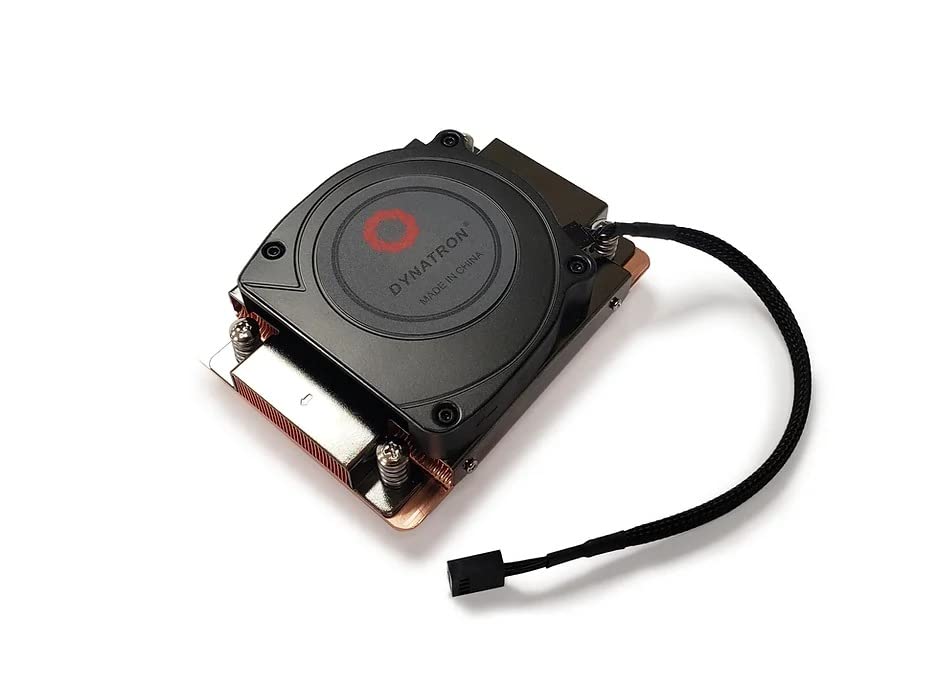
Изображение 2.1: Верх view of the Dynatron A42 CPU Cooler, showing the integrated fan and Dynatron branding.
3. Настройка и установка
Follow these steps carefully to install the Dynatron A42 CPU Cooler on your AMD AM4 or AM5 motherboard.
- Подготовьте материнскую плату: Ensure your motherboard is compatible with AMD AM4 or AM5 sockets. Remove any existing CPU cooler and clean the CPU surface thoroughly with isopropyl alcohol to remove old thermal paste.
- Нанесите термопасту: Apply a small, pea-sized amount of high-quality thermal paste to the center of the CPU's integrated heat spreader (IHS). Avoid applying excessive amounts, as this can lead to reduced cooling performance or unintended residue.
- Установите охладитель: Carefully align the Dynatron A42 cooler with the mounting holes on the motherboard around the CPU socket. The cooler's base should make even contact with the CPU's IHS.
- Закрепите кулер: Use the provided mounting screws to secure the cooler to the motherboard. Tighten the screws in a diagonal pattern (e.g., top-left, bottom-right, top-right, bottom-left) gradually until the cooler is firmly seated. Do not overtighten.
- Подключите кабель вентилятора: Locate the 4-pin PWM fan header on your motherboard (typically labeled "CPU_FAN"). Connect the cooler's 4-pin fan cable to this header. Ensure the connector is fully seated.
- Окончательная проверка: Double-check all connections and ensure the cooler is securely mounted and does not wobble.

Изображение 3.1: Внизу view of the Dynatron A42 CPU Cooler, showing the copper base and pre-applied thermal paste (if applicable) or area for application.

Image 3.2: Dynatron A42 CPU Cooler with indicated dimensions for reference during installation.
4. Руководство по эксплуатации
Once installed, the Dynatron A42 operates automatically, controlled by your motherboard's PWM fan settings. For optimal performance and longevity:
- Настройки BIOS/UEFI: Access your system's BIOS/UEFI to ensure the CPU fan control is set to PWM mode for dynamic fan speed adjustment based on CPU temperature.
- Мониторинг температуры: Regularly monitor your CPU temperatures using system monitoring software to ensure they remain within safe operating limits, especially under heavy load.
- Расход воздуха: Ensure adequate airflow within your server chassis. Proper case ventilation is crucial for the cooler's effectiveness.
5. Техническое обслуживание
Регулярное техническое обслуживание помогает обеспечить долговечность и оптимальную производительность вашего кулера для процессора.
- Удаление пыли: Periodically (every 3-6 months, depending on environment) use compressed air to clean dust from the fan blades and heatsink fins. Ensure the fan is not spinning during cleaning to prevent damage.
- Термопаста: If CPU temperatures rise significantly over time, consider reapplying thermal paste. This typically involves removing the cooler, cleaning both the CPU and cooler base, and applying fresh thermal paste.
- Проверка вентилятора: Check the fan for any signs of wear, unusual noise, or obstructions. Replace the fan if it becomes excessively noisy or stops functioning correctly.
6. Поиск Неисправностей
If you encounter issues with your Dynatron A42 CPU Cooler, refer to the following common problems and solutions:
- Высокие температуры процессора:
- Убедитесь, что кулер надежно закреплен и плотно прилегает к процессору.
- Verify that thermal paste was applied correctly and not excessively.
- Check for dust buildup on the heatsink and fan.
- Confirm proper case airflow and ventilation.
- Ensure the fan is spinning and connected to the correct motherboard header.
- Вентилятор не вращается и не издает шума:
- Check the 4-pin fan cable connection to the motherboard.
- Inspect for any obstructions preventing the fan blades from rotating.
- Проверьте настройки вентилятора в BIOS/UEFI.
- If the fan is making grinding or clicking noises, it may be faulty and require replacement.
- Трудности при установке:
- Refer to the installation steps in Section 3.
- Ensure you are using the correct mounting hardware for your socket type (AM4/AM5).
7. Технические характеристики
| Особенность | Спецификация |
|---|---|
| Размеры продукта | 3.35"Д x 1.07"Ш x 4.33"В (110.0 x 85.0 x 27.3 мм) |
| Бренд | Динатрон |
| Тип разъема питания | 4-Pin PWM |
| Томtage | 12 Вольт |
| Ватtage (TDP Support) | 95 Вт |
| Метод охлаждения | Воздух |
| Совместимые устройства | Desktop (AMD AM4, AM5 Sockets) |
| Уровень шума | 62 децибел (макс.) |
| Материал | Медный плавник |
| Максимальная скорость вращения | 2500 об/мин |
| Емкость воздушного потока | 26.25 кубических футов в минуту |
| Вес товара | 1 фунт |
| Номер модели | А42 (840556075493) |
8. Информация о гарантии
Dynatron products are manufactured to high-quality standards. Specific warranty terms and conditions may vary by region and retailer. Please refer to the warranty documentation included with your purchase or visit the official Dynatron webНа сайте вы найдете подробную информацию о гарантии и процедуре регистрации. Сохраните чек о покупке для предъявления гарантийных претензий.
9 Поддержка
For technical assistance, product inquiries, or further support, please visit the official Dynatron website or contact their customer service department. Online resources, FAQs, and driver downloads may also be available on the manufacturer's webсайт.
Официально Webсайт: www.dynatron.com (Пожалуйста, проверьте актуальную контактную информацию и ресурсы поддержки.)