
1. Введение
This manual provides instructions for the installation, operation, and maintenance of your NETGEAR GS305P 5-Port PoE Gigabit Ethernet Unmanaged Switch. This device is designed to expand your network connectivity with both standard Gigabit Ethernet and Power over Ethernet (PoE+) capabilities, ideal for small office or home network environments.
2. Содержимое упаковки
Убедитесь, что ваш пакет содержит следующие предметы:
- NETGEAR GS305P 5-Port PoE Gigabit Ethernet Unmanaged Switch (GS305Pv3)
- Адаптер питания
- Комплект для крепления на стену
- Краткое руководство по установке

Image: The NETGEAR GS305P switch, power adapter, and power cord as typically found in the package.
3. Продукт закончилсяview
The NETGEAR GS305P is an unmanaged switch featuring 5 Gigabit Ethernet ports, with 4 of these ports supporting PoE+ (Power over Ethernet Plus). It provides a total power budget of 63W for connected PoE devices. The switch is designed for plug-and-play operation, requiring no software installation or configuration.
Видео: Оверview of the NETGEAR 5-Port PoE Switch, demonstrating its features and ease of use.
Передняя панель

Image: Front panel of the GS305P switch, highlighting the 5 Gigabit Ethernet ports and LED indicators for power, PoE Max, link/activity, and PoE fault.
- Светодиод питания: Указывает состояние питания.
- Индикатор максимального PoE: Illuminates when PoE power consumption is near maximum capacity.
- Link/Activity LEDs (Ports 1-5): Green for 1000Mbps link, Yellow for 10/100Mbps link. Blinks to indicate activity.
- PoE Status LEDs (Ports 1-4): Green for PoE powered, Yellow for PoE fault.
- Порты Ethernet (1–5): RJ-45 ports for network connections. Ports 1-4 support PoE+.
4. Настройка и установка
The NETGEAR GS305P switch is designed for simple plug-and-play installation. No software configuration is required.
4.1 Подключение коммутатора
- Connect the power adapter to the switch's power input and then plug the power adapter into an electrical outlet. The Power LED on the switch will illuminate.
- Подключите маршрутизатор или модем к любому из 5 гигабитных портов Ethernet на коммутаторе с помощью кабеля Ethernet.
- Connect your network devices (computers, printers, network storage) to the remaining Gigabit Ethernet ports. For PoE-powered devices (e.g., IP cameras, wireless access points), connect them to ports 1-4.

Image: A diagram illustrating the plug-and-play nature of the unmanaged switch, connecting various devices like WiFi Access Points, IP Cameras, Computers, and NAS.
4.2 Варианты монтажа
The GS305P switch can be placed on a desktop or mounted on a wall. A wallmount kit is included for secure installation.
- Размещение на рабочем столе: Ensure the switch is placed on a flat, stable surface with adequate ventilation.
- Настенное крепление: Use the provided wallmount kit to secure the switch to a wall. Refer to the quick installation guide for detailed steps on wall mounting.
5. Эксплуатация переключателя
Once connected, the switch operates automatically. The LEDs provide visual feedback on the network status.
- Включение питания: The Power LED will be green when the switch is receiving power.
- Network Activity: The Link/Activity LEDs will light up when a device is connected and blink to indicate data transmission.
- Мощность PoE: For PoE-powered devices, the PoE Status LED will be green when power is being supplied. If a PoE fault occurs, the LED will turn yellow.
- Бесшумная работа: The fanless design ensures quiet operation, making it suitable for noise-sensitive environments.
6. Техническое обслуживание
Для обеспечения оптимальной производительности и долговечности вашего коммутатора следуйте этим рекомендациям по техническому обслуживанию:
- Уборка: Для чистки внешней поверхности переключателя используйте мягкую сухую ткань. Не используйте жидкие или аэрозольные чистящие средства.
- Вентиляция: Во избежание перегрева убедитесь, что вентиляционные отверстия не заблокированы.
- Среда: Operate the switch within its specified temperature and humidity ranges. Avoid direct sunlight or extreme temperatures.
- Управление кабелями: Поддерживайте порядок среди сетевых кабелей, чтобы избежать нагрузки на порты и улучшить циркуляцию воздуха.
7. Поиск Неисправностей
If you encounter issues with your NETGEAR GS305P switch, refer to the following common troubleshooting steps:
- Нет питания: Ensure the power adapter is securely connected to the switch and a working electrical outlet. Check the Power LED.
- Нет ссылки/активности: Verify that Ethernet cables are properly connected to both the switch and the connected device. Try a different cable or port. Check the Link/Activity LED.
- Устройство PoE не включается: Ensure the device is PoE-compatible and connected to one of the PoE+ ports (1-4). Check the PoE Status LED for the port; a yellow light indicates a fault. Verify the total power budget (63W) is not exceeded by all connected PoE devices.
- Низкая скорость сети: Ensure all connected devices and cables support Gigabit Ethernet for optimal performance. Check for excessive network traffic.
8. Технические характеристики
Key technical specifications for the NETGEAR GS305P switch:
| Особенность | Описание |
|---|---|
| Модель | GS305P (GS305Pv3) |
| Количество портов | 5 гигабитных порта Ethernet |
| Порты PoE+ | 4 (порты 1-4) |
| Общий бюджет мощности PoE | 63 Вт |
| Скорость передачи данных | 1000 Мбит/с (гигабит) |
| Тип переключателя | Неуправляемый |
| Материал корпуса | Металл |
| Размеры (Д x Ш x В) | 9.5" x 6.7" x 3.4" (approximate, from product data) |
| Томtage | 240 Volts (Power adapter input) |
| Операционная среда | Designed for indoor use in U.S. & CA. |
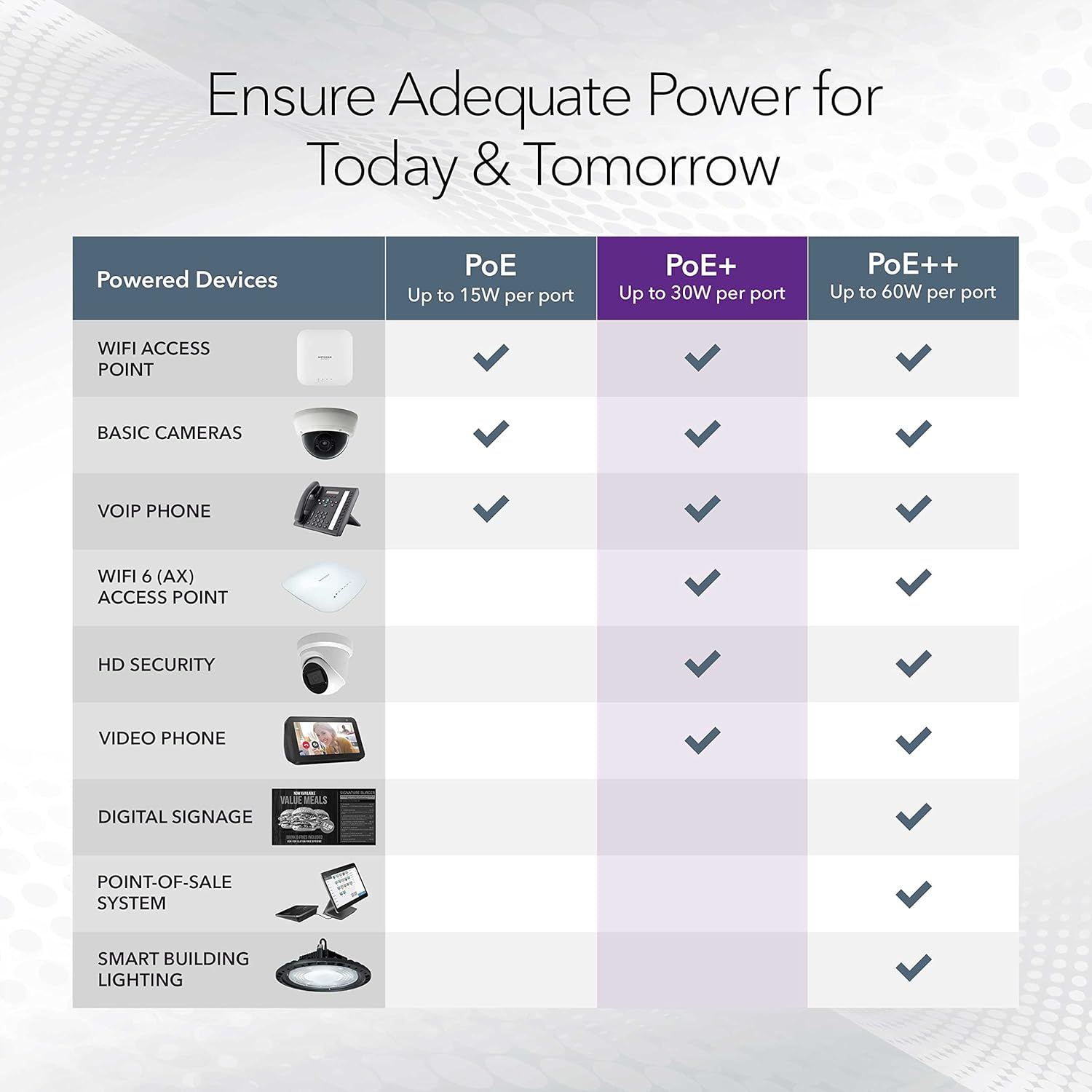
Image: A table illustrating the power capabilities of PoE, PoE+, and PoE++ for different powered devices.
9. Гарантия и поддержка
9.1 Информация о гарантии
The NETGEAR GS305P switch comes with an industry-leading 3-летняя ограниченная гарантия на оборудование. Please retain your proof of purchase for warranty claims. For full warranty terms and conditions, refer to the official NETGEAR webсайт или документацию, прилагаемую к вашему продукту.
9.2 Техническая поддержка
For technical assistance, product registration, or to access additional resources, visit the official NETGEAR support website. You can find FAQs, firmware updates, and community forums there.
Поддержка NETGEAR Webсайт: www.netgear.com/support