
isinwheel E9
isinwheel S9 Pro Electric Scooter User Manual
Model: S9 Pro (E9)
1. Введение
This user manual provides essential information for the safe operation, maintenance, and troubleshooting of your isinwheel S9 Pro Electric Scooter. Please read this manual thoroughly before your first ride to ensure proper use and to maximize the lifespan of your scooter.
The isinwheel S9 Pro Electric Scooter is designed for personal urban commuting and recreational use, offering a portable and efficient mode of transport. It features a powerful motor, long-range battery, dual suspension, and a smart app for enhanced control.
2. Правила техники безопасности
Ваша безопасность превыше всего. Всегда соблюдайте следующие правила:
- Во время езды всегда надевайте шлем и соответствующую защитную экипировку (наколенники, налокотники).
- Не катайтесь в сильный дождь и не проезжайте через лужи глубиной более 0.8 дюйма (2 см).
- Перед каждой поездкой проверяйте исправность обоих тормозов.
- Соблюдайте все местные законы и правила дорожного движения.
- Do not allow children under 16 to ride the scooter.
- Избегайте езды по скользким поверхностям, крутым склонам или неровной местности.
- Соблюдайте безопасную дистанцию от других транспортных средств и пешеходов.
- Не выполняйте трюков и резких маневров.
- The maximum weight limit for the rider is 220 lbs (100 kg).

Image: A person riding the isinwheel S9 Pro Electric Scooter, demonstrating safe operation in an urban environment.
3. Компоненты продукта
Familiarize yourself with the main parts of your isinwheel S9 Pro Electric Scooter:
- Руль: Controls steering and houses the display, accelerator, and brake levers.
- Smart LED Dashboard: Displays speed, battery level, and riding mode.
- Рычаг тормоза: Activates the dual braking system (Disc brake & EABS anti-lock brake).
- Ускоритель: Регулирует скорость скутера.
- Фара: Передняя подсветка для лучшей видимости.
- Механизм складывания: Обеспечивает компактное хранение и транспортировку.
- Палуба: Платформа для ног всадника.
- Подставка: Обеспечивает устойчивость скутера при парковке.
- 8.5-дюймовые пневматические шины: Provide shock absorption and traction.
- Rear Dual Suspension: Enhances ride comfort over uneven surfaces.
- Задний фонарь/стоп-сигнал: Задняя подсветка и индикация тормозов.
- Порт зарядки: Для подключения зарядного устройства.

Изображение: Оверview of the isinwheel S9 Pro Electric Scooter, showing its main components and the accompanying mobile application interface.

Изображение: подробное view of the Smart LED Dashboard, highlighting the brake lever and accelerator controls.
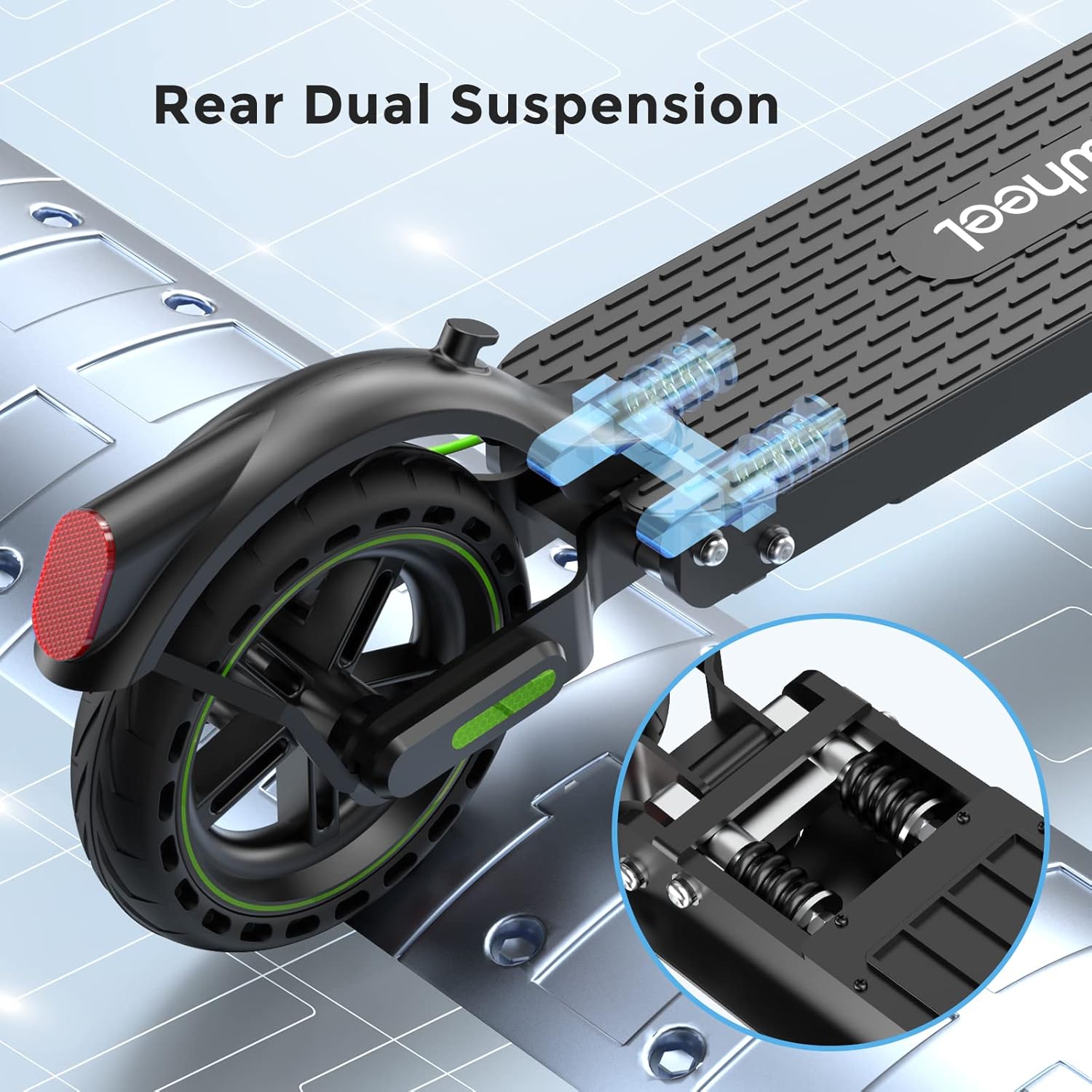
Image: Illustration of the rear dual suspension system, showing the shock-absorbing springs for a smoother ride.
4. Настройка и первое использование
4.1 Распаковка и сборка
- Аккуратно извлеките все компоненты из упаковки.
- Разложите самокат, нажав кнопкуasinПроверьте механизм складывания. Убедитесь, что он надежно зафиксирован.
- Attach the handlebar to the stem, ensuring all cables are properly connected and secured.
- Tighten all screws and bolts as per the quick start guide.
4.2 Первоначальная зарядка
Перед первой поездкой полностью зарядите аккумулятор скутера. Обычно это занимает около 5 часов.
- Найдите порт зарядки на скутере.
- Подключите зарядное устройство к скутеру, а затем вставьте зарядное устройство в розетку.
- Когда зарядка будет завершена, индикатор на зарядном устройстве изменит цвет (например, с красного на зеленый).
4.3 App Connection (MiniRobot APP)
Enhance your riding experience by connecting to the MiniRobot APP:
- Download the "MiniRobot" app from the App Store (iOS) or Google Play Store (Android).
- Включите самокат и включите Bluetooth на смартфоне.
- Open the MiniRobot app and follow the on-screen instructions to pair with your scooter.
- The app allows you to lock/unlock the scooter, control lights, adjust gears, set start mode (zero/non-zero), and manage maximum speed and cruise control.

Image: The isinwheel S9 Pro Electric Scooter alongside a smartphone displaying the MiniRobot App interface, showing various control options.

Image: A close-up of the MiniRobot App settings screen, demonstrating options like unit selection, cruise control, battery capacity, energy recovery, riding mode, and zero start.
5. Инструкция по эксплуатации
5.1 Запуск скутера
- Нажмите кнопку питания, чтобы включить самокат.
- For non-zero start mode (default): Kick off with one foot to gain a little speed (approx. 1.8 mph / 3 km/h), then press the accelerator.
- For zero start mode (can be enabled via app): Press the accelerator directly from a standstill.
5.2 езда
- Place both feet firmly on the deck.
- Gently press the accelerator to increase speed. The scooter has a top speed of 15.6 mph (25 km/h).
- Steer by leaning slightly in the desired direction and turning the handlebar.
5.3 Торможение
The S9 Pro features a dual brake system for effective stopping:
- Gently squeeze the brake lever on the handlebar to engage both the disc brake and EABS anti-lock brake.
- Apply brakes smoothly to avoid sudden stops, especially at higher speeds.

Image: Illustration of the dual brake system, showing the brake lever on the handlebar and the disc brake on the rear wheel, along with the headlight and taillight.
5.4 Складывание и переноска
- Убедитесь, что самокат выключен.
- Найдите и отпустите механизм складывания.
- Fold the stem down until it locks into place with the rear fender.
- The scooter weighs approximately 26 lbs (11.8 kg), making it portable for carrying or storing in compact spaces.

Image: A diagram illustrating the dimensions of the isinwheel S9 Pro Electric Scooter in both its unfolded and folded states, highlighting its compact design.
6. Техническое обслуживание
6.1 Очистка
- Протирайте самокат мягкой тряпкой.amp Ткань. Не используйте струи воды под высоким давлением или агрессивные чистящие средства.
- Перед очисткой убедитесь, что крышка порта зарядки надежно закрыта.
6.2 Уход за шинами
- Regularly check tire pressure. Proper inflation ensures optimal performance and range.
- Перед каждой поездкой проверяйте шины на предмет износа, проколов и повреждений.
6.3 Уход за аккумулятором
- Перед длительным хранением полностью зарядите аккумулятор.
- Store the scooter in a cool, dry place between 50°F and 77°F (10°C and 25°C).
- Recharge the battery every 30-60 days if not in use to prevent deep discharge.
- The battery has over-charge and over-discharge protection and can be recharged more than 1000 times.
6.4 Общий осмотр
- Периодически проверяйте затяжку всех винтов и болтов.
- Убедитесь, что механизм складывания работает плавно и надежно фиксируется.
- Verify that the brake levers, accelerator, and lights are functioning correctly.
7. Поиск Неисправностей
| Проблема | Возможная причина | Решение |
|---|---|---|
| Скутер не включается. | Низкий заряд батареи; кнопка питания нажата неправильно. | Зарядите аккумулятор. Нажмите и удерживайте кнопку питания. |
| Уменьшенная дальность или скорость. | Low tire pressure; Overloaded; Riding uphill; Cold weather. | Check and inflate tires; Reduce load; Ride on flatter terrain; Battery performance decreases in cold. |
| Тормоза кажутся ослабленными или неэффективными. | Требуется регулировка тормозного троса; изношены тормозные колодки. | Отрегулируйте натяжение тормозного троса; осмотрите и замените тормозные колодки, если они изношены. |
| Проблемы с подключением к приложению. | Bluetooth выключен; Самокат выключен; Приложение не обновлено. | Ensure Bluetooth is on and scooter is powered; Restart app/scooter; Update app. |
| Error Code E-14 (as per customer review). | Accelerator malfunction or wiring issue. | Contact customer support for diagnosis and replacement parts. Do not attempt to disassemble without proper knowledge. |
If you encounter issues not listed here or if solutions do not resolve the problem, please contact isinwheel customer support.
Video: Official isinwheel S9Pro & S9MAX Electric Scooter overview, demonstrating features and usage scenarios. This video provides a visual guide to the scooter's capabilities and general operation.
8. Технические характеристики
| Особенность | Деталь |
|---|---|
| Название модели | E9 (S9 Pro) |
| Мощность двигателя | 350W Brushless Motor (Peak Power: 700W) |
| Максимальная скорость | До 15.6 миль/ч (25 км/ч) |
| Макс Диапазон | До 18 миль (29 км) |
| Емкость аккумулятора | 7.5 Ач литий-ионный |
| Время зарядки | Приблизительно 5 часов |
| Максимальный вес | 220 фунта (100 кг) |
| Размер шин | 8.5-дюймовые пневматические шины |
| Тормозная система | Dual Brake System (Disc brake & EABS anti-lock brake) |
| Приостановка | Задняя двойная подвеска |
| Материал рамы | Авиационный алюминий |
| Вес товара | Приблизительно 26 фунта (11.8 кг) |
| Размеры (ДxШxВ) | 45 x 5 x 20 дюймов (в разложенном виде) |

Изображение: взорванный view illustrating the 8.5-inch tires and the internal motor components of the isinwheel S9 Pro Electric Scooter, highlighting its power and load capacity.
9. Гарантия и поддержка
9.1 Информация о гарантии
The isinwheel S9 Pro Electric Scooter comes with a limited warranty. Specific warranty periods may vary for different parts (e.g., 12-month or 180-day for different components). Please refer to your purchase documentation for detailed warranty terms and conditions.
9.2 Поддержка клиентов
For any questions, technical assistance, or warranty claims, please contact isinwheel customer support. Contact information can typically be found on the official isinwheel webсайт или через вашу платформу покупок.
When contacting support, please have your model number (E9) and purchase details ready to expedite the process.
Ask a question about this manual
Ask about setup, troubleshooting, compatibility, parts, safety, or missing instructions. Manuals+ will review the question and use this page’s manual context to help answer it.