
Cecotec Conga 11090 Spin Revolution Home&Wash
Руководство пользователя робота-пылесоса Cecotec Conga 11090 Spin Revolution Home&Wash
Модель: 08105
1. Введение
Thank you for choosing the Cecotec Conga 11090 Spin Revolution Home&Wash Robot Vacuum Cleaner. This advanced robot is designed to provide comprehensive cleaning for your home, combining powerful vacuuming with effective mopping capabilities and an automatic self-emptying and mop-washing station. Please read this manual carefully before using the product to ensure proper operation, maintenance, and safety.
2. Важные инструкции по технике безопасности
Всегда соблюдайте основные меры предосторожности при использовании электроприборов, чтобы снизить риск возникновения пожара, поражения электрическим током или получения травм.
- Перед использованием прибора прочтите все инструкции.
- Не позволяйте детям управлять роботом. Следите за детьми и домашними животными во время работы робота.
- Убедитесь, что мощностьtage соответствует объемуtage указано на паспортной табличке.
- Не используйте робота на мокрых поверхностях или в местах со стоячей водой.
- Держите волосы, свободную одежду, пальцы и все части тела подальше от отверстий и движущихся частей.
- Не поднимайте роботом крупные предметы, острые предметы или жидкости.
- Перед выполнением любого обслуживания или чистки выключите робота и отсоедините зарядную станцию.
- Используйте только рекомендованные производителем насадки и аксессуары.
- Store the robot and charging station indoors in a cool, dry place.
- Do not operate the robot if it has been dropped, damaged, left outdoors, or dropped into water.
3. Содержимое упаковки
Убедитесь, что в упаковке присутствуют все компоненты:
- 1 робот-пылесос
- 1 x Боковая кисть
- 2 вращающиеся швабры
- 1 x Self-emptying Base with 2 Tanks (1 x Clean Water Tank, 1 x Dirty Water Tank)
- 1 пылесборник
- 1 х Кабель питания
- 1 самоочищающаяся щетка
- 1 x Multifunction Brush
- 1 х Руководство по эксплуатации

4. Продукт закончилсяview
The Conga 11090 Spin Revolution Home&Wash is an intelligent cleaning solution featuring advanced navigation and comprehensive cleaning capabilities.
Робот-пылесос 4.1
- Умная навигация: Equipped with iTech Laser Eye technology for precise mapping and obstacle avoidance.
- Мощное всасывание: Delivers up to 5000 Pa suction power for effective dirt and debris removal.
- Spin Revolution Mopping: Features two rotating mops for deep scrubbing and floor cleaning.
- Длительный срок службы батареи: Provides up to 140 minutes of cleaning autonomy.


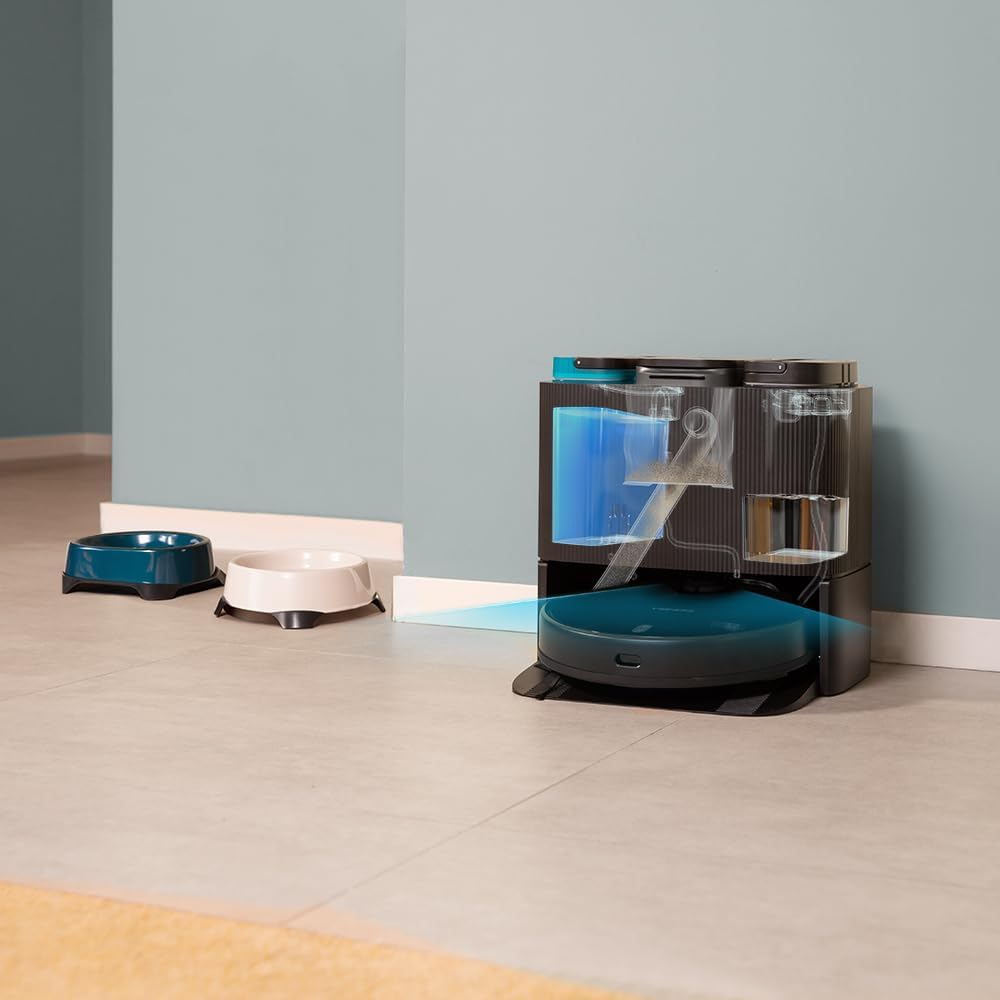
4.2 Self-Emptying and Mop-Washing Station
- Автоматический сбор пыли: The robot automatically empties its dustbin into a 2L dust bag in the station.
- Автоматическая мойка швабр: The station cleans the robot's mopping pads with clean water from its 2.8L tank and collects dirty water in a 2.4L tank.
- Удобная конструкция: Reduces manual intervention for a truly hands-free cleaning experience.


5. Настройка
5.1 Распаковка и размещение
- Аккуратно извлеките все компоненты из упаковки.
- Choose a suitable location for the self-emptying station. Ensure there is at least 1.5 meters of clear space in front of the station and 0.5 meters on either side.
- Plug the power cable into the station and connect it to a power outlet.
5.2 Первоначальная зарядка
Place the robot onto the charging contacts of the self-emptying station. Ensure the robot is properly aligned. The robot will begin charging automatically. For first use, it is recommended to fully charge the robot before operation.
5.3 Установка и подключение приложения
Download the "CECOTEC" app from your smartphone's app store (iOS or Android). Follow the in-app instructions to connect your robot to your home Wi-Fi network (2.4 GHz) and Bluetooth. The app provides enhanced control and mapping features.

6. Управление роботом
6.1 Запуск цикла очистки
- Через кнопку робота: Press the power button on the robot to start a general cleaning cycle.
- Через приложение: Open the CECOTEC app. You can select various cleaning modes such as "Clean All", "Spot Clean", "Zone Clean", or schedule cleanings.

6.2 Картография и навигация
The robot uses its iTech Laser Eye to create a detailed map of your home during its first cleaning cycle. This map can be viewed and customized in the app. You can set virtual walls, restricted zones, and specific cleaning areas.

6.3 Automatic Self-Maintenance
During and after cleaning cycles, the robot will automatically return to its station to empty its dustbin and wash its mopping pads. The frequency of these actions can be configured in the app.
7. Техническое обслуживание
Регулярное техническое обслуживание обеспечивает оптимальную производительность и продлевает срок службы вашего робота-пылесоса.
7.1 Очистка робота
- Основная кисть: Remove the main brush and clean it regularly using the provided self-cleaning brush to remove tangled hair and debris.
- Боковая щетка: Check and clean the side brush for any tangled hair or debris. Replace if worn.
- Насадки для швабры: Although the station washes them, it is recommended to manually remove and rinse the mopping pads periodically.
- Датчики: Wipe all sensors (cliff sensors, laser sensor) with a clean, dry cloth to ensure proper navigation.

7.2 Maintaining the Self-Emptying Station
- Мешок для пыли: Replace the dust bag in the station when it is full. The app will notify you.
- Водяные баки: Regularly empty the dirty water tank and refill the clean water tank. Clean both tanks to prevent mold or odor buildup.
- Washing Tray: Clean the washing tray where the mops are cleaned to remove any residue.

8. Поиск Неисправностей
If you encounter issues with your robot, refer to the following common problems and solutions:
| Проблема | Возможная причина | Решение |
|---|---|---|
| Робот не включается. | Low battery; power cable not connected. | Place robot on charging station; ensure power cable is securely connected. |
| Робот не может найти зарядную станцию. | Station is blocked; robot is too far. | Ensure clear space around station; manually place robot closer to station. |
| Низкая эффективность очистки. | Brushes tangled; dustbin full; mops dirty. | Clean main/side brushes; empty dustbin/replace bag; clean mopping pads. |
| Робот часто застревает. | Obstacles; dark surfaces; dirty sensors. | Clear obstacles; use virtual walls in app; clean sensors. |
| Проблемы с подключением к приложению. | Incorrect Wi-Fi password; 5GHz network; Bluetooth off. | Verify Wi-Fi password; ensure 2.4GHz network; enable Bluetooth; restart robot and router. |
9. Технические характеристики
| Особенность | Деталь |
|---|---|
| Бренд | Cecotec |
| Название модели | Conga 11090 Spin Revolution Home&Wash |
| Номер модели | 08105 |
| Цвет | Черный |
| Размеры продукта (робот) | 34.3 х 34.5 х 10.8 см |
| Вес продукта | 11.25 кг |
| Томtage | 120 Вольт |
| Уровень шума | 75 дБ |
| Время работы | До 2 часов 20 минут (140 минут) |
| Емкость пылесборника (станция) | 2 литра |
| Clean Water Tank Capacity (Station) | 2.8 литра |
| Dirty Water Tank Capacity (Station) | 2.4 литра |
| Особые возможности | Wireless, Automatic Shut-off, iTech Laser Eye Navigation |
| Совместимые устройства | Smartphones (via CECOTEC App) |
10. Гарантия и поддержка
Cecotec products are manufactured to high-quality standards. For warranty information, please refer to the warranty card included in your product packaging or visit the official Cecotec website. For technical support, troubleshooting assistance, or spare parts, please contact Cecotec customer service or the retailer from whom you purchased the product.
Онлайн поддержка: Посетите Фирменный магазин Cecotec на Amazon для получения дополнительной информации о продукте и ресурсов поддержки.
Ask a question about this manual
Ask about setup, troubleshooting, compatibility, parts, safety, or missing instructions. Manuals+ will review the question and use this page’s manual context to help answer it.