
1. Введение
Thank you for choosing the Cecotec Bolero Hexa AF316000 Multifunction Built-in Oven. This manual provides essential information for the safe and efficient operation, installation, and maintenance of your new appliance. Please read this manual thoroughly before using the oven and keep it for future reference.

Рисунок 1.1: Передняя часть view of the Cecotec Bolero Hexa AF316000 oven.
2. Информация по технике безопасности
Всегда соблюдайте следующие меры предосторожности, чтобы предотвратить травмы или повреждение прибора.
- Перед использованием убедитесь, что духовка правильно установлена квалифицированным специалистом.
- Не прикасайтесь к горячим поверхностям. Всегда используйте прихватки или рукавицы.
- Во время работы духовки держите детей и домашних животных подальше от нее.
- Never use abrasive cleaners or sharp objects to clean the oven interior.
- Отключите электропитание перед выполнением любого обслуживания или чистки.
- Не храните легковоспламеняющиеся материалы внутри печи или рядом с ней.
3. Особенности продукта
The Cecotec Bolero Hexa AF316000 oven is designed with advanced features for versatile cooking.
3.1.Основные характеристики
- Большая вместимость: 81 Liters with 5 shelf positions, offering up to 25% more interior space.
- 11 Функции приготовления: Convection, Maxi Grill, Fast Cooking, Steam Assist Cooking, Steam EasyClean, Fan Grill, Multicooking, Airfry Master, Pizza Master, 3D Cooking, and Defrost.
- Класс энергоэффективности А: Разработан для снижения энергопотребления.
- Центральный пункт управления: Intuitive electronic control for easy operation.
- X3 Display: Three-zone display for clear viewing and selection of temperature, time, and cooking mode.
- Телескопические направляющие: For easy access and control of food during cooking.

Figure 3.1: Visual representation of the oven's spacious 81-liter capacity.

Figure 3.2: The oven's Energy Efficiency Class A rating.

Figure 3.3: Close-up of the intuitive control panel with various function icons.
4. Настройка и установка
Правильная установка имеет решающее значение для безопасной и эффективной работы вашей духовки. Рекомендуется, чтобы установку выполнял квалифицированный специалист.
4.1. Габариты и зазоры
Ensure adequate space and ventilation around the oven. Refer to the diagrams below for precise measurements.

Рисунок 4.1: Сторона view of the oven with overall dimensions (59.4 cm width, 59.5 cm height, 63.5 cm depth).

Figure 4.2: Diagram illustrating the required cutout dimensions for built-in installation.

Figure 4.3: Diagram illustrating the required cutout dimensions for installation in a tall cabinet.
4.2. Электрическое подключение
The oven requires a 230 Volts electrical supply with a power rating of 3400 Watts. Ensure the electrical circuit can support this load and is properly grounded. Consult a qualified electrician for connection.
4.3. Первоначальная очистка
Перед первым использованием очистите внутреннюю поверхность духовки и принадлежности с помощью моющего средства.amp cloth and mild detergent. Run the oven empty at a high temperature (e.g., 200°C) for about 30 minutes to burn off any manufacturing residues. Ensure the kitchen is well-ventilated during this process.
5. Инструкция по эксплуатации
This section details how to use the various functions of your Cecotec oven.
5.1. Основные операции
- Включение питания: Turn the central control knob or press the power button to activate the oven.
- Выберите функцию: Use the function selection buttons or knob to choose your desired cooking mode (e.g., Convection, Grill).
- Установить температуру: Adjust the temperature using the dedicated control. The X3 display will show the selected temperature.
- Установить время: Use the timer controls to set the cooking duration.
- Начать приготовление: Нажмите кнопку «Старт», чтобы начать процесс приготовления.

Figure 5.1: A hand interacting with the oven's control panel to select settings.
5.2. Специальные функции
- Airfryer Master: This function uses forced hot air convection for healthier frying with minimal oil. Place food in the included SS Airfry Basket for best results.
- Мастер пиццы: Achieve authentic stone-baked pizzas. Use the included Pizza Stone XXL (35 cm diameter) for professional results.
- Приготовление пищи с помощью пара: Add water to the designated area to create steam, ensuring dishes are crispy on the outside and juicy on the inside.
- 3D-кулинария: Ensures homogeneous heat distribution throughout the oven cavity for perfect cooking results on multiple levels.

Рисунок 5.2: Examples of dishes prepared using Airfryer, Pizza Master, and Steam Assist functions.

Figure 5.3: The Pizza Master function in action, utilizing the special pizza stone.

Figure 5.4: Illustrating the Steam Assist function, where water is added to generate steam for cooking.
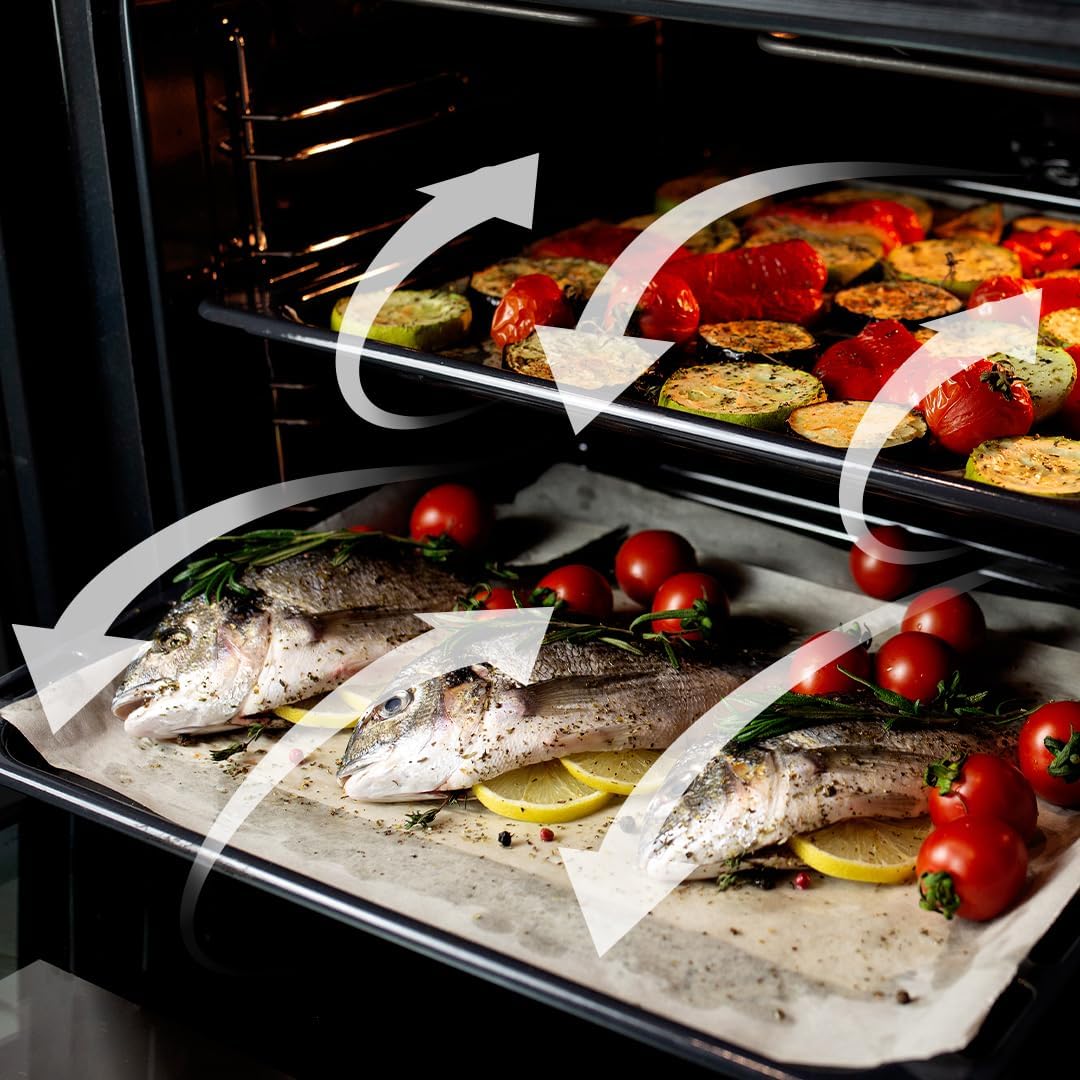
Figure 5.5: Visual representation of the 3D Cooking function's homogeneous airflow.
6. Чистка и обслуживание
Регулярная чистка и техническое обслуживание продлят срок службы вашей духовки и обеспечат ее оптимальную работу.
6.1. Steam EasyClean Function
This function uses steam to loosen dirt and food residues, making cleaning easier. Add water to the designated area and activate the Steam EasyClean function. After the cycle, wipe the interior with a soft cloth.

Figure 6.1: Comparison showing the effectiveness of the Steam EasyClean function.
6.2. Генеральная уборка
- Очистите внешнюю часть с помощью рекламыamp ткань и мягкое моющее средство. Избегайте абразивных чистящих средств.
- Remove and clean oven racks and accessories separately using warm soapy water.
- Перед чисткой убедитесь, что духовка остыла.
7. Поиск Неисправностей
If you encounter issues with your oven, refer to the table below for common problems and solutions.
| Проблема | Возможная причина | Решение |
|---|---|---|
| Духовка не включается | Нет питания | Проверьте шнур питания, автоматический выключатель и розетку. |
| Не греет духовка | Incorrect function/temperature setting | Verify selected function and temperature. |
| Неравномерное приготовление | Improper rack position or overloaded oven | Use recommended rack positions; avoid overcrowding. Utilize 3D Cooking function. |
| Smoke/odor during first use | Сжигание производственных отходов | This is normal. Ensure good ventilation. It will dissipate after initial use. |
Если проблема не устранена после применения этих решений, обратитесь в службу поддержки клиентов Cecotec.
8. Технические характеристики
Detailed technical specifications for the Cecotec Bolero Hexa AF316000 oven.
| Спецификация | Ценить |
|---|---|
| Бренд | Cecotec |
| Номер модели | АФ316000 (02814) |
| Емкость | 81 литра |
| Размеры (Д x Ш x В) | 59.4 х 63.5 х 59.5 см |
| Масса | 32.3 Килограмма |
| Власть | 3400 Вт |
| Томtage | 230 Вольт |
| Энергоэффективность | Класс А |
| Тип установки | Wall Mount (Built-in) |
| Режимы приготовления | 11 Functions (Convection, Maxi Grill, Fast Cooking, Steam Assist, Steam EasyClean, Fan Grill, Multicooking, Airfry Master, Pizza Master, 3D Cooking, Defrost) |
| Включенные компоненты | 1 Integrated Air Fryer Oven, 1 Airfryer Basket, 1 User Manual, 1 Pizza Stone XXL |
| Наличие запасных частей | 10 года |
9. Гарантия и поддержка
Cecotec products are manufactured to high-quality standards. This product comes with a standard manufacturer's warranty. For specific warranty terms and conditions, please refer to the warranty card included with your product or visit the official Cecotec webсайт.
For technical support, spare parts, or service inquiries, please contact Cecotec customer service through their official channels. When contacting support, please have your model number (AF316000 or 02814) and purchase date available.
You can find more information and support at the official Cecotec webсайт: www.cecotec.com