
1. Введение и окончаниеview
This manual provides detailed instructions for the proper setup, operation, and maintenance of your Techbee TE02 Indoor Digital Electrical Outlet Timer Plug. This device is designed to automate the power supply to your electrical appliances, offering convenience, energy savings, and enhanced home security through its programmable features.
The Techbee TE02 timer plug features a large, easy-to-read display and intuitive controls, allowing for precise scheduling of up to 20 ON/OFF programs per day. It also includes advanced functions such as a countdown timer and a random ON/OFF mode for vacation security. Its built-in battery ensures that your programmed settings are retained even during power outagес.
2. Особенности продукта
- Extensive Programming: Supports up to 20 weekly ON-OFF timing programs for flexible scheduling.
- Функция обратного отсчета: Allows for precise delay ON/OFF timing, from 1 second up to 99 hours, 59 minutes, and 59 seconds.
- Anti-theft Random Mode: Activates lights or other appliances at varying times to simulate occupancy, deterring potential intruders.
- Удобный для пользователя дисплей: Features a large screen for clear visibility of digits and numbers.
- Сила ОуtagЭлектронная защита: Equipped with a built-in NiMH 1.2V battery to retain programmed settings for over 30 days during power interruptions.
- Versatile Time Format: Interchangeable 12-hour (AM/PM) and 24-hour formats.
- Заземленная розетка: Designed with a 3-prong plug and socket for safe use with a wide range of appliances.
- Бесшумная работа: Operates completely silently, making it suitable for home use.
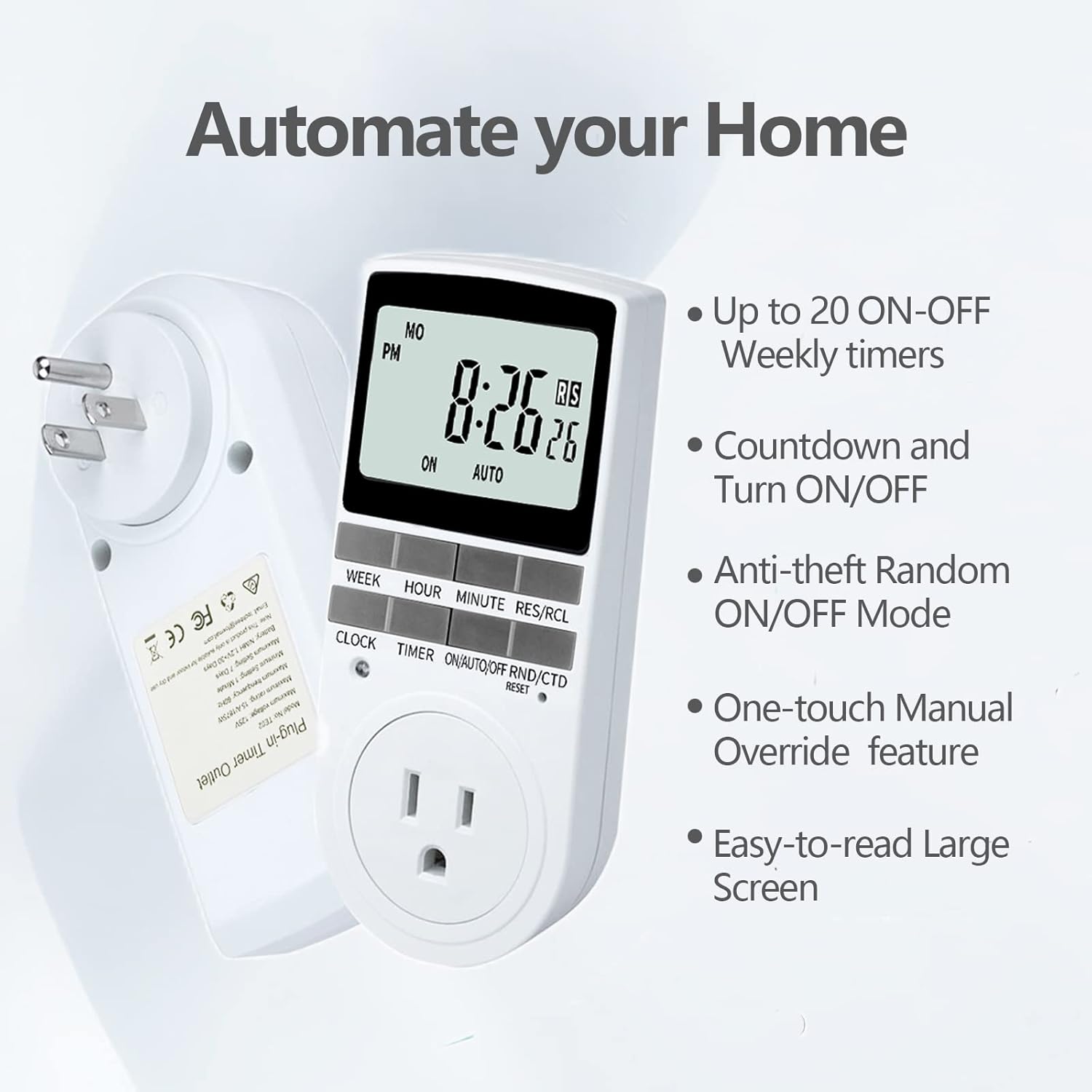
Figure 2.1: Key features of the Techbee TE02 Digital Timer Plug.
3. Технические характеристики
| Спецификация | Ценить |
|---|---|
| Номер модели | ТЕ02 |
| Максимальный объемtage | 125В |
| Максимальный рейтинг | 15A / 1875W |
| Максимальная частота | 60 Гц |
| Минимальный интервал настройки | 1 Minute (1 second for countdown) |
| Maximum Setting Duration | 7 дней |
| Тип батареи | NiMH 1.2V (retains settings >30 days) |
| Количество настроек | 20 ON-OFF programs |

Рисунок 3.1: Технические данные и характеристики, указанные на упаковке продукта.
4. Настройка
Before initial use, it is recommended to plug the timer into a live outlet for at least 30 minutes to charge the internal battery. This ensures that the timer retains its settings even if unplugged or during a power outage.
- Unpack the timer plug and included instruction manual.
- Locate a standard 125V grounded electrical outlet.
- Plug the Techbee TE02 timer directly into the wall outlet. The display should illuminate.
- Нажмите ПЕРЕЗАГРУЗИТЬ button (usually a small recessed button) using a non-metallic pointed object (like a pen tip) to clear all previous settings and ensure proper function.
- Proceed to set the current time and day as described in the 'Operating Instructions' section.

Figure 4.1: The Techbee TE02 Digital Timer Plug ready for setup.
Видео 4.1: Оверview of the Techbee TE02 timer plug, including unboxing and initial setup steps.
5. Инструкция по эксплуатации
5.1 Установка текущего времени и дня
- Нажмите ЧАСЫ кнопка. На дисплее отобразится текущее время.
- Удерживая ЧАСЫ , нажмите НЕДЕЛЯ установить текущий день недели (ПН, ВТ, СР, ЧТ, ПТ, СБ, ВС).
- Удерживая ЧАСЫ , нажмите ЧАС установить текущий час (в 12-часовом или 24-часовом формате).
- Удерживая ЧАСЫ , нажмите МИНУТА для установки текущей минуты.
- Выпустите ЧАСЫ чтобы сохранить настройки.
5.2. Programming ON/OFF Times (Up to 20 Programs)
- Нажмите ТАЙМЕР Кнопка для входа в режим программирования. На дисплее отобразится «1 ON».
- Нажимать НЕДЕЛЯ для выбора дня (дней) для этой программы (например, ПН, ВТ, СР, ЧТ, ПТ, СБ, ВС или различные комбинации).
- Нажимать ЧАС для установки желаемого часа включения.
- Нажимать МИНУТА для установки желаемой минуты включения.
- Нажимать ТАЙМЕР На дисплее появится надпись «1 OFF».
- Повторите шаги 2-4, чтобы установить желаемое время выключения для этой программы.
- Продолжайте нажимать ТАЙМЕР to cycle through programs "2 ON", "2 OFF" up to "20 ON", "20 OFF", setting each as needed.
- После установки всех желаемых программ нажмите кнопку ЧАСЫ кнопку для выхода из режима программирования и возврата к отображению текущего времени.

Figure 5.1: Programming the timer for daily routines.
5.3. Функция обратного отсчета
The countdown function allows the timer to turn ON or OFF after a specified duration.
- Нажмите ON/AUTO/OFF RND/CTD button repeatedly until "CTD" appears on the display.
- Нажимать ЧАС, МИНУТА, и РЕЗ/РКЛ (for seconds) to set the desired countdown duration.
- Нажимать ТАЙМЕР Чтобы начать обратный отсчет. На дисплее отобразится оставшееся время.
- Once the countdown reaches zero, the connected appliance will either turn ON or OFF, depending on its initial state.

Figure 5.2: Setting a countdown timer to turn an appliance ON or OFF.
5.4. Random Function (Anti-theft Mode)
The random function helps deter intruders by turning connected lights or appliances ON and OFF at irregular intervals.
- Нажмите ON/AUTO/OFF RND/CTD button repeatedly until "RND" appears on the display.
- The timer will now randomly turn the connected appliance ON and OFF within a set time window (typically 6 PM to 6 AM, but the Techbee TE02 offers random from any time).
- Для деактивации нажмите кнопку ON/AUTO/OFF RND/CTD button again until "AUTO" or "ON"/"OFF" is displayed.

Figure 5.3: Utilizing the random function for home security.
5.5. Ручное управление
You can manually switch the timer's output state without affecting the programmed settings.
- Нажмите ON/AUTO/OFF RND/CTD кнопка для циклического переключения режимов: ON (всегда включено), АВТО (follows programs), ВЫКЛЮЧЕННЫЙ (всегда выключено), РНД (random), CTD (countdown).
- Выбирать ON or ВЫКЛЮЧЕННЫЙ for immediate control. The timer will remain in this state until manually changed or switched back to АВТО.
6. Техническое обслуживание
- Уборка: Перед чисткой отключите таймер от сети. Протрите внешнюю поверхность мягкой сухой тканью. Не используйте жидкие чистящие средства или абразивные материалы.
- Хранилище: If storing the timer for an extended period, ensure the internal battery is charged by plugging it in for a few hours every few months. Store in a cool, dry place away from direct sunlight and extreme temperatures.
- Аккумулятор: The internal NiMH battery is designed for long-term use and retains settings for over 30 days. It is not user-replaceable.
7. Поиск Неисправностей
- Timer Display is Blank:
- Убедитесь, что таймер надежно подключен к работающей электрической розетке.
- The internal battery might be fully discharged. Plug the timer in for at least 30 minutes to charge it.
- Программы не активируются:
- Убедитесь, что текущее время и день установлены правильно.
- Check that the timer is in АВТО режим.
- Ensure the ON/OFF programs are set correctly and do not overlap in an unintended way.
- Confirm the connected appliance is functioning correctly and its power switch is in the ON position.
- Таймер не реагирует на кнопки:
- Выполните полную перезагрузку, нажав кнопку. ПЕРЕЗАГРУЗИТЬ button with a pointed object. You will need to re-enter all settings after a reset.
- Appliance Does Not Turn ON/OFF with Countdown:
- Убедитесь, что таймер включен. CTD mode and the countdown duration is set.
- Verify the connected appliance is working and its power switch is ON.
8. Гарантия и поддержка
For warranty information, technical support, or any inquiries regarding your Techbee TE02 Digital Timer Plug, please refer to the official documentation provided with your product or visit the official Techbee store.
Дополнительную поддержку и информацию о продукте можно найти на сайте. Techbee Store on Amazon.
A detailed PDF instruction manual is also available for download: Инструкция по применению (PDF).