Введение
The Texas Instruments TI-30XS MultiView is a scientific calculator designed for students and professionals requiring advanced mathematical and scientific functions. Its innovative MultiView display allows for multiple calculations to be viewed simultaneously, enhancing clarity and comparison of results. This manual provides essential information for setting up, operating, maintaining, and troubleshooting your calculator.
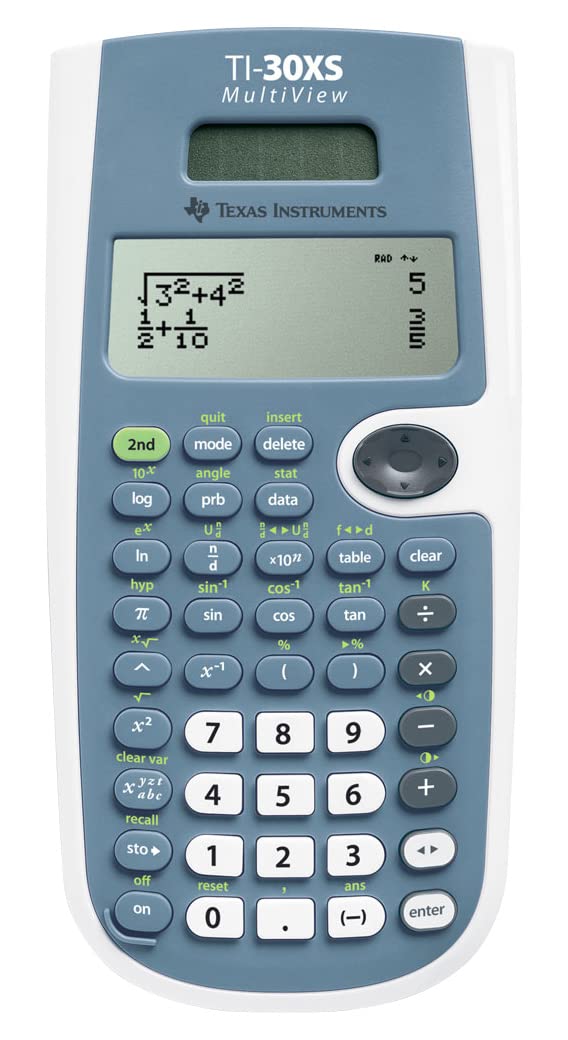
This image displays the front of the TI-30XS MultiView calculator, showing its 4-line display, full keypad with scientific functions, and solar panel.
Настраивать
- Распаковка: Carefully remove the calculator and its protective slide case from the packaging.
- Источник питания: The TI-30XS MultiView operates on both solar power and an internal battery. Under normal lighting conditions, the solar panel will power the calculator and extend battery life. No initial battery installation is typically required.
- Первоначальное включение: Нажмите ON button located at the bottom left of the keypad to turn on the calculator.
- Защитный чехол: Use the included slide case to protect the calculator's screen and keys when not in use.
Инструкция по эксплуатации
The TI-30XS MultiView offers a range of functions for various mathematical and scientific calculations. Below are key operational features:
- МультиView Отображать: The calculator features an up to 4-line display, allowing you to view multiple calculations, inputs, and results simultaneously. This transparency aids in comparing different computing paths and understanding complex problems.
- Симпатичный принт: Input and output expressions in mathematical notation, similar to how they appear in textbooks. This feature simplifies understanding and verification of equations.
- Scientific and Statistical Functions: Access a comprehensive set of scientific functions for algebra, geometry, trigonometry, and calculus. The calculator also includes advanced data/list editor functions for statistics, enabling simplified data input, storage, and assignment to functions.
- Push-Button Conversions: Easily convert between fractions, square roots, and decimal numbers with dedicated buttons. This functionality also works in reverse.
- Equation Recall: Utilize the Equation Recall feature to review, edit, or correct previous inputs and statistical data. The calculator automatically updates the result after any modifications.
- Основные операции: Perform standard arithmetic operations (addition, subtraction, multiplication, division) using the numerical keypad and operator buttons.

The back of the product packaging illustrates key features such as the 4-line screen, 2-variable statistics, solar/battery power, MathPrint display, and protective case.
Обслуживание
- Уборка: Use a soft, dry cloth to clean the calculator's exterior. Avoid abrasive cleaners or solvents, which can damage the casinг или экран.
- Хранилище: When not in use, store the calculator in its protective slide case to prevent scratches and damage. Keep it away from extreme temperatures and direct sunlight for prolonged periods.
- Аккумулятор: The calculator uses a combination of solar and battery power. The solar panel helps to extend battery life. If the display becomes dim or unresponsive in adequate light, the internal battery may need replacement. Refer to the full online manual for battery replacement instructions if necessary.
Поиск неисправностей
- Калькулятор не включается:
- Ensure there is sufficient light for the solar panel.
- Нажмите ON кнопку прочно.
- If the issue persists, the internal battery may be depleted. Consult the full online manual for battery replacement procedures.
- Дисплей тусклый или пустой:
- Move the calculator to a brighter area to activate the solar panel.
- If the problem continues, the battery may be low.
- Calculator is unresponsive or frozen:
- Нажмите ON button to attempt a restart.
- Найдите ПЕРЕЗАГРУЗИТЬ button (often a small hole on the back or near the battery compartment) and use a paperclip to press it. This will clear all memory.
Технические характеристики
| Название модели | TI-30XS МультиView |
| Номер модели | 130003 |
| Бренд | Техасские инструменты |
| Отображать | Up to 4-line MultiView отображать |
| Источник питания | Solar and Battery Operated |
| Размеры продукта | 1.1 x 9.69 x 6.5 дюйма |
| Вес товара | 5.29 унции |
| Основные характеристики | Scientific functions, Statistics, Pretty Print, Conversions, Equation Recall |
| Дата выпуска | 15 ноября 2022 г. |
Гарантия и поддержка
For detailed warranty information, please refer to the official Texas Instruments website or the documentation included with your purchase. Texas Instruments provides various support resources for their products.
Additional resources and a comprehensive digital manual can be found by scanning the QR code on the product packaging or by visiting the official Texas Instruments education webсайт:
Многофункциональный калькулятор Texas Instruments TI-30XSView Страница поддержки