
WANGCL IND26864
WANGCL Multimeter LCD Digital USB Tester User Manual
Модель: IND26864 | Бренд: WANGCL
1. Введение
The WANGCL Multimeter LCD Digital USB Tester is a versatile diagnostic tool designed for monitoring and testing various electrical parameters of electronic devices. It is capable of measuring voltage, current, power, resistance, and capacity, making it ideal for assessing the performance of mobile phone chargers, data cables, and mobile power supplies. This device provides real-time data to help identify and troubleshoot charging issues.

Рисунок 1.1: Передняя часть view of the WANGCL Multimeter LCD Digital USB Tester, displaying its color screen and various input/output ports.
2. Информация по технике безопасности
Please read all safety instructions carefully before using the device. Failure to follow these instructions may result in electric shock, fire, or damage to the device or connected equipment.
- Источник питания: Always use a compliant and stable power supply. Ensure the input voltage and current do not exceed the device's specified limits.
- Температура: Avoid exposing the device to extreme heat or direct sunlight. Operate within the specified temperature range (0~80°C).
- Вентиляция: Во время работы обеспечьте надлежащую вентиляцию вокруг устройства, чтобы предотвратить перегрев.
- Влага: Keep the device dry. Do not expose it to water or other liquids.
- Умение обращаться: Обращайтесь с устройством осторожно. Избегайте падений и сильных ударов.
- Разборка: Не пытайтесь разбирать, ремонтировать или модифицировать устройство. Все работы по техническому обслуживанию должны выполняться квалифицированным персоналом.
- Связь: Ensure all connections are secure and correct before applying power. Incorrect connections can cause damage.
Note: This safety information is derived from standard product safety guidelines and typical product packaging warnings.
3. Особенности продукта
The WANGCL Multimeter LCD Digital USB Tester offers a comprehensive set of features for detailed electrical analysis:
- Широкое применение: Suitable for testing mobile phone chargers, data cables, and mobile power supplies.
- Мониторинг в реальном времени: Continuously monitors charging parameters of electronic devices.
- Несколько интерфейсов: Equipped with 8 types of interfaces for broad compatibility:
- Type-C male input
- Type-C female input
- Type-C female chassis output
- 5525/5521 female input
- 5525/5521 male output
- USB3.0 male input
- USB3.0 female header output
- Микро-USB
- Bluetooth-подключение: Supports Bluetooth remote control for setting and measuring via a mobile phone application.
- Multifunctional Protections: Includes overload protection, power-off memory, timer charging, and battery full power-off functions.
- Цветной экран: Features a 1.8-inch 128*160 color screen for clear display of data.
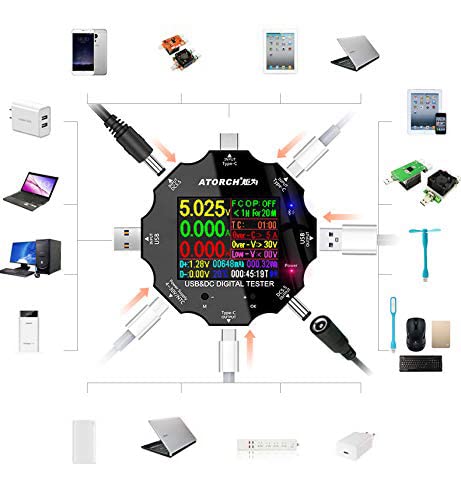
Figure 3.1: Diagram illustrating the various input and output interfaces of the USB tester and its broad compatibility with different devices.
4. Технические характеристики
| Параметр | Ценить |
|---|---|
| Томtage Диапазон измерения | 3.60В~32.00В |
| Диапазон измерения тока | 0.00~5.10А |
| USB Load Limit | 5V 1A/2A/3A (Max 15W) |
| Capacity/Power Accumulation Range | 0~99999mAh / 0~999.99Wh |
| Диапазон измерения мощности | 000.00~163.00 Вт |
| Диапазон измерения импеданса | 1~999.9 Ом |
| Диапазон измерения температуры | 0~80°С |
| Диапазон времени | 999 часа 59 минут 59 секунд |
| Входные интерфейсы | Type-C / Micro USB / USB / DC5.5 |
| USB D+ D- Voltage Диапазон | 0В~2.99В |
| Тип экрана | 1.8 inches 128*160 color screen |
| Текущий уровень собственного потребления | <0.025А |
| Рабочая температура | -10~+60°С |
| Размеры | 6.2 х 6.2 х 1.4 см |
| Вес товара | 65 г |
5. Настройка
Follow these steps to set up your WANGCL USB Tester for first use:
- Распаковка: Carefully remove the USB tester from its packaging. Inspect the device for any signs of damage.
- Первоначальное включение: Connect the tester to a USB power source (e.g., a wall charger, power bank, or computer USB port) using one of its input interfaces (Type-C, Micro USB, or USB). The screen should light up, displaying the current measurements.
- Ознакомьтесь с элементами управления: Locate the physical buttons on the device. These are typically used for navigating menus and changing display modes.
6. Инструкция по эксплуатации
The USB tester is designed for straightforward operation. Here are the basic steps for common measurements:
- Подключите источник питания: Plug the tester's input port (e.g., USB-A male, Type-C male) into your power source (e.g., wall charger, power bank, computer USB port).
- Подключите тестируемое устройство: Plug the device you wish to test (e.g., smartphone, tablet, USB fan) into one of the tester's output ports (e.g., USB-A female, Type-C female).
- Прочитайте измерения: The color screen will immediately display real-time measurements such as voltage (V), current (A), power (W), accumulated capacity (mAh), and accumulated energy (Wh).
- Navigate Display Modes: Use the physical buttons (usually labeled 'M' for Mode and 'OK' or '+' for selection/next) to cycle through different display screens or measurement parameters. This may include detailed views of D+/D- voltage, temperature, timing, and impedance.
- Сброс данных: To clear accumulated capacity and energy data, typically press and hold a specific button (refer to on-screen prompts or specific model instructions if available) while on the main display.
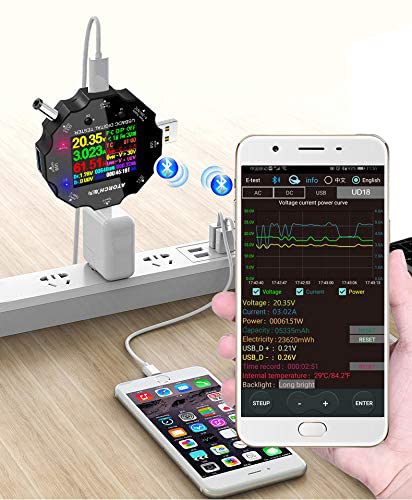
Figure 6.1: The USB tester actively measuring power flow between a wall charger and a mobile phone, with Bluetooth enabled.
7. Подключение по Bluetooth и мобильное приложение
The WANGCL USB Tester supports Bluetooth connectivity, allowing you to monitor and control the device remotely via a dedicated mobile application. This feature provides a more detailed view of data and additional control options.
- Загрузите приложение: Искать the "E_Test" application in your mobile device's app store (e.g., Apple App Store for iOS, Google Play Store for Android). Download and install the application.
- Включить Bluetooth: Убедитесь, что Bluetooth включен на вашем мобильном устройстве.
- Тестер включения питания: Connect the USB tester to a power source to turn it on.
- Сочетание: Open the "E_Test" app. The app should automatically detect nearby WANGCL USB testers. Select your device from the list to initiate pairing. Follow any on-screen prompts within the app to complete the connection.
- Данные мониторинга: После подключения вы можете view real-time data, historical graphs, and adjust settings directly from your mobile phone.
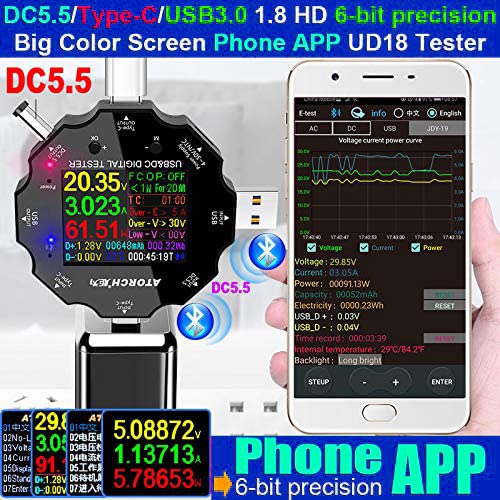
Figure 7.1: The USB tester displaying data on its screen while simultaneously transmitting data to a connected smartphone app for detailed analysis.
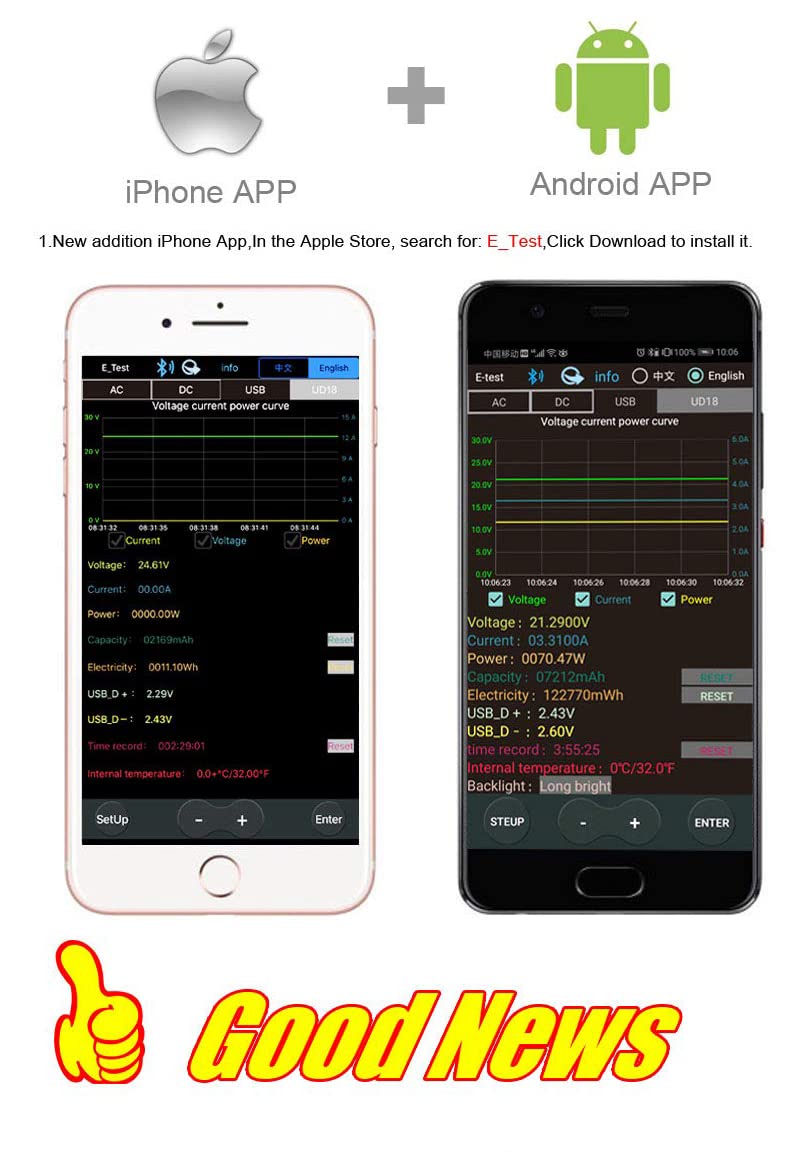
Figure 7.2: Screenshots of the "E_Test" application interface on both iPhone and Android devices, showing similar data display capabilities.
8. Техническое обслуживание
Proper maintenance ensures the longevity and accuracy of your WANGCL USB Tester:
- Уборка: Use a soft, dry cloth to clean the device. Do not use abrasive cleaners, solvents, or harsh chemicals.
- Хранилище: Храните устройство в прохладном, сухом месте, вдали от прямых солнечных лучей, экстремальных температур и высокой влажности.
- Умение обращаться: Не допускайте падения устройства и не подвергайте его сильным вибрациям.
- Уход за портом: Keep the USB and other ports free from dust and debris.
9. Поиск Неисправностей
If you encounter issues with your WANGCL USB Tester, refer to the following common problems and solutions:
| Проблема | Возможная причина/решение |
|---|---|
| Устройство не включается. |
|
| No readings displayed. |
|
| Bluetooth-соединение не работает. |
|
| Неточные показания. |
|
10. Гарантия и поддержка
WANGCL is committed to providing quality products. For specific warranty details and support, please refer to your purchase documentation or contact the seller directly.
- Политика возврата: This product typically comes with a 30-day return policy from the date of purchase. Please check the specific terms and conditions of your retailer.
- Техническая поддержка: For technical assistance, troubleshooting beyond this manual, or warranty claims, please contact the seller, WANGCL EU, through the Amazon messaging system or the platform where the product was purchased.
Ask a question about this manual
Ask about setup, troubleshooting, compatibility, parts, safety, or missing instructions. Manuals+ will review the question and use this page’s manual context to help answer it.