
1. Введение
The WANGCL HOA26727 Universal Learning Remote Control is designed to replace multiple original infrared (IR) remote controls for various devices such as TVs, Satellite receivers, and DVD players. Its programmable learning function allows you to easily copy and consolidate the functions of your existing remotes into a single, convenient unit.
2. Продукт закончилсяview
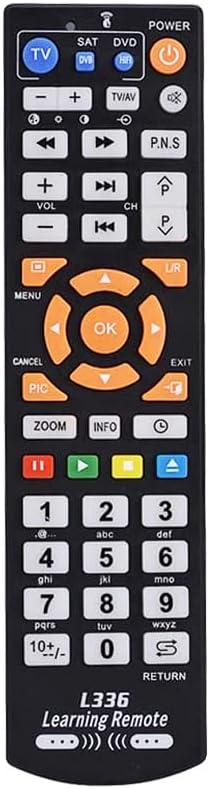
This remote control features a standard layout with dedicated buttons for TV, SAT, and DVD modes, along with a full numeric keypad, navigation buttons, and media controls. It is constructed from durable ABS material and comes in a black finish.


3. Настройка: установка аккумулятора
The WANGCL HOA26727 remote control requires two AAA batteries (not included) for operation.
- Найдите батарейный отсек на задней стороне пульта дистанционного управления.
- Чтобы открыть крышку батарейного отсека, сдвиньте ее вниз или нажмите на защелку и поднимите крышку.
- Вставьте две батарейки типа AAA, убедившись, что положительный (+) и отрицательный (-) полюса правильно совпали с отметками внутри отсека.
- Установите крышку батарейного отсека на место, сдвинув ее на место до щелчка.
Примечание: Always use new batteries and dispose of old batteries responsibly. Do not mix old and new batteries, or different types of batteries.
4. Operating Instructions: Learning Function
This remote control features a learning function, allowing it to copy commands from your original remote controls. Follow these steps to program the remote:
- Подготовка: Place the WANGCL universal remote control and your original remote control head-to-head, with the infrared emitters facing each other. Ensure the distance between them is less than 1 cm (approximately 0.4 inches).
- Войдите в режим обучения: Select the desired learning mode (TV, SAT, or DVD) by pressing the corresponding button in the upper left corner of the universal remote. Press and hold the selected mode button until the red indicator light flashes. Release the button.
- Выберите кнопку для программирования: Press the button on the WANGCL universal remote control that you wish to program. The red indicator light will remain steadily lit, indicating it is ready for programming.
- Передача сигнала: Press the corresponding button on your original remote control. The WANGCL universal remote will receive the infrared signal and begin programming. The red indicator light will flash three times to confirm successful programming.
- Program Additional Buttons: To program more buttons, press the next button on the WANGCL remote you wish to teach and repeat steps 3 and 4.
- Выйти из режима обучения: To exit the learning mode, press the learning mode button again, or the remote will automatically exit if no operation is performed within 15 seconds.
After programming, test the learned functions to ensure they operate correctly with your devices.
5. Техническое обслуживание
- Уборка: Wipe the remote control with a soft, dry cloth. Do not use abrasive cleaners, solvents, or alcohol, as these can damage the surface.
- Уход батареи: If the remote control will not be used for an extended period, remove the batteries to prevent leakage and potential damage. Replace batteries when the remote's performance degrades.
- Хранилище: Храните пульт дистанционного управления в прохладном, сухом месте, вдали от прямых солнечных лучей и экстремальных температур.
6. Поиск Неисправностей
- Пульт дистанционного управления не отвечает:
- Проверьте правильность установки батареек и соблюдение полярности.
- Замените батареи новыми.
- Убедитесь, что между пультом дистанционного управления и устройством нет препятствий.
- Verify that the remote is pointed directly at the device's IR receiver.
- Learning function fails or programmed buttons do not work:
- Ensure the distance between the universal remote and the original remote is less than 1 cm during the learning process.
- Make sure both remotes have fresh batteries.
- Repeat the learning procedure carefully, ensuring the red indicator light flashes correctly at each step.
- Some original remotes may have weaker IR signals; try adjusting the angle or distance slightly during learning.
- Убедитесь, что оригинальный пульт дистанционного управления работает исправно.
- Remote only controls one device:
- Remember to switch between TV, SAT, and DVD modes using the dedicated buttons at the top of the remote to control different devices.
- Ensure you programmed the correct functions under the desired mode.
7. Технические характеристики
| Номер модели | HOA26727 |
| Бренд | WANGCL |
| Материал | АБС |
| Цвет | Черный |
| Совместимые устройства | TV, Satellite (SAT), DVD, and other Infrared (IR) devices |
| Технология связи | Инфракрасный (ИК) |
| Источник питания | Батареи 2 x AAA (не входят в комплект) |
| Размеры (Д x Ш x В) | 18.4 см х 4.7 см х 2.2 см (7.24 х 1.85 х 0.87 дюйма) |
| Вес товара | 10 грамм (0.35 унции) |
| Максимальный диапазон | 1 метр (3.3 фута) |
| Специальная характеристика | IR, Universal, Learning Function |
8. Гарантия и поддержка
Specific warranty information for the WANGCL HOA26727 Universal Learning Remote Control is not provided in this manual. Please refer to the retailer's return policy or contact the seller directly for details regarding warranty coverage and customer support.
For further assistance or inquiries, please contact WANGCL customer service through the platform where the product was purchased.