
1. Введение
This manual provides detailed instructions for the safe and efficient use of your MECHEN HIFI MP3 Player M30. Please read this manual thoroughly before operating the device and retain it for future reference.
The MECHEN M30 is a dedicated HIFI lossless audio player designed for high-fidelity sound reproduction. It features advanced DSD decoding technology and supports a wide range of audio formats. Please note that this device does not support Bluetooth, FM radio, recording, video playback, e-books, photos, or alarm functions.

Figure 1: MECHEN M30 HIFI MP3 Player Overview
2. Особенности продукта
- Высококачественный звук: Equipped with a high-quality DSP chip and advanced DSD decoding technology for immersive, low-distortion sound.
- Расширяемое хранилище: Comes with a 64GB microSD card and supports expansion up to 256GB, allowing for extensive music libraries.
- Durable Design & Intuitive Controls: Constructed from a high-quality zinc alloy for durability. Features a unique scroll control wheel and simple physical buttons for easy navigation and operation.
- Универсальные возможности подключения: Includes a 3.5mm headphone jack and a line-out port, enabling connection to wired headphones, AUX speakers, and car audio systems.
- Длительный срок службы батареи: Built-in 1500mAh battery provides approximately 30 hours of music playback on a 2.5-hour full charge.
- Поддержка широкого формата: Compatible with numerous audio formats including MP3, WMA, WAV/PCM, APE, FLAC, AAC, OGG, DSF, AIFF, ALAC, IMA/MS-ADPCM, DFF, and DSD 128. (Note: AAC files play in mono.)

Figure 2: High-Quality DSD and DAC Chips
3. Настройка
3.1. Содержимое упаковки
Проверьте наличие всех предметов в упаковке:
- MECHEN HIFI MP3 Player M30
- 64GB MicroSD Memory Card
- USB-кабель
- Руководство пользователя (этот документ)

Рисунок 3: Включенные компоненты
3.2. Зарядка устройства
- Подключите прилагаемый USB-кабель к порту зарядки плеера.
- Другой конец USB-кабеля подключите к USB-адаптеру питания (не входит в комплект) или к USB-порту компьютера.
- Индикатор заряда батареи на экране покажет состояние зарядки. Полная зарядка занимает около 2.5 часов.
3.3. Установка карты MicroSD.
- Найдите слот для карты microSD на боковой панели плеера.
- Gently insert the provided 64GB microSD card (or another compatible card up to 256GB) into the slot until it clicks into place.
- To remove, push the card inward until it clicks, then release, and it will eject.
3.4. Перенос музыки Files
- Подключите плеер к компьютеру с помощью кабеля USB.
- The player will appear as a removable disk (or prompt you to select 'Mass Storage' mode).
- Перетащите нужный аудиофайл files into the appropriate folders on the microSD card. Organizing files into folders (e.g., by Artist, Album) is recommended for easier navigation.
- Перед отсоединением USB-кабеля безопасно извлеките плеер из компьютера.
4. Инструкция по эксплуатации
4.1. Включение/выключение питания
- Включение питания: Нажмите и удерживайте кнопку питания, пока не загорится экран.
- Выключение: Нажмите и удерживайте кнопку питания, пока устройство не выключится.
4.2. Навигация и меню
- Колесо прокрутки: Для навигации по меню и спискам вращайте колесо прокрутки.
- Кнопка МЕНЮ: Press to enter the main menu or confirm a selection.
- Кнопка назад: Press to return to the previous screen or cancel an action.
- Кнопки управления воспроизведением: Use the dedicated buttons for Play/Pause, Next Track, Previous Track.
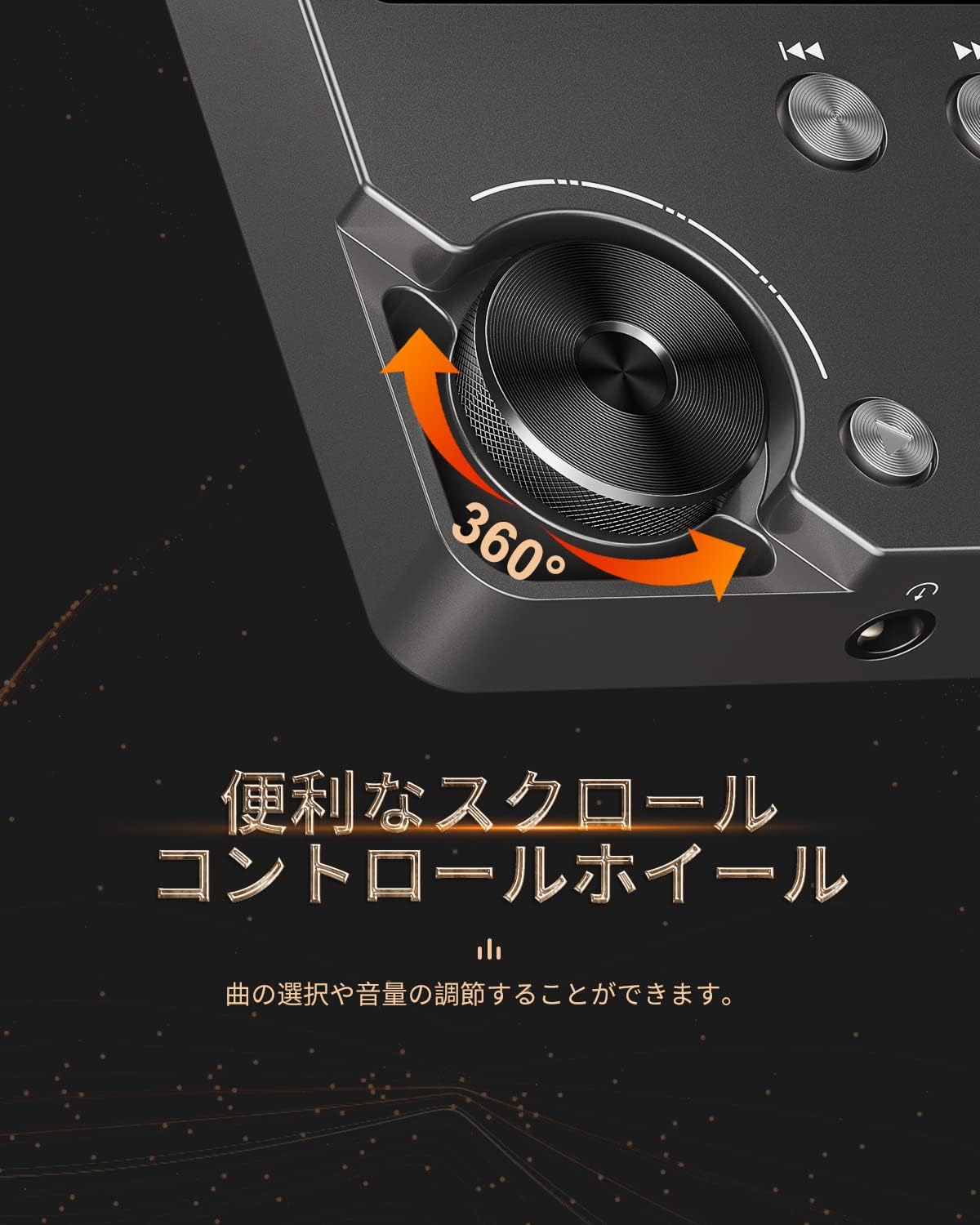
Figure 4: Scroll Control Wheel
4.3. Воспроизведение музыки
- Navigate to the 'Music' section from the main menu.
- Browse your music by folder, artist, album, or all songs.
- Select a track and press the MENU button to start playback.
- Для управления воспроизведением используйте кнопку «Воспроизведение/Пауза».
- Press Next Track or Previous Track buttons to skip songs. Hold these buttons for fast forward or rewind.
4.4. Регулятор громкости
Rotate the scroll wheel during music playback to adjust the volume level. It is recommended to set the initial maximum volume to a low level to prevent sudden loud sounds.
4.5. Настройки эквалайзера
The player features an equalizer with various presets (e.g., Rock, Pop, Jazz, Classical, Soft, Techno) and a custom setting. Access the equalizer settings from the playback screen or system settings to adjust the sound profile по вашему желанию.

Figure 5: Equalizer Function
4.6. Repeat and Shuffle Modes
During playback, access the options menu to select repeat modes (e.g., repeat one, repeat all) or enable shuffle playback for a randomized song order.
4.7. Подключение к внешним устройствам
The MECHEN M30 can connect to various audio output devices:
- Проводные наушники: Plug your 3.5mm headphones into the headphone jack.
- External Speakers/Car Audio: Use an AUX cable (not included) to connect the player's line-out port to your speakers or car's AUX input.

Figure 6: Connecting to Various Devices
5. Техническое обслуживание
5.1. Уборка
Wipe the device with a soft, dry cloth. Do not use liquid cleaners or abrasive materials, as they may damage the finish or internal components.
5.2. Уход за аккумулятором
Чтобы продлить срок службы аккумулятора, избегайте его частой полной разрядки. Регулярно заряжайте устройство, даже если оно не используется в течение длительного времени. Храните устройство в прохладном, сухом месте.

Рисунок 7: Информация о батарее
5.3. Хранение
When storing the player for a long time, ensure it is fully charged and then power it off completely. Recharge it every few months to prevent deep discharge.
6. Поиск Неисправностей
- Устройство не включается: Ensure the battery is charged. Connect the player to a power source using the USB cable and try again. If the issue persists, perform a reset by pressing the reset button (if available) or holding the power button for an extended period.
- Нет звука: Check the volume level. Ensure headphones or external speakers are properly connected. Test with different headphones or speakers if possible.
- Музыка fileне распознано: Убедитесь, что музыка files are in a supported format (refer to Specifications). Ensure the microSD card is properly inserted and the fileФайлы не повреждены. Перенесите файл повторно. files при необходимости.
- Screen is unresponsive or erratic: Try restarting the device. If the problem continues, ensure the device is not exposed to extreme temperatures or moisture.
- Album art or metadata not displayed: Ensure that the metadata (ID3 tags) for your music files are correctly embedded. While the player supports folder-based navigation, correct tags enhance the browsing experience.
- Playback stops unexpectedly: Ensure the battery is sufficiently charged. If connected to a car audio system via USB, playback might pause when the engine is turned off or on due to changes in the USB host communication.
7. Технические характеристики
| Особенность | Описание |
|---|---|
| Название модели | М30 |
| Бренд | МЕЧЕН |
| Отображать | 2-дюймовый ЖК-дисплей |
| Память для хранения данных | 64GB MicroSD card included (expandable up to 256GB) |
| Связность | AUX (3.5mm headphone jack, Line Out) |
| Емкость аккумулятора | 1500 мАч |
| Срок службы батареи | Approx. 30 hours playback |
| Время зарядки | Приблизительно 2.5 часов |
| Размеры продукта (Д x Ш x В) | 1.6 х 5.6 х 8.8 см |
| Вес продукта | 176 грамм |
| Поддерживаемые аудиоформаты | MP3 (8-48KHz, 16bits), WMA (8-192KHz, 16/24bits), WAV/PCM (8-192KHz, 8/16/24/32bits), APE (8-192KHz, 16/24bits), FLAC (8-192KHz, 16/24bits), AAC (8-96KHz, 16bits - mono playback), OGG (8-48KHz, 10-500bits), DSF (2822.4KHz, 1bit), AIFF (8-192KHz, 8/16/24/32bits), ALAC (8-192KHz, 16/24bits), IMA/MS-ADPCM (8-48KHz, 8/16bits), DFF (3072KHz, 1bit), DSD 128 (5.6MHz) |
| Особые возможности | Equalizer, Shuffle Play, Hi-Res Audio, Repeat Play, Auto Power-Off |
| Страна происхождения | Китай |
| СКП | 607469642453 |

Рисунок 8: Поддерживаемые аудиоформаты
8. Гарантия и поддержка
8.1 Гарантия производителя
The MECHEN HIFI MP3 Player M30 comes with a one-year manufacturer's warranty from the date of purchase. This warranty covers defects in materials and workmanship under normal use. It does not cover damage caused by misuse, accidents, unauthorized modifications, or normal wear and tear.
8.2. Поддержка клиентов
For technical assistance, warranty claims, or any questions regarding your MECHEN M30 player, please contact your retailer or the MECHEN customer support team. Refer to the contact information provided with your purchase documentation or visit the official MECHEN webсайт для получения подробной информации о поддержке.