
Введение
Thank you for choosing the SENSTREE Digital Bluetooth BBQ Grill Meat Thermometer. This device is designed to help you achieve perfectly cooked meals by remotely monitoring food temperatures during grilling, smoking, or oven cooking. Please read this manual carefully before use to ensure proper operation and to maximize the performance of your thermometer.
Содержимое упаковки
При распаковке убедитесь, что все перечисленные ниже предметы присутствуют:
- Meat thermometer display unit
- 4 Temperature probes
- 2 Stainless probe holders
- 4 Probe winders
- 1 USB-кабель для зарядки
- Руководство пользователя (этот документ)
Настраивать
1. Зарядка устройства
Before first use, fully charge the thermometer display unit using the provided USB charging cable. Connect the cable to the device and a standard USB power source. The battery indicator on the display will show charging status.
2. Установка приложения
To utilize the full features of your thermometer, download the companion app on your smartphone. Scan the QR code below or visit the provided link:
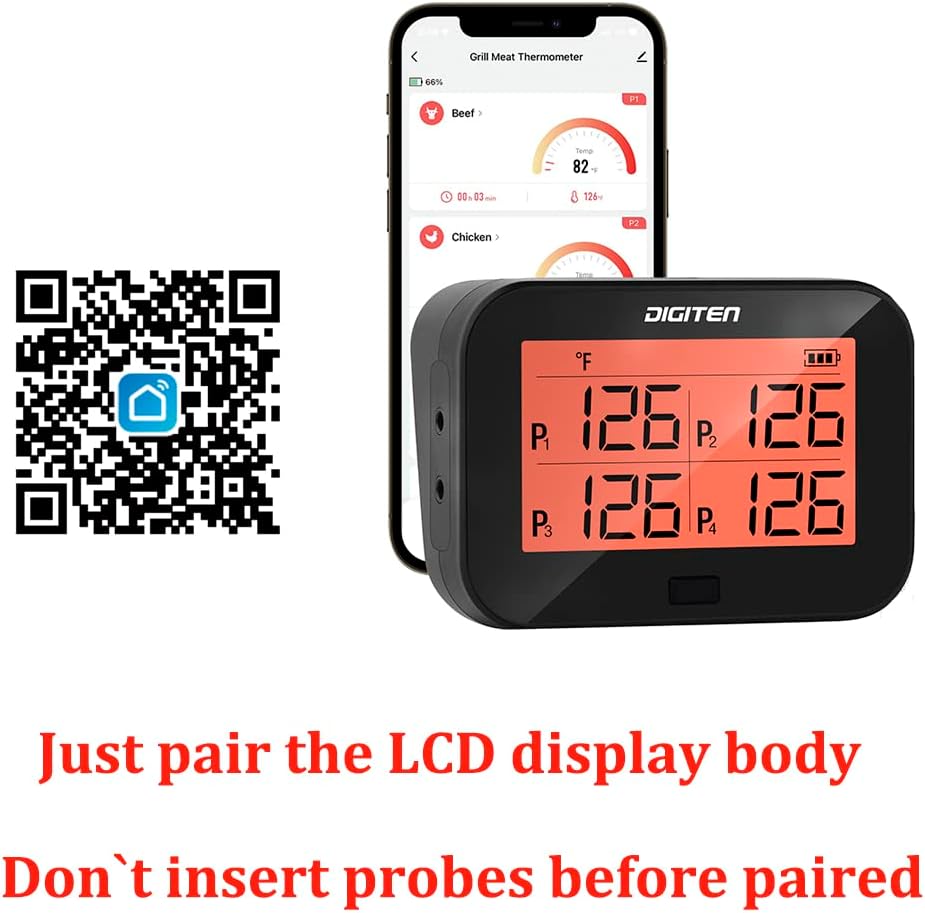
Image: QR code for app download and the thermometer display unit next to a smartphone showing the app interface. The text on the image states: "Just pair the LCD display body. Don't insert probes before paired."
Загрузите приложение здесь: https://smartapp.tuya.com/smartlife
3. Сопряжение устройств
Ensure Bluetooth is enabled on your smartphone. Open the installed app and follow the on-screen instructions to add a new device. The app will search for and connect to your thermometer. It is crucial to pair the display unit with your phone до inserting any probes.
4. Подключение зонда
After successful pairing, insert the temperature probes into the designated ports on the side of the display unit. The display unit supports up to four probes simultaneously.
Инструкция по эксплуатации
1. Power On/Off and Unit Selection
- To power on or off the device, press and hold the single button on the display unit.
- To switch between Celsius (°C) and Fahrenheit (°F), short press the button.
2. Размещение зонда
Insert the tip of the probe into the thickest part of the meat, avoiding bones. For monitoring ambient grill or oven temperature, use the included stainless probe holders to position a probe away from direct heat sources.

Image: The thermometer display unit on a grill table with probes inserted into food, and a smartphone displaying smart alerts for temperature and time. An alarm icon indicates an alert is triggered.

Изображение: крупный план view of a heat-resistant probe inserted into a piece of meat on a grill, showing the probe's construction and temperature accuracy details.
3. Использование приложения для смартфона
Приложение предоставляет комплексные функции управления и мониторинга:
- Мониторинг температуры в режиме реального времени: View the current temperature of each probe directly on your phone. The temperature refreshes every 2 seconds.
- Preset Cooking Modes: Select from various preset meat types and doneness levels (e.g., Beef, Lamb, Pork, Chicken, Fish, Hamburg, Ground Beef, Poultry) with recommended target temperatures.
- Настраиваемые сигналы тревоги: Set personalized temperature alarms for each probe. The app will notify you when the target temperature is reached. You can also set time-based alarms.
- История изменения температуры: The app records temperature data, allowing you to view graphs of your cooking progress over time. This helps in understanding cooking patterns and achieving consistent results.
- Преобразование единиц: Easily switch between Celsius and Fahrenheit within the app.

Image: A smartphone displaying the app interface with options for preset cooking modes, custom temperature and time alarms, temperature unit conversion, and a glanceable temperature track graph.

Image: A screenshot of the app showing an alarm notification indicating that the set temperature has been reached.
4. Функции дисплея
The thermometer features a large 3-inch LCD screen with a backlight, ensuring clear visibility of temperature data even in low light conditions or smoky environments.

Image: The thermometer display unit shown in both a well-lit environment and a dark environment, highlighting its large 3-inch backlit LCD screen for clear visibility.
5. Варианты размещения
The display unit can be placed on a flat surface using its integrated stand or attached to a metallic surface (like an oven or grill) via its magnetic back.

Image: The thermometer display unit shown in various cooking settings, including a kitchen, smoker, grill, and oven, demonstrating its versatility and features like the stand and magnetic attachment.
Обслуживание
1. Уборка
The display unit should be wiped clean with a damp cloth. Do not immerse the display unit in water. The probes are heat-resistant and can be cleaned with soap and water. Ensure probes are completely dry before storage.
2. Хранение
Use the provided probe winders to neatly store the probe wires, preventing tangles and damage. Store the thermometer and probes in a dry place when not in use.

Image: A probe winder designed for convenient and neat storage of the thermometer probes and their cables.
Поиск неисправностей
1. Устройство не сопрягается с приложением
- Убедитесь, что Bluetooth включен на вашем смартфоне.
- Make sure the thermometer display unit is powered on.
- Restart both the app and the thermometer.
- Try re-pairing the device through the app's "Add Device" function.
- Ensure no probes are inserted into the display unit during the initial pairing process.
2. App Disconnects Frequently or Freezes
- Ensure your smartphone remains within the Bluetooth range (up to 394ft/120m in open areas). Obstacles like walls can reduce this range.
- Close and reopen the app if it freezes.
- Ensure the thermometer display unit remains powered on throughout use. The app requires the base unit to be active and connected.
- Check for app updates in your phone's app store.
3. App Alarms Not Functioning
- Verify that app notifications are enabled in your smartphone's settings.
- Ensure your phone's volume is audible and not muted.
- Confirm that alarms are correctly set within the app for the desired temperature or time.
- Note that the display unit itself will beep when a target temperature is reached, even if phone notifications are not received.
4. Неточные показания температуры
- Убедитесь, что зонд правильно вставлен в самую толстую часть продукта, избегая костей.
- Verify that the probe tip is not touching the cooking surface or any metal.
- The probes have an accuracy of ±1.8°F (±1°C).
- If a probe appears damaged, replace it.
5. Weak Magnet
If the magnetic attachment is not holding securely, ensure the surface is clean and flat. For heavier items or unstable surfaces, use the integrated stand instead.
Технические характеристики
| Бренд | SENSTREE |
| Название модели | 727567439448 (MTB-4P-ZJ) |
| Специальная характеристика | Система быстрого чтения |
| Цвет | Черный |
| Внешний материал | Пластик |
| Тип дисплея | LCD (3-inch with backlight) |
| Технология связи | Bluetooth |
| Источник питания | Питание от аккумулятора (перезаряжаемый) |
| Диапазон температур | 32°F to 482°F (0°C to 250°C) for continuous monitoring; up to 572°F (300°C) for short-term measurement |
| Время отклика | 2 секунд |
| Разрешение | 0.1°F |
| Точность | ± 1.8 ° F (± 1 ° C) |
| Диапазон Bluetooth | На открытых пространствах высота до 120 метров (394 футов) |
| Инструкции по уходу за изделием | Oven Safe (probes only), Wipe Clean (display unit) |
| Использование внутри и снаружи помещений | Да |

Image: The thermometer display unit illustrating its wide temperature measurement range, from 32°F (cold environment) to 482°F (hot environment).
Гарантия и поддержка
For warranty information or technical support, please refer to the contact details provided on the product packaging or visit the official SENSTREE webсайт. Сохраните чек о покупке на случай гарантийных претензий.