
1. Введение
Thank you for choosing the COMAOGO T002-W Mini Projector. This manual provides essential information for setting up, operating, and maintaining your projector to ensure optimal performance and longevity. The T002-W is a versatile projector featuring 9500 Lumens brightness, 1080P support, 5G WiFi, and Bluetooth 5.1 connectivity, designed for an immersive viewопыт до 220 дюймов.
2. Содержимое упаковки
Проверьте комплектацию на наличие следующих предметов:
- 1 x COMAOGO T002-W Mini Projector
- 1 х пульт дистанционного управления
- 1 х Кабель питания
- 1 х HDMI-кабель
- 1 x AV-кабель
- 1 х Руководство пользователя
3. Продукт закончилсяview
Ознакомьтесь с компонентами и интерфейсами проектора.

Image: COMAOGO T002-W Projector with 5G and 2.4G WiFi capabilities, showing wireless screen synchronization with a tablet and smartphone.
The projector features various ports for connectivity, including HDMI, USB, VGA, AV, and a TF card slot, along with a 3.5mm audio output. It also supports dual-band 5G and 2.4G WiFi for stable wireless connections and Bluetooth 5.1 for audio devices.

Image: COMAOGO T002-W Projector connected to various devices including a laptop, game console, and streaming stick, highlighting its multiple input ports (AV, HDMI, USB, TF, VGA).
4. Настройка
4.1 Размещение
Position the projector on a stable, flat surface or mount it on a tripod. Ensure there are no obstructions to the ventilation vents. For optimal viewing, the projection distance should be between 1.5 meters and 5.5 meters, yielding a screen size from 45 inches to 220 inches.
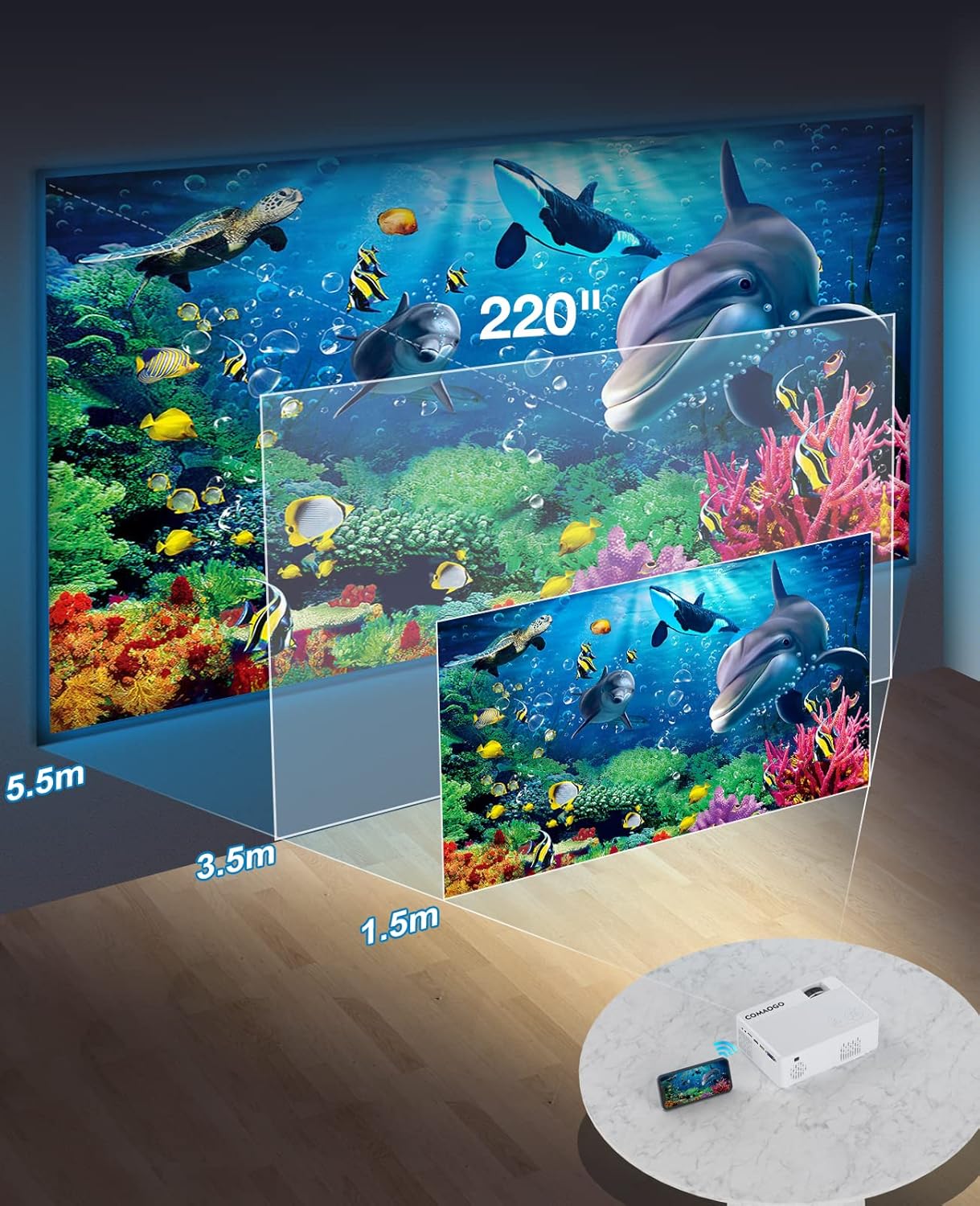
Image: Diagram illustrating the projection distances (1.5m to 5.5m) and corresponding screen sizes (45 to 220 inches) for the COMAOGO T002-W Projector.
4.2 Подключение питания
Connect the power cable to the projector's power input and then plug it into a power outlet (AC 220V).
4.3 Фокусировка и коррекция трапецеидальных искажений
Чтобы получить четкое и прямоугольное изображение:
- Регулировка фокуса: Rotate the focus ring on the projector lens until the image appears sharp.
- Коррекция трапецеидальных искажений: Adjust the keystone correction dial (if available, or via menu settings) to correct trapezoidal distortion, ensuring the image is rectangular. The projector supports ±15° keystone correction.

Image: Illustration of keystone correction and focus adjustment for the COMAOGO T002-W Projector, showing how to achieve a clear, rectangular image.
5. Инструкция по эксплуатации
5.1 Включение/выключение питания
- Включение питания: Нажмите кнопку питания на проекторе или на пульте дистанционного управления.
- Выключение: Нажмите кнопку питания еще раз, чтобы выключить проектор.
5.2 Выбор источника входного сигнала
Use the "Source" button on the remote control or the projector's control panel to select the desired input source (e.g., HDMI, USB, VGA, AV).
5.3 Беспроводное подключение (Wi-Fi)
The projector supports dual-band 5G and 2.4G WiFi for stable screen mirroring.
- Navigate to the WiFi settings on the projector's menu.
- Select your desired WiFi network (5G for faster, more stable connection; 2.4G for longer range and better penetration).
- Введите пароль для подключения.
- For screen mirroring, select the appropriate option (e.g., "iOS Cast" or "Android Cast") on the projector and follow the on-screen instructions to connect your smartphone or tablet.
5.4. Bluetooth-подключение
Connect external Bluetooth audio devices like speakers or headphones.

Image: COMAOGO T002-W Projector demonstrating Bluetooth 5.1 connection with a speaker and headphones.
- Перейдите в настройки Bluetooth в меню проектора.
- Убедитесь, что ваше устройство Bluetooth находится в режиме сопряжения.
- Выберите устройство из списка для сопряжения.
- Note: The projector's Bluetooth function is for connecting output devices (speakers, headphones) only.
5.5 Проводные соединения
Подключайте различные устройства, используя доступные порты:
- HDMI: Connect laptops, PCs, game consoles (Xbox), TV sticks (Roku, Chromecast), DVD players.
- USB: Play media fileнепосредственно с USB-накопителей.
- VGA: Подключите старые компьютеры или ноутбуки.
- СРЕДНИЙ: Connect legacy video devices.
- TF-карта: Insert a TF card to play media files.
- Important: Copyright-protected content from services like Netflix or Disney+ is not directly supported via screen mirroring. For these services, use an HDMI connection with a compatible adapter (e.g., Lightning Digital AV Adapter for iOS devices) or a streaming stick.
6. Техническое обслуживание
6.1 Очистка объектива
Use a soft, lint-free cloth or lens cleaning paper to gently wipe the projector lens. Avoid using abrasive materials or harsh chemicals that could damage the lens coating.
6.2 Система охлаждения
The projector features an updated cooling system designed to reduce noise and maintain optimal operating temperature. Ensure the ventilation vents are clear of dust and obstructions to prevent overheating. Regular cleaning of the vents with a soft brush or compressed air is recommended.
7. Поиск Неисправностей
Если у вас возникли проблемы с проектором, воспользуйтесь следующими распространенными решениями:
- Нет картинки:
- Проверьте подключение питания и убедитесь, что проектор включен.
- Verify the input source selection matches your connected device.
- Ensure all cables (HDMI, VGA, etc.) are securely connected.
- Отрегулируйте фокус и выполните коррекцию трапецеидальных искажений.
- Нет звука:
- Отрегулируйте громкость проектора.
- При использовании внешних динамиков убедитесь, что они правильно подключены и включены.
- Check Bluetooth connection for external audio devices.
- Ensure the audio output from your source device is enabled.
- WiFi/Screen Mirroring Issues:
- Ensure both the projector and your device are connected to the same WiFi network.
- Check for strong WiFi signal.
- Restart both the projector and your source device.
- For Android devices, ensure "Wireless Projection" or "Screen Mirroring" is enabled. For iOS, use "Screen Mirroring" from Control Center.
- Изображение размыто:
- Отрегулируйте фокусировочное кольцо на объективе.
- Убедитесь, что расстояние проекции находится в пределах рекомендуемого диапазона.
- Изображение трапециевидное:
- Отрегулируйте параметр или настройку коррекции трапецеидальных искажений.
For further assistance or software updates, please contact COMAOGO customer support.
8. Технические характеристики
| Особенность | Спецификация |
|---|---|
| Бренд | КОМАОГО |
| Модель | Т002-В |
| Яркость | 9500 люмен (220 ANSI) |
| Коэффициент контрастности | 6000:1 |
| Собственное разрешение | 1280 х 720 |
| Поддерживаемое разрешение | 1080P |
| Размер проекции | 45" - 220" |
| Расстояние проекции | 1.5м - 5.5м |
| Коррекция трапецеидальных искажений | ±15° |
| Подключение Wi-Fi | Двухдиапазонный (5 ГГц + 2.4 ГГц) |
| Bluetooth | Блютус 5.1 |
| аппаратный интерфейс | 3.5mm Audio, TF Card, USB 2.0, VGA, HDMI |
| Встроенный динамик | Да |
| Уровень шума | 45 децибела |
| Потребляемая мощность | 48 Вт |
| Размеры | 20.32 х 15.24 х 7.62 см |
| Масса | 1 Килограмм |
9. Официальное видео о продукте
Watch this video for a visual guide on the COMAOGO T002-W Mini Projector's features and operation.
Video: An official product video demonstrating the features and usage of the COMAOGO T002-W Mini Projector, including connectivity and display capabilities.
10. Гарантия и поддержка
The COMAOGO T002-W Mini Projector comes with a standard manufacturer's warranty. For warranty claims, technical support, or inquiries regarding software updates, please contact COMAOGO customer service through the retailer where you purchased the product or visit the official COMAOGO webсайт.
SOFTWARE UPDATES can be provided; please contact us if needed.