
1. Введение
The OWON SDS1102 is a 2-channel digital storage oscilloscope designed for a wide range of electronic measurement and analysis tasks. It features a 100 MHz bandwidth, a 1 GSa/s real-time sampling rate, and a clear 7-inch TFT-LCD display. This manual provides essential information for setting up, operating, maintaining, and troubleshooting your device, ensuring optimal performance and longevity.

Figure 1: OWON SDS1102 Digital Oscilloscope
2. Информация по технике безопасности
Please read and understand all safety instructions before operating the device. Failure to comply with these instructions may result in electric shock, fire, or damage to the product.
- Используйте только сетевой шнур, входящий в комплект поставки устройства.
- Во избежание поражения электрическим током убедитесь, что устройство надежно заземлено.
- Не эксплуатируйте устройство во влажных или сухих условиях.amp условия.
- Избегайте воздействия прямых солнечных лучей или высоких температур на устройство.
- Не открывайте устройство casinг; поручайте все работы по обслуживанию квалифицированному персоналу.
- Verify probe attenuation settings match the oscilloscope's input settings.
3. Содержимое упаковки
Убедитесь, что все перечисленные ниже предметы включены в ваш пакет:
- OWON SDS1102 Digital Oscilloscope
- Шнур питания
- CD-ROM (containing software and documentation)
- USB-кабель
- Щупы осциллографа (2 шт.)
- Инструмент для регулировки щупа (отвертка)
- Руководство пользователя (этот документ)
4. Продукт закончилсяview
The SDS1102 is designed for efficiency and accuracy in various applications, from electronic circuit debugging to automotive maintenance.
Основные характеристики:
- HD ЖК-экран: A 7-inch color TFT-LCD with 65535 colors and 800 x 480 pixel resolution provides clear and concise waveform readings. It supports four automatic cursor modes for precise voltagи измерения разницы во времени.
- Высокий Sampскорость: Equipped with a 1 GSa/s sampling rate, the device allows for detailed waveform capture and analysis. It includes single waveform recording and playback, and supports plug-and-play USB storage devices.
- Powerful System: Features an auto-range function and supports horizontal, vertical, single/multi-waveform tracking. Probe attenuation settings include 1x, 10x, 100x, and 1000x. It offers 30 types of automatic measurement functions and supports LABVIEW communication for secondary development.
- Портативность: With ultra-thin body design (301 x 152 x 70 mm) and a weight of 1.1 kg, the oscilloscope is highly portable, saving desktop space and operating quietly.

Figure 2: Key features of the SDS1102 Oscilloscope

Figure 3: Compact design and dimensions for portability

Figure 4: Diverse applications of the SDS1102 Oscilloscope
5. Настройка
5.1 Первоначальное включение
- Connect the power cord to the oscilloscope and a suitable power outlet.
- Нажмите кнопку питания, чтобы включить устройство.
- The 7-inch TFT-LCD display will illuminate, showing the OWON logo and then the main waveform interface.
5.2 Калибровка датчика
Before taking measurements, it is crucial to calibrate the oscilloscope probes for accurate readings. This process compensates for any slight variations in the probes as supplied.
- Connect a probe to one of the BNC input connectors (e.g., CH1).
- Ensure the probe's attenuation switch (usually on the probe body) is set to 10x.
- Connect the probe tip to the test point, which is a small metal loop located on the bottom right of the oscilloscope's front panel.
- Attach the black grounding alligator clip of the probe to the lower metal loop, which serves as the ground test point.
- Нажмите Автонастройка button on the oscilloscope. The device will automatically adjust settings to display the test signal. The test point outputs a 1 kHz, 5V square wave.
- Observe the waveform on the screen. If it does not appear as a perfect square wave (e.g., rounded corners or overshoot), use the supplied probe adjustment tool (small screwdriver).
- Carefully insert the screwdriver into the compensation screw on the BNC connector of the probe and adjust it until the displayed square wave is clean and flat on top and bottom, with sharp corners. A slight turn (approximately 1/8th) may be sufficient.
- Repeat this process for all probes you intend to use.
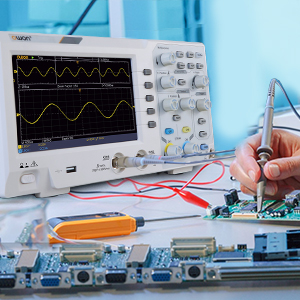
Figure 5: Oscilloscope probe connected to a circuit for testing
6. Инструкция по эксплуатации
6.1 Базовое отображение осциллограмм
- Подключите зонд к проверяемой цепи.
- Отрегулируйте Vertical Scale (VOLTS/DIV) и Horizontal Scale (SEC/DIV) knobs to get a stable and viewable waveform on the screen.
- Используйте Позиция knobs to move the waveform vertically or horizontally.
- Нажмите Автонастройка кнопка для автоматической оптимизации формы сигнала.

Figure 6: Auto-range function in action
6.2 Измерения курсора
The SDS1102 supports four automatic cursor modes for precise measurements.
- Нажмите Курсор кнопка.
- Выберите желаемый тип курсора (например, Vol).tage, Time) using the menu options.
- Adjust the cursor positions using the multipurpose knob to measure specific points on the waveform.
- The measured values (e.g., ◊V, ◊T) will be displayed on the screen.

Figure 7: Performing cursor measurements
6.3 Автоматические измерения
The oscilloscope offers 30 types of automatic measurements for quick analysis.
- Нажмите Мера кнопка.
- Navigate through the menu to select the desired automatic measurements (e.g., Frequency, Peak-to-Peak Voltage, RMS).
- Выбранные параметры будут отображаться на экране, обновляясь в режиме реального времени.

Figure 8: Automatic measurement display
6.4 Waveform Recording and Playback
The device allows for recording and replaying single waveforms.
- Нажмите Сохранить/Восстановить button (or similar function).
- Select the option to record a waveform.
- To replay, select the playback option and choose the desired stored waveform.
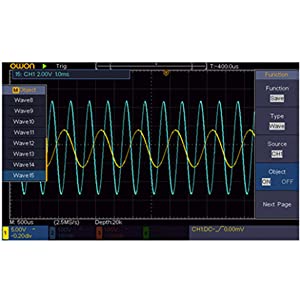
Figure 9: Waveform save and recall menu
6.5 USB Connectivity and PC Control
The SDS1102 supports plug-and-play USB storage devices for saving data and configurations. It also allows for remote communication and control via a computer using the USB interface, with support for LABVIEW and SCPI commands.

Figure 10: USB connection for PC communication and data transfer
7. Техническое обслуживание
The OWON SDS1102 is designed for continuous, maintenance-free use under normal operating conditions. However, proper care ensures its longevity and performance.
- Уборка: Для очистки корпуса осциллографа используйте мягкую сухую ткань. Для удаления стойких загрязнений слегка протрите поверхность.amp Можно использовать ткань с мягким моющим средством, следя за тем, чтобы жидкость не попала внутрь устройства. Не используйте абразивные чистящие средства или растворители.
- Хранилище: When not in use, store the oscilloscope in a clean, dry environment, away from extreme temperatures and humidity.
- Уход за зондом: Обращайтесь с датчиками осторожно. Избегайте сгибания и натяжения кабелей. Держите наконечники датчиков в чистоте.
- Внутреннее обслуживание: The device does not require user-performed internal maintenance. Do not attempt to open the casinг) поскольку это может привести к аннулированию гарантии и подвергнуть вас опасности поражения электрическим током.
8. Поиск Неисправностей
If you encounter issues with your OWON SDS1102, refer to the following common troubleshooting steps:
| Проблема | Возможная причина | Решение |
|---|---|---|
| Устройство не включается. | Power cord not connected; power outlet faulty; device fault. | Check power cord connection. Test power outlet with another device. If problem persists, contact support. |
| Осциллограмма не отображается. | Probe not connected; probe faulty; input signal too small/large; incorrect vertical/horizontal settings. | Ensure probes are securely connected. Check probe functionality. Adjust VOLTS/DIV and SEC/DIV. Use Autoset. |
| Waveform is distorted or noisy. | Uncalibrated probe; poor grounding; external interference. | Perform probe calibration (Section 5.2). Ensure proper grounding. Minimize external electromagnetic interference. |
| USB-накопитель не распознан. | USB device format incompatible; faulty USB device/port. | Ensure USB device is formatted correctly (e.g., FAT32). Try a different USB device or port. |
For issues not covered here, please refer to the full manual on the provided CD-ROM or contact OWON customer support.
9. Технические характеристики
| Особенность | Спецификация |
|---|---|
| Производитель | ОВОН |
| Номер модели | OWON-SDS1102 |
| Размеры (Д x Ш x В) | 30.1 х 15.2 х 7 см |
| Масса | 1.67 кг |
| Отображать | 7-inch Color TFT-LCD, 800 x 480 pixels |
| Каналы | 2 |
| Пропускная способность | 100 МГц |
| Sampле Скорость | 1 Гвыб/с |
| Длина записи | 10 000 баллов |
| Время нарастания | ≤1.7 нс |
| Затухание зонда | 1x, 10x, 100x, 1000x |
| Автоматические измерения | 30 видов |
| Связность | USB (for storage, PC communication) |
| Поддержка программного обеспечения | ЛАБОРАТОРИЯVIEW, SCPI |
| Батарейки в комплекте | Нет |
| Дата первой доступности | 23 июня 2022 г. |

Figure 11: Summary of key technical specifications
10. Гарантия и поддержка
OWON products are designed for reliability and performance. For warranty information, please refer to the documentation included on the CD-ROM or visit the official OWON website. Information regarding the availability of spare parts is currently unavailable.
For technical support, product inquiries, or service requests, please contact OWON customer service through their official channels. Keep your purchase receipt and product model number (OWON-SDS1102) handy when contacting support.