
1. Введение
The SteelSeries Arctis Nova 1X Gaming Headset delivers an immersive audio experience across multiple platforms. Designed for comfort and clarity, it features the Signature Arctis Sound and a ClearCast Gen 2 Microphone, making it ideal for Xbox Series X|S, PC, PlayStation, Switch, and mobile gaming.
This manual provides detailed instructions for setting up, operating, and maintaining your Arctis Nova 1X headset to ensure optimal performance and longevity.
2. Что в коробке
Upon unboxing your SteelSeries Arctis Nova 1X Gaming Headset, you should find the following components:
- Гарнитура Arctis Nova 1X
- Main Headset Cable (3.5mm)
- Headband (pre-installed or separate, as per packaging)
- Руководство по информации о продукте

Изображение: Спереди view of the SteelSeries Arctis Nova 1X Gaming Headset, showcasing its sleek design and microphone.
3. Настройка
3.1 Подключение гарнитуры
The Arctis Nova 1X is a wired headset designed for universal compatibility. To connect your headset:
- Locate the 3.5mm main headset cable.
- Plug one end of the 3.5mm cable into the audio jack on the left earcup of your Arctis Nova 1X headset.
- Plug the other end of the 3.5mm cable into the corresponding audio port on your gaming device (Xbox Series X|S controller, PC, PlayStation controller, Nintendo Switch, or mobile device).
Note: Ensure the cable is securely connected to both the headset and your device for optimal audio and microphone performance.

Image: Diagram illustrating the multi-platform compatibility of the Arctis Nova 1X headset, showing connections to various gaming devices.
4. Использование гарнитуры
4.1 Регулятор громкости
Adjust the audio volume directly from the headset:
- Locate the volume wheel on the left earcup.
- Roll the wheel up to increase the volume or down to decrease it.
4.2 Отключение микрофона
To mute or unmute your microphone:
- Find the microphone mute button on the left earcup, adjacent to the volume wheel.
- Press the button to toggle the microphone on or off. A red indicator will typically show when the microphone is muted.
4.3 Retractable ClearCast Gen 2 Microphone
The ClearCast Gen 2 microphone is retractable for convenience:
- To use the microphone, gently pull it out from the left earcup until it reaches your desired position.
- To store the microphone, push it back into the earcup until it is fully retracted.
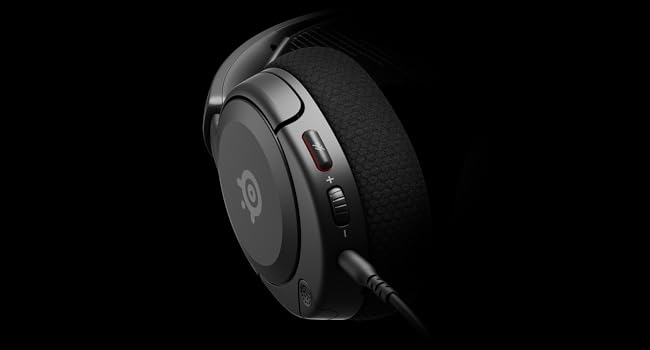
Изображение: Крупный план view of the left earcup of the Arctis Nova 1X, highlighting the volume wheel and microphone mute button for easy access during gameplay.
Video: Official SteelSeries video demonstrating the features of the Arctis Nova 1 headset, including its audio capabilities and microphone design.
5. Комфорт и посадка
The Arctis Nova 1X is designed for extended gaming sessions with its ComfortMAX System:
- Сверхлегкая конструкция: Weighing only 236g, the headset minimizes pressure during long use.
- Height-Adjustable Earcups: The earcups can be adjusted vertically to fit various head sizes comfortably.
- Flexible Suspension Headband: The elastic headband conforms to your head for a secure yet gentle fit.

Image: The Arctis Nova 1X headset highlighting its ultra-lightweight and slim profile, designed for comfort.

Image: The Arctis Nova 1X headset demonstrating its height-adjustable earcups for a personalized and comfortable fit.
6. Аудиовозможности
Experience superior sound with the Arctis Nova 1X:
- Всемогущий Аудио: The Nova Acoustic System with High Fidelity Drivers delivers crystal-clear highs, precise mids, and deep bass.
- Пространственное аудио 360°: Immerse yourself in the game with surround sound that allows you to pinpoint enemy positions and environmental cues.
- Pro-grade Parametric EQ: Настройте своего профессионального звукорежиссераfile with the SteelSeries Sonar Audio Software Suite for a competitive edge.

Image: The Arctis Nova 1X headset highlighting its "Almighty Audio" capabilities for a rich sound experience.
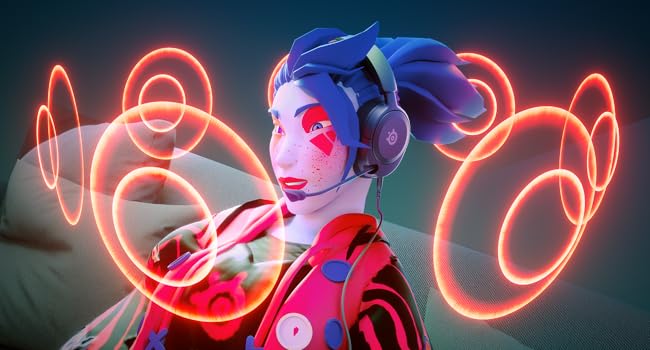
Image: Visual representation of 360° Spatial Audio, showing sound waves surrounding a gamer wearing the Arctis Nova 1X headset.
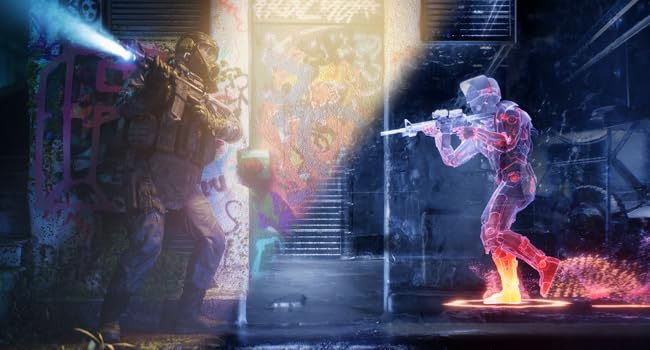
Image: Graphic illustrating the Pro-grade Parametric EQ, suggesting advanced audio customization options available with the headset.
7. Характеристики микрофона
The ClearCast Gen 2 Mic ensures clear communication:
- Шумоподавление с использованием искусственного интеллекта: Advanced AI algorithms filter out background noise, ensuring your voice is heard clearly by teammates.
- Выдвижная конструкция: The microphone can be fully retracted into the earcup when not in use, maintaining a sleek profile.

Image: The Nova 1 AI Microphone, emphasizing its noise-cancelling capabilities for clear voice communication.
8. Техническое обслуживание
To ensure the longevity and optimal performance of your Arctis Nova 1X headset, follow these maintenance guidelines:
- Уборка: Для протирки амбушюр и оголовья используйте мягкую сухую ткань. Для более тщательной очистки слегка протрите тканью.amp cloth with mild soap can be used, ensuring no moisture enters the speaker grilles or ports.
- Уход за кабелем: Avoid sharp bends or excessive pulling on the headset cable to prevent internal damage. Store the cable neatly when not in use.
- Хранилище: Храните гарнитуру в прохладном, сухом месте, вдали от прямых солнечных лучей и экстремальных температур.
- Амбушюры для наушников: If applicable, ensure earbud tips (if using with mobile) fit snugly. Replace worn-out earbud tips to maintain sound quality and comfort.
9. Поиск Неисправностей
If you encounter issues with your Arctis Nova 1X headset, try the following solutions:
- Нет звука/Низкая громкость:
- Ensure the 3.5mm cable is fully inserted into both the headset and your device.
- Проверьте регулятор громкости на гарнитуре и системный регулятор громкости вашего устройства.
- Проверьте работу гарнитуры с другим устройством, чтобы исключить проблемы, специфичные для конкретного устройства.
- Микрофон не работает:
- Ensure the microphone mute button is not activated (red indicator off).
- Verify the microphone is fully extended and positioned correctly.
- Проверьте настройки звука вашего устройства, чтобы убедиться, что выбран правильный вход микрофона и его громкость не отключена.
- Плохое качество звука:
- Ensure the 3.5mm cable is not damaged and is securely connected.
- Adjust your device's audio settings or equalizer settings.
10. Технические характеристики
| Особенность | Деталь |
|---|---|
| Бренд | SteelSeries |
| Название модели | Арктис Нова 1X |
| Номер модели | 61616 |
| Технология связи | Проводной (разъем 3.5 мм) |
| Расположение ушей | Над ухом |
| Контроль шума | Активное шумоподавление (микрофон) |
| Тип аудиодрайвера | Динамический драйвер |
| Диапазон частот | 20 Гц - 20 000 Гц |
| Микрофон | ClearCast Gen 2 (Retractable, AI Noise Cancelling) |
| Совместимые устройства | Xbox Series X|S, PC, PlayStation, Switch, Mobile |
| Вес товара | 1.1 фунта (приблизительно 500 г) |
| Цвет | Черный |
| СКП | 850014119737 |
Видео: 360-градусный обзор view of the SteelSeries Arctis Nova 1X headset in black, showcasinг его дизайн со всех сторон.
11. Гарантия и поддержка
11.1 Информация о гарантии
The SteelSeries Arctis Nova 1X Gaming Headset comes with a Ограниченная гарантия на 1 года Гарантия действует с даты покупки. Данная гарантия распространяется на производственные дефекты и обеспечивает исправную работу изделия при нормальном использовании. Для предъявления гарантийных претензий сохраните чек о покупке.
For detailed warranty terms and conditions, please refer to the official SteelSeries webили на гарантийном талоне, входящем в комплект поставки товара.
11.2 Поддержка клиентов
For further assistance, technical support, or warranty claims, please contact SteelSeries customer support through their official webсайт:
You may also find additional resources, FAQs, and software downloads on their support page.