
Fasizi UM34C
Fasizi UM34C USB Meter Tester User Manual
Model: UM34C | Brand: Fasizi
1. Введение
The Fasizi UM34C is a versatile USB meter tester designed for precise measurement of voltage, current, power, capacity, and energy. It features a 1.44-inch color LCD display for clear readings and offers Bluetooth connectivity for Android app control, allowing for enhanced data monitoring and analysis. This manual provides essential information for the safe and effective use of your UM34C device.

Figure 1: Fasizi UM34C USB Meter Tester, showcasing благодаря компактному дизайну и яркому дисплею.
Key features include quick charge recognition, load impedance measurement, temperature display, and adjustable screen brightness. The UM34C model specifically includes a Bluetooth communication module for seamless integration with compatible Android devices.
2. Настройка
2.1 Содержимое упаковки
- 1 x Fasizi UM34C USB Meter Tester
2.2 Подключение устройства
To begin using your UM34C tester, simply plug the USB-A male connector into a USB power source (e.g., charger, power bank, computer USB port). Then, connect the device you wish to test (e.g., smartphone, tablet) to the USB-A female port or the Type-C IN port on the UM34C.

Figure 2: Detail of the Type-C IN port, allowing connection of Type-C devices for testing.
2.3 Bluetooth Connection (UM34C Only)
The UM34C model features a built-in Bluetooth module for wireless communication with an Android application. Ensure your UM34C is powered on. On your Android device, enable Bluetooth and search for available devices. Select the UM34C from the list to pair. Once paired, open the dedicated Android application to view real-time data and control settings.

Figure 3: The UM34C model, highlighting the integrated Bluetooth board for wireless connectivity.
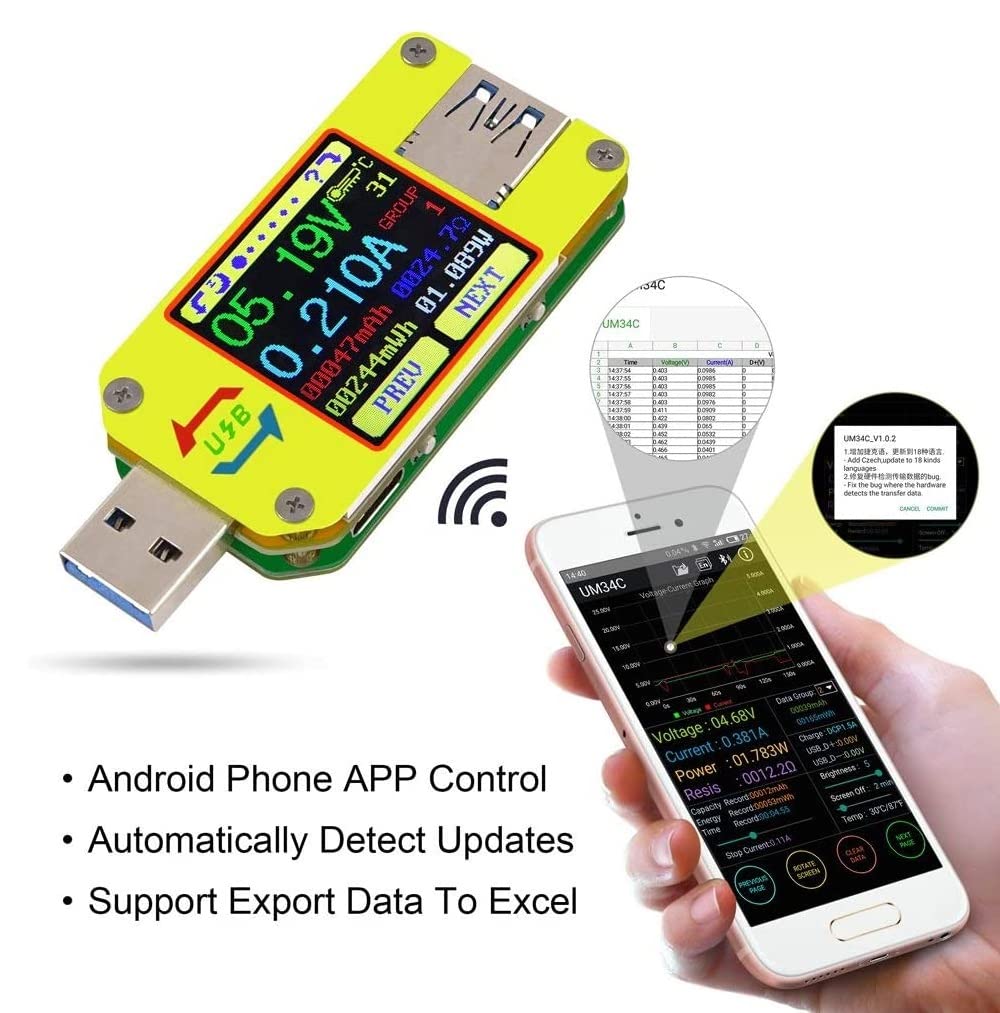
Figure 4: An Android phone displaying the UM34C application interface, demonstrating remote control and data export capabilities.
3. Инструкция по эксплуатации
3.1 Навигация по дисплею
The UM34C features a 1.44-inch color LCD display. Use the 'PREV' and 'NEXT' buttons located on the device to cycle through different measurement screens and settings. Each screen provides specific data points such as voltage, current, power, capacity, energy, temperature, and load impedance.
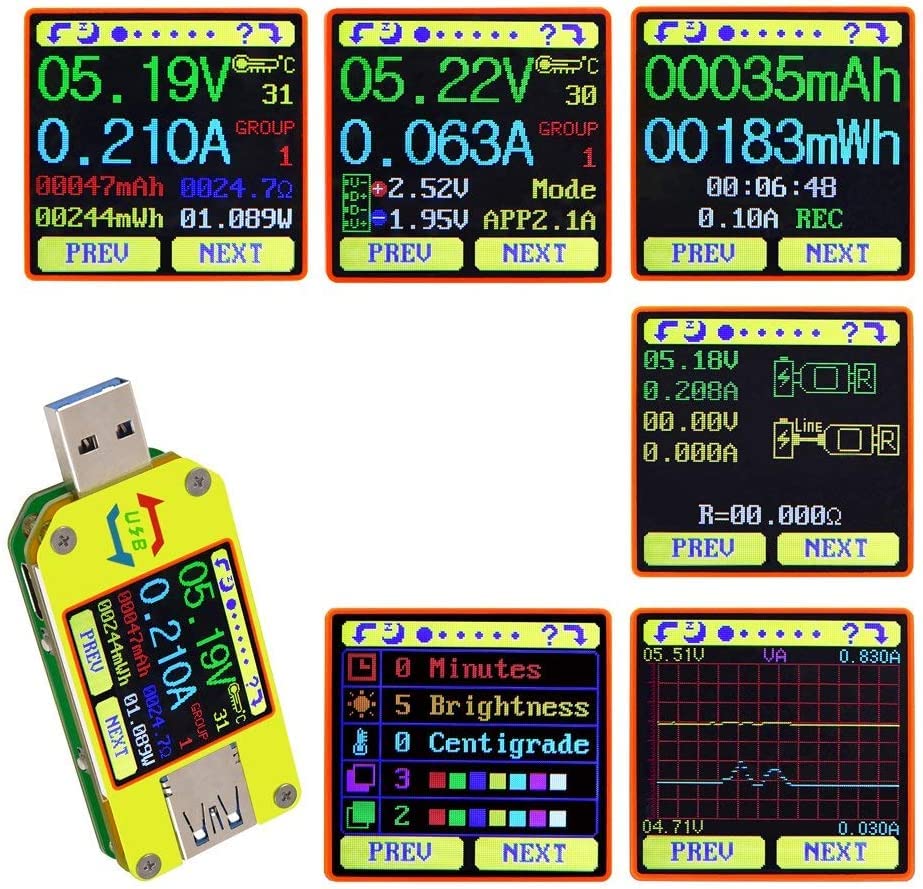
Figure 5: A collage of different display modes available on the UM34C, showing various measurement parameters.
3.2 Режимы измерения
- Томtage/Current/Power Detection: Мониторинг объема в реальном времениtage (V), current (A), and calculated power (W).
- Capacity/Energy Detection: Accumulates charge capacity (mAh) and energy (Wh) over time, useful for evaluating power banks or battery charging.
- Load Impedance Measurement: Displays the calculated load impedance in Ohms (Ω).
- Отображение температуры: Shows the ambient temperature in Celsius (℃) or Fahrenheit (℉).
- Распознавание быстрой зарядки: Identifies various quick charge protocols (e.g., QC2.0, QC3.0, Apple 2.4A, Samsung). Note that recognition is for reference only and may not be 100% accurate due to rapid protocol updates.

Figure 6: The UM34C screen showing quick charge recognition and various detection modes for comprehensive analysis.
3.3 Настройка параметров
Navigate through the settings menu using the 'PREV' and 'NEXT' buttons to adjust parameters such as screen brightness (levels 0-5) and auto-off time (0-9 minutes). The device also supports data storage for up to 10 groups of measurements.

Figure 7: An illustration of the UM34C's internal components and design features, including the Bluetooth indicator light and durable PC materials.
4. Техническое обслуживание
To ensure the longevity and accuracy of your Fasizi UM34C USB Meter Tester, follow these maintenance guidelines:
- Уборка: Use a soft, dry cloth to clean the device. Avoid using abrasive cleaners or solvents, which can damage the screen or casing.
- Хранилище: Храните устройство в прохладном, сухом месте, вдали от прямых солнечных лучей и экстремальных температур.
- Умение обращаться: Обращайтесь с устройством осторожно. Не допускайте его падений и сильных ударов, так как это может повредить внутренние компоненты.
- Защита: The device features a double-sided scratch-resistant and hard PC material. A surface protection film can be uncovered for optimal clarity.
5. Поиск Неисправностей
5.1 Bluetooth Connection Issues (UM34C Only)
Some Android phones, such as Samsung NOTE8/S8, may experience incompatibility issues with the UM34C's Bluetooth module. If you encounter connection problems, consider the following:
- Версия Android: Ensure your Android device is running Android 5.0 or higher.
- Фоновая активность приложения: Allow the UM34C application to run in the background without being cleared by the system.
- Auto-Start Permission: Grant the UM34C app permission to auto-start.
- Screen Lock Activity: Ensure the app is allowed to remain active even after the screen is locked and is not cleared from memory.
- Повторное сопряжение: Попробуйте отменить сопряжение устройства и повторно выполнить его в настройках Bluetooth вашего телефона.
5.2 Неточные показания
If you suspect inaccurate readings:
- Ensure all connections are secure and free of debris.
- Verify the power source and load are within the specified operating ranges of the UM34C.
- Avoid extreme environmental conditions (temperature, humidity) that may affect performance.
6. Технические характеристики
The following table details the technical specifications for the Fasizi UM34C USB Meter Tester:

Figure 8: Physical dimensions of the UM34 and UM34C models, indicating slight differences in height due to the Bluetooth module.
| Особенность | Спецификация |
|---|---|
| Модель | UM34C (Bluetooth Communication Version) |
| Экран дисплея | 1.44-дюймовый цветной ЖК-дисплей |
| Томtage Диапазон измерения | 4.000-24.000В |
| ТомtagРазрешение измерения | 0.01В |
| Томtage Точность измерения | ± (0.2% + 1 цифра) |
| Диапазон измерения тока | 0-5.0000А |
| Разрешение измерения тока | 0.001А |
| Точность измерения тока | ± (0.8% + 3 цифр) |
| Диапазон накопления емкости | 0-99999 мАч |
| Диапазон накопления энергии | 0-999.99Втч |
| Диапазон измерения времени | 0-99ч 59мин 59с |
| Диапазон сопротивления нагрузки | 0.8 Ом-9999.9 Ом |
| Диапазон измерения температуры | От -10 ℃ до 100 ℃ / от 0 ℉ до 200 ℉ |
| Ошибка измерения температуры | ± 3℃ / ± 6℉ |
| Регулировка яркости экрана | Уровень 0-5 |
| Время автоматического выключения экрана | 0-9 минуты |
| Томtage Graphic Range | 0-24.00В |
| Current Graphic Range | 0-4.0000А |
| Группы хранения данных | 10 групп |
| Частота обновления | 2 Гц |
| Product Size (UM34C) | 71.2 х 30.5 х 12.4 мм |
| Product Size (UM34) | 71.2 х 30.5 х 11.3 мм |
| Масса | 22.87 грамм |
| Источник питания | Battery Powered (via USB input) |
| СКП | 798339964895 |
| Номер модели производителя | ЭЛА2424 |
7. Гарантия и поддержка
Fasizi products are designed for reliability and performance. For any technical assistance, troubleshooting, or warranty inquiries, please contact the retailer or manufacturer directly. Keep your purchase receipt as proof of purchase for warranty claims.
For the latest information and support resources, please refer to the official Fasizi webсайт или свяжитесь с их службой поддержки.
Ask a question about this manual
Ask about setup, troubleshooting, compatibility, parts, safety, or missing instructions. Manuals+ will review the question and use this page’s manual context to help answer it.