
Lucci Air 21304101
Инструкция по эксплуатации потолочного вентилятора Lucci Air Whitehaven 56 дюймов.
Модель: 21304101
Введение
This manual provides detailed instructions for the installation, operation, and maintenance of your Lucci Air Whitehaven 56-inch 3-blade DC Smart WiFi Controlled Indoor/Outdoor Black Ceiling Fan. Please read this manual thoroughly before installation and use to ensure safe and efficient operation.
The Lucci Air Whitehaven fan features a modern 3-blade design, DC technology for energy efficiency and quiet operation, and smart WiFi control capabilities. It is suitable for both indoor and outdoor locations.
Информация по безопасности
Always follow basic safety precautions when installing and operating electrical appliances. This includes, but is not limited to:
- Перед установкой или обслуживанием убедитесь, что питание отключено на автоматическом выключателе.
- Все электротехнические работы должны выполняться квалифицированным электриком.
- Mount the fan to a structure capable of supporting the fan's weight (approximately 15 pounds).
- Ensure fan blades are at least 7 feet (2.1 meters) from the floor.
- Не вставляйте предметы на пути вращающихся лезвий.
Содержимое упаковки
Перед началом установки убедитесь, что все компоненты присутствуют:
- Сборка двигателя потолочного вентилятора
- 3 Fan Blades (ABS Plastic)
- Пульт дистанционного управления с настенным креплением
- Монтажное оборудование
- 1 x CP2032 Battery (for remote)
- Руководство по эксплуатации

Image: The Lucci Air Whitehaven 56-inch ceiling fan, showcasing its sleek black finish and three distinct blades.
Настройка и установка
Installation of the Lucci Air Whitehaven ceiling fan requires assembly and electrical wiring. It is recommended that installation be performed by a licensed electrician.
1. Монтаж кронштейна
Secure the mounting bracket to a ceiling joist or a fan-rated outlet box. Ensure the bracket is firmly attached and can support the fan's weight.
2. Проводные соединения
Connect the fan's electrical wires to the household wiring according to local electrical codes. Typically, this involves connecting the live, neutral, and ground wires. Refer to the wiring diagram provided in the physical manual for specific color codes.
3. Сборка вентилятора
Attach the fan blades to the motor housing. The Whitehaven fan features three ABS plastic blades designed for optimal airflow. Ensure all screws are tightened securely.

Image: Technical line drawing illustrating the dimensions of the Lucci Air Whitehaven ceiling fan, including its 56-inch diameter and 11.8-inch height.
4. Securing the Fan to the Bracket
Carefully lift the fan assembly and attach it to the mounted bracket. Ensure all safety clips and screws are engaged to prevent accidental detachment.
Инструкция по эксплуатации
The Lucci Air Whitehaven fan can be controlled via the included remote control or through the Bond Home app for smart WiFi control.
Дистанционное управление
The remote control allows for comprehensive control of the fan's functions:
- Кнопка питания: Включает/выключает вентилятор.
- Контроль скорости: Select from 6 fan speeds (I to VI).
- Обратный переключатель: Changes the direction of blade rotation for summer (downward airflow) or winter (upward airflow) modes. This is a manual switch on the fan body.
- Включение / выключение / затемнение света: Controls the integrated light (if applicable to your model). Hold to dim.
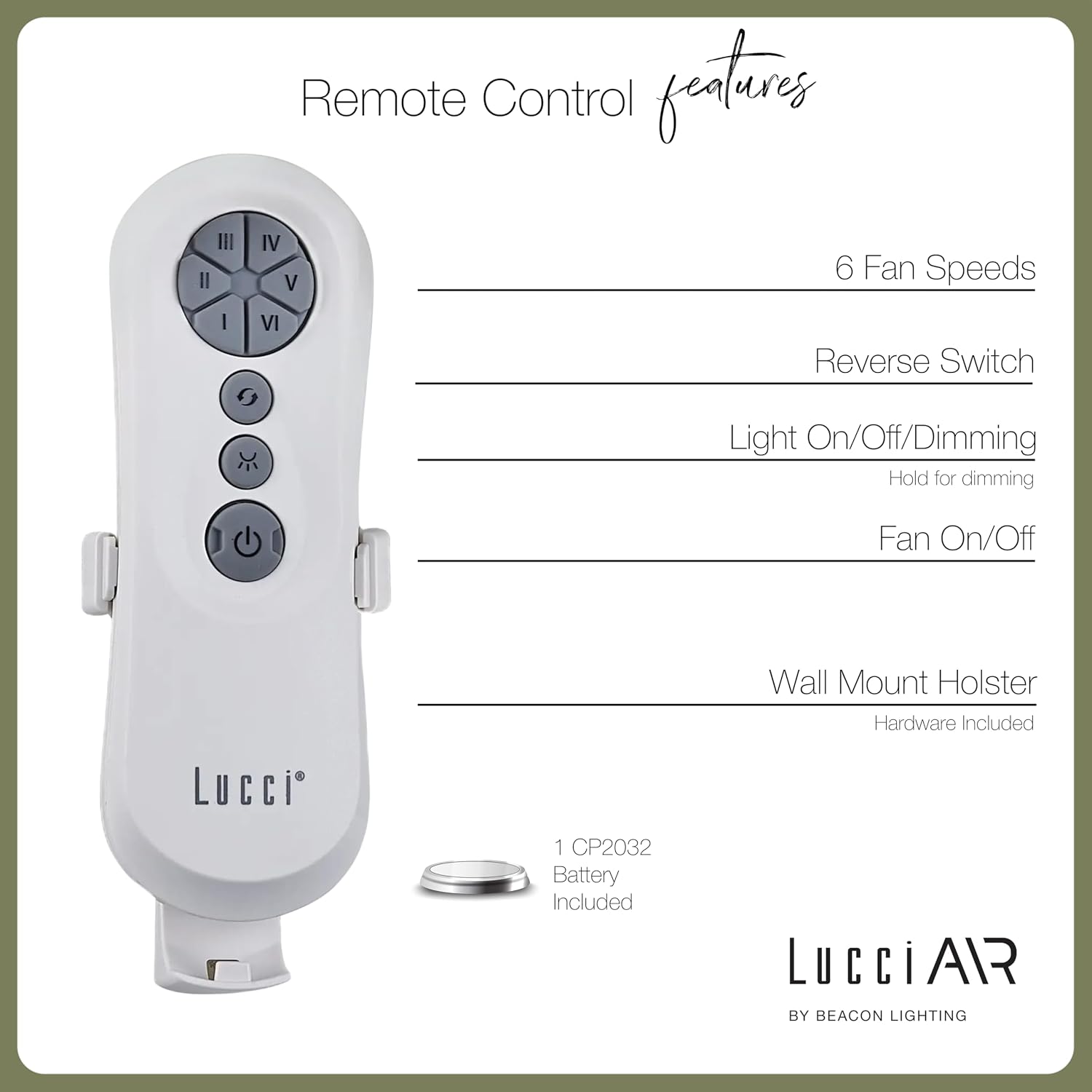
Image: Diagram detailing the features of the Lucci Air remote control, including buttons for 6 fan speeds, reverse switch, light control, and fan power, along with information about the wall mount holster and included battery.
Умное управление WiFi
For advanced control and smart home integration, download the Bond Home app. The app allows you to control your fan from anywhere, set schedules, and integrate with voice assistants.
- Download the "Bond Home" app from your device's app store.
- Follow the in-app instructions to pair your Lucci Air Whitehaven fan.
- Once paired, you can control fan speed, direction, and lighting (if applicable) directly from your smartphone or smart speaker.
Обслуживание
Регулярное техническое обслуживание обеспечит долговечность и оптимальную производительность вашего потолочного вентилятора.
- Уборка: Периодически протирайте лопасти вентилятора и корпус двигателя от пыли мягкой тряпкой.amp cloth. Do not use abrasive cleaners or solvents. The manufacturer recommends "Hand Wash" for care, implying gentle cleaning.
- Проверка лезвия: Check that all blade screws are tight at least twice a year. Loose blades can cause wobbling and noise.
- Смазка двигателя: The DC motor is typically sealed and does not require lubrication. Refer to the physical manual for specific instructions if unsure.
- Удаленная замена батареи: Replace the CP2032 battery in the remote control when its range decreases or it stops responding.
Поиск неисправностей
| Проблема | Возможная причина | Решение |
|---|---|---|
| Вентилятор не запускается | Вентилятор не работает; ослаблены проводные соединения; разряжена батарея в пульте дистанционного управления. | Проверьте автоматический выключатель; Убедитесь, что все проводные соединения надежны; Замените батарею пульта дистанционного управления. |
| Покачивание вентилятора | Ослабленные винты лезвий; Несбалансированные лезвия; Ослабленный монтажный кронштейн. | Tighten all blade screws; Ensure blades are balanced (balancing kit may be needed); Secure mounting bracket. |
| Пульт дистанционного управления не работает | Dead battery; Remote not paired with fan. | Replace CP2032 battery; Refer to pairing instructions in the physical manual or Bond Home app. |
| Вентилятор шумит | Ослабленные винты; Гудение двигателя; Лопасти бьют о препятствие. | Check and tighten all screws; Ensure no obstructions are in the fan's path. A slight motor hum is normal for DC fans. |
| WiFi control not connecting | Incorrect WiFi password; Router too far; Bond Home app issue. | Verify WiFi credentials; Move router closer or use a WiFi extender; Reinstall Bond Home app or contact Bond Home support. |
Технические характеристики
| Особенность | Деталь |
|---|---|
| Название модели | Уайтхейвен |
| Номер модели | 21304101 |
| Бренд | Луччи Эйр |
| Размеры (Д x Ш x В) | 56" x 56" x 11.8" |
| Длина лезвия | 28 дюйма |
| Количество лезвий | 3 |
| Материал лезвия | АБС-пластик |
| Цвет | Черный |
| Источник питания | DC (постоянный ток) |
| Томtage | 120В |
| Ватtage | 35 Вт |
| Емкость воздушного потока | 7070 кубических футов в минуту (CFM) |
| Количество скоростей | 6 |
| Метод контроля | Remote, Smart WiFi (Bond Home App) |
| Использование внутри и снаружи помещений | На открытом воздухе, В помещении |
| Вес товара | 15 фунта |
| СКП | 811769032429 |
Гарантия и поддержка
The Lucci Air Whitehaven ceiling fan comes with a ограниченная пожизненная гарантия. Сохраните чек о покупке для предъявления гарантийных претензий.
For technical support, troubleshooting assistance beyond this manual, or warranty inquiries, please contact Lucci Air customer service. Contact information can typically be found on the manufacturer's webсайте или на упаковке продукта.
For Bond Home app related issues, please refer to the Bond Home support resources.
Дополнительный продукт Views

Image: Two Lucci Air Whitehaven fans installed on an outdoor patio, demonstrating their suitability for outdoor use and modern aesthetic in an exterior setting.

Image: A Lucci Air Whitehaven fan installed in an indoor dining room, highlighting its sleek design complementing a modern interior space.

Image: The Lucci Air Whitehaven fan positioned in a contemporary living room, illustrating its integration into a comfortable indoor environment.

Изображение: детальная сторона view of the Lucci Air Whitehaven ceiling fan, emphasizing the slim profile of its blades and motor housing.
Официальные видеоролики о продуктах
В предоставленных данных не найдено официальных видеороликов продавца для этого продукта.
Ask a question about this manual
Ask about setup, troubleshooting, compatibility, parts, safety, or missing instructions. Manuals+ will review the question and use this page’s manual context to help answer it.