
1. Введение и информация по безопасности
Thank you for choosing the CABLETECH UCH0199-1 Universal Full-Motion TV Wall Mount. This manual provides detailed instructions for safe installation, operation, and maintenance of your TV mount. Please read all instructions carefully before assembly and use to ensure proper installation and to prevent personal injury or property damage.
Важные предупреждения о безопасности:
- Грузоподъемность: Do not exceed the maximum load capacity of 35 kg (77 lbs). Exceeding this limit may result in serious injury or property damage.
- Размер экрана: Это крепление предназначено для телевизоров с диагональю экрана от 37 до 70 дюймов.
- Тип стены: Ensure the mounting surface can safely support the combined weight of the mount and your TV. This mount is suitable for solid concrete walls, brick walls, and wood stud walls. Do not install on drywall alone.
- Профессиональная установка: Если вы не уверены в процессе установки, проконсультируйтесь с квалифицированным специалистом.
- Дети: Во время установки держите детей подальше от зоны сборки. Мелкие детали могут представлять опасность удушья.
- Инструменты: Use appropriate tools and follow all safety precautions for tool usage.
- Регулярные проверки: Периодически проверяйте надежность крепления и затяжку всех крепежных элементов.
2. Содержимое упаковки
Verify that all components are present and undamaged before beginning installation. If any parts are missing or defective, contact CABLETECH customer support.

Рисунок 2.1: Надview of the CABLETECH UCH0199-1 TV Wall Mount components. The image displays the main articulating arm assembly, the wall plate, and the two vertical TV bracket arms.
- Сборка настенной пластины (1)
- Articulating Arm Assembly (1)
- Кронштейны для телевизора (2)
- Комплект крепежных элементов (винты, дюбели, шайбы, прокладки)
3. Технические характеристики
Refer to the following technical specifications to ensure compatibility with your television and installation environment.
| Особенность | Спецификация |
|---|---|
| Совместимость с размером экрана | 37" - 70" |
| Максимальная грузоподъемность | 35 кг (77 фунта) |
| Совместимость с VESA | 200x200, 300x200, 300x300, 400x200, 400x300, 400x400, 600x400 мм |
| Угол наклона | +5° / -18° |
| Угол поворота | +90° / -90° |
| Расстояние от стены | 105 мм - 429 мм |
| Управление кабелями | Интегрированный |
| Материал | Сталь |
| Цвет | Черный |
| Вес продукта | 2.2 кг |
4. Настройка и установка
4.1 Контрольный список перед установкой
- Необходимые инструменты: Pencil, drill, stud finder (for wood studs), level, Phillips head screwdriver, socket wrench.
- Тип стены: Identify your wall type (wood stud, solid concrete, brick). Different wall types require specific mounting hardware and procedures.
- TV Weight and VESA Pattern: Confirm your TV's weight is within the mount's capacity and its VESA pattern matches the mount's compatibility.
4.2 Пошаговая установка
Step 1: Determine TV Height and Wall Plate Position
- Decide on the desired viewing height for your TV.
- Using a stud finder, locate the center of the wood studs in your desired mounting area. Mark these locations with a pencil. For concrete/brick walls, choose a suitable location away from electrical wires or plumbing.
Step 2: Install the Wall Plate Assembly
- Hold the wall plate assembly against the wall at the marked height and use a level to ensure it is perfectly horizontal.
- Mark the drilling holes through the wall plate onto the wall.
- Drill pilot holes at the marked locations. For wood studs, use a smaller drill bit than the lag bolts. For concrete/brick, use a masonry drill bit and insert wall anchors.
- Secure the wall plate assembly to the wall using the provided lag bolts and washers. Tighten firmly but do not overtighten.
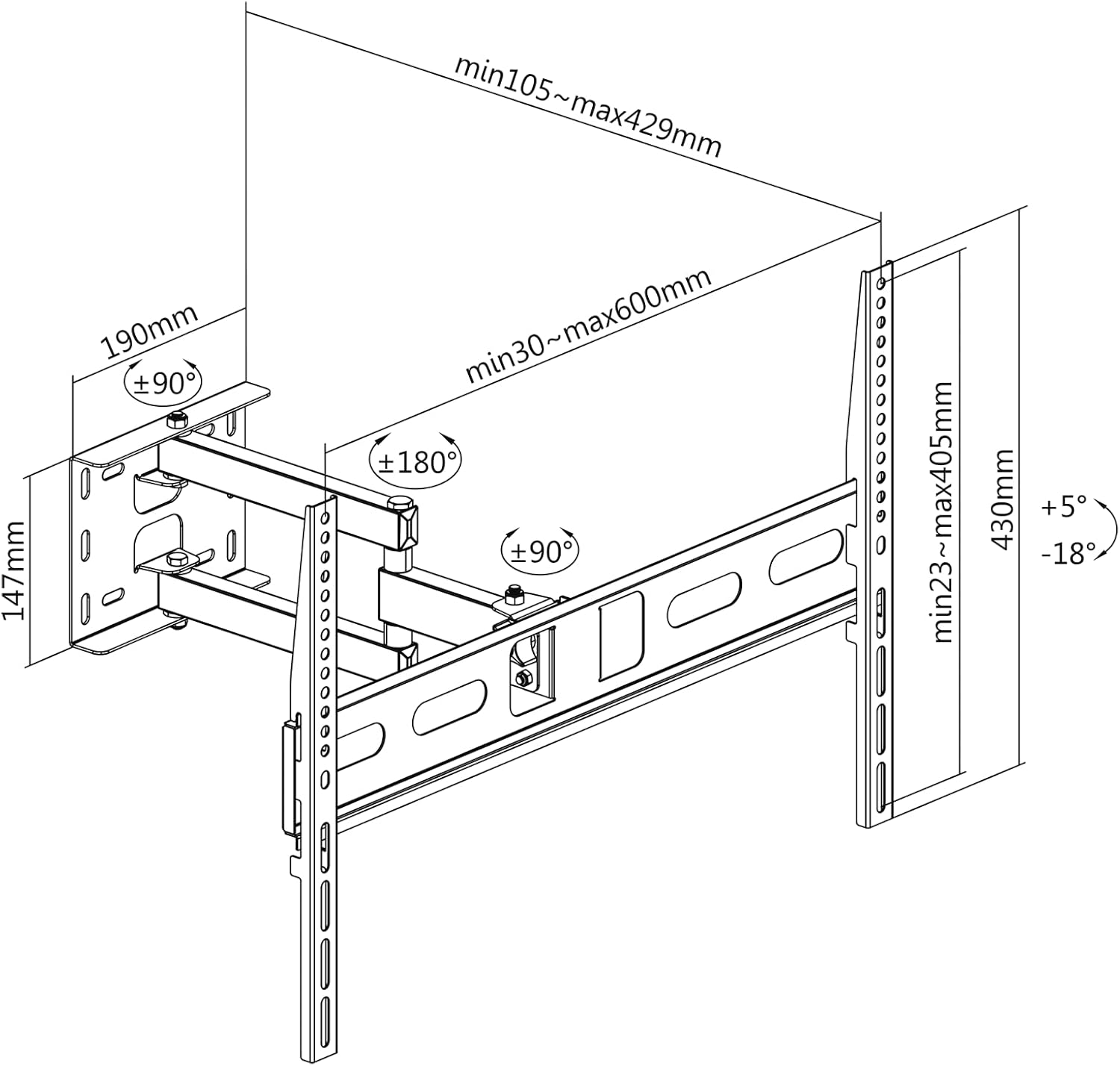
Рисунок 4.1: Dimensional drawing showing the mount's measurements, VESA compatibility, and articulation ranges. This diagram assists in planning the installation and understanding the mount's capabilities.
Шаг 3: Прикрепите кронштейны к телевизору.
- Чтобы предотвратить повреждение экрана, аккуратно положите телевизор экраном вниз на мягкую чистую поверхность.
- Найдите монтажные отверстия VESA на задней панели телевизора.
- Выберите из комплекта крепежных элементов подходящие винты, шайбы и прокладки, соответствующие отверстиям VESA вашего телевизора.
- Attach the two TV bracket arms to the back of your TV. Ensure the hooks on the brackets are facing upwards and the brackets are centered and level. Tighten the screws securely.
Шаг 4: Закрепите телевизор на настенной пластине.
- С помощью посторонней помощи осторожно поднимите телевизор, держа его за прикрепленные кронштейны.
- Hook the TV bracket arms onto the wall plate assembly. Ensure both brackets are securely seated on the wall plate.
- Locate the safety screws or locking mechanisms on the bottom of the TV brackets and tighten them to prevent the TV from accidentally lifting off the mount.
5. Инструкция по эксплуатации
Once installed, your CABLETECH UCH0199-1 mount allows for flexible TV positioning.
5.1 Регулировка угла наклона
- Крепление обеспечивает диапазон наклона от +5° (вверх) до -18° (вниз).
- To adjust the tilt, loosen the tilt adjustment knobs or bolts located on the TV bracket arms.
- Осторожно наклоните телевизор под нужным углом.
- Tighten the tilt adjustment knobs/bolts to secure the TV in place.

Рисунок 5.1: Visual representation of the TV tilt adjustment feature, showing the range of motion from upward to downward tilt.
5.2 Adjusting Swivel Angle and Wall Distance
- The articulating arm allows for a swivel range of +90° to -90° (depending on TV size and wall clearance) and extends the TV from 105 mm to 429 mm from the wall.
- Gently grasp the sides of your TV and move it to the desired swivel angle or extend/retract it from the wall. The joints are designed to move smoothly.
- No locking mechanism is typically required for swivel, as the friction in the joints holds the position.

Рисунок 5.2: The mount shown fully extended from the wall, demonstrating its maximum reach and swivel capability.
5.3 Portrait and Landscape Orientation
- This mount supports installing your TV in either portrait or landscape orientation. This is typically achieved during the initial installation by aligning the TV's VESA mounting holes with the mount's brackets in the desired orientation.
- Примечание: The mount itself does not provide a rotational mechanism to switch between portrait and landscape after installation. This feature refers to the flexibility of initial setup.
5.4 Управление кабелями
- Utilize the integrated cable clips or channels on the articulating arm to route and secure your TV cables. This helps maintain a tidy appearance and prevents cables from snagging during adjustments.
6. Техническое обслуживание
Регулярное техническое обслуживание обеспечивает долговечность и безопасную работу настенного крепления для телевизора.
- Проверка герметичности: Every 3-6 months, check all screws and bolts (wall plate, arm joints, TV brackets) to ensure they are securely tightened. Do not overtighten.
- Уборка: Для удаления пыли протрите крепление мягкой сухой тканью. Для удаления стойких пятен используйте слегка сухую ткань.amp Можно использовать ткань, а затем высушить. Избегайте абразивных чистящих средств или растворителей.
- Смазка: The articulating joints are designed for smooth movement. If movement becomes stiff, a small amount of silicone-based lubricant can be applied to the pivot points, but this is rarely necessary.
7. Поиск Неисправностей
If you encounter issues with your CABLETECH UCH0199-1 TV wall mount, refer to the following common problems and solutions.
- Телевизор после установки установлен неровно:
Решение: Ensure the wall plate was installed level. Some mounts offer post-installation leveling adjustments on the TV brackets; check your specific model for this feature. If not, you may need to slightly adjust the wall plate. - Крепление кажется расшатанным или неустойчивым:
Решение: Immediately remove the TV from the mount. Re-check all mounting screws and bolts for tightness, both on the wall plate and the TV brackets. Ensure the wall anchors (if used) are properly seated and the wall material is suitable. If the issue persists, consult a professional installer. - Difficulty moving the articulating arm:
Решение: The arm joints are designed to hold the TV's position. If movement is too stiff, check for any overtightened bolts on the arm joints. If too loose, gently tighten the bolts at the pivot points. - Телевизор не подходит к креплению:
Решение: Verify your TV's VESA pattern and weight against the specifications in Section 3. If they do not match, the mount is incompatible with your TV.
8. Гарантия и поддержка
For warranty information or technical support, please refer to the documentation included with your purchase or contact CABLETECH customer service directly. Keep your proof of purchase for warranty claims.
CABLETECH is committed to providing high-quality products and support. If you have any questions or require assistance, do not hesitate to reach out to our support team.