
Введение
This manual provides comprehensive instructions for the proper setup, operation, and maintenance of your WANGCL ZK-1002MT Bluetooth 5.0 Subwoofer Amplifier Board. Please read this manual thoroughly before using the product to ensure optimal performance and safety.
Продукт болееview
The ZK-1002MT is a high-power audio stereo amplifier board featuring Bluetooth 5.0 connectivity and AUX input. It is designed to deliver clear audio with independent treble and bass adjustment. This module is suitable for driving 30-200W, 4-8Ω speakers, providing a robust audio experience.

Рисунок 1: Передняя часть view of the ZK-1002MT amplifier board, showing the main controls and branding.
Технические характеристики
| Особенность | Спецификация |
|---|---|
| Модель | ЗК-1002МТ |
| Версия Bluetooth | 5.0 (unobstructed, 15 meters) |
| Метод ввода | AUX + Bluetooth |
| Количество каналов | Левый и правый каналы (стерео) |
| Адаптер питания | DC 12~24 V / 5A or more |
| Адаптация докладчика | 30~200 W, 4~8 Ω |
| Соотношение сигнал/шум | > 90 дБ |
| Размеры | 99мм х 60мм х 21мм |
| Выходная мощность | 200 Watts (Total, 100W per channel) |
Note: The power of the adapter power supply must be greater than the actual working power of the ampдля оптимальной производительности.
Инструкции по установке
- Распаковываем компоненты: Carefully remove all items from the packaging. The package typically includes the amplifier board, knobs, screws, and copper pillars for assembly.
- Соберите Casing (if applicable): Если ваш amplifier board came with a DIY casing, assemble it using the provided screws and copper pillars. Ensure all components are securely fitted.
- Подключите динамики: Connect your passive speakers to the designated left and right channel output terminals. Ensure correct polarity (+ and -) for each speaker. The amplifier supports 4-8Ω speakers with power ratings between 30-200W.
- Подключить источник питания: Connect a DC 12-24V / 5A or higher power adapter to the DC 12-24V power input port (5.5*2.1mm DC plug). Do not use a 24V battery pack directly. Ensure the power supply is sufficient for the amplifier's working power.
- Подключите аудиовход (опционально):
- For AUX input, connect your audio source (e.g., smartphone, MP3 player) to the AUX-IN port using a standard 3.5mm audio cable.
- For Bluetooth input, ensure no AUX cable is connected and proceed to the operating instructions for pairing.
- Установите ручки: Place the treble, bass, and volume control knobs onto their respective shafts on the ampподъемная доска.

Figure 2: Detailed connection diagram for power, speakers, and AUX input.

Рисунок 3: В разобранном виде view принадлежащий amplifier board and included assembly components.
Инструкция по эксплуатации
- Включение питания: Once all connections are secure, plug in the power adapter. The amplifier board will power on automatically.
- Регулировка громкости: Use the rightmost knob labeled 'VOL' to adjust the overall volume level. Turn clockwise to increase volume and counter-clockwise to decrease.
- Регулировка высоких частот: Use the leftmost knob labeled 'TREBLE' to adjust the high-frequency response. Turn clockwise for more treble, counter-clockwise for less.
- Регулировка басов: Use the middle knob labeled 'BASS' to adjust the low-frequency response. Turn clockwise for more bass, counter-clockwise for less.
- Bluetooth-соединение:
- Убедитесь, что к устройству не подключен кабель AUX. ampпожизненнее.
- На вашем устройстве Bluetooth (например, смартфоне) включите Bluetooth и выполните поиск доступных устройств.
- Select 'ZK-1002MT' from the list to pair. A confirmation sound may indicate successful pairing.
- После сопряжения вы сможете транслировать аудио по беспроводной сети с вашего устройства.
- Использование входа AUX: If an AUX cable is connected, the amplifier will automatically switch to AUX input. Disconnect the AUX cable to enable Bluetooth mode.
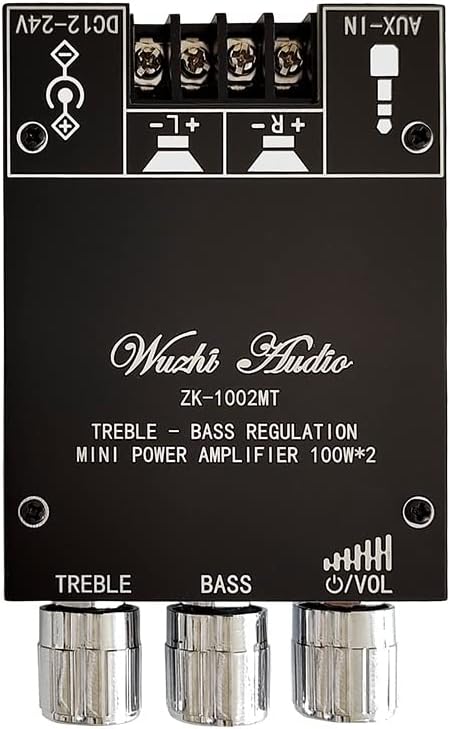
Figure 4: Close-up of the treble, bass, and volume control knobs.
Обслуживание
- Уборка: Для чистки используйте мягкую сухую ткань. ampПлата усилителя. Не используйте жидкие чистящие средства или растворители.
- Среда: Эксплуатируйте amplifier in a dry, well-ventilated area. Avoid exposure to moisture, extreme temperatures, and direct sunlight.
- Рассеивание тепла: Ensure the heat sink (visible on the board) is not obstructed to allow for proper cooling. Adequate airflow is crucial for stable operation.
- Соединения: Periodically check all connections (power, speakers, audio cables) to ensure they are secure and free from corrosion.

Рисунок 5: Вверху view принадлежащий amplifier board highlighting the heat sink for thermal management.
Поиск неисправностей
| Проблема | Возможная причина | Решение |
|---|---|---|
| Нет звука | Incorrect speaker connection; insufficient power supply; volume too low; incorrect input mode. | Check speaker polarity and connections. Ensure power supply meets 12-24V/5A requirements. Increase volume. Verify correct input (Bluetooth/AUX). |
| Низкий или искаженный звук | Insufficient power supply current/voltage; speaker impedance mismatch; audio source volume too low. | Ensure power supply is 5A or more and within 12-24V. Use speakers within 4-8Ω. Increase volume on the audio source device. |
| Ошибка сопряжения Bluetooth | AUX cable connected; device too far; Bluetooth not enabled on source; ampУсилитель не находится в режиме сопряжения. | Disconnect AUX cable. Ensure device is within 15 meters. Enable Bluetooth on your device. Restart amplifier and try pairing again. |
| Перегрев | Плохая вентиляция; чрезмерная нагрузка. | Ensure adequate airflow around the heat sink. Reduce volume or speaker load if operating at maximum capacity for extended periods. |
Информация о гарантии
Based on the available product information, there is no specific warranty description provided for the WANGCL ZK-1002MT amplifier board. Please refer to the retailer's return policy or contact the seller directly for any warranty-related inquiries.
Поддерживать
If you encounter any issues not covered in this manual or require further assistance, please contact your point of purchase or the manufacturer's customer support. When contacting support, please provide your product model (ZK-1002MT) and a detailed description of the issue.