Введение
The T-Dagger Arena T-TGK321 is a compact 60% mechanical gaming keyboard designed for performance and versatility. Featuring T-Dagger Brown mechanical switches, this keyboard offers a tactile and quiet typing experience with a durability of 50 million clicks. Its 61-key layout provides maximum desk space while retaining full functionality through FN key combinations. This manual will guide you through the setup, operation, maintenance, and troubleshooting of your T-Dagger Arena keyboard.
Содержимое упаковки
Пожалуйста, отметьте галочкой следующие пункты:
- T-Dagger Arena T-TGK321 Mechanical Gaming Keyboard
- USB-C to USB-A Cable (1.5 meters, detachable)
- Съемник Keycap
- Съемник переключателя
- Руководство пользователя (этот документ)
Настраивать
- Распакуйте клавиатуру: Осторожно извлеките клавиатуру и все аксессуары из упаковки.
- Подсоедините кабель: Insert the USB-C end of the provided cable into the port on the keyboard. Connect the USB-A end of the cable to an available USB port on your computer.
- Распознавание системы: Your computer should automatically detect and install the necessary drivers for the keyboard. This process may take a few moments. The keyboard is compatible with Windows 10 and later operating systems.
- Тестовая функциональность: Once recognized, the keyboard's rainbow backlighting should illuminate. Test a few keys to ensure proper operation.
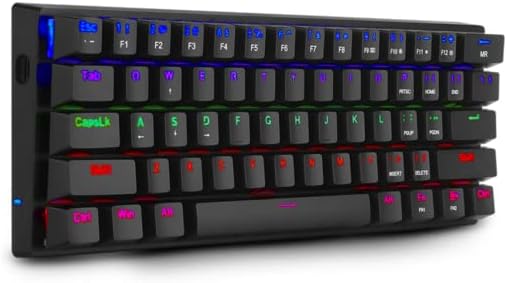
Image: The T-Dagger Arena T-TGK321 keyboard connected and illuminated with rainbow backlighting.
Инструкция по эксплуатации
The T-Dagger Arena T-TGK321 features a 60% layout, meaning some functions are accessed via the Function (FN) key. The keyboard supports full N-key rollover, ensuring every keypress is registered accurately during intense gaming sessions.
Комбинации клавиш FN
To access secondary functions, press and hold the FN key, then press the desired key. The keyboard features a double FN key for enhanced accessibility.
- FN + Number Keys (1-0): Доступ к функциям F1-F10.
- FN + - (minus) / = (equals): Access F11 / F12 functions.
- FN + P / [ / ] / ; / ' / , / . / /: Access various special characters or functions depending on the specific keycap legends.
- FN + клавиши со стрелками: Typically used for navigation (Home, End, Page Up, Page Down) or media controls. Refer to keycap legends for exact functions.
- FN + клавиша Windows: Блокирует или разблокирует клавишу Windows, чтобы предотвратить случайные нажатия во время игры.
Управление подсветкой
The keyboard features vibrant rainbow backlighting. Specific key combinations, often involving the FN key and other designated keys (e.g., P, [), are used to cycle through lighting modes, adjust brightness, or change speed. Consult the keycap legends for specific lighting control functions.
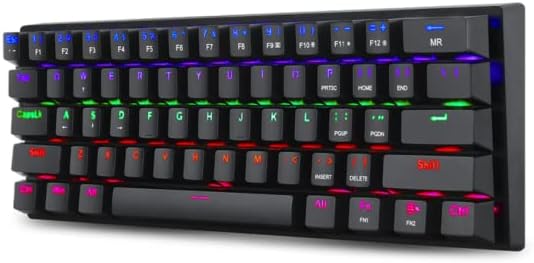
Image: A different perspective of the T-Dagger Arena T-TGK321 keyboard, highlighting the keycap legends for secondary FN functions.

Изображение: Подробный view of the T-Dagger Brown mechanical switches and the durable double-shot injection keycaps.
Обслуживание
Правильный уход гарантирует долговечность и оптимальную работу вашей клавиатуры.
- Уборка: Regularly clean the keyboard with a soft, dry cloth. For deeper cleaning, use the provided keycap puller to remove keycaps and clean dust and debris from the switch area using compressed air or a small brush.
- Устойчивость к разливам: The keyboard features a spill-resistant design. While it can withstand minor splashes, it is not waterproof. In case of a spill, immediately disconnect the keyboard from your computer, wipe off any liquid, and allow it to dry completely before reconnecting.
- Уход за кабелем: Handle the detachable USB-C cable with care. Avoid bending or twisting it excessively to prevent damage.
Поиск неисправностей
If you encounter issues with your T-Dagger Arena T-TGK321 keyboard, try the following troubleshooting steps:
- Клавиатура не отвечает:
- Убедитесь, что USB-кабель надежно подключен к клавиатуре и компьютеру.
- Попробуйте подключить клавиатуру к другому USB-порту вашего компьютера.
- Проверьте клавиатуру на другом компьютере, чтобы исключить системные неполадки.
- Перезагрузите компьютер.
- Подсветка не работает:
- Check if the backlighting has been turned off using an FN key combination.
- Убедитесь, что клавиатура правильно подключена и получает питание.
- Ключи не регистрируются:
- Remove the keycap using the keycap puller and inspect the switch for any obstructions.
- Gently re-seat the keycap.
Технические характеристики
| Тип | Механическая игровая клавиатура |
| Переключатели | T-Dagger Brown (Tactile, Silent) |
| Сила срабатывания | 45 грамм |
| Прочность | 50 миллионов кликов |
| Раскладка клавиш | 60% компактный, 61 клавиша |
| Колпачки | Double-shot Injection, Laser-Engraved |
| Подсветка | Радужный RGB |
| Кабель | Detachable USB-C to USB-A, PVC, 1.5 meters |
| N-клавиша Rollover | Полный |
| Строительство | Reinforced ABS Plastic |
| Spill-Resistant | Да |
| Раскладка клавиатуры | Английский |
| Масса | 390 грамм |
| Размеры (Д x Ш x В) | 293 х 104 х 35 мм |
| Совместимость с операционными системами | Виндовс 10 |

Image: The T-Dagger Arena T-TGK321 keyboard positioned on a gaming desk alongside a gaming mouse.
Гарантия и поддержка
For warranty information or technical support, please refer to the official T-Dagger webОбратитесь в местный магазин или к продавцу. Сохраните чек о покупке в качестве подтверждения покупки для предъявления гарантийных претензий.