
1. Продукт закончилсяview
The iTOMA CKS209 is a versatile alarm clock radio designed to enhance your bedside experience. It features dual wireless charging capabilities for your smartphone and earbuds, along with two additional USB ports for other devices. Enjoy your favorite music via Bluetooth 5.1 technology or tune into digital FM radio. The clock includes dual alarms with customizable wake-up modes, a large 1.4-inch orange LED display with auto and manual dimmer control, and a 2-level orange night light.
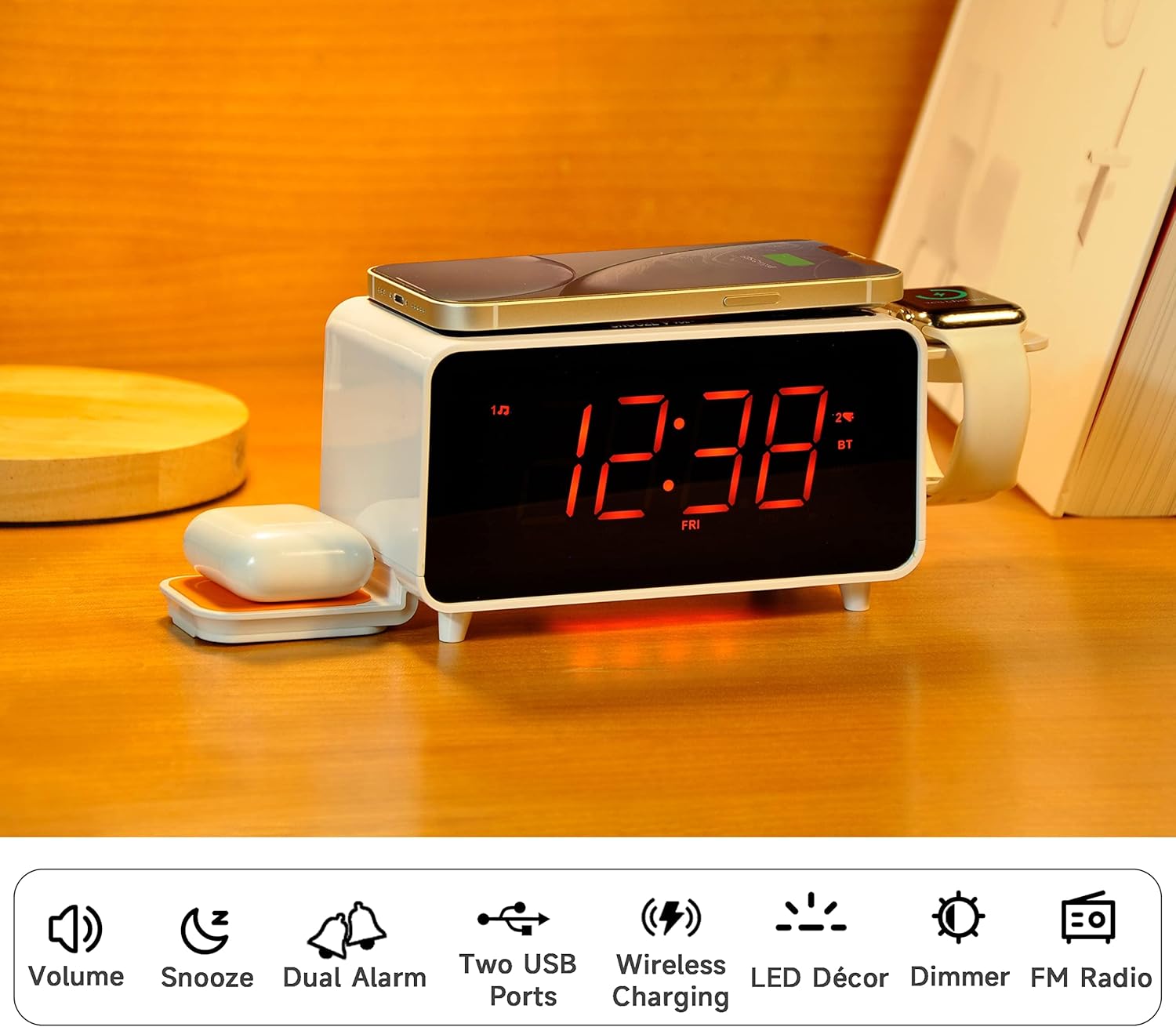
Image: The iTOMA CKS209 alarm clock radio displaying the time, with a smartphone wirelessly charging on top, earbuds on a side wireless charging pad, and a smartwatch on its holder.
Основные характеристики:
- Беспроводная зарядка: 15W ultra-fast wireless charger for smartphones and 3W foldable earphone wireless charger. Includes a watch wireless charging support holder (charging cable not included).
- Bluetooth 5.1: Seamless audio streaming from your Bluetooth-enabled devices.
- Двойные порты USB: One USB-A and one USB-C port (5V 2.1A) for additional device charging.
- Smart Dual Alarm: Set two independent alarms with options to wake to radio or buzzer. Features snooze, crescendo wake-up, 15-level volume control, and 4 alarm week modes (Every day, single day, weekdays, weekends).
- 1.4" Orange LED Display: Clear 12/24-hour format display with 3-level dimmer brightness and auto-dimmer function.
- Ночной свет: 2-level orange night light for ambient illumination.
- Цифровое FM-радио: 20 programmable preset stations with external wire antenna for enhanced reception.
- Резервная батарея: Maintains time and alarm settings during power interruptions.
2. Настройка
2.1 Подключение питания
- Unpack the iTOMA CKS209 unit and all accessories.
- Connect the provided AC adapter to the DC IN jack on the back of the unit.
- Plug the AC adapter into a standard wall outlet. The display will light up, and the clock will automatically set the time.
2.2 Initial Time Setting (Manual)
While the clock features auto-time setting, you can manually adjust the time, date, and year if needed.
- Нажмите и удерживайте ЧАСЫ button located on the top panel until the year flashes on the display.
- Используйте НАСТРОЙКА +/- buttons (or rotate the SNOOZE/VOL dial) to adjust the year.
- Нажимать ЧАСЫ again to confirm and move to the month setting. Repeat the process for month, day, hour, and minute.
- Нажимать ЧАСЫ one last time to save your settings.
2.3 Time Zone and Daylight Saving Time (DST)
- Нажмите и удерживайте СОН/ЧАСОВОЙ ПОЯС button to enter time zone setting.
- Используйте НАСТРОЙКА +/- buttons (or rotate the SNOOZE/VOL dial) to select your desired time zone.
- Нажимать СОН/ЧАСОВОЙ ПОЯС again to toggle DST ON or OFF.
- Нажимать СОН/ЧАСОВОЙ ПОЯС one last time to confirm and exit.
Video: This video demonstrates the time setting and Bluetooth operation for a similar iTOMA CKS207 model, which shares similar functionalities with the CKS209.
3. Инструкция по эксплуатации
3.1 Беспроводная зарядка
The iTOMA CKS209 features multiple wireless charging options:
- Smartphone Wireless Charging: Place your Qi-compatible smartphone on the top charging pad. The charging indicator on the display will illuminate to confirm charging.
- Earbud Wireless Charging: Place your Qi-compatible earbuds on the foldable 3W wireless charging pad located on the side.
- Smartwatch Holder: Utilize the integrated holder for your smartwatch. Note: A separate smartwatch charging cable (not included) is required and connects to one of the USB ports.
Image: A smartphone is placed on the top surface of the iTOMA CKS209, indicating wireless charging in progress.
Image: A close-up of the side of the iTOMA CKS209 showing the integrated holder designed for a smartwatch.
3.2 USB-портов для зарядки
In addition to wireless charging, the unit provides two USB ports (one Type-A and one Type-C) on the back for wired charging of other devices.
- Connect your device's USB charging cable to either the USB-A or USB-C port on the back of the alarm clock.
- Ensure your device is properly connected and charging.
Image: A smartphone is connected via a USB cable to one of the charging ports on the back of the iTOMA CKS209.
3.3 диктор Bluetooth
Передавайте аудио по беспроводной связи со своих устройств с поддержкой Bluetooth.
- Нажмите ВКЛ/ВЫКЛ кнопку, чтобы включить устройство.
- Нажмите РЕЖИМ button repeatedly until 'BT' appears on the display and starts flashing, indicating pairing mode.
- On your mobile device, enable Bluetooth and search for 'iTOMA CKS209' (or similar model name).
- Select the device to pair. Once connected, 'BT' will stop flashing and remain solid.
- You can now play audio from your device through the alarm clock speaker. Adjust volume using the ГРОМКОСТЬ +/- buttons or your mobile device.

Image: A smartphone displaying music playback is positioned near the iTOMA CKS209, indicating a Bluetooth connection.
3.4 FM-радио
Слушайте ваши любимые FM-радиостанции.
- Нажмите ВКЛ/ВЫКЛ кнопку, чтобы включить устройство.
- Нажмите РЕЖИМ Нажимайте кнопку несколько раз, пока на дисплее не появится частота FM.
- For automatic station search, press and hold the НАСТРОЙКА +/- buttons. The radio will scan and save available stations.
- For manual tuning, short press the НАСТРОЙКА +/- кнопки для пошаговой регулировки частоты.
- Отрегулируйте громкость с помощью ГРОМКОСТЬ +/- кнопки.
3.5 Двойной будильник
Установите до двух независимых будильников.
- Нажмите АЛ1 or АЛ2 button to select the desired alarm. The alarm time will flash on the display.
- Используйте НАСТРОЙКА +/- buttons (or rotate the SNOOZE/VOL dial) to set the desired alarm hour and minute.
- Нажимать АЛ1 or АЛ2 again to select the wake-up source (Buzzer or FM Radio).
- Нажимать АЛ1 or АЛ2 again to select the alarm week mode (Every day, single day, weekdays, or weekends).
- Нажимать АЛ1 or АЛ2 one last time to confirm and activate the alarm. The alarm indicator will appear on the display.
- Чтобы отключить будильник, нажмите соответствующую кнопку. АЛ1 or АЛ2 Нажимайте кнопку до тех пор, пока индикатор тревоги не исчезнет с дисплея.
- Функция повтора: Когда прозвучит сигнал будильника, нажмите кнопку SNOOZE button to temporarily silence the alarm for 9 minutes.

Image: The iTOMA CKS209 alarm clock radio displaying the time on a bedside table, ready for use.
3.6 Display & Dimmer Control
Adjust the brightness of the 1.4-inch orange LED display.
- Короткое нажатие ДИММЕР button to cycle through 3 brightness levels (High, Medium, Low).
- The unit also features an auto-dimmer function that adjusts display brightness based on ambient light conditions.
Image: A visual representation of the iTOMA CKS209 display at different brightness levels, from bright to invisible, and the auto-dimmer setting.
3.7 Ночной Светильник
Activate the ambient orange night light.
- Нажмите ВЕЛ button to turn the night light ON.
- Нажмите ВЕЛ button again to cycle through 2 brightness levels.
- Нажмите ВЕЛ button a third time to turn the night light OFF.
4. Техническое обслуживание
To ensure the longevity and optimal performance of your iTOMA CKS209, follow these maintenance guidelines:
- Уборка: Use a soft, dry cloth to clean the exterior of the unit. Do not use liquid cleaners or abrasive materials, as they may damage the finish.
- Вентиляция: Убедитесь, что устройство установлено в хорошо проветриваемом помещении, чтобы предотвратить перегрев. Не закрывайте вентиляционные отверстия.
- Шнур питания: Регулярно проверяйте шнур питания на наличие повреждений. В случае повреждения прекратите использование и обратитесь в службу поддержки клиентов.
- Хранилище: При длительном хранении устройства отключите его от розетки и храните в прохладном, сухом месте.
5. Поиск Неисправностей
If you encounter any issues with your iTOMA CKS209, please refer to the following common troubleshooting steps:
- Нет питания/дисплей выключен:
- Убедитесь, что адаптер переменного тока надежно подключен как к устройству, так и к исправной розетке.
- Проверьте работоспособность розетки, подключив к ней другое устройство.
- Беспроводная зарядка не работает:
- Убедитесь, что ваше устройство совместимо со стандартом Qi.
- Убедитесь, что ваше устройство правильно отцентрировано на зарядной панели.
- Снимите с телефона толстые чехлы и металлические предметы, которые могут помешать зарядке.
- Убедитесь, что устройство включено.
- Проблемы с сопряжением Bluetooth:
- Ensure the alarm clock is in Bluetooth pairing mode ('BT' flashing).
- Убедитесь, что на вашем мобильном устройстве включен Bluetooth.
- Поднесите мобильное устройство ближе к будильнику.
- Если устройство ранее было сопряжено, попробуйте разорвать сопряжение и заново подключить его.
- FM Radio Static/Poor Reception:
- Extend the external wire antenna fully for better reception.
- Reposition the antenna or the unit to find a location with better signal strength.
- Будильник не звучит:
- Ensure the alarm (AL1 or AL2) is activated and its indicator is visible on the display.
- Проверьте настройку громкости будильника.
- Verify the alarm time and day settings are correct.
6. Технические характеристики
| Особенность | Деталь |
|---|---|
| Бренд | iTOMA |
| Номер модели | CKS209-CA |
| Цвет | Orange Led Display |
| Размеры продукта | 16.8 х 3.81 х 9.1 см |
| Вес товара | 820 г |
| Материал | Пластик |
| Тип дисплея | ВЕЛ |
| Особые возможности | Auto Dimmable, Charging Port, Charging Station, Foldable, Multiple Time Zone |
| Беспроводная зарядка | 15W (Phone), 3W (Earbuds) |
| USB-зарядка | USB-A, USB-C (5V 2.1A) |
| Версия Bluetooth | 5.1 |
| FM-частота | 87.5-108 МГц |
7. Гарантия и поддержка
For warranty information, technical support, or any inquiries regarding your iTOMA CKS209, please refer to the documentation included in your product packaging or visit the official iTOMA webсайт. Вы также можете обратиться за помощью напрямую к продавцу.