
1. Продукт закончилсяview
The ASUS TUF Gaming LC 240 ARGB is an all-in-one liquid CPU cooler designed for mid-sized gaming builds. It provides efficient CPU cooling and features Addressable RGB (ARGB) lighting for aesthetic customization. This cooler is compatible with various Intel (LGA 1700, 1200, 1150, 1151, 1152, 1155, 1156, 1366) and AMD (AM4) CPU sockets.

Image 1.1: The ASUS TUF Gaming LC 240 ARGB Liquid CPU Cooler, showcasing its dual ARGB fans and illuminated pump head.
Основные характеристики:
- TUF Gaming ARGB Radiator Fans: Equipped with a fan blade groove design for optimized airflow and reduced noise levels.
- NCVM-Coated Pump Cover: Features a durable, non-conductive vacuum metallization coating that enhances the cooler's rugged and modern aesthetic.
- Совместимость с Aura Sync: Allows for synchronized lighting effects with other Aura Sync-enabled components.
- Reinforced, Sleeved Tubing: Provides increased durability and protection against wear and tear.
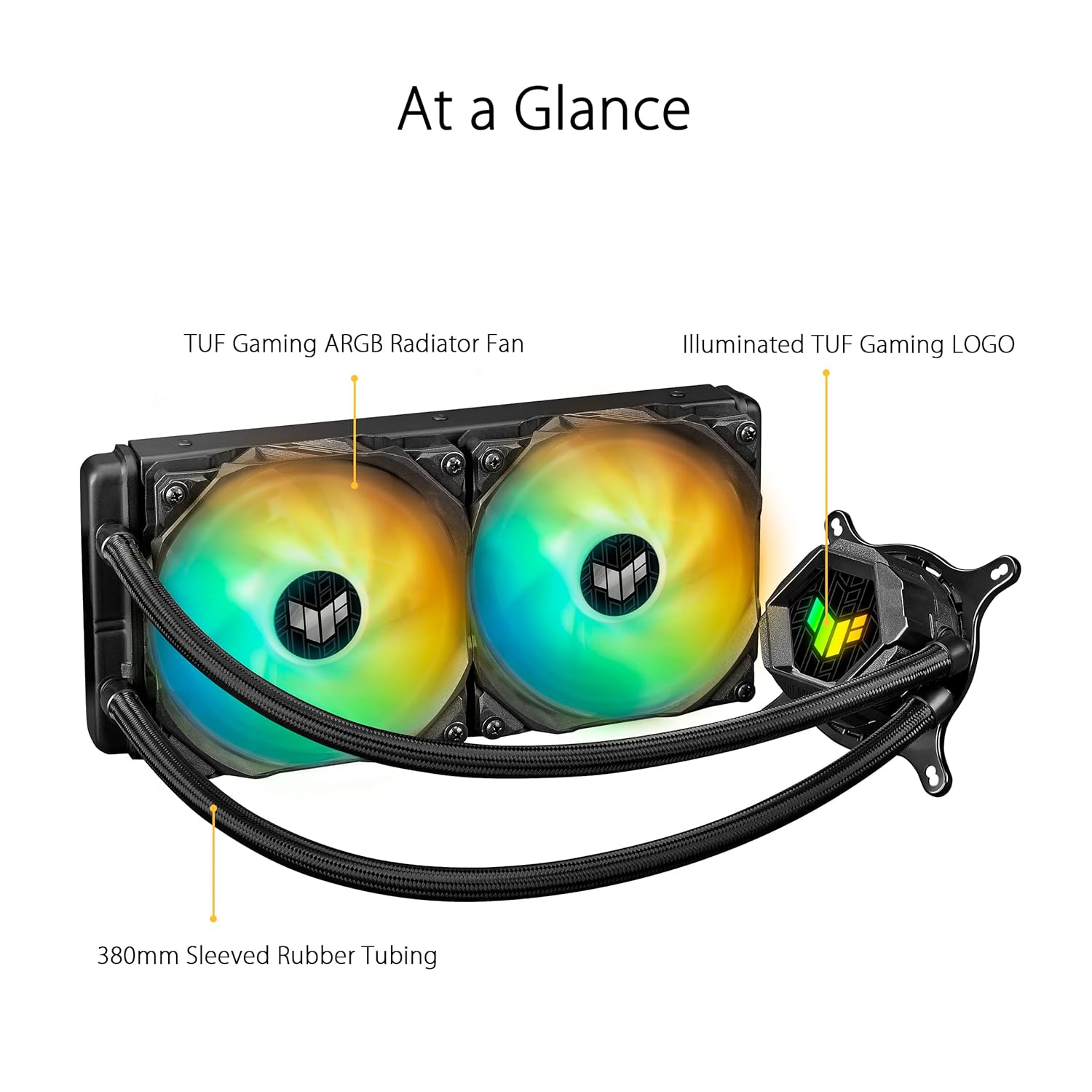
Image 1.2: An 'At a Glance' view of the cooler, highlighting the TUF Gaming ARGB Radiator Fans, Illuminated TUF Gaming LOGO on the pump, and 380mm Sleeved Rubber Tubing.
2. Содержимое упаковки
Verify that all components are present in the package before beginning installation. If any items are missing or damaged, contact your retailer or ASUS support.
%202%20x%20120mm%20TUF%20Gaming%20ARGB%20Radiator%20Fans%20Fan%20Cable%20for%20Fan%20Connection%20ARGB%20Cable%20for%20Lighting%20Control%20Accessory%20Pack%20of%20Screws%20and%20Brackets%20Quick%20Start%20Guide%20TUF%20Gaming%20Sticker.jpg)
Image 2.1: All components included in the ASUS TUF Gaming LC 240 ARGB package. This includes the liquid cooler unit with pre-applied thermal compound, two 120mm ARGB radiator fans, fan cables, ARGB lighting control cables, an accessory pack of screws and mounting brackets for various CPU sockets, a quick start guide, and a TUF Gaming sticker.
Включенные элементы:
- ASUS TUF Gaming LC 240 ARGB Liquid Cooler (with pre-applied thermal compound)
- 2 x 120mm TUF Gaming ARGB Radiator Fans
- Кабель вентилятора для подключения вентилятора
- ARGB-кабель для управления освещением
- Комплект крепежных винтов и кронштейнов (для сокетов Intel и AMD)
- Краткое руководство пользователя
- Наклейка TUF Gaming
3. Настройка и установка
Proper installation is crucial for optimal cooling performance. Refer to the detailed Quick Start Guide included in your package for specific, step-by-step instructions for your CPU socket type. The following provides a general overview.
Общие шаги установки:
- Подготовьте материнскую плату: Install the appropriate mounting backplate (if required) for your CPU socket (Intel or AMD) onto the motherboard.
- Mount Radiator Fans: Attach the two 120mm ARGB fans to the radiator using the provided screws. Ensure the fan airflow direction is correct for your case's cooling configuration (intake or exhaust).
- Установка радиатора: Secure the radiator assembly to an available fan mount in your PC case (e.g., top, front, or rear).
- Монтаж насоса/охлаждающей пластины: Carefully align the pump/cold plate assembly over your CPU. The thermal compound is pre-applied; avoid touching it. Secure the pump to the CPU socket using the correct mounting brackets and screws. Apply even pressure when tightening.
- Соединительные кабели:
- Подключите кабель питания помпы к соответствующему разъему CPU_FAN или AIO_PUMP на материнской плате.
- Подключите кабели вентиляторов к имеющимся разъемам на материнской плате или контроллере вентиляторов.
- Connect the ARGB lighting cables from the fans and pump to an Addressable RGB header (5V-D-G) on your motherboard or a compatible ARGB controller.
- Управление кабелями: Аккуратно проложите все кабели, чтобы обеспечить надлежащую циркуляцию воздуха внутри корпуса ПК.

Image 3.1: The ASUS TUF Gaming LC 240 ARGB cooler installed within a PC system, showing the radiator, fans, and illuminated pump head on the CPU.
4. Инструкция по эксплуатации
Once installed, the ASUS TUF Gaming LC 240 ARGB operates automatically to cool your CPU. The pump circulates coolant through the system, and the fans dissipate heat from the radiator.
Мониторинг и контроль:
- Температура процессора: Monitor your CPU temperatures using motherboard monitoring software or third-party utilities to ensure optimal performance.
- Регулировка скорости вентилятора: Fan speeds can typically be controlled via your motherboard's BIOS/UEFI settings or through motherboard-specific software (e.g., ASUS Fan Xpert). Adjust fan curves to balance cooling performance and noise levels.
- Управление подсветкой ARGB: The Addressable RGB lighting on the fans and pump head can be customized using ASUS Aura Sync software. This allows you to synchronize lighting effects with other compatible components in your system.

Image 4.1: A close-up of the illuminated TUF Gaming logo on the pump head, demonstrating the ARGB lighting capabilities.
5. Техническое обслуживание
Регулярное техническое обслуживание поможет обеспечить долговечность и оптимальную производительность вашего жидкостного охладителя процессора.
- Удаление пыли: Periodically clean dust from the radiator fins and fan blades using compressed air. Excessive dust buildup can impede airflow and reduce cooling efficiency.
- Осмотрите трубки: Check the reinforced, sleeved tubing for any signs of kinks, leaks, or damage. While designed for durability, regular inspection is recommended.
- Проверка вентилятора: Ensure fan blades are free from obstructions and rotate smoothly. Clean any debris that may have accumulated.
- Термопаста: The cooler comes with pre-applied thermal compound. If you ever need to remount the cooler (e.g., for CPU upgrade), clean off the old thermal paste from both the CPU and cold plate, and apply a fresh layer of high-quality thermal paste.
6. Поиск Неисправностей
If you encounter issues with your ASUS TUF Gaming LC 240 ARGB cooler, refer to the following common troubleshooting steps.
Распространенные проблемы и решения:
- Высокие температуры процессора:
- Ensure the pump is running and connected to the correct motherboard header.
- Verify fans are spinning and properly oriented for airflow.
- Проверьте радиатор на наличие скопления пыли и при необходимости очистите его.
- Confirm the cold plate is making proper contact with the CPU and that thermal paste is adequately applied.
- Вентиляторы не вращаются/подсветка ARGB не включается:
- Проверьте все соединения силовых и ARGB-кабелей с материнской платой или контроллером.
- Ensure ARGB headers are enabled in motherboard BIOS/UEFI.
- Verify that ASUS Aura Sync software is installed and configured correctly.
- Необычные шумы:
- A slight gurgling sound upon initial startup is normal as air settles. If persistent, ensure the radiator is mounted higher than the pump if possible, to allow air to collect in the radiator.
- Проверьте, не задевают ли лопасти вентилятора никакие кабели или препятствия.
- If the pump makes loud grinding noises, contact ASUS support.
7. Технические характеристики
Detailed technical specifications for the ASUS TUF Gaming LC 240 ARGB Liquid CPU Cooler.
| Особенность | Спецификация |
|---|---|
| Бренд | АСУС |
| Номер модели | TUF GAMING LC 240 ARGB |
| Метод охлаждения | Вентилятор, Вода |
| Совместимые устройства | Рабочий стол |
| Поддержка сокетов ЦП | Intel LGA 1700, 1200, 1150, 1151, 1152, 1155, 1156, 1366; AMD AM4 |
| Размер радиатора | 240mm (Dual 120mm fans) |
| Размер вентилятора | 120 мм |
| Максимальная скорость вращения | 2000 об/мин |
| Уровень шума | 29 децибел |
| Тип разъема питания | 3-контактный (насос), 4-контактный ШИМ (вентиляторы) |
| Томtage | 20 Kilovolts (Pump, typical operating voltagе - 12 В) |
| Ватtage | 1 Вт (насос) |
| Материал | Алюминий, металл, пластик, резина |
| Размеры продукта | 11.81 x 7.87 x 4.72 дюйма |
| Вес товара | 2.2 фунта |
| СКП | 195553233149 |
8. Гарантия и поддержка
ASUS products are manufactured to high quality standards. For specific warranty information, please refer to the warranty card included with your product or visit the official ASUS webсайт.
Служба поддержки клиентов:
If you require technical assistance or have questions regarding your ASUS TUF Gaming LC 240 ARGB Liquid CPU Cooler, please contact ASUS customer support through their official channels.
- Официальный представитель ASUS Webсайт: For drivers, FAQs, and support resources, visit www.asus.com.
- Страница поддержки продукта: Look for the specific product support page for the TUF Gaming LC 240 ARGB on the ASUS webсайт.