
MJJC GL-C-008P
GLEDOPTO Zigbee Pro RGBCCT LED Strip Controller User Manual
Модель: GL-C-008P
Brand: MJJC
Введение
This user manual provides comprehensive instructions for the GLEDOPTO Zigbee Pro RGBCCT LED Strip Controller (Model: GL-C-008P). This advanced controller is designed for use with Single Color, WW CW, RGB, RGBW, and RGBCCT LED strip lights, offering enhanced control and compatibility with various smart home ecosystems. Please read this manual thoroughly before installation and operation to ensure proper use and optimal performance.
Характеристики продукта
- Upgraded Zigbee Pro Version: Offers faster and more stable performance, allowing for smoother adjustments of color, color temperature, and brightness.
- 5-in-1 Controller: Compatible with Single Color, WW CW, RGB, RGBW, and RGBCCT LED Strip Lights, providing versatile lighting solutions.
- Широкая совместимость: Seamlessly integrates with popular smart home platforms such as Samsung SmartThings, Osram Lightify, Amazon Echo Plus, and Ikea Tradfri.
- Single ID Recognition: Functions as a 1ID controller, appearing as a single device in your application, similar to Philips Hue Light Strip Plus.
- Philips Hue App Integration: Fully integrates into the Philips Hue app for managing scenes, dimming controls, colors, and timers.
Содержимое упаковки
Пожалуйста, убедитесь, что все перечисленные ниже предметы включены в ваш пакет:
- 1 х Упаковочная коробка
- 1 x GLEDOPTO Zigbee 3.0 RGB+CCT LED Controller (Model: GL-C-008P)
- 1 х Руководство пользователя
- 1 наклейка 3 см

Figure 1: Contents of the product package, including the controller, manual, and sticker.
Технические характеристики
| Атрибут | Ценить |
|---|---|
| Название продукта | ZIGBEE RGB+CCT Strip Controller |
| Модель № | GL-C-008P |
| Томtage | DC12V-24V |
| Выходной ток/канал | Макс. 6А |
| Общий выходной ток | Макс. 15А |
| Общая мощность | Максимум. 270W |
| Размер продукта | 89 x 48 x 23.5 мм (3.5 x 1.89 x 0.93 дюйма) |
| Рабочая температура | от -20 до +60°С |
| Протокол подключения | Зигби |
| Использование внутри и снаружи помещений | В помещении |
| Уровень водонепроницаемости | Не водостойкий |
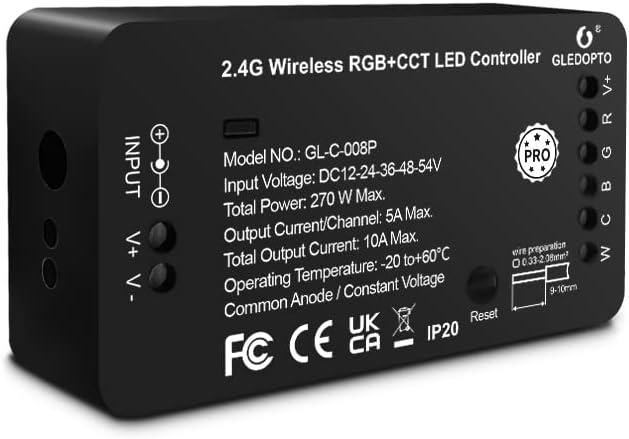
Рисунок 2: Передняя часть view of the GLEDOPTO Zigbee Pro RGBCCT LED Controller, showing model number and input/output details.
Инструкции по установке
Follow these steps to set up your GLEDOPTO Zigbee Pro RGBCCT LED Strip Controller:
- Включите ваши источники света: Connect your LED strip product to the controller. Ensure the correct mode is selected if applicable. Use the press-type design for wiring; no screwing is required. Then, connect the controller to a suitable power adapter (DC12V-24V) and plug it into a power socket.
- Set Up Your WiFi Gateway: Plug in your Zigbee Light Link Gateway (e.g., Philips Hue Bridge). It will automatically power up. Connect it to your WiFi router using an Ethernet cable.
- Connect with Gateway (Device Searching):
- Start the device searching function on your Zigbee Light Link Gateway's application. This process may take some time.
- If the Gateway does not find the device, try power cycling the controller (unplug and plug back in) or perform a reset (refer to the Troubleshooting section for reset instructions).
- If issues persist, try restarting your router and gateway.
- Assign and Control: Once the Gateway finds your device, you can assign it to different rooms, zones, or groups within your smart home application. You can now use the application to control the LED strip, including color temperature and brightness.

Figure 3: Wiring diagram for the GLEDOPTO controller, illustrating input and output connections.

Figure 4: Visual guide detailing the four main steps for controller setup, from power connection to app control.
Инструкция по эксплуатации
The GLEDOPTO Zigbee Pro RGBCCT LED Strip Controller offers flexible control options through compatible smart home applications and voice assistants.
Управление приложениями:
Utilize your smart home app (e.g., Philips Hue, SmartThings) to manage your LED strip lights. The app allows for:
- Изменение цвета: Access a palette of 16 million colors to set the perfect ambiance for any occasion.
- Регулировка цветовой температуры: Fine-tune the white light from warm white to cool white to suit your preference.
- Регулировка яркости: Dim or brighten your lights to the desired intensity.
- Управление сценой: Создавайте и активируйте индивидуальные световые сцены для разных настроений или занятий.
- Таймеры и расписания: Set automated on/off times and schedules for your lights.
- Multiple DIY Scenes: Explore and create various personalized lighting scenarios.
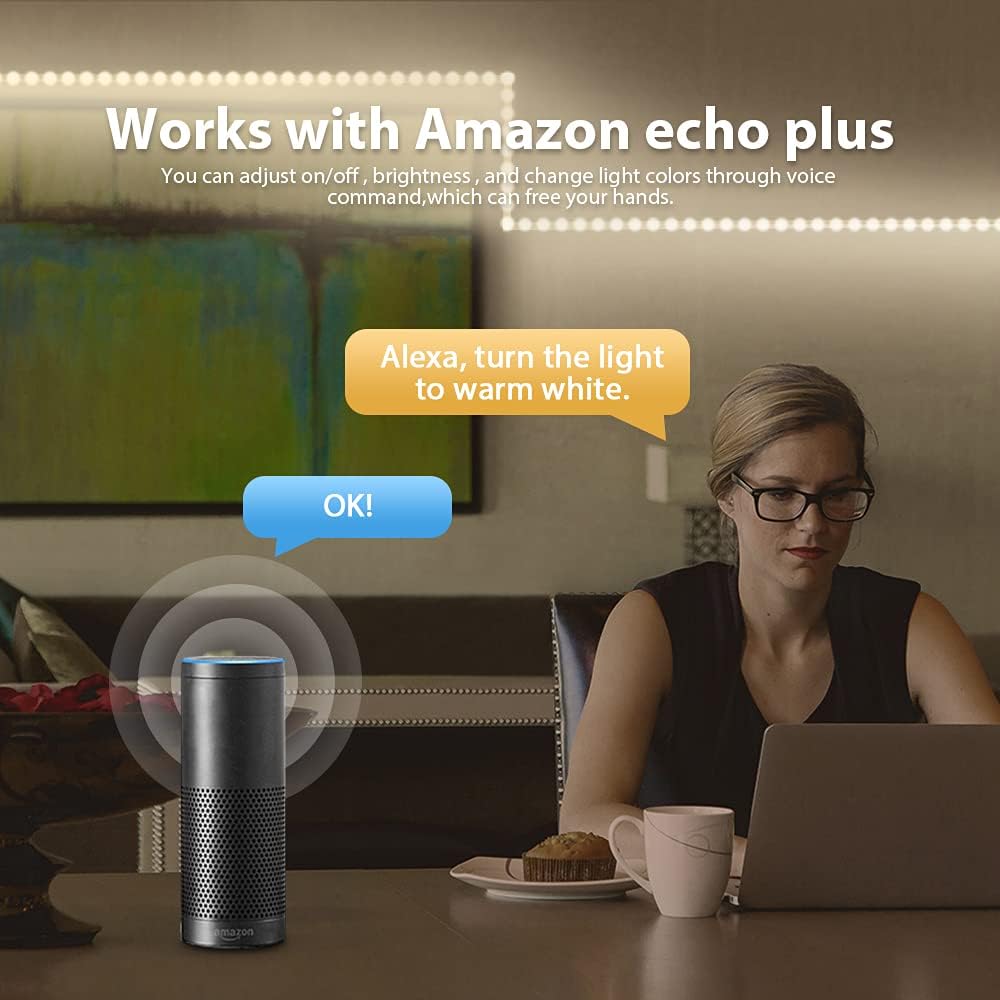
Figure 5: App interface demonstrating the wide range of 16 million colors available for selection.

Figure 6: App interface for adjusting the color temperature of the LED strip lights.
Голосовое управление:
When connected to compatible voice assistants like Amazon Echo Plus, you can control your lights using simple voice commands. For example, say "Alexa, turn the light to warm white" to adjust the lighting hands-free.

Figure 7: Illustration of voice control functionality with Amazon Echo Plus.
Видеодемонстрация продукта:
Video 1: A demonstration of the Gledopto Zigbee Pro Controller for RGBW RGBCCT LED Strip, showcasing its features and operation within a smart home environment.
Обслуживание
To ensure the longevity and optimal performance of your GLEDOPTO Zigbee Pro RGBCCT LED Strip Controller, follow these simple maintenance guidelines:
- Храните контроллер в сухом месте, вдали от влаги и сырости.
- Не подвергайте устройство воздействию экстремальных температур.
- Clean the exterior of the controller with a soft, dry cloth. Do not use liquid cleaners or aerosols.
- Обеспечьте надлежащую вентиляцию вокруг контроллера, чтобы предотвратить перегрев.
Поиск неисправностей
If you encounter issues with your GLEDOPTO Zigbee Pro RGBCCT LED Strip Controller, refer to the following common solutions:
| Проблема | Возможная причина | Решение |
|---|---|---|
| Gateway does not find the device. | Device not in pairing mode, network interference, or temporary glitch. |
|
| LED strip not responding after reset. | Improper reset procedure or continued network issue. |
|
Функция сброса:
The controller features a reset button for easy troubleshooting and re-pairing:
- Короткое нажатие: Press the reset button once to turn the LED strip on or off.
- Длительное нажатие (> 2 секунд): Press and hold the reset button for more than 2 seconds. The LED strip will blink 3 times, indicating that the reset is successful. This will reset the controller to factory defaults and put it into pairing mode.

Figure 8: Location and function of the reset button on the GLEDOPTO controller.
Гарантия и поддержка
Specific warranty information and detailed support contact details are not provided within this manual. For warranty claims, technical support, or further assistance, please refer to the product packaging, the seller's website, or contact the manufacturer directly through their official channels.
Связанные документы - GL-C-008P
 |
MJJC COB LED Strip Light User Manual Technical specifications and user guide for MJJC COB LED Strip Lights, including single color, CCT, RGB, RGBW, and RGBCCT variants. |
 |
User Manual: RGB+CCT 5IN1 LED Strip Light User manual and specifications for the MJJC RGB+CCT 5IN1 LED Strip Light. Details on installation, power requirements, and product features. |
 |
MJJC RF17 Keys CCT Mini Controller and LED Strip User Manual User manual for the MJJC RF17 Keys CCT Mini Controller and associated 2 Wire CCT COB LED Strip Lights. Details product parameters, technical specifications, and remote control functions for adjustable color temperature and brightness. |
 |
User Manual for Dimmable LED Strip Lights with Remote Control Comprehensive user manual for Dimmable 2835 60LED IP65 Waterproof LED Strip Lights, detailing specifications, features, technical parameters, remote control functions, and safety attention. |
 |
Zigbee 3.0 LED Strip Controller User Manual User manual for the MJJC Zigbee 3.0 LED Strip Controller, featuring compatibility with Amazon Alexa and Google Assistant, and setup instructions for the Smart Life app. |
 |
MJJC 5V CCT USB Dimmable LED Strip Light User Manual | Features & Specifications User manual for the MJJC 5V CCT USB Dimmable LED Strip Light. Features dual white (Warm White/Cool White) SMD5050 LEDs, RF remote control, and easy cuttable design. Includes specifications and connection instructions. |
Ask a question about this manual
Ask about setup, troubleshooting, compatibility, parts, safety, or missing instructions. Manuals+ will review the question and use this page’s manual context to help answer it.